
MiBOXER FUT088
FUT088 RGB+CCT Full Touch Remote User Manual
മോഡൽ: FUT088
1. ആമുഖം
The MiBOXER FUT088 RGB+CCT Full Touch Remote is an advanced wireless controller designed for seamless management of RGB+CCT (Color Changing + Tunable White) lighting systems. This remote provides intuitive control and customization of your lighting environment, allowing for dynamic and personalized ambiance.
It features a sleek, ergonomic design with a responsive full-touch interface, utilizing 2.4GHz RF technology for reliable wireless connectivity up to 30 meters. The FUT088 is compatible with MiBoxer/Mi-Light 2.4G series products, offering control over 16 million colors, brightness, color temperature, and saturation.
2. ഉൽപ്പന്നം കഴിഞ്ഞുview
2.1 പ്രധാന സവിശേഷതകൾ
- 2.4G RF Wireless Transmission: Ensures strong anti-interference and a control distance of up to 30 meters.
- RGB+CCT Control: Full control over 16 million colors, brightness, color temperature (2700K-6500K), and saturation.
- Full-Touch Interface: Responsive touch-sensitive controls for intuitive operation.
- മൾട്ടി-സോൺ അനുയോജ്യത: Can be paired with multiple lights or zones for synchronized or independent control (requires compatible MiBoxer/Mi-Light 2.4G series products).
- ഡൈനാമിക് ലൈറ്റിംഗ് മോഡുകൾ: Includes pre-set lighting effects.
- ഡിമ്മിംഗ് പിന്തുണ: Flicker-free, stepless dimming for precise light adjustment.
- Delay Off Function: Convenient 60-second or 10-minute delay off options.
2.2 റിമോട്ട് കൺട്രോൾ ലേഔട്ട്
The FUT088 remote features a clear and intuitive layout. Refer to the diagram below for an understanding of each control element.

Figure 1: FUT088 Remote Control Function Diagram. This diagram illustrates the various touch and button controls on the remote, including the Color Ring, Saturation/CCT Control, Dimming Slider, and individual function buttons.
- കളർ റിംഗ്: Touch to select any of 16 million colors.
- ഇൻഡിക്കേറ്റർ ലൈറ്റ്: Illuminates to confirm button presses or touch input.
- Saturation / CCT Control: Slide to adjust color saturation or color temperature (Cool White to Warm White).
- ഡിമ്മിംഗ് സ്ലൈഡർ: Slide to adjust brightness from 1% to 100%.
- ON / Link (Unlink): Press to turn lights ON. For linking/unlinking, see Section 3.2.
- W (White): Press to switch to pure white light mode.
- ഓഫാണ്: Press to turn lights OFF.
- ആർ (ചുവപ്പ്): Press for static red light.
- ജി (പച്ച): Press for static green light.
- ബി (നീല): Press for static blue light.
- S- / 60s Delay OFF: In dynamic mode, press to decrease speed. Long press for 60-second delay off.
- എം (മോഡ്): Press to cycle through various dynamic lighting modes.
- S+ / 10min Delay OFF: In dynamic mode, press to increase speed. Long press for 10-minute delay off.
3. സജ്ജീകരണം
3.1 ബാറ്ററി ഇൻസ്റ്റാളേഷൻ
The FUT088 remote requires 2x AAA batteries (not included). Follow these steps to install them:
- റിമോട്ടിന്റെ പിൻഭാഗത്ത് ബാറ്ററി കമ്പാർട്ട്മെന്റ് കവർ കണ്ടെത്തുക.
- കമ്പാർട്ട്മെന്റ് തുറക്കാൻ കവർ താഴേക്ക് സ്ലൈഡ് ചെയ്യുക.
- കമ്പാർട്ടുമെന്റിനുള്ളിൽ സൂചിപ്പിച്ചിരിക്കുന്നതുപോലെ ശരിയായ പോളാരിറ്റി (+ ഉം - ഉം) ഉറപ്പാക്കിക്കൊണ്ട് 2x AAA ബാറ്ററികൾ ഇടുക.
- സുരക്ഷിതമായി ക്ലിക്കുചെയ്യുന്നത് വരെ ബാറ്ററി കവർ തിരികെ സ്ഥലത്തേക്ക് സ്ലൈഡ് ചെയ്യുക.
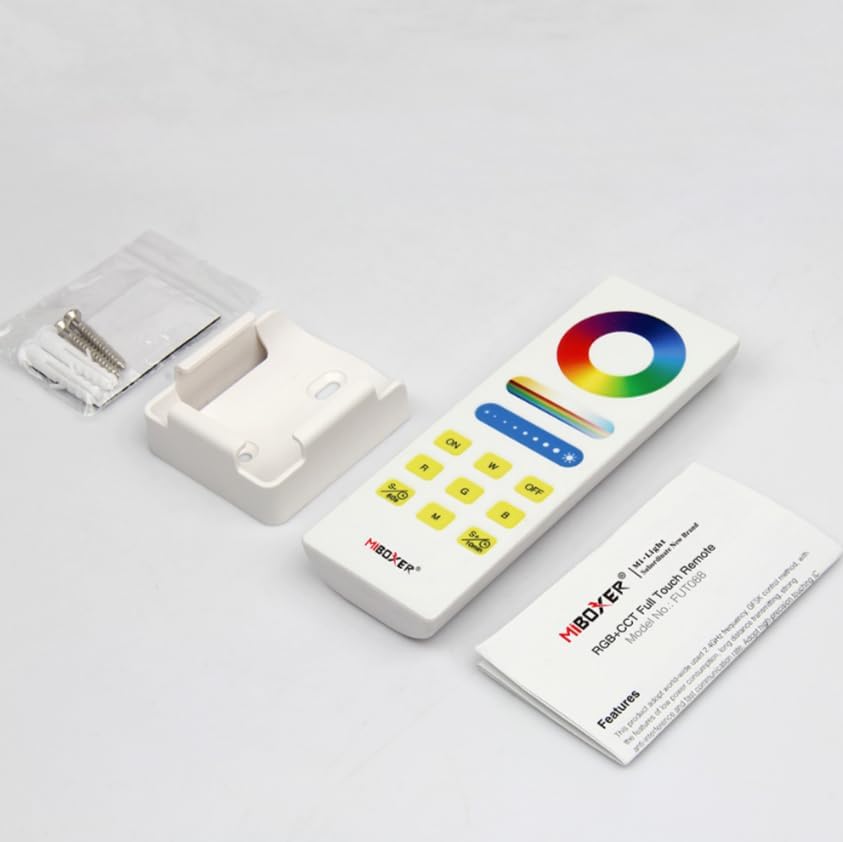
Figure 2: FUT088 Remote with included accessories, including the wall mount.
3.2 Linking (Pairing) the Remote with Lights
To control your MiBoxer/Mi-Light 2.4G series products, the remote must be linked to them. This process typically involves the following steps:
- Ensure the light fixture you wish to control is powered off.
- Turn the light fixture ON.
- Within 3 seconds of turning the light ON, press the "ON" button on the FUT088 remote മൂന്നു തവണ.
- The light should flash slowly three times, indicating successful linking.
If the light does not flash, repeat the linking process. Ensure the remote is within range of the light fixture.
3.3 Unlinking (Unpairing) the Remote from Lights
To unlink the remote from a light fixture, follow these steps:
- Ensure the light fixture you wish to unlink is powered off.
- Turn the light fixture ON.
- Within 3 seconds of turning the light ON, press the "ON" button on the FUT088 remote അഞ്ച് തവണ.
- The light should flash quickly ten times, indicating successful unlinking.
4. പ്രവർത്തന നിർദ്ദേശങ്ങൾ
Once linked, the FUT088 remote provides comprehensive control over your lighting. Refer to the "Remote Control Layout" in Section 2.2 for button locations.
4.1 അടിസ്ഥാന നിയന്ത്രണം
- പവർ ഓൺ/ഓഫ്: അമർത്തുക ON button to turn lights on, and the ഓഫ് button to turn lights off.
- തെളിച്ച ക്രമീകരണം: നിങ്ങളുടെ വിരൽ ഇതിലൂടെ സ്ലൈഡ് ചെയ്യുക Dimming Slider to increase or decrease the brightness level.
- വർണ്ണ തിരഞ്ഞെടുപ്പ്: തൊടുക കളർ റിംഗ് to select any desired color from the 16 million available options.
- വൈറ്റ് ലൈറ്റ് മോഡ്: അമർത്തുക W button to switch to pure white light.
- വർണ്ണ താപനില ക്രമീകരണം: നിങ്ങളുടെ വിരൽ ഇതിലൂടെ സ്ലൈഡ് ചെയ്യുക സാച്ചുറേഷൻ / CCT നിയന്ത്രണം to adjust the color temperature from warm white (2700K) to cool white (6500K) when in white light mode.
- Saturation Adjustment: നിങ്ങളുടെ വിരൽ ഇതിലൂടെ സ്ലൈഡ് ചെയ്യുക സാച്ചുറേഷൻ / CCT നിയന്ത്രണം to adjust the saturation of the selected color.
- സ്റ്റാറ്റിക് നിറങ്ങൾ: അമർത്തുക R for Red, G for Green, and B for Blue.
4.2 Dynamic Modes and Speed Control
- മോഡ് തിരഞ്ഞെടുക്കൽ: അമർത്തുക M button to cycle through various pre-programmed dynamic lighting modes (e.g., color fades, jumps, flashes).
- വേഗത ക്രമീകരണം: While in a dynamic mode, press S+ to increase the speed of the effect, and S- വേഗത കുറയ്ക്കാൻ.
4.3 Delay Off Function
The remote includes a convenient delay off feature:
- 60-സെക്കൻഡ് ഡിലേ ഓഫ്: ദീർഘനേരം അമർത്തുക S- / 60s button. The lights will automatically turn off after 60 seconds.
- 10-Minute Delay Off: ദീർഘനേരം അമർത്തുക S+ / 10min button. The lights will automatically turn off after 10 minutes.

Figure 3: Delay Off Light Function. This image highlights the buttons used for setting a 60-second or 10-minute delay before the lights turn off.
5 സ്പെസിഫിക്കേഷനുകൾ
| ഫീച്ചർ | വിശദാംശങ്ങൾ |
|---|---|
| മോഡൽ നമ്പർ | FUT088 |
| നിയന്ത്രണ തരം | RGB+CCT (Red, Green, Blue, Tunable White) |
| സിഗ്നൽ ആവൃത്തി | 2.4GHz RF |
| നിയന്ത്രണ പരിധി | 30 മീറ്റർ വരെ (98 അടി) |
| വർണ്ണ താപനില പരിധി | 2700 കെ - 6500 കെ |
| പവർ ഉറവിടം | 2x AAA ബാറ്ററികൾ (ഉൾപ്പെടുത്തിയിട്ടില്ല) |
| അളവുകൾ | 5.5 x 2 x 1 ഇഞ്ച് (ഏകദേശം) |
| ഇനത്തിൻ്റെ ഭാരം | 2.56 ഔൺസ് |
| നിർമ്മാതാവ് | മിബോക്സർ |
6. പ്രശ്നപരിഹാരം
- Lights not responding to remote:
- ബാറ്ററികൾ ശരിയായി ഇൻസ്റ്റാൾ ചെയ്തിട്ടുണ്ടെന്നും തീർന്നിട്ടില്ലെന്നും ഉറപ്പാക്കുക. ആവശ്യമെങ്കിൽ മാറ്റിസ്ഥാപിക്കുക.
- Verify the remote is properly linked to the light fixture (refer to Section 3.2).
- Check if the light fixture is powered on and functioning correctly.
- Ensure the remote is within the 30-meter control range and there are no significant obstructions.
- Remote indicator light not illuminating:
- ബാറ്ററി ഇൻസ്റ്റാളേഷൻ പരിശോധിച്ച് ബാറ്ററികൾ മാറ്റിസ്ഥാപിക്കുക.
- Inconsistent control or flickering lights:
- Interference from other 2.4GHz devices might be present. Try moving the remote or light fixture.
- Ensure the light fixture is compatible with the FUT088 remote.
7. പരിപാലനം
- വൃത്തിയാക്കൽ: മൃദുവായതും ഉണങ്ങിയതുമായ തുണി ഉപയോഗിച്ച് റിമോട്ട് തുടയ്ക്കുക. അബ്രാസീവ് ക്ലീനറുകളോ ലായകങ്ങളോ ഉപയോഗിക്കരുത്.
- സംഭരണം: നേരിട്ടുള്ള സൂര്യപ്രകാശത്തിൽ നിന്നും കടുത്ത താപനിലയിൽ നിന്നും മാറി തണുത്തതും വരണ്ടതുമായ സ്ഥലത്ത് റിമോട്ട് സൂക്ഷിക്കുക.
- ബാറ്ററി കെയർ: ചോർച്ച തടയാൻ റിമോട്ട് ദീർഘനേരം ഉപയോഗിക്കുന്നില്ലെങ്കിൽ ബാറ്ററികൾ നീക്കം ചെയ്യുക.
8. വാറൻ്റിയും പിന്തുണയും
വാറന്റി വിവരങ്ങൾക്കും സാങ്കേതിക പിന്തുണയ്ക്കും, ദയവായി ഔദ്യോഗിക MiBOXER കാണുക. webനിങ്ങളുടെ സൈറ്റിൽ ബന്ധപ്പെടുക അല്ലെങ്കിൽ നിങ്ങളുടെ റീട്ടെയിലറെ ബന്ധപ്പെടുക. ഏതെങ്കിലും വാറന്റി ക്ലെയിമുകൾക്ക് വാങ്ങിയതിന്റെ തെളിവായി നിങ്ങളുടെ വാങ്ങൽ രസീത് സൂക്ഷിക്കുക.
കൂടുതൽ സഹായത്തിന്, നിങ്ങൾക്ക് സന്ദർശിക്കാവുന്നതാണ് ആമസോണിലെ MiBOXER സ്റ്റോർ.
Ask a question about this manual
Ask about setup, troubleshooting, compatibility, parts, safety, or missing instructions. Manuals+ will review the question and use this page’s manual context to help answer it.