ആമുഖം
This manual provides comprehensive instructions for the setup, operation, and maintenance of your DQ03 Mini Android TV Stick. Designed for seamless streaming and entertainment, this device transforms any HDMI-enabled display into a smart TV, offering access to a wide range of applications and media content.
The DQ03 TV Stick features a powerful Quad Core ARM Cortex A53 processor, 4K H.265 support, and dual-band Wi-Fi for a smooth and immersive viewing experience. Please read this manual carefully to ensure proper use and to maximize the performance of your device.

Image: The DQ03 Mini Android TV Stick, its remote control, and the product packaging, illustrating the compact design and included accessories.
ബോക്സിൽ എന്താണുള്ളത്
പാക്കേജ് തുറക്കുമ്പോൾ, ഇനിപ്പറയുന്ന എല്ലാ ഇനങ്ങളും ഉൾപ്പെടുത്തിയിട്ടുണ്ടെന്ന് ദയവായി ഉറപ്പാക്കുക:
- DQ03 TV Stick
- വിദൂര നിയന്ത്രണം
- HD cable (HDMI cable)
- IR Extend Cable
- പവർ കേബിൾ
- മാനുവൽ

Image: A visual representation of all items included in the DQ03 TV Stick package, including the TV stick, remote, various cables, and the manual.
സജ്ജീകരണ ഗൈഡ്
Follow these steps to set up your DQ03 Mini Android TV Stick:
- Connect the TV Stick: Insert the DQ03 TV Stick directly into an available HDMI port on your television. If space is limited, use the provided HD cable (HDMI extension cable) to connect the stick to the TV.
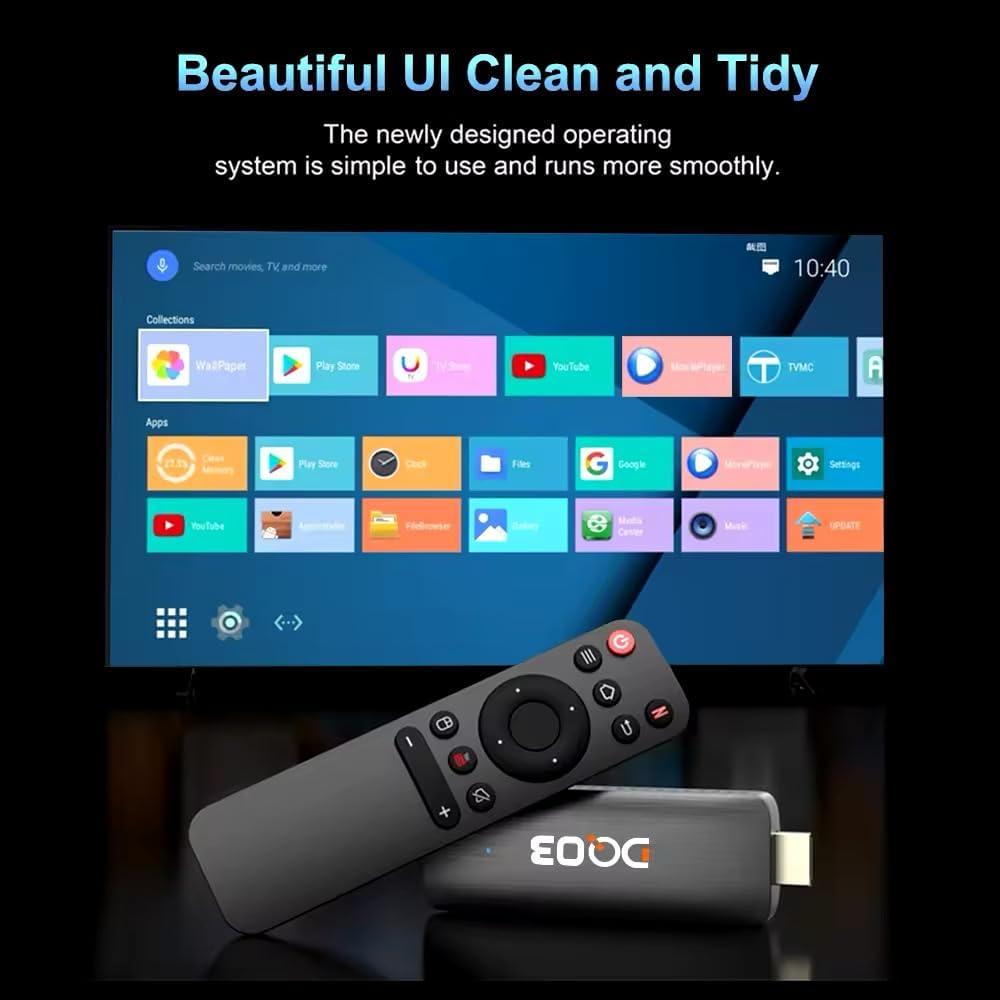
Image: The DQ03 TV Stick connected to a television using an HDMI extension cable, highlighting the HDMI port and connection point.
- പവർ ബന്ധിപ്പിക്കുക: Connect the power cable to the TV Stick's power input port and then plug the other end into a suitable power outlet. The device will power on automatically.
- റിമോട്ട് ബാറ്ററികൾ ചേർക്കുക: Open the battery compartment on the back of the remote control and insert two AAA batteries (not included), ensuring correct polarity.

Image: The DQ03 TV Stick alongside its dedicated remote control, showing the overall design of both components.
- HDMI ഇൻപുട്ട് തിരഞ്ഞെടുക്കുക: On your television, use the TV remote to select the correct HDMI input source to which the DQ03 TV Stick is connected.
- പ്രാരംഭ സജ്ജീകരണ വിസാർഡ്: പ്രാരംഭ സജ്ജീകരണം പൂർത്തിയാക്കാൻ സ്ക്രീനിലെ നിർദ്ദേശങ്ങൾ പാലിക്കുക. ഇതിൽ സാധാരണയായി ഇവ ഉൾപ്പെടുന്നു:
- ഭാഷ തിരഞ്ഞെടുക്കൽ
- നെറ്റ്വർക്ക് കണക്ഷൻ (വൈ-ഫൈ സജ്ജീകരണം)
- Google account sign-in (optional, but recommended for app access)
- തീയതിയും സമയവും ക്രമീകരണം
പ്രവർത്തന നിർദ്ദേശങ്ങൾ
Once set up, you can begin using your DQ03 Mini Android TV Stick to access various entertainment options.
ഇൻ്റർഫേസ് നാവിഗേറ്റ് ചെയ്യുന്നു
The DQ03 TV Stick runs on Android 10 Big TV OS, providing a user-friendly interface. Use the remote control's directional pad and OK button to navigate through menus and select items. The Home button will always return you to the main screen.

Image: A screenshot of the DQ03 TV Stick's user interface, displaying various app icons and navigation elements.
ആപ്ലിക്കേഷനുകൾ ആക്സസ് ചെയ്യുന്നു
Pre-installed applications like Netflix, Prime Video, and YouTube are readily available. You can download additional apps from the Google Play Store. Ensure you are signed in with your Google account to access the Play Store.

Image: A family watching YouTube content in 4K resolution on a television, demonstrating the high-quality output of the DQ03 TV Stick.
പ്രധാന സവിശേഷതകൾ
- 4K@60fps & HDR10+ Support: Enjoy ultra-high-definition content with vibrant colors and enhanced contrast. The device supports H.265 decoding for efficient streaming of 4K video.
- ഡ്യുവൽ-ബാൻഡ് വൈ-ഫൈ: Connect to either 2.4GHz or 5.8GHz Wi-Fi networks for stable and fast internet connectivity.
- Google Voice Input: Use the voice search feature on your remote (if supported) to quickly find content, launch apps, or get information.
- സ്ക്രീൻ പങ്കിടൽ: The DQ03 TV Stick supports Airplay, DLNA, and Miracast, allowing you to cast content from your Android or iOS devices to your TV.

Image: A diagram illustrating the screen sharing capabilities (Airplay, DLNA, Miracast) of the DQ03 TV Stick, showing content being cast from a mobile device to a television.

Image: A collage of images depicting various entertainment activities enabled by the DQ03 TV Stick, such as playing games, watching movies, viewing sports, and screen sharing.
മെയിൻ്റനൻസ്
To ensure the longevity and optimal performance of your DQ03 Mini Android TV Stick, consider the following maintenance tips:
- വൃത്തിയാക്കൽ: Gently wipe the device and remote control with a soft, dry cloth. Do not use liquid cleaners or abrasive materials.
- വെൻ്റിലേഷൻ: Ensure the TV Stick is placed in a well-ventilated area to prevent overheating. Avoid covering its ventilation holes.
- സോഫ്റ്റ്വെയർ അപ്ഡേറ്റുകൾ: Periodically check for system updates in the device settings. Keeping the software updated can improve performance and security. For firmware updates and additional support, visit the official software link: https://www.vontar.cn/pages/download.
- പവർ സൈക്കിൾ: If the device becomes unresponsive, disconnect the power cable, wait a few seconds, and then reconnect it to perform a power cycle.
ട്രബിൾഷൂട്ടിംഗ്
If you encounter issues with your DQ03 Mini Android TV Stick, refer to the following common problems and solutions:
| പ്രശ്നം | സാധ്യമായ കാരണം | പരിഹാരം |
|---|---|---|
| പവർ ഇല്ല/ഉപകരണം ഓണാകുന്നില്ല | Power cable not connected properly; Power outlet issue | പവർ കേബിൾ സുരക്ഷിതമായി ബന്ധിപ്പിച്ചിട്ടുണ്ടെന്ന് ഉറപ്പാക്കുക. മറ്റൊരു പവർ ഔട്ട്ലെറ്റ് പരീക്ഷിക്കുക. |
| No signal on TV screen | Incorrect HDMI input selected; Loose HDMI connection | Select the correct HDMI input on your TV. Reconnect the HDMI cable firmly. |
| Wi-Fi കണക്ഷൻ പ്രശ്നങ്ങൾ | Incorrect Wi-Fi password; Router too far; Network interference | Double-check Wi-Fi password. Move device closer to router. Restart router. |
| ആപ്പുകൾ ക്രാഷാകുന്നു അല്ലെങ്കിൽ മരവിക്കുന്നു | Insufficient memory; App specific issue; Outdated software | Close background apps. Clear app cache/data. Update the app or system software. |
| റിമോട്ട് കൺട്രോൾ പ്രതികരിക്കുന്നില്ല | Low or dead batteries; Obstruction between remote and device | Replace batteries. Ensure clear line of sight to the TV Stick. |
സ്പെസിഫിക്കേഷനുകൾ
Detailed technical specifications for the DQ03 Mini Android TV Stick:
| ഫീച്ചർ | വിശദാംശങ്ങൾ |
|---|---|
| മോഡലിൻ്റെ പേര് | DQ03 TV Stick |
| സിപിയു | ക്വാഡ് കോർ ARM കോർട്ടെക്സ് A53 |
| ജിപിയു | മാലി G31 |
| ഓപ്പറേറ്റിംഗ് സിസ്റ്റം | Android 10 Big TV OS |
| റാം | DDR3, 1GB/2GB options (as per model variant) |
| സംഭരണം | 8GB/16GB eMMC (as per model variant) |
| റെസല്യൂഷൻ സപ്പോർട്ട് | 4K@60fps, HDR10+, H.265 decoding |
| കണക്റ്റിവിറ്റി | HDMI, Dual-Band Wi-Fi (2.4G & 5.8G) |
| പിന്തുണയ്ക്കുന്ന ഇന്റർനെറ്റ് സേവനങ്ങൾ | Netflix, Prime Video, YouTube (and others via Google Play Store) |
| അളവുകൾ | 18 x 4 x 10 സെ.മീ; 180 ഗ്രാം |
| നിറം | കറുപ്പ് |
| നിർമ്മാതാവ് | Fazalom-store |

Image: A visual comparison demonstrating the superior quality and efficiency of H.265/HEVC decoding compared to H.264, highlighting deeper colors and smoother playback.
Image: A detailed diagram showing the dimensions of the DQ03 TV Stick from multiple angles, including length, width, and thickness.
പിന്തുണ
For further assistance, firmware updates, or additional support, please visit the official software download page:
Official Software & Support Link
Please note that warranty information is typically provided with your purchase documentation. Retain your proof of purchase for any warranty claims.


