
1. ആമുഖം
Thank you for choosing the AC85-265V 16A Tuya WiFi Smart Socket. This device is designed to provide intelligent control and comprehensive monitoring of your electrical appliances. With its integrated digital wattmeter, you can track real-time voltage, current, power consumption, and energy usage directly on the device display or via the Tuya/Smart Life mobile application. This manual will guide you through the setup, operation, and maintenance of your smart socket to ensure optimal performance and energy efficiency.
2 സുരക്ഷാ വിവരങ്ങൾ
- This device is designed for indoor use only. Do not expose to moisture or extreme temperatures.
- Ensure the total load of connected appliances does not exceed the maximum current rating of 16A.
- ഉപകരണം ഡിസ്അസംബ്ലിംഗ് ചെയ്യുകയോ പരിഷ്കരിക്കുകയോ ചെയ്യരുത്. എല്ലാ സേവനങ്ങളും യോഗ്യതയുള്ള ഉദ്യോഗസ്ഥരെ ഏൽപ്പിക്കുക.
- കുട്ടികൾക്ക് ലഭ്യമാകാതെ സൂക്ഷിക്കുക.
- Always plug the smart socket into a properly grounded US standard outlet (120V).
- വൃത്തിയാക്കുന്നതിന് മുമ്പ്, മതിൽ ഔട്ട്ലെറ്റിൽ നിന്ന് ഉപകരണം അൺപ്ലഗ് ചെയ്യുക.
3. ബോക്സിൽ എന്താണുള്ളത്?
- 1 x AC85-265V 16A Tuya WiFi Smart Socket
- 1 x ഉപയോക്തൃ മാനുവൽ
4. ഉൽപ്പന്ന സവിശേഷതകൾ
- സ്മാർട്ട് കണക്റ്റിവിറ്റി: Connects to your home WiFi and works with the Tuya and Smart Life apps, allowing remote control from your smartphone.
- പവർ മോണിറ്ററിംഗ്: The digital display shows real-time voltage, current, power usage, frequency, and power factor, helping you track electricity consumption.
- ഷെഡ്യൂളിംഗ്: Set schedules and timers to automatically turn devices on or off at specific times for energy savings and convenience.
- യുഎസ് പ്ലഗ്: Features a standard US plug design that fits into any 120V wall outlet.
- കോംപാക്റ്റ് ഡിസൈൻ: Sleek and compact form factor, easily plugged into tight spaces without obstructing other outlets.
- പരിരക്ഷണ പ്രവർത്തനങ്ങൾ: ഓവർ വോളിയം ഉൾപ്പെടുന്നുtage, over-current, and over-power protection for enhanced safety.
5 സ്പെസിഫിക്കേഷനുകൾ
| സ്പെസിഫിക്കേഷൻ | മൂല്യം |
|---|---|
| ഉൽപ്പന്ന അളവുകൾ | 3.5 x 2.5 x 0.1 ഇഞ്ച് |
| ഭാരം | 9.6 ഔൺസ് |
| ബ്രാൻഡ് | Generic (Manufacturer: Atorch) |
| നിറം | വെള്ള |
| വാല്യംtagഇ റേഞ്ച് | എസി 85-265V |
| പരമാവധി കറന്റ് | 16എ |
| മെറ്റീരിയൽ | അക്രിലോണിട്രൈൽ ബ്യൂട്ടാഡീൻ സ്റ്റൈറൈൻ (എബിഎസ്) |
| കണക്റ്റർ തരം | ടൈപ്പ് ബി (യുഎസ് സ്റ്റാൻഡേർഡ്) |
6. ഉൽപ്പന്നം കഴിഞ്ഞുview

Image: The smart socket displaying real-time electricity data, alongside a smartphone showing the corresponding mobile application interface for remote control and monitoring. A side view of the compact plug is also visible.

Image: Illustration highlighting the smart socket's built-in safety features, including over-voltage, over-current, and over-power protection, indicated by visual cues and a protective shield icon.

Image: A diagram showing the smart socket at the center, connected wirelessly to a smartphone, and controlling various household appliances such as a washing machine, fan, lamp, blender, microwave, and refrigerator, demonstrating remote control capabilities.
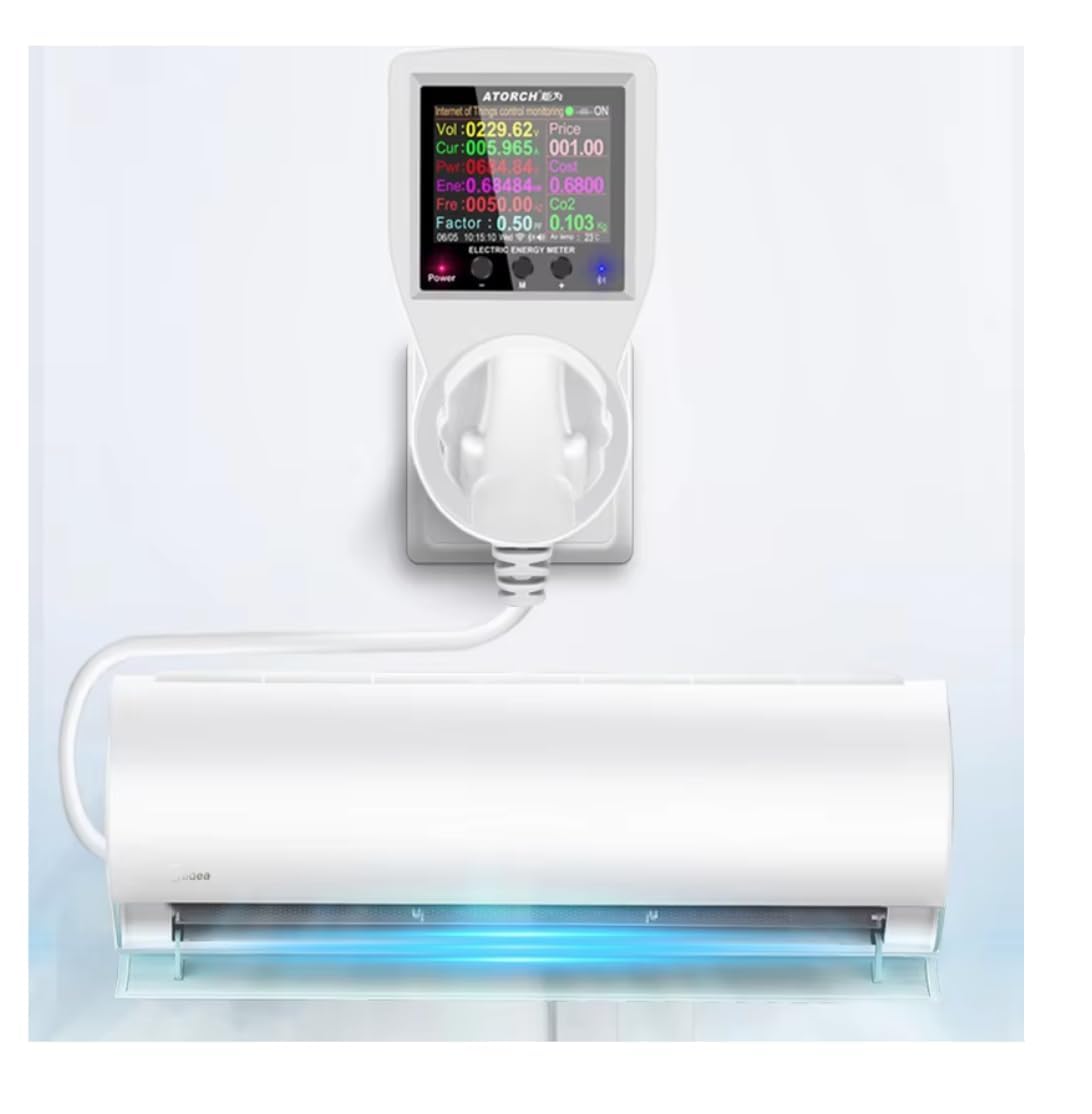
Image: The smart socket plugged into a wall outlet, with an air conditioning unit connected to it. The socket's digital display shows real-time power consumption data for the connected appliance, illustrating its energy monitoring function.
7. സജ്ജീകരണവും ഇൻസ്റ്റാളേഷനും
7.1 ഫിസിക്കൽ ഇൻസ്റ്റലേഷൻ
- Plug the AC85-265V 16A Tuya WiFi Smart Socket into a standard US wall outlet.
- Plug the appliance you wish to control and monitor into the smart socket.
7.2 ആപ്പ് ഇൻസ്റ്റാളേഷനും ജോടിയാക്കലും
- ആപ്പ് ഡൗൺലോഡ് ചെയ്യുക: ഇതിനായി തിരയുക "Tuya Smart" or "Smart Life" in your mobile app store (App Store for iOS, Google Play Store for Android) and download the application.
- രജിസ്റ്റർ ചെയ്യുക/ലോഗിൻ ചെയ്യുക: ആപ്പ് തുറന്ന് ഒരു പുതിയ അക്കൗണ്ട് രജിസ്റ്റർ ചെയ്യുക അല്ലെങ്കിൽ നിങ്ങൾക്ക് ഇതിനകം അക്കൗണ്ട് ഉണ്ടെങ്കിൽ ലോഗിൻ ചെയ്യുക.
- ഉപകരണം ചേർക്കുക: ഒരു പുതിയ ഉപകരണം ചേർക്കാൻ ആപ്പിന്റെ മുകളിൽ വലത് കോണിലുള്ള "+" ഐക്കണിൽ ടാപ്പ് ചെയ്യുക.
- ഉപകരണ തരം തിരഞ്ഞെടുക്കുക: Choose "Electrical Outlet" or "Socket (Wi-Fi)" from the list of device types.
- വൈഫൈ വിശദാംശങ്ങൾ നൽകുക: Ensure your phone is connected to a 2.4GHz Wi-Fi network. Enter your Wi-Fi network password in the app.
- ജോടിയാക്കൽ മോഡ്: On the smart socket, press and hold the power button for 5-7 seconds until the Wi-Fi indicator light starts blinking rapidly. This indicates it's in pairing mode.
- മിന്നിമറയുന്നത് സ്ഥിരീകരിക്കുക: In the app, confirm that the indicator light is blinking rapidly and proceed.
- ബന്ധിപ്പിക്കുക: The app will begin searching for and connecting to the device. Once connected, you can rename the device and assign it to a room.
8. പ്രവർത്തന നിർദ്ദേശങ്ങൾ
8.1 ആപ്പ് വഴിയുള്ള റിമോട്ട് കൺട്രോൾ
- From the app's main screen, tap on the smart socket's icon to access its control interface.
- Tap the large power button to turn the connected appliance ON or OFF remotely.
8.2 ഷെഡ്യൂളിംഗും ടൈമറുകളും
- Within the device control interface in the app, navigate to the "Schedule" or "Timer" section.
- ഷെഡ്യൂൾ: Set specific times for the socket to turn ON or OFF daily or on selected days of the week.
- ടൈമർ: Set a countdown timer for the socket to turn ON or OFF after a specified duration.
8.3 Real-time Power Monitoring
- ഉപകരണത്തിലെ ഡിസ്പ്ലേ: The smart socket's built-in screen continuously displays real-time voltage (V), current (A), power (W), and accumulated energy consumption (kWh).
- ആപ്പ് മോണിറ്ററിംഗ്: In the app, access the device's interface and look for the "Statistics" or "Power" section to view detailed real-time and historical energy consumption data, including voltage, current, power, and power factor.
9. പരിപാലനം
- വൃത്തിയാക്കുന്നതിന് മുമ്പ് ഉപകരണം അൺപ്ലഗ് ചെയ്തിട്ടുണ്ടെന്ന് ഉറപ്പാക്കുക.
- Wipe the surface with a soft, dry cloth. Do not use abrasive cleaners or liquids.
- ശരിയായ വായുസഞ്ചാരം ഉറപ്പാക്കാൻ ഉപകരണം പൊടിയിൽ നിന്നും അവശിഷ്ടങ്ങളിൽ നിന്നും മുക്തമായി സൂക്ഷിക്കുക.
10. പ്രശ്നപരിഹാരം
- ഉപകരണം ഓണാക്കുന്നില്ല: Ensure the smart socket is securely plugged into a live wall outlet. Check the appliance connected to the socket to ensure it is functioning correctly.
- Wi-Fi-ലേക്ക് കണക്റ്റുചെയ്യാൻ കഴിയില്ല:
- നിങ്ങളുടെ വൈഫൈ നെറ്റ്വർക്ക് 2.4GHz ആണെന്ന് ഉറപ്പാക്കുക. 5GHz നെറ്റ്വർക്കുകൾ പിന്തുണയ്ക്കുന്നില്ല.
- കൃത്യതയ്ക്കായി നിങ്ങളുടെ വൈഫൈ പാസ്വേഡ് പരിശോധിക്കുക.
- Move the smart socket closer to your Wi-Fi router.
- Reset the smart socket by unplugging it for 10 seconds and plugging it back in, then attempt pairing again.
- Ensure your router is not blocking new device connections.
- കൃത്യമല്ലാത്ത പവർ റീഡിംഗുകൾ: Ensure the connected appliance is within the specified voltage and current limits. If issues persist, try plugging a different appliance to verify.
- റിമോട്ട് കൺട്രോൾ പ്രവർത്തിക്കുന്നില്ല: Check your internet connection on your smartphone and ensure the smart socket is still connected to your home Wi-Fi network.
11. വാറൻ്റിയും പിന്തുണയും
This product comes with a standard manufacturer's warranty. For specific warranty terms, please refer to the documentation provided at the time of purchase or contact your retailer. For technical support, troubleshooting assistance, or inquiries regarding your smart socket, please contact the seller or manufacturer directly through the platform where the product was purchased.