
1. ആമുഖം
Thank you for choosing the OKP Life K5 Robot Vacuum. This intelligent cleaning device is designed to provide efficient and convenient floor cleaning for your home. Featuring Wi-Fi connectivity and remote control capabilities, the K5 offers multiple cleaning modes and smart navigation to ensure a thorough clean. Please read this manual carefully before using the product to ensure proper operation and maintenance.
2. പാക്കേജ് ഉള്ളടക്കം
അൺപാക്ക് ചെയ്യുമ്പോൾ എല്ലാ ഇനങ്ങളും നിലവിലുണ്ടെന്നും നല്ല നിലയിലാണെന്നും ഉറപ്പാക്കുക.
- OKP Life K5 Robot Vacuum Cleaner (1 unit)
- റിമോട്ട് കൺട്രോൾ (1 യൂണിറ്റ്)
- Charging Dock (1 unit)
- പവർ അഡാപ്റ്റർ (1 യൂണിറ്റ്)
- Side Brushes (4 units, 2 for immediate use, 2 spares)
- Cleaning Tool (1 unit)
- ഉപയോക്തൃ മാനുവൽ (ഈ പ്രമാണം)

Image: The OKP Life K5 Robot Vacuum, its remote control, and a set of four side brushes, illustrating the typical package contents.
3. ഉൽപ്പന്നം കഴിഞ്ഞുview
3.1 റോബോട്ട് വാക്വം ഘടകങ്ങൾ
Familiarize yourself with the main parts of your K5 Robot Vacuum.

ചിത്രം: മുകളിൽ നിന്ന് താഴേക്ക് view of the OKP Life K5 Robot Vacuum, highlighting its sleek, disc-shaped design and central power button.
- Main Body: Contains the motor, dustbin, and navigation sensors.
- Power Button/Indicator Light: For manual operation and status indication.
- Dustbin: 550ml capacity for collecting debris.
- Side Brushes: Two rotating brushes to sweep debris into the suction path.
- Driving Wheels: For movement across various floor types.
- Charging Contacts: For automatic recharging at the charging dock.
- Sensors: Anti-drop and anti-collision sensors for safe navigation.
3.2 വിദൂര നിയന്ത്രണം
The remote control provides convenient access to various cleaning functions.

Image: A close-up of the white remote control for the OKP Life K5 Robot Vacuum, showing its various function buttons for control and mode selection.
- Power Button: Turns the robot on/off or starts/pauses cleaning.
- Directional Buttons: Manually control the robot's movement.
- Home Button: Sends the robot back to the charging dock.
- Mode Selection Buttons: Switch between Auto, Spot, Edge, and Zigzag cleaning modes.
- Suction Power Adjustment: Adjusts the vacuum's suction strength.
4. സജ്ജീകരണം
4.1 Preparing the Robot
- റോബോട്ടിൽ നിന്നും ചാർജിംഗ് ഡോക്കിൽ നിന്നും എല്ലാ സംരക്ഷണ ഫിലിമുകളും സ്റ്റിക്കറുകളും നീക്കം ചെയ്യുക.
- Attach the side brushes by pressing them onto the square posts until they click into place.
4.2 Placing the Charging Dock
- ചാർജിംഗ് ഡോക്ക് ഒരു ഭിത്തിയോട് ചേർത്ത് കട്ടിയുള്ളതും നിരപ്പായതുമായ പ്രതലത്തിൽ വയ്ക്കുക.
- ഡോക്കിന്റെ ഇരുവശത്തും കുറഞ്ഞത് 0.5 മീറ്റർ (1.6 അടി) വ്യക്തമായ ഇടവും മുന്നിൽ 1.5 മീറ്റർ (4.9 അടി) അകലവും ഉണ്ടെന്ന് ഉറപ്പാക്കുക.
- Plug the power adapter into the charging dock and then into a wall outlet.
4.3 പ്രാരംഭ ചാർജിംഗ്
For optimal performance, fully charge the robot before its first use.
- Manually place the robot onto the charging dock, ensuring the charging contacts align.
- The indicator light on the robot will show charging status (e.g., breathing light).
- പൂർണ്ണമായി ചാർജ് ചെയ്യുന്നതിന് സാധാരണയായി 4-5 മണിക്കൂർ എടുക്കും.

Image: The OKP Life K5 Robot Vacuum automatically navigating back to its charging dock, demonstrating its self-charging capability when the battery is low.
4.4 വൈഫൈയിലേക്കും ആപ്പിലേക്കും കണക്റ്റുചെയ്യുന്നു
The OKP Life App allows for advanced control and scheduling.
- Download the "OKP Life" app from the App Store (iOS) or Google Play Store (Android).
- ഒരു അക്കൗണ്ട് രജിസ്റ്റർ ചെയ്ത് ലോഗിൻ ചെയ്യുക.
- Follow the in-app instructions to add your K5 robot vacuum. Ensure your Wi-Fi network is 2.4GHz.
- The robot can also be connected to Amazon Alexa and Google Assistant for voice control. Refer to the app for detailed instructions on integrating with these smart home platforms.

Image: A user interacting with the OKP Life K5 Robot Vacuum via a smartphone app, with icons indicating compatibility with Google Assistant and Amazon Alexa, and a note about 2.4GHz Wi-Fi connectivity.
5. പ്രവർത്തന നിർദ്ദേശങ്ങൾ
5.1 ഒരു ക്ലീൻ ആരംഭിക്കൽ
- റോബോട്ടിൽ നിന്ന്: Press the power button on the robot once.
- റിമോട്ട് കൺട്രോളിൽ നിന്ന്: റിമോട്ടിലെ പവർ ബട്ടൺ അമർത്തുക.
- ആപ്പിൽ നിന്ന്: Tap the "Start Cleaning" button in the OKP Life app.
- വോയ്സ് കമാൻഡ്: Use a connected smart assistant (e.g., "Alexa, turn on Robot Vacuum").
5.2 Pausing/Resuming a Clean
- Press the power button on the robot or remote, or use the app/voice command.
- Press again to resume cleaning.
5.3 Sending Robot to Charging Dock
- Press the "Home" button on the remote control or in the app.
- The robot will automatically return to its charging dock when the battery is low.
5.4 ക്ലീനിംഗ് മോഡുകൾ
The K5 offers multiple cleaning modes to suit different needs, selectable via the remote control or app.
- ഓട്ടോ ക്ലീനിംഗ്: The robot intelligently navigates and cleans the entire accessible area. This is the default mode.
- സ്പോട്ട് ക്ലീനിംഗ്: The robot cleans a concentrated area in a spiral pattern, ideal for localized dirt or spills.
- എഡ്ജ് ക്ലീനിംഗ്: സമഗ്രമായ കവറേജ് ഉറപ്പാക്കാൻ റോബോട്ട് ചുവരുകളിലും ഫർണിച്ചറിന്റെ അരികുകളിലും വൃത്തിയാക്കുന്നു.
- Zigzag Cleaning: The robot cleans in a systematic back-and-forth pattern, covering the maximum area and reducing missed spots.

Image: The OKP Life K5 Robot Vacuum cleaning a room, with an overlay illustrating its efficient Z-Shape (zigzag) cleaning path, designed to maximize coverage and minimize missed areas.
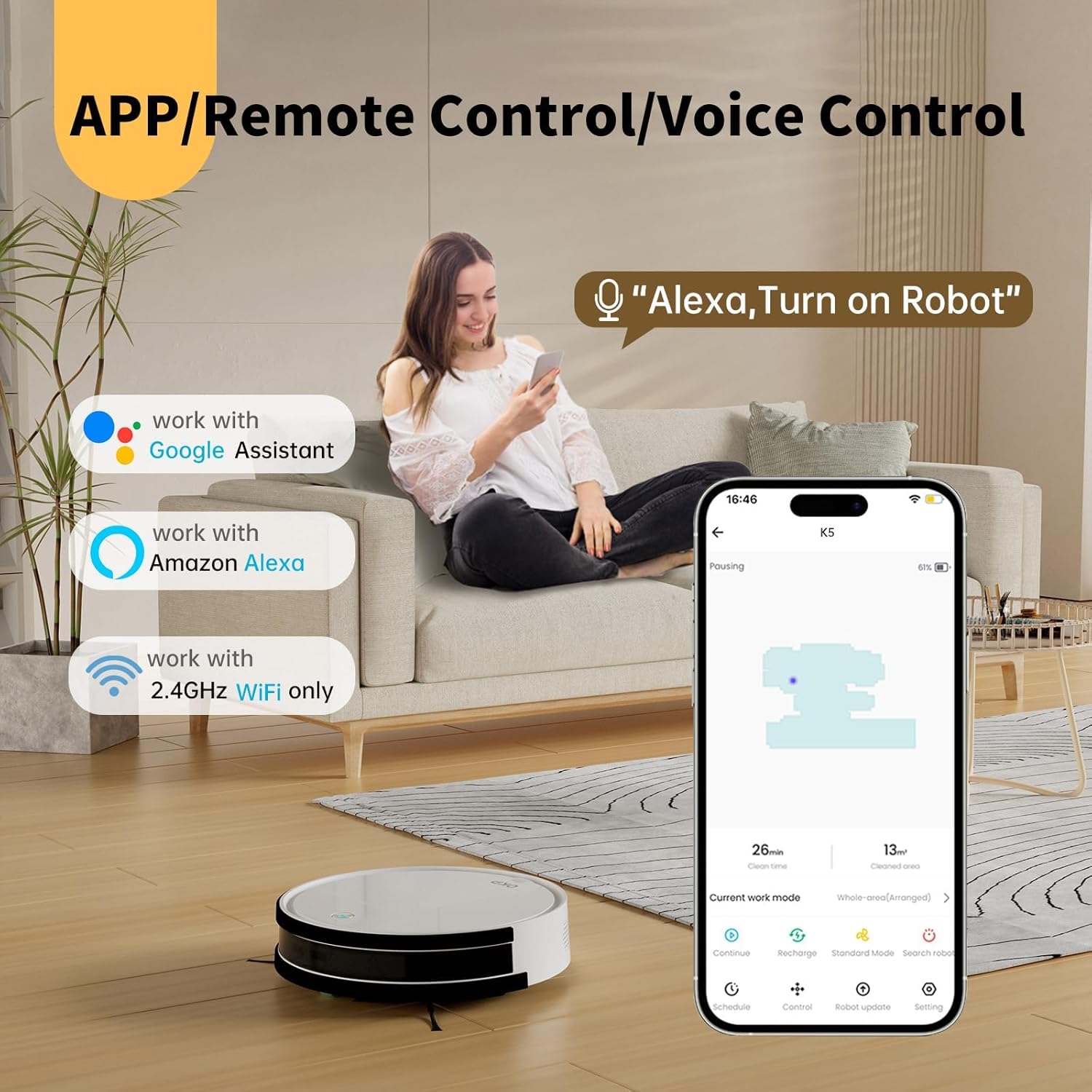
Image: The OKP Life K5 Robot Vacuum demonstrating its suction power, with illustrations of various debris types (debris, dust, beans, hair) being effectively vacuumed, indicating its versatility for different cleaning scenarios.
6. പരിപാലനം
പതിവ് അറ്റകുറ്റപ്പണികൾ ഒപ്റ്റിമൽ പ്രകടനം ഉറപ്പാക്കുകയും നിങ്ങളുടെ റോബോട്ട് വാക്വമിന്റെ ആയുസ്സ് വർദ്ധിപ്പിക്കുകയും ചെയ്യുന്നു.
6.1 ഡസ്റ്റ്ബിൻ ശൂന്യമാക്കൽ
- ഡസ്റ്റ്ബിൻ റിലീസ് ബട്ടൺ അമർത്തി ഡസ്റ്റ്ബിൻ പുറത്തെടുക്കുക.
- ചവറ്റുകുട്ടയുടെ മൂടി തുറന്ന് അതിലെ സാധനങ്ങൾ ഒരു ചവറ്റുകുട്ടയിലേക്ക് ഒഴിക്കുക.
- ആവശ്യമെങ്കിൽ ഡസ്റ്റ്ബിൻ വെള്ളത്തിൽ കഴുകുക (വീണ്ടും സ്ഥാപിക്കുന്നതിന് മുമ്പ് അത് പൂർണ്ണമായും ഉണങ്ങിയെന്ന് ഉറപ്പാക്കുക).
6.2 ഫിൽട്ടർ വൃത്തിയാക്കുന്നു
- ചവറ്റുകുട്ടയിൽ നിന്ന് ഫിൽട്ടർ നീക്കം ചെയ്യുക.
- പൊടി നീക്കം ചെയ്യാൻ ഫിൽട്ടറിൽ സൌമ്യമായി ടാപ്പ് ചെയ്യുക. HEPA ഫിൽട്ടർ വെള്ളത്തിൽ കഴുകരുത്.
- ഉപയോഗത്തിനനുസരിച്ച് ഓരോ 3-6 മാസത്തിലും ഫിൽട്ടർ മാറ്റിസ്ഥാപിക്കുക.
6.3 ക്ലീനിംഗ് സൈഡ് ബ്രഷുകൾ
- സൈഡ് ബ്രഷുകൾ മുകളിലേക്ക് വലിച്ചുകൊണ്ട് അവ നീക്കം ചെയ്യുക.
- ബ്രഷുകളിൽ പൊതിഞ്ഞിരിക്കുന്ന രോമങ്ങളോ അവശിഷ്ടങ്ങളോ നീക്കം ചെയ്യുക.
- Reattach the brushes. Replace if worn or damaged.
6.4 സെൻസറുകളും ചാർജിംഗ് കോൺടാക്റ്റുകളും വൃത്തിയാക്കൽ
- Wipe the anti-drop sensors, anti-collision sensors, and charging contacts on both the robot and the charging dock with a clean, dry cloth.
- Keep these areas clean to ensure proper navigation and charging.
7. പ്രശ്നപരിഹാരം
If your robot vacuum encounters issues, refer to the following common problems and solutions.
| പ്രശ്നം | സാധ്യമായ കാരണം | പരിഹാരം |
|---|---|---|
| റോബോട്ട് ഓണാക്കുന്നില്ല. | ബാറ്ററി കുറവാണ്; പവർ സ്വിച്ച് ഓഫ്. | Charge the robot; Ensure the main power switch (if present) is ON. |
| Robot cannot charge. | ചാർജിംഗ് കോൺടാക്റ്റുകൾ വൃത്തികേടാണ്; ചാർജിംഗ് ഡോക്കിൽ പവർ ഇല്ല. | Clean charging contacts; Ensure charging dock is plugged in and has power. |
| റോബോട്ട് ഇടയ്ക്കിടെ കുടുങ്ങിപ്പോകാറുണ്ട്. | Obstacles; Sensors dirty. | Clear cables, rugs, or small objects; Clean sensors. |
| മോശം ക്ലീനിംഗ് പ്രകടനം. | നിറഞ്ഞ ചവറ്റുകുട്ട; അടഞ്ഞുപോയ ഫിൽട്ടർ; തേഞ്ഞുപോയ ബ്രഷുകൾ. | മാലിന്യക്കൂമ്പാരം ശൂന്യമാക്കുക; ഫിൽട്ടർ വൃത്തിയാക്കുക/മാറ്റിസ്ഥാപിക്കുക; സൈഡ് ബ്രഷുകൾ വൃത്തിയാക്കുക/മാറ്റിസ്ഥാപിക്കുക. |
| വൈഫൈ/ആപ്പിലേക്ക് കണക്റ്റ് ചെയ്യാൻ കഴിയുന്നില്ല. | Incorrect Wi-Fi band (only 2.4GHz supported); Incorrect password; Robot too far from router. | Ensure 2.4GHz Wi-Fi; Re-enter password; Move robot closer to router. |
പ്രശ്നം നിലനിൽക്കുകയാണെങ്കിൽ, ദയവായി ഉപഭോക്തൃ പിന്തുണയുമായി ബന്ധപ്പെടുക.
8 സ്പെസിഫിക്കേഷനുകൾ
| ബ്രാൻഡ് | OKP ലൈഫ് |
| മോഡലിൻ്റെ പേര് | K5 |
| സക്ഷൻ പവർ | 2100 പിഎ |
| ഡസ്റ്റ്ബിൻ കപ്പാസിറ്റി | 550 മില്ലി |
| പവർ ഉറവിടം | ബാറ്ററി പവർ |
| ഫോം ഫാക്ടർ | ഡിസ്ക് ആകൃതിയിലുള്ള |
| പ്രത്യേക സവിശേഷതകൾ | Smart, Edge Cleaning, Obstacle Avoidance, Selective Room Cleaning, Bagless, Wi-Fi Connectivity, Remote Control, Voice Control (Alexa, Google Assistant), Automatic Charging, Multiple Cleaning Modes (Auto/Spot/Edge/Zigzag) |
| അളവുകൾ (ഏകദേശം.) | 280mm (width) x 77mm (height) / 11.02 inches (width) x 3 inches (height) |
9. വാറൻ്റിയും പിന്തുണയും
OKP Life products come with a standard manufacturer's warranty. Please refer to the warranty card included in your package or visit the official OKP Life webവിശദമായ വാറന്റി നിബന്ധനകൾക്കും വ്യവസ്ഥകൾക്കും സൈറ്റ്.
For technical support, troubleshooting assistance, or to order replacement parts, please contact OKP Life customer service through the contact information provided on their official website or within the OKP Life app.
Webസൈറ്റ്: Visit the OKP Life Store on Amazon