
ആമുഖം
Thank you for choosing the CREATE Speaker Retro. This portable Bluetooth speaker combines a classic retro design with modern audio technology, offering versatile connectivity and powerful sound. This manual will guide you through the setup, operation, and maintenance of your new speaker to ensure optimal performance and longevity.

Image: The CREATE Speaker Retro, highlighting its elegant retro aesthetic and compact form factor.
പ്രധാനപ്പെട്ട സുരക്ഷാ നിർദ്ദേശങ്ങൾ
- ഉൽപ്പന്നം ഉപയോഗിക്കുന്നതിന് മുമ്പ് എല്ലാ നിർദ്ദേശങ്ങളും ശ്രദ്ധാപൂർവ്വം വായിക്കുക.
- ഭാവി റഫറൻസിനായി ഈ മാനുവൽ സൂക്ഷിക്കുക.
- Do not expose the speaker to water or excessive moisture. This product is വാട്ടർപ്രൂഫ് അല്ല.
- റേഡിയേറ്ററുകൾ, ഹീറ്റ് രജിസ്റ്ററുകൾ, സ്റ്റൗകൾ അല്ലെങ്കിൽ മറ്റ് ഉപകരണങ്ങൾ (ഉൾപ്പെടെ) പോലുള്ള താപ സ്രോതസ്സുകൾക്ക് സമീപം സ്ഥാപിക്കരുത്. ampലൈഫയറുകൾ) ചൂട് ഉത്പാദിപ്പിക്കുന്നത്.
- നിർമ്മാതാവ് വ്യക്തമാക്കിയ അറ്റാച്ച്മെൻ്റുകൾ/ആക്സസറികൾ മാത്രം ഉപയോഗിക്കുക.
- മിന്നൽ കൊടുങ്കാറ്റുകളുടെ സമയത്തോ ദീർഘനേരം ഉപയോഗിക്കാത്ത സമയത്തോ ഈ ഉപകരണം അൺപ്ലഗ് ചെയ്യുക.
- എല്ലാ സേവനങ്ങളും യോഗ്യതയുള്ള സേവന ഉദ്യോഗസ്ഥർക്ക് റഫർ ചെയ്യുക.
പാക്കേജ് ഉള്ളടക്കം
The CREATE Speaker Retro package includes:
- CREATE Speaker Retro Portable Bluetooth Speaker (1 unit)
- USB-C ചാർജിംഗ് കേബിൾ
- ഉപയോക്തൃ മാനുവൽ (ഈ പ്രമാണം)
Controls and Ports Overview
Familiarize yourself with the speaker's controls and connection ports:

ചിത്രം: വിശദമായത് view സ്പീക്കറിന്റെ മുകളിലെ നിയന്ത്രണ പാനലിന്റെ.
- വോളിയം നോബ്: മൊത്തത്തിലുള്ള ശബ്ദ വോളിയം ക്രമീകരിക്കുന്നു.
- ബാസ് നോബ്: ബാസ് ലെവൽ ക്രമീകരിക്കുന്നു.
- ട്രിബിൾ നോബ്: ട്രെബിൾ ലെവൽ ക്രമീകരിക്കുന്നു.
- ഇൻപുട്ട് സെലക്ടർ സ്വിച്ച്: Toggles between AUX, Bluetooth (BT), and USB input modes.
- വൈദ്യുതി സ്വിച്ച്: സ്പീക്കർ ഓൺ/ഓഫ് ചെയ്യുന്നു.
- AUX ഇൻപുട്ട് (3.5mm): For connecting external audio devices via an audio cable.
- USB പോർട്ട്: യുഎസ്ബി ഡ്രൈവ് പ്ലേബാക്കിനായി.
- DC-IN 5V Port: സ്പീക്കർ ചാർജ് ചെയ്തതിന്.
- ഇൻഡിക്കേറ്റർ ലൈറ്റ്: പവർ സ്റ്റാറ്റസ്, ചാർജിംഗ് സ്റ്റാറ്റസ്, ബ്ലൂടൂത്ത് പെയറിംഗ് സ്റ്റാറ്റസ് എന്നിവ കാണിക്കുന്നു.
സജ്ജമാക്കുക
1. സ്പീക്കറിൽ നിന്ന് നിരക്ക് ഈടാക്കുന്നു
Before first use, fully charge the speaker. Connect the provided USB-C charging cable to the DC-IN 5V port on the speaker and the other end to a compatible USB power adapter (not included) or a computer's USB port. The indicator light will show the charging status. A full charge takes approximately 4-5 hours.
- ചാർജിംഗ്: Indicator light glows (color may vary).
- പൂർണ്ണമായി ചാർജ്ജ് ചെയ്തത്: Indicator light turns off or changes color.
2. പവർ ഓൺ/ഓഫ്
To power on the speaker, flip the പവർ സ്വിച്ച് to the "ON" position. To power off, flip the switch to the "OFF" position.
പ്രവർത്തന നിർദ്ദേശങ്ങൾ
1. ബ്ലൂടൂത്ത് മോഡ്
The speaker features Bluetooth 5.2 for wireless audio streaming with a range of up to 10 meters.
- സ്പീക്കറിൽ പവർ.
- സജ്ജമാക്കുക ഇൻപുട്ട് സെലക്ടർ സ്വിച്ച് to "BT/AUX" and then ensure it's in Bluetooth mode (indicator light will blink, indicating pairing mode).
- നിങ്ങളുടെ സ്മാർട്ട്ഫോണിലോ, ടാബ്ലെറ്റിലോ, മറ്റ് ബ്ലൂടൂത്ത് പ്രവർത്തനക്ഷമമാക്കിയ ഉപകരണത്തിലോ, ബ്ലൂടൂത്ത് പ്രവർത്തനക്ഷമമാക്കി ലഭ്യമായ ഉപകരണങ്ങൾക്കായി തിരയുക.
- Select "CREATE Speaker Retro" from the list.
- Once paired, the indicator light will stop blinking and remain solid. You can now play music wirelessly.
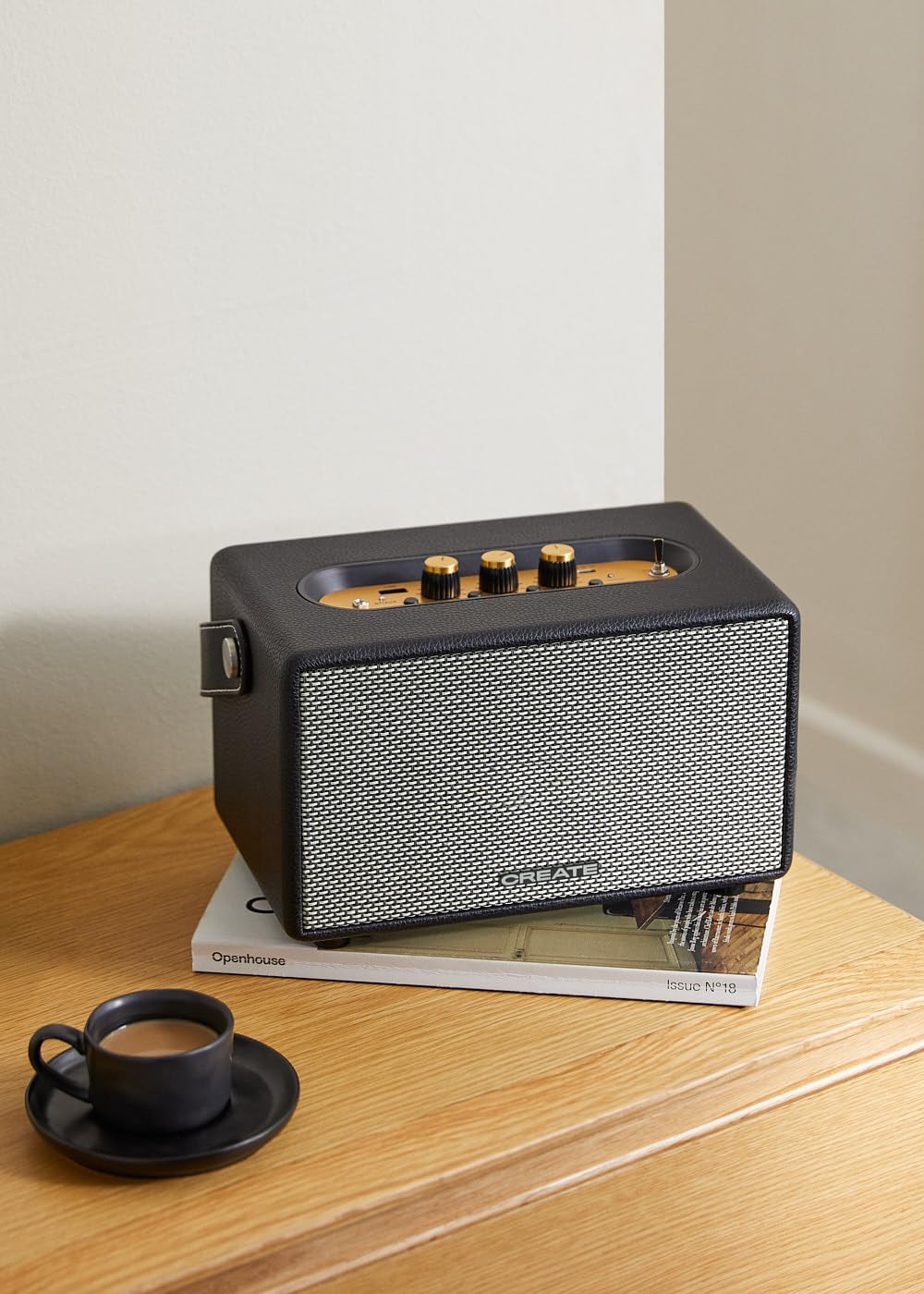
Image: Connecting to the speaker via Bluetooth from a mobile device.
2. USB Playback Mode
ഓഡിയോ പ്ലേ ചെയ്യുക fileഒരു USB ഫ്ലാഷ് ഡ്രൈവിൽ നിന്ന് നേരിട്ട്.
- സ്പീക്കറിൽ പവർ.
- ഓഡിയോ അടങ്ങിയ യുഎസ്ബി ഫ്ലാഷ് ഡ്രൈവ് ചേർക്കുക fileഎസ് USB പോർട്ട്.
- സജ്ജമാക്കുക ഇൻപുട്ട് സെലക്ടർ സ്വിച്ച് to "USB". The speaker will automatically begin playing music from the USB drive.

Image: Inserting a USB drive for direct audio playback.
3. AUX ഇൻപുട്ട് മോഡ്
ഒരു 3.5mm ഓഡിയോ കേബിൾ ഉപയോഗിച്ച് ബാഹ്യ ഓഡിയോ ഉപകരണങ്ങൾ ബന്ധിപ്പിക്കുക.
- സ്പീക്കറിൽ പവർ.
- 3.5mm ഓഡിയോ കേബിളിന്റെ ഒരു അറ്റം (ഉൾപ്പെടുത്തിയിട്ടില്ല) ബന്ധിപ്പിക്കുക AUX ഇൻപുട്ട് സ്പീക്കറിൽ പോർട്ട്.
- കേബിളിന്റെ മറ്റേ അറ്റം ഹെഡ്ഫോൺ ജാക്കിലേക്കോ നിങ്ങളുടെ ബാഹ്യ ഉപകരണത്തിന്റെ ഓഡിയോ ഔട്ട്പുട്ടിലേക്കോ ബന്ധിപ്പിക്കുക (ഉദാ: MP3 പ്ലെയർ, ലാപ്ടോപ്പ്).
- സജ്ജമാക്കുക ഇൻപുട്ട് സെലക്ടർ സ്വിച്ച് to "AUX". The speaker will now play audio from your connected device.
4. ശബ്ദം ക്രമീകരിക്കുന്നു
Use the dedicated knobs on the control panel to fine-tune your audio experience:
- തിരിക്കുക വോളിയം നോബ് to increase or decrease the overall sound level.
- തിരിക്കുക ബാസ് നോബ് to adjust the low-frequency sounds.
- തിരിക്കുക ട്രെബിൾ നോബ് to adjust the high-frequency sounds.
മെയിൻ്റനൻസ്
വൃത്തിയാക്കൽ
To clean the speaker, use a soft, dry cloth. Do not use abrasive cleaners, waxes, or solvents as they may damage the finish. Avoid spraying liquids directly onto the speaker.
സംഭരണം
ദീർഘനേരം ഉപയോഗിക്കാത്തപ്പോൾ, നേരിട്ടുള്ള സൂര്യപ്രകാശത്തിൽ നിന്നും കടുത്ത താപനിലയിൽ നിന്നും മാറി തണുത്തതും വരണ്ടതുമായ സ്ഥലത്ത് സ്പീക്കർ സൂക്ഷിക്കുക. ബാറ്ററിയുടെ ആരോഗ്യം സംരക്ഷിക്കുന്നതിന് മുമ്പ് സ്പീക്കർ പൂർണ്ണമായും ചാർജ് ചെയ്തിട്ടുണ്ടെന്ന് ഉറപ്പാക്കുക.
ബാറ്ററി കെയർ
The speaker is equipped with a built-in rechargeable battery. To maximize battery life:
- ബാറ്ററി ഇടയ്ക്കിടെ പൂർണ്ണമായും ഡിസ്ചാർജ് ചെയ്യുന്നത് ഒഴിവാക്കുക.
- Recharge the battery regularly, even if the speaker is not used often.
- 45°C (113°F) ന് മുകളിലോ 0°C (32°F) ന് താഴെയോ ഉള്ള താപനിലയിൽ സ്പീക്കറിനെ തുറന്നുകാട്ടരുത്.
ട്രബിൾഷൂട്ടിംഗ്
If you encounter any issues with your CREATE Speaker Retro, please refer to the following common problems and solutions:
| പ്രശ്നം | സാധ്യമായ കാരണം | പരിഹാരം |
|---|---|---|
| സ്പീക്കർ പവർ ഓൺ ചെയ്യുന്നില്ല. | ബാറ്ററി തീർന്നു. | Charge the speaker for 4-5 hours using the USB-C cable. |
| സ്പീക്കറിൽ നിന്ന് ശബ്ദമൊന്നുമില്ല. | വോളിയം വളരെ കുറവാണ്; തെറ്റായ ഇൻപുട്ട് മോഡ്; ഉപകരണം ശരിയായി കണക്റ്റ് ചെയ്തിട്ടില്ല. | Increase volume. Ensure the correct input mode (BT, USB, AUX) is selected. Reconnect Bluetooth device or AUX cable. |
| ബ്ലൂടൂത്ത് ജോടിയാക്കൽ പരാജയപ്പെട്ടു. | സ്പീക്കർ ജോടിയാക്കൽ മോഡിലല്ല; ഉപകരണം പരിധിക്ക് പുറത്താണ്; ഇടപെടൽ. | Ensure speaker is in Bluetooth pairing mode (blinking indicator). Move device closer to speaker (within 10m). Turn off other Bluetooth devices. |
| യുഎസ്ബി പ്ലേബാക്ക് പ്രവർത്തിക്കുന്നില്ല. | Incorrect input mode; USB drive not formatted correctly or no compatible files. | Ensure "USB" input mode is selected. Check USB drive for compatible audio files (e.g., MP3). Try a different USB drive. |
| Play/Pause button not responding. | സാധ്യതയുള്ള ഹാർഡ്വെയർ പ്രശ്നം അല്ലെങ്കിൽ സോഫ്റ്റ്വെയർ തകരാർ. | Restart the speaker. If the issue persists, contact customer support. (കുറിപ്പ്: ഒരു ഉപയോക്താവ്view mentioned this issue.) |
സ്പെസിഫിക്കേഷനുകൾ
| മോഡലിൻ്റെ പേര് | SPEAKER RETRO |
| മോഡൽ നമ്പർ | 181643_452174 |
| അളവുകൾ (D x W x H) | 17 x 26 x 15 സെ.മീ |
| ഭാരം | 2.5 കി.ഗ്രാം |
| പരമാവധി സ്പീക്കർ ഔട്ട്പുട്ട് പവർ | 40 W |
| ഓഡിയോ put ട്ട്പുട്ട് മോഡ് | സ്റ്റീരിയോ (2.0 ചാനൽ) |
| കണക്റ്റിവിറ്റി ടെക്നോളജി | ബ്ലൂടൂത്ത് 5.2, യുഎസ്ബി, AUX (3.5mm) |
| ബ്ലൂടൂത്ത് ശ്രേണി | 10 മീറ്റർ വരെ |
| ബാറ്ററി ശേഷി | 3000 mAh |
| ബാറ്ററി ലൈഫ് | 5 മണിക്കൂർ വരെ (ഉപയോഗത്തെ ആശ്രയിച്ച്) |
| ചാർജിംഗ് സമയം | ഏകദേശം 4-5 മണിക്കൂർ |
| നിയന്ത്രണ രീതി | Touch (knobs and switches) |
| നിറം | കറുപ്പ് |
| വാട്ടർപ്രൂഫ് | ഇല്ല |
വാറൻ്റിയും പിന്തുണയും
വാറൻ്റി വിവരങ്ങൾ
The CREATE Speaker Retro comes with a standard manufacturer's warranty. Please retain your proof of purchase for warranty claims. The warranty covers defects in materials and workmanship under normal use. It does not cover damage caused by misuse, accidents, unauthorized modifications, or exposure to water.
For specific warranty terms and conditions, please refer to the warranty card included with your product or contact CREATE customer service.
ഉപഭോക്തൃ പിന്തുണ
If you have any questions, require technical assistance, or need to report an issue that cannot be resolved using the troubleshooting guide, please contact CREATE customer support.
You can find more information and contact details on the official CREATE webസൈറ്റ് അല്ലെങ്കിൽ അവരുടെ ആമസോൺ ബ്രാൻഡ് സ്റ്റോർ വഴി: