
Mitone ANC 5.1
Mitone ANC 5.1 Bluetooth Headphones User Manual
Model: Mitone ANC 5.1
1. ആമുഖം
Thank you for choosing the Mitone ANC 5.1 Bluetooth Headphones. These headphones are designed to provide an immersive audio experience with advanced Active Noise Cancellation (ANC) technology, crystal-clear call quality, and long-lasting comfort. This manual will guide you through the setup, operation, and maintenance of your new headphones to ensure you get the most out of them.
2. പാക്കേജ് ഉള്ളടക്കം
പാക്കേജിലെ ഉള്ളടക്കങ്ങൾ ശ്രദ്ധാപൂർവ്വം പരിശോധിക്കുക. എന്തെങ്കിലും ഇനങ്ങൾ നഷ്ടപ്പെട്ടിട്ടുണ്ടെങ്കിലോ കേടായിട്ടുണ്ടെങ്കിലോ, ദയവായി നിങ്ങളുടെ റീട്ടെയിലറെ ബന്ധപ്പെടുക.
- Mitone ANC 5.1 Bluetooth Headphones
- USB-C ചാർജിംഗ് കേബിൾ
- ഉപയോക്തൃ മാനുവൽ
3. ഉൽപ്പന്നം കഴിഞ്ഞുview
Familiarize yourself with the components and controls of your Mitone ANC 5.1 headphones.

മൊത്തത്തിൽ view of the Mitone ANC 5.1 headphones, showcasing അവയുടെ മിനുസമാർന്ന കറുത്ത രൂപകൽപ്പനയും ഓവർ-ഇയർ ഫോം ഫാക്ടറും.

A user wearing the headphones demonstrates their comfortable design, featuring large ear cups, a soft headband pad, adjustable headband, 90° rotational axis, and memory foam ear pads for extended wear.
ഹെഡ്ഫോൺ ഘടകങ്ങൾ:
- ഇയർ കപ്പുകൾ: Plush, over-ear design with memory foam for comfort.
- ഹെഡ്ബാൻഡ്: Adjustable and padded for a secure fit.
- നിയന്ത്രണ ബട്ടണുകൾ: (Typically located on ear cups) Power On/Off, Volume Up/Down, Multi-function Button (Play/Pause, Answer/End Call), ANC On/Off switch.
- മൈക്രോഫോൺ: Integrated CVC 8.0 noise cancellation microphone for clear calls.
- USB-C ചാർജിംഗ് പോർട്ട്: വേഗത്തിലുള്ള ചാർജിംഗിനായി.
- LED സൂചകം: പവർ, ചാർജിംഗ്, ജോടിയാക്കൽ നില എന്നിവ പ്രദർശിപ്പിക്കുന്നു.
4. സജ്ജീകരണം
4.1 ഹെഡ്ഫോണുകൾ ചാർജ് ചെയ്യുന്നു
Before first use, fully charge your headphones. The Mitone ANC 5.1 headphones support USB-C fast charging.
- ഹെഡ്ഫോണുകളിലെ ചാർജിംഗ് പോർട്ടിലേക്ക് USB-C ചാർജിംഗ് കേബിൾ ബന്ധിപ്പിക്കുക.
- കേബിളിന്റെ മറ്റേ അറ്റം ഒരു USB പവർ അഡാപ്റ്ററുമായി (ഉൾപ്പെടുത്തിയിട്ടില്ല) അല്ലെങ്കിൽ ഒരു കമ്പ്യൂട്ടറിന്റെ USB പോർട്ടുമായി ബന്ധിപ്പിക്കുക.
- The LED indicator will show the charging status (e.g., red while charging, blue/off when fully charged).
- ഒരു ഫുൾ ചാർജ് 35 മണിക്കൂർ വരെ പ്ലേടൈം നൽകുന്നു.
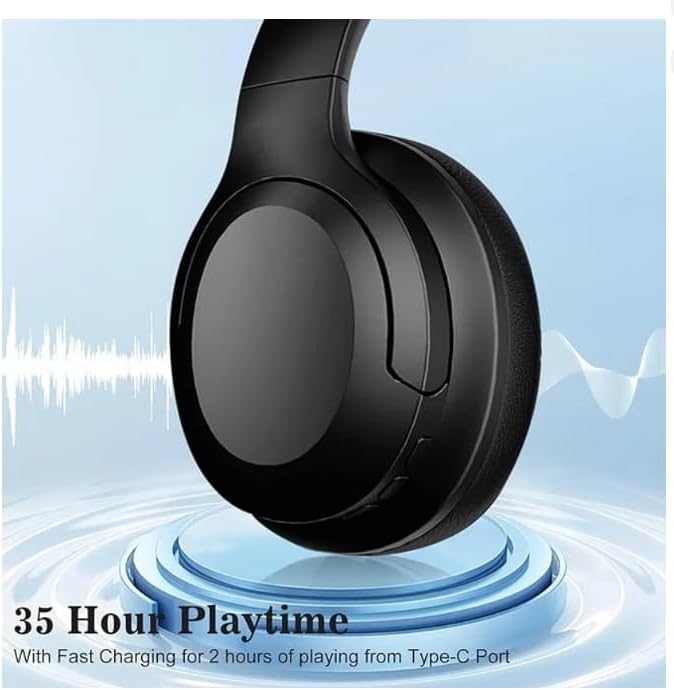
The headphones are shown on a charging platform, emphasizing their impressive 35-hour playtime and the convenience of fast charging via the USB-C port.
4.2 ബ്ലൂടൂത്ത് ജോടിയാക്കൽ
Pair your headphones with your Bluetooth-enabled device (smartphone, tablet, PC, etc.).
- Ensure the headphones are turned off and fully charged.
- എൽഇഡി ഇൻഡിക്കേറ്റർ നീലയും ചുവപ്പും മാറിമാറി മിന്നുന്നതുവരെ ഏകദേശം 3-5 സെക്കൻഡ് നേരത്തേക്ക് പവർ ബട്ടൺ അമർത്തിപ്പിടിക്കുക, ഇത് ജോടിയാക്കൽ മോഡിനെ സൂചിപ്പിക്കുന്നു.
- നിങ്ങളുടെ ഉപകരണത്തിൽ, ബ്ലൂടൂത്ത് പ്രവർത്തനക്ഷമമാക്കി പുതിയ ഉപകരണങ്ങൾക്കായി തിരയുക.
- Select "Mitone ANC 5.1" from the list of available devices.
- Once connected, the LED indicator will flash blue slowly or turn solid blue.
- The headphones will automatically reconnect to the last paired device when powered on, if it's within range.
5. പ്രവർത്തന നിർദ്ദേശങ്ങൾ
5.1 പവർ ഓൺ/ഓഫ്
- പവർ ഓൺ: പവർ ബട്ടൺ 2 സെക്കൻഡ് അമർത്തിപ്പിടിക്കുക.
- പവർ ഓഫ്: പവർ ബട്ടൺ 3 സെക്കൻഡ് അമർത്തിപ്പിടിക്കുക.
5.2 മ്യൂസിക് പ്ലേബാക്ക്
- പ്ലേ/താൽക്കാലികമായി നിർത്തുക: മൾട്ടി-ഫംഗ്ഷൻ ബട്ടൺ ഒരിക്കൽ അമർത്തുക.
- അടുത്ത ട്രാക്ക്: വോളിയം അപ്പ് ബട്ടൺ അമർത്തിപ്പിടിക്കുക.
- മുമ്പത്തെ ട്രാക്ക്: വോളിയം ഡൗൺ ബട്ടൺ അമർത്തിപ്പിടിക്കുക.
- വോളിയം കൂട്ടുക: വോളിയം അപ്പ് ബട്ടൺ ചുരുക്കി അമർത്തുക.
- വോളിയം താഴേക്ക്: വോളിയം ഡൗൺ ബട്ടൺ ചുരുക്കി അമർത്തുക.
5.3 കോൾ മാനേജ്മെന്റ്
- ഉത്തരം/അവസാന കോൾ: മൾട്ടി-ഫംഗ്ഷൻ ബട്ടൺ ഒരിക്കൽ അമർത്തുക.
- കോൾ നിരസിക്കുക: മൾട്ടി-ഫംഗ്ഷൻ ബട്ടൺ 2 സെക്കൻഡ് അമർത്തിപ്പിടിക്കുക.
- വോയ്സ് അസിസ്റ്റന്റിനെ സജീവമാക്കുക: മൾട്ടി-ഫംഗ്ഷൻ ബട്ടൺ രണ്ടുതവണ അമർത്തുക.

This image highlights the advanced features for crystal clear calls, including Bluetooth 5.1 connectivity and cVc 8.0 noise cancellation technology for the microphone, ensuring clear communication.
5.4 സജീവ ശബ്ദം റദ്ദാക്കൽ (ANC)
The Mitone ANC 5.1 headphones feature Active Noise Cancellation, reducing ambient noise by up to 25dB.
- ANC സജീവമാക്കുക: Locate the dedicated ANC switch (if available) or button on the headphones and toggle/press it. An indicator light or voice prompt may confirm activation.
- ANC നിർജ്ജീവമാക്കുക: Toggle/press the ANC switch/button again.
6. പരിപാലനം
ശരിയായ പരിചരണം നിങ്ങളുടെ ഹെഡ്ഫോണുകളുടെ ആയുസ്സ് വർദ്ധിപ്പിക്കും.
- വൃത്തിയാക്കൽ: Use a soft, dry cloth to clean the ear cups and headband. Do not use harsh chemicals or abrasive materials.
- സംഭരണം: ഹെഡ്ഫോണുകൾ തണുത്തതും വരണ്ടതുമായ സ്ഥലത്ത് സൂക്ഷിക്കുക, നേരിട്ടുള്ള സൂര്യപ്രകാശത്തിൽ നിന്നും കടുത്ത താപനിലയിൽ നിന്നും അകറ്റി നിർത്തുക.
- ബാറ്ററി കെയർ: To preserve battery life, avoid fully discharging the headphones frequently. Charge them regularly, even if not in use for extended periods.
- ജല പ്രതിരോധം: These headphones are not waterproof. Avoid exposure to liquids.
7. പ്രശ്നപരിഹാരം
നിങ്ങളുടെ ഹെഡ്ഫോണുകളിൽ പ്രശ്നങ്ങൾ നേരിടുകയാണെങ്കിൽ, ഇനിപ്പറയുന്ന പരിഹാരങ്ങൾ പരീക്ഷിക്കുക:
| പ്രശ്നം | സാധ്യമായ പരിഹാരം |
|---|---|
| ഹെഡ്ഫോണുകൾ ഓണാകില്ല. | ഹെഡ്ഫോണുകൾ പൂർണ്ണമായും ചാർജ്ജ് ചെയ്തിട്ടുണ്ടെന്ന് ഉറപ്പാക്കുക. |
| ഉപകരണവുമായി ജോടിയാക്കാൻ കഴിയില്ല. | Ensure headphones are in pairing mode (flashing blue/red). Turn off and on Bluetooth on your device. Clear previous Bluetooth connections on your device. |
| ശബ്ദമില്ല അല്ലെങ്കിൽ കുറഞ്ഞ ശബ്ദമില്ല. | Increase volume on both headphones and your device. Ensure headphones are connected. Try re-pairing. |
| ANC ഫലപ്രദമായി പ്രവർത്തിക്കുന്നില്ല. | Ensure ANC is activated. Check that ear cups form a good seal around your ears. |
| മോശം കോൾ നിലവാരം. | Ensure microphone is not obstructed. Move closer to your device. Check network signal. |
8 സ്പെസിഫിക്കേഷനുകൾ
Key technical specifications for the Mitone ANC 5.1 Headphones:

This visual represents the impeccable Hi-Res Audio quality delivered by the headphones, powered by 40mm drivers for a rich and detailed sound experience.
- മോഡൽ: Mitone ANC 5.1
- നിർമ്മാതാവ്: Mitone
- ബ്ലൂടൂത്ത് പതിപ്പ്: 5.1
- ശബ്ദം കുറയ്ക്കൽ: Up to 25dB (Active Noise Cancellation)
- മൈക്രോഫോൺ: CVC 8.0 Noise Cancellation Mic
- കളിസമയം: 35 മണിക്കൂർ വരെ
- ചാർജിംഗ് പോർട്ട്: USB-C
- ചെവി സ്ഥാപിക്കൽ: ചെവിക്ക് മുകളിൽ
- ഫോം ഘടകം: ചെവിക്ക് മുകളിൽ
- പ്രതിരോധം: 120 ഓം
- നിറം: കറുപ്പ്
9. വാറൻ്റിയും പിന്തുണയും
For warranty information or technical support, please refer to the warranty card included with your purchase or contact the retailer/manufacturer directly. Please retain your proof of purchase for any warranty claims.
Ask a question about this manual
Ask about setup, troubleshooting, compatibility, parts, safety, or missing instructions. Manuals+ will review the question and use this page’s manual context to help answer it.