
ആമുഖം
This manual provides comprehensive instructions for the setup, operation, and maintenance of your Mini GF10 GPS Tracker. Designed for real-time location tracking of vehicles, kids, and pets, this device offers robust features including geo-fencing, waterproof design, and mobile app alerts. Please read this manual thoroughly to ensure optimal performance and longevity of your device.

Image: The Mini GF10 GPS Tracker, a compact black rectangular device with indicator lights on its surface.
ഉൽപ്പന്ന സവിശേഷതകൾ
- കോംപാക്റ്റ് ഡിസൈൻ: Smallest tracker at 2.2 x 1.4 x 0.7 inches and 1.4 ounces.
- Global 4G-LTE Coverage: Supports FDD B1/B2/B3/B4/B5/B7/B8/B28/B66 and GSM 850/900/1800/1900MHz.
- Multi-Satellite Positioning: Connects to GPS, Glonass, and Galileo networks for pinpoint accuracy.
- നീണ്ട ബാറ്ററി ലൈഫ്: Up to 9 days in power-saving mode, 3 days in workhorse mode, with a 2-hour charge time.
- വാട്ടർപ്രൂഫ് റേറ്റിംഗ്: IP66, providing protection against dust and strong jets of water.
- കാന്തിക അറ്റാച്ച്മെൻ്റ്: Includes a strong 6lb earth magnet for secure mounting on metallic surfaces.
- Mobile App & Web പ്ലാറ്റ്ഫോം: User-friendly app for iOS/Android and web platform for tracking history, real-time movement, and alerts.
- അലേർട്ടുകൾ: Virtual boundaries (geo-fencing), speeding, low battery, movement, and parking alerts.
- Lifetime Replacement Warranty: Available with active annual service.

Image: Visual representation of key features including precise positioning, strong magnetic attachment, long standby, safety fence (geo-fencing), historical track, WiFi positioning, and stable performance.

Image: Diagram highlighting the GF10 4G Tracker's capabilities: 4-level positioning, 4G positioning, driving track, fencing system, statistical reports, remote on/off, GPS+Beidou+LBS+WiFi, and a lifelong free platform.
സജ്ജീകരണ ഗൈഡ്
1 ഉപകരണം ചാർജ് ചെയ്യുന്നു
Before first use, fully charge the GF10 GPS Tracker. Connect the provided USB Type-C cable to the charging port on the device and plug the other end into a USB power adapter (not included). A full charge takes approximately 2 hours. The indicator light will change to indicate charging status.

ചിത്രം: ക്ലോസ്-അപ്പ് view of the GF10 tracker's side, showing the easy on/off switch and the Hi-Speed HQ Type-C charge port.
2. SIM Card Installation (If Applicable)
The GF10 GPS Tracker includes a Pay-As-You-Go Global GPS card. Ensure the SIM card is properly inserted into the designated slot. Refer to the device's physical instructions for precise SIM card orientation.
3. Activating Service
Follow the instructions provided with your GPS card for service activation. This typically involves visiting a website or calling a support number to set up your monthly data plan.
4. App Download and Account Setup
Download the official GPScards Mobile App from the Apple App Store (for iOS devices) or Google Play Store (for Android devices). Create an account and log in. You will need to add your GF10 tracker to your account using its unique ID number, usually found on the device or its packaging.
പ്രവർത്തന നിർദ്ദേശങ്ങൾ
1. പവർ ഓൺ/ഓഫ്
Use the easy on/off switch located on the side of the device to power it on or off. Once powered on, the device will attempt to connect to satellite and data networks.
2. തത്സമയ ട്രാക്കിംഗ്
Open the GPScards Mobile App or log into the web platform. Your device's current location will be displayed on the map. The map supports Google Standard, Street View, Satellite, Hybrid, and Traffic views.
3. Geo-Fencing (Virtual Boundaries)
Within the app or web platform, you can set up virtual boundaries (geo-fences). You will receive alerts when the tracker enters or exits these predefined areas.
4. Historical Tracking
ആപ്പ് ഒപ്പം web platform allow you to view up to a year of tracking history, with options to export data.
5. Alert Management
Configure various alerts including speeding, low battery, motion detection, and parking alerts. Alerts can be received via mobile push notifications, email, or PC pop-ups.
6. Mounting the Tracker
The GF10 tracker comes with a strong 6lb earth magnet for easy attachment to metallic surfaces. It also includes a hook/loop attachment for non-metallic surfaces. Consider discreet and secure locations for mounting.

Image: The GF10 GPS Tracker shown magnetically attached to the undercarriage of a vehicle, demonstrating its strong 6lb magnetic hold.
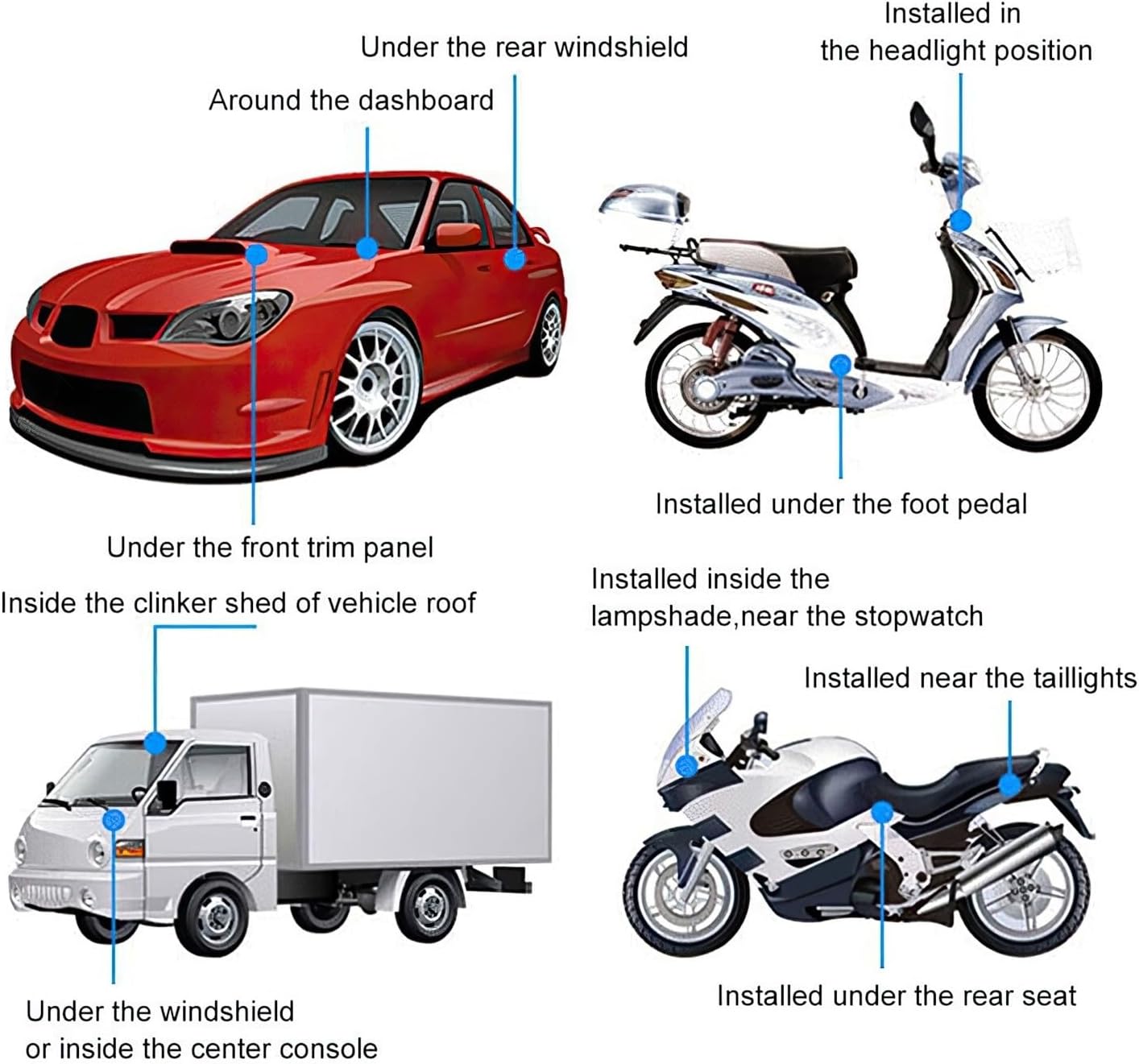
Image: A diagram illustrating various potential installation locations for the GPS tracker on cars, motorcycles, and trucks, such as under the rear windshield, around the dashboard, under the front trim panel, inside the vehicle roof, under the windshield, inside the center console, in the headlight position, under the foot pedal, inside the lampshade near the stopwatch, near the taillights, and under the rear seat.
മെയിൻ്റനൻസ്
1. ബാറ്ററി പരിചരണം
To maximize battery life, avoid extreme temperatures. Recharge the device when the low battery alert is received. Regular charging helps maintain battery health.
2. വൃത്തിയാക്കൽ
Wipe the device with a soft, dry cloth. Do not use harsh chemicals or abrasive cleaners. While the device is IP66 waterproof, avoid submerging it in water for extended periods.
3. സംഭരണം
If storing the device for an extended period, ensure it is partially charged (around 50%) and store it in a cool, dry place.
ട്രബിൾഷൂട്ടിംഗ്
| പ്രശ്നം | സാധ്യമായ കാരണം | പരിഹാരം |
|---|---|---|
| ഉപകരണം ഓണാക്കുന്നില്ല | ബാറ്ററി കുറവാണ്; പവർ സ്വിച്ച് ഓഫ് | Charge the device fully; Ensure the power switch is in the 'On' position. |
| No location data / Inaccurate tracking | Poor satellite signal; No data service; SIM card issue | തെളിഞ്ഞ ആകാശമുള്ള ഒരു തുറസ്സായ സ്ഥലത്തേക്ക് മാറുക view; Verify data service is active; Reinsert SIM card or contact service provider. |
| ആപ്പ് ഉപകരണത്തിലേക്ക് കണക്റ്റ് ചെയ്യുന്നില്ല | Incorrect device ID; App requires update; Network issue | Double-check device ID; Update the app to the latest version; Ensure your phone has internet connectivity. |
| ചെറിയ ബാറ്ററി ലൈഫ് | Constant tracking mode; Old battery; Extreme temperatures | Switch to power-saving mode if constant tracking is not needed; Contact support for battery replacement if old; Avoid extreme temperatures. |
സ്പെസിഫിക്കേഷനുകൾ
- അളവുകൾ: 2.2L x 1.4W x 0.7D inches
- ഭാരം: 1.4 ഔൺസ്
- വാട്ടർപ്രൂഫ് റേറ്റിംഗ്: IP66
- ബാറ്ററി ഉപയോഗം: 9 days (Power Saving Mode), 3 days (Workhorse Mode)
- ബാറ്ററി ചാർജ്ജ് സമയം: 2 മണിക്കൂർ
- ബാറ്ററി തരം: Lithium-Ion HiCap Mini Battery
- Satellite Networks: GPS L1 Band + Glonass L1 Band + Galileo E1B/L1
- Data Networks: 4G Band +3 for 194 Countries (FDD B1/B2/B3/B4/B5/B7/B8/B28/B66 | Backup GSM 850/900/1800/1900MHz)
- Tracking Storage History: Up to one year, with export option
- ഇതുമായി പൊരുത്തപ്പെടുന്നു: Windows, Mac, iPhone (APP Included), Android (APP Included), iPad/Tablet (APP Included)
- ഭാഷാ പിന്തുണ: English, Spanish, Portuguese, French
- മെറ്റീരിയൽ: പോളികാർബണേറ്റ്
- നിർമ്മാതാവ്: ElectroFlip
- മാതൃരാജ്യം: USA (Designed in USA)

Image: Caliper measurements of the GF10 GPS Tracker, showing its dimensions as 2.24 inches (length), 1.37 inches (width), and 0.75 inches (thickness).

Image: The GF10 GPS Tracker positioned next to a red sports car, emphasizing its use as a car GPS tracker. Icons below highlight features like long standby, historical track, precise positioning, WiFi positioning, and SOS help.

Image: A comparison image showing the authentic Mini GF10 GPS Tracker (labeled "Real 4G GPS Tracker") next to a smaller, inferior device labeled "Fake Clone Copy" (GF-07), highlighting the difference in quality and authenticity.
വാറൻ്റിയും പിന്തുണയും
ആജീവനാന്ത മാറ്റിസ്ഥാപിക്കൽ വാറന്റി
The Mini GF10 GPS Tracker comes with a Lifetime Replacement Warranty. This warranty covers device replacement up to twice a year, provided you have an active annual service plan at the time of the claim. This policy is designed to offer peace of mind in case of loss or malfunction.
ഉപഭോക്തൃ പിന്തുണ
For technical assistance, service inquiries, or warranty claims, please refer to the contact information provided with your GPS card service or within the GPScards Mobile App/Web Platform. Support is available in English, Spanish, Portuguese, and French.