
GF10 Mini GPS Tracking Device
GF10 Mini GPS Tracking Device User Manual
Model: GF10 Mini GPS Tracking Device | Brand: Generic
1. ആമുഖവും അവസാനവുംview
The GF10 Mini GPS Tracking Device is a compact and powerful solution for real-time location tracking. Designed for versatility, it offers global coverage, long battery life, and user-friendly mobile and web applications. This manual provides essential information for setting up, operating, and maintaining your device.
പ്രധാന സവിശേഷതകൾ:
- ഒതുക്കമുള്ള വലിപ്പം: Measuring approximately 2.2 x 1.4 x 0.7 inches and weighing 1.4 ounces, it is highly portable.
- Global 4G-LTE Coverage: Supports 4G-Lte FDD B1/B2/B3/B4/B5/B7/B8/B28/B66 and backup GSM 850/900/1800/1900MHz for worldwide connectivity.
- Multi-Satellite Positioning: Connects to GPS, Glonass, and Galileo networks for pinpoint accuracy.
- നീണ്ട ബാറ്ററി ലൈഫ്: Up to 9 days in power-saving mode, 3 days in constant tracking mode.
- User-Friendly Applications: Track via dedicated Apple/Android mobile apps and a webഅടിസ്ഥാന പ്ലാറ്റ്ഫോം.
- കാന്തിക അറ്റാച്ച്മെൻ്റ്: Features a strong 6lb earth magnet for easy installation on metallic surfaces.
- Comprehensive Alerts: Receive notifications for low battery, speeding, geofence entry/exit, and motion detection.

Figure 1.1: The GF10 Mini GPS Tracking Device, showcasing its compact design and indicator lights.

ചിത്രം 1.2: ഓവർview of the GF10 4G Tracker's capabilities, including 4-level positioning and a lifelong free platform.
2. സജ്ജീകരണ ഗൈഡ്
Follow these steps to set up your GF10 Mini GPS Tracking Device for optimal performance.
2.1 ഉപകരണം ചാർജ് ചെയ്യുന്നു
Before first use, fully charge the device. Connect the provided Type-C charging cable to the device's charging port and a compatible USB power source. A full charge typically takes approximately 2 hours.

ചിത്രം 2.1: വശം view of the GF10 device, showing the Easy On/Off Switch and Hi-Speed HQ Type-C Charge Port.
2.2. Activating Service
The device includes a Pay-As-You-Go Global GPS card. Refer to the included service activation instructions or visit the GPScards website to activate your data plan. An active service plan is required for real-time tracking.
2.3. Mobile App Installation
Download the official GPScards Mobile App from the Apple App Store (for iOS devices) or Google Play Store (for Android devices). ഇതിനായി തിരയുക "GPScards Mobile App" and follow the on-screen instructions to install.
2.4 ഉപകരണം സ്ഥാപിക്കൽ
The GF10 device can be discreetly placed in various locations due to its compact size and strong magnetic attachment. Ensure the device has a clear line of sight to the sky for optimal GPS signal reception, especially if placed inside a vehicle.
- കാന്തിക അറ്റാച്ച്മെൻ്റ്: Utilize the built-in 6lb magnet to attach the device securely to any metallic surface, such as the underside of a vehicle chassis.
- Alternative Placement: For non-metallic surfaces, use the included hook/loop attachment. Common placement areas include:
- Under the rear windshield
- Around the dashboard
- Under the front trim panel
- Inside the clinker shed of vehicle roof
- Under the windshield or inside the center console
- Installed in the headlight position (motorcycle)
- Installed under the foot pedal (motorcycle)
- Installed inside the lampshade, near the stopwatch (motorcycle)
- Installed near the taillights (motorcycle)
- Installed under the rear seat (motorcycle)

ചിത്രം 2.2: ഉദാample of magnetic attachment of the GF10 device to the underside of a vehicle.
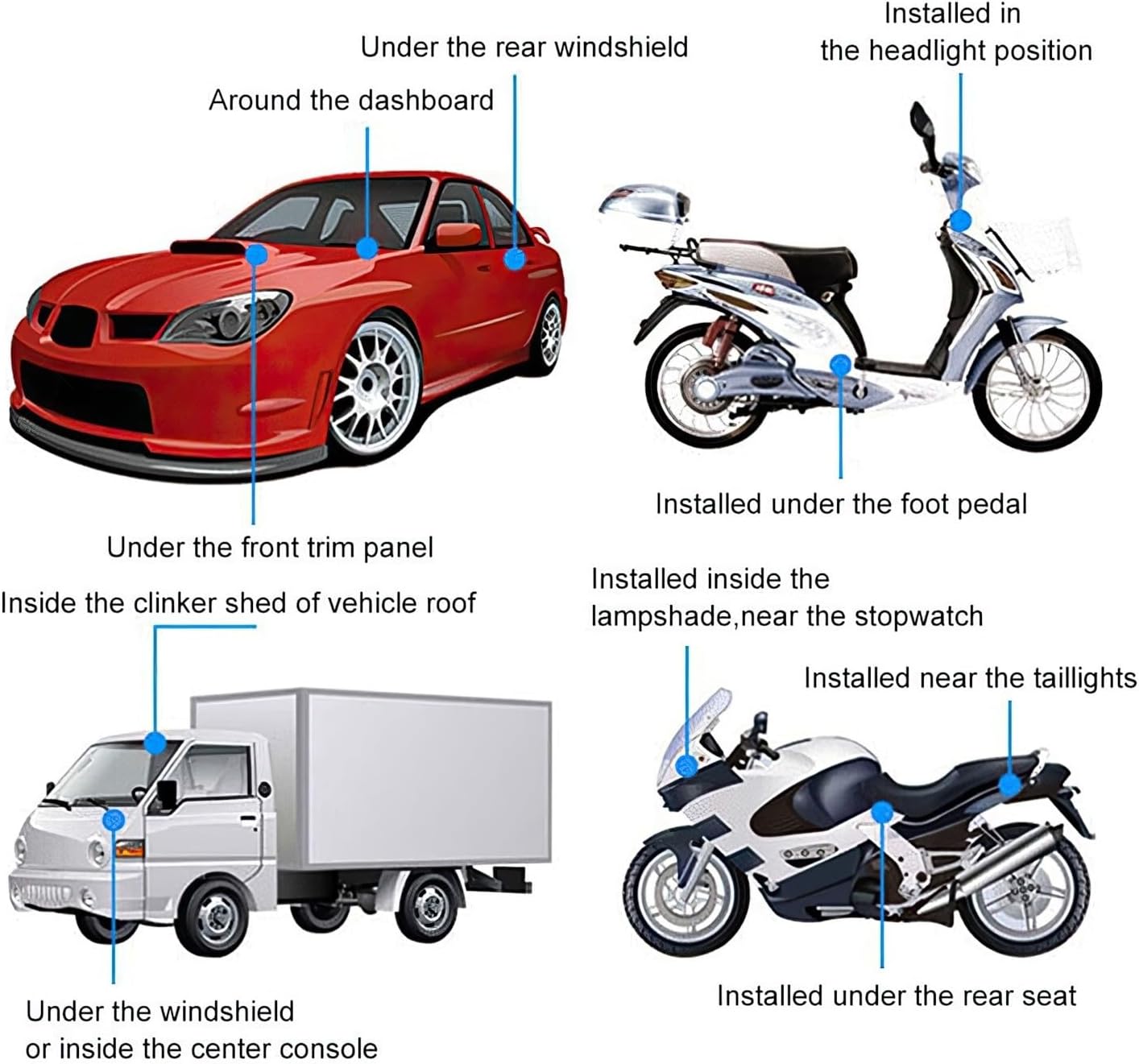
Figure 2.3: Diagrams illustrating various recommended installation points for the GF10 on cars, trucks, and motorcycles.
3. പ്രവർത്തന നിർദ്ദേശങ്ങൾ
Once set up, you can monitor and manage your GF10 Mini GPS Tracking Device using the mobile app or web പ്ലാറ്റ്ഫോം.
3.1. മൊബൈൽ ആപ്പ് ഉപയോഗിക്കുന്നത്
The GPScards Mobile App provides a comprehensive interface for tracking. After logging in, you can:
- View തത്സമയ സ്ഥാനം: See the current position of your device on Google Maps.
- Access Tracking History: Review past routes and locations for up to a year, with export options.
- അലേർട്ടുകൾ സജ്ജമാക്കുക: Configure various alerts to receive notifications directly on your phone.
- Manage Multiple Devices: If you have more than one GF10, manage them all from a single account.
3.2. ഉപയോഗിക്കുന്നത് Web പ്ലാറ്റ്ഫോം
For desktop users, the web platform offers the same functionalities as the mobile app. Visit the official GPScards website and log in to your account to access real-time tracking, history, and settings.
3.3. Understanding Alerts
The GF10 device supports various alerts to keep you informed:
- Virtual Boundaries (Geofencing): Receive alerts when the device enters or leaves a predefined area.
- Speeding Alerts: Get notified if the device exceeds a set speed limit.
- കുറഞ്ഞ ബാറ്ററി അലേർട്ടുകൾ: Receive a notification when the device's battery is running low.
- ചലനം കണ്ടെത്തൽ: Alerts you when the device starts moving after being stationary. Sensitivity can be adjusted.
- Parking Alerts: Notification when the device stops moving.
Alerts can be configured to be sent via mobile push notifications, email, or PC pop-ups.
3.4. Google Maps Integration
The tracking platform utilizes authorized and licensed Google Maps, providing various viewing ഓപ്ഷനുകൾ:
- Standard Map View
- ഉപഗ്രഹം View
- തെരുവ് View
- ഹൈബ്രിഡ് View
- Live Traffic View
You can zoom in/out, view business names, street names, and Points of Interest (POI).

Figure 3.1: Visual representation of the GF10 as a car GPS tracker, highlighting features like long standby, historical track, precise positioning, WiFi positioning, and SOS (if applicable).
4. പരിപാലനം
Proper maintenance ensures the longevity and reliable performance of your GF10 Mini GPS Tracking Device.
4.1. ബാറ്ററി മാനേജ്മെന്റ്
- ചാർജിംഗ്: Recharge the device when the low battery alert is received or when the battery indicator shows low charge. A full charge takes approximately 2 hours.
- ബാറ്ററി ലൈഫ്: The device offers up to 9 days in power-saving mode and 3 days in constant tracking (workhorse) mode. Actual battery life may vary based on usage and signal strength.
- നുറുങ്ങ്: For continuous tracking without downtime, consider having two devices and swapping them, moving the GPS card service between units. This allows one to charge while the other is in use.
4.2 വൃത്തിയാക്കലും സംഭരണവും
- Wipe the device with a soft, dry cloth to remove dust and debris. Avoid using harsh chemicals or abrasive cleaners.
- ദീർഘനേരം ഉപയോഗിക്കാത്തപ്പോൾ നേരിട്ടുള്ള സൂര്യപ്രകാശത്തിൽ നിന്നും തീവ്രമായ താപനിലയിൽ നിന്നും മാറി തണുത്തതും വരണ്ടതുമായ സ്ഥലത്ത് ഉപകരണം സൂക്ഷിക്കുക.
5. പ്രശ്നപരിഹാരം
If you encounter issues with your GF10 Mini GPS Tracking Device, consider the following common solutions:
- ലൊക്കേഷൻ ഡാറ്റ ഇല്ല: Ensure the device has an active service plan and sufficient battery charge. Verify that the device is placed in an area with a clear view GPS സിഗ്നലുകൾ സ്വീകരിക്കാൻ ആകാശത്തിൻ്റെ.
- കൃത്യമല്ലാത്ത സ്ഥാനം: This can occur in areas with weak GPS signals (e.g., indoors, dense urban areas). Move the device to an open area. The device also uses LBS (Location Based Service) and WiFi positioning as backups, which may be less precise than GPS.
- ഉപകരണം പ്രതികരിക്കുന്നില്ല: Check the battery level. If the battery is low, charge the device. Ensure the device is powered on using the Easy On/Off Switch.
- ആപ്പ്/Website Issues: Ensure your internet connection is stable. Try logging out and logging back into the app or website. Check for app updates.
- ഹ്രസ്വ ബാറ്ററി ലൈഫ്: Review your tracking frequency settings. More frequent updates consume more battery. Consider using power-saving mode if real-time constant tracking is not always necessary.
If problems persist, refer to the online support resources provided by GPScards or contact their customer service.
6 സ്പെസിഫിക്കേഷനുകൾ
| ഫീച്ചർ | വിവരണം |
|---|---|
| അളവുകൾ | 2.2L x 1.4W x 0.7D inches |
| ഭാരം | 1.4 ഔൺസ് |
| വാട്ടർപ്രൂഫ് റേറ്റിംഗ് | IP66 |
| ബാറ്ററി തരം | Lithium-Ion HiCap Mini Battery |
| ബാറ്ററി ഉപയോഗം | 9 days (Power Saving Mode), 3 days (Workhorse Mode) |
| ബാറ്ററി ചാർജ് സമയം | 2 മണിക്കൂർ |
| Worldwide Satellite Networks | GPS L1 Band + Glonass L1 Band + Galileo E1B/L1 (up to 64 satellites) |
| Worldwide Data Networks | 4G Band +3 for 194 Countries (4G-Lte FDD B1/B2/B3/B4/B5/B7/B8/B28/B66 | Backup GSM 850/900/1800/1900MHz) |
| Tracking Storage History | Up to a year, with export option |
| യുമായി പൊരുത്തപ്പെടുന്നു | Windows, Mac, iPhone (APP Included), Android (APP Included), iPad/Tablet (APP Included) |
| ഭാഷാ പിന്തുണ | English, Spanish, Portuguese, French |
| മെറ്റീരിയൽ | പോളികാർബണേറ്റ് |
| പ്രത്യേക സവിശേഷതകൾ | 9-day Battery Life, Real-time Tracking, Global Coverage, Power Saving Mode, Magnetic Attachment |
| പ്രവർത്തനങ്ങൾ | Easy Setup, Easy to Mount, Alerts (Virtual Boundaries, Entering, Leaving, Speeding, Fuel, Email, Mobile, Push Notification, PC Popup), Motion Detection |
| ശുപാർശ ചെയ്യുന്ന ഉപയോഗം | Car, Truck, Bike, Teens, Personal, Hikers, Pets, Motorcycles, Luggage, Offroad Toys |
| ഇൻസ്റ്റലേഷൻ തരം | ദ്രുത സജ്ജീകരണം |
| Google Maps Features | Google Standard, Street View, Satellite, Hybrid, Traffic, Zoom In/Out, Business Names, Street Names, POI Names |
| നിർമ്മാതാവ് | ElectroFlip |
| മാതൃരാജ്യം | USA (Designed in USA) |

Figure 6.1: Detailed dimensions of the GF10 Mini GPS Tracking Device (2.24" x 1.37" x 0.75").

Figure 6.2: Icons representing key features: Precise positioning, Strong magnetic, Long standby, Safety fence, Historical track, WiFi positioning, Stable performance.
7. വാറൻ്റിയും പിന്തുണയും
7.1. Lifetime Replacement Warranty
The GF10 Mini GPS Tracking Device comes with a Lifetime Replacement Warranty. If you lose your device, it can be replaced. This warranty is subject to the following conditions:
- Must have an active annual service plan at the time of the claim.
- Limited to one replacement per 6 months.
For warranty claims, please contact GPScards customer support directly.
7.2. ഉപഭോക്തൃ പിന്തുണ
For any questions, technical assistance, or support regarding your GF10 Mini GPS Tracking Device or service plan, please refer to the contact information provided on the official GPScards website or within the mobile application. American support is available.
Ask a question about this manual
Ask about setup, troubleshooting, compatibility, parts, safety, or missing instructions. Manuals+ will review the question and use this page’s manual context to help answer it.