
1. ആമുഖം
This manual provides essential information for the safe and efficient operation, installation, and maintenance of your Durastar DRTHC122XNA1 Through-the-Wall Air Conditioner. Please read these instructions thoroughly before installation and use, and retain them for future reference.
2 സുരക്ഷാ വിവരങ്ങൾ
പ്രധാനപ്പെട്ട സുരക്ഷാ നിർദ്ദേശങ്ങൾ:
- Always connect the unit to a properly grounded electrical outlet with the correct voltagഇ (208V / 230V).
- Do not operate the unit with a damaged power cord or plug. If the cord is damaged, it must be replaced by qualified service personnel.
- Ensure the unit is installed securely in a wall opening according to local electrical and building codes.
- Do not block air intake or exhaust vents. Maintain clear space around the unit for proper airflow.
- Turn off and unplug the unit before performing any maintenance or cleaning.
- പ്രവർത്തന സമയത്ത് കുട്ടികളെയും വളർത്തുമൃഗങ്ങളെയും യൂണിറ്റിൽ നിന്ന് അകറ്റി നിർത്തുക.
- Do not attempt to repair or modify the unit yourself. Refer all servicing to qualified personnel.
3. ഉൽപ്പന്നം കഴിഞ്ഞുview
The Durastar DRTHC122XNA1 is a 12,000 BTU through-the-wall air conditioner designed for cooling and supplemental heating. It features a remote control for convenient operation.
പ്രധാന ഘടകങ്ങൾ:
- എയർ കണ്ടീഷണർ യൂണിറ്റ്
- റിമോട്ട് കൺട്രോൾ
- Air Filter (internal)
ഫീച്ചറുകൾ:
- 12,000 BTU Cooling Capacity
- 10,600 BTU Supplemental Heating Capacity
- Covers areas of approximately 450-550 sq. ft.
- Multiple operating modes: Cool, Heat, Fan, Dry, Auto
- ക്രമീകരിക്കാവുന്ന ഫാൻ വേഗത
- പ്രോഗ്രാം ചെയ്യാവുന്ന ടൈമർ
- സ്ലീപ്പ് മോഡ്
- വിദൂര നിയന്ത്രണ പ്രവർത്തനം
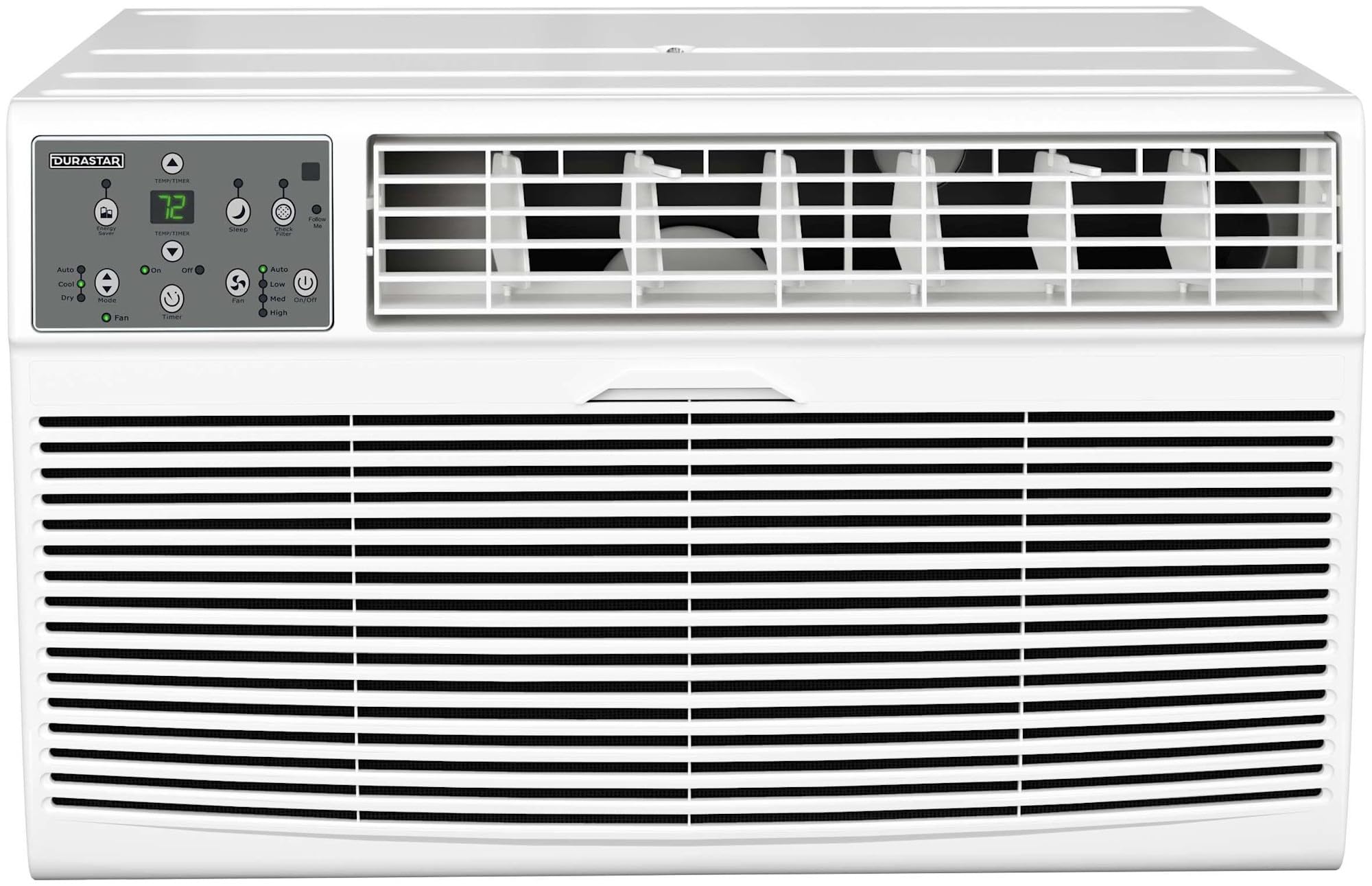
ചിത്രം 3.1: മുൻഭാഗം view of the Durastar DRTHC122XNA1 Through-the-Wall Air Conditioner unit.

Image 3.2: The remote control for the Durastar DRTHC122XNA1 Air Conditioner, showing various function buttons and the display.
4. സജ്ജീകരണവും ഇൻസ്റ്റാളേഷനും
The DRTHC122XNA1 is designed for through-the-wall installation. A wall sleeve (Durastar DRWTCSLV) is required and sold separately for proper installation. Professional installation is recommended.
4.1 സൈറ്റ് തിരഞ്ഞെടുക്കൽ
- Choose a wall location that can support the unit's weight (approximately 75 lbs).
- Ensure there are no obstructions to airflow both inside and outside the room.
- The unit requires a dedicated 208V / 230V electrical outlet with a NEMA 6-20P plug type. Ensure the outlet is within reach of the power cord.

Image 4.1: The air conditioner installed in a wall, showing the required NEMA 6-20P electrical plug type and unit dimensions.
4.2 Wall Opening Dimensions
The unit dimensions are approximately 20.25 inches (Depth) x 24.25 inches (Width) x 14.5 inches (Height). The wall opening should accommodate these dimensions, along with the wall sleeve if used, ensuring a snug fit and proper sealing to prevent air leakage.

ചിത്രം 4.2: പുറംഭാഗം view of the air conditioner installed through a wall, demonstrating proper outdoor clearance.
4.3 ഇലക്ട്രിക്കൽ കണക്ഷൻ
This unit operates on 208V / 230V AC power. It comes with a NEMA 6-20P plug. Ensure your electrical circuit and outlet are compatible and properly grounded. Do not use extension cords or adapter plugs.
5. പ്രവർത്തന നിർദ്ദേശങ്ങൾ
യൂണിറ്റിലെ കൺട്രോൾ പാനൽ അല്ലെങ്കിൽ ഉൾപ്പെടുത്തിയിരിക്കുന്ന റിമോട്ട് കൺട്രോൾ ഉപയോഗിച്ച് യൂണിറ്റ് പ്രവർത്തിപ്പിക്കാൻ കഴിയും.
5.1 വിദൂര നിയന്ത്രണ പ്രവർത്തനങ്ങൾ
- ഓൺ/ഓഫ്: യൂണിറ്റ് ഓണാക്കുകയോ ഓഫാക്കുകയോ ചെയ്യുന്നു.
- വഴികൾ: Cycles through operating modes: Auto, Cool, Dry, Heat, Fan.
- താപനില ▲/▼: ആവശ്യമുള്ള താപനില ക്രമീകരണം ക്രമീകരിക്കുന്നു.
- ഫാൻ സ്പീഡ്: Selects fan speed: High, Medium, Low, Auto.
- ടൈമർ ഓൺ/ഓഫ്: Sets the unit to turn on or off automatically after a set period.
- ഉറക്കം: ഉറക്കത്തിൽ നിശബ്ദമായ പ്രവർത്തനത്തിനും ഊർജ്ജ ലാഭത്തിനുമായി സ്ലീപ്പ് മോഡ് സജീവമാക്കുന്നു.
- എന്നെ പിന്തുടരുക: Allows the remote control to act as a thermostat, sensing the temperature at its location.
- ℃/℉: സെൽഷ്യസിനും ഫാരൻഹീറ്റിനും ഇടയിൽ താപനില ഡിസ്പ്ലേ ടോഗിൾ ചെയ്യുന്നു.
- LED പ്രദർശനം: Turns the unit's LED display on or off.
- എനർജി സേവർ: Activates energy-saving features.
5.2 ഓപ്പറേറ്റിംഗ് മോഡുകൾ
- കൂൾ മോഡ്: തണുപ്പിക്കൽ നൽകുന്നു. ആവശ്യമുള്ള താപനിലയും ഫാൻ വേഗതയും സജ്ജമാക്കുക.
- HEAT Mode: Provides supplemental heating. Set desired temperature and fan speed.
- ഫാൻ മോഡ്: തണുപ്പിക്കുകയോ ചൂടാക്കുകയോ ചെയ്യാതെ വായു സഞ്ചാരം നൽകുന്നു. ആവശ്യമുള്ള ഫാൻ വേഗത തിരഞ്ഞെടുക്കുക.
- ഡ്രൈ മോഡ്: Reduces humidity in the room. The fan speed is automatically controlled.
- ഓട്ടോ മോഡ്: The unit automatically selects cooling, heating, or fan-only operation based on the room temperature and your set temperature.
6. പരിപാലനം
Regular maintenance ensures optimal performance and extends the lifespan of your air conditioner. Always unplug the unit before cleaning or servicing.
6.1 എയർ ഫിൽറ്റർ ക്ലീനിംഗ്
ഉപയോഗവും വായുവിന്റെ ഗുണനിലവാരവും അനുസരിച്ച് എയർ ഫിൽറ്റർ രണ്ടാഴ്ച കൂടുമ്പോഴോ അതിലധികമോ തവണ വൃത്തിയാക്കണം.
- യൂണിറ്റിന്റെ മുൻ പാനൽ തുറക്കുക.
- എയർ ഫിൽട്ടർ ശ്രദ്ധാപൂർവ്വം നീക്കം ചെയ്യുക.
- ഫിൽട്ടർ ചൂടുള്ള സോപ്പ് വെള്ളത്തിൽ കഴുകുക. നന്നായി കഴുകുക.
- Allow the filter to air dry completely before reinstalling. Do not expose to direct sunlight or heat.
- Reinsert the dry filter and close the front panel.
6.2 ബാഹ്യ ശുചീകരണം
ഒരു സോഫ്റ്റ്, ഡി ഉപയോഗിച്ച് യൂണിറ്റിൻ്റെ പുറംഭാഗം തുടയ്ക്കുകamp cloth. Do not use harsh cleaners, waxes, or polishes that could damage the finish or internal components.
6.3 സീസണൽ സംഭരണം
If the unit will not be used for an extended period, clean the air filter and ensure the unit is dry. Store the unit in a dry, protected area.
7. പ്രശ്നപരിഹാരം
ഉപഭോക്തൃ പിന്തുണയുമായി ബന്ധപ്പെടുന്നതിന് മുമ്പ്, വീണ്ടുംview ഇനിപ്പറയുന്ന പൊതുവായ പ്രശ്നങ്ങളും പരിഹാരങ്ങളും.
| പ്രശ്നം | സാധ്യമായ കാരണം | പരിഹാരം |
|---|---|---|
| യൂണിറ്റ് ഓണാക്കുന്നില്ല | വൈദ്യുതിയില്ല; പവർ കോർഡ് ഊരിവച്ചു; സർക്യൂട്ട് ബ്രേക്കർ ട്രിപ്പ് ചെയ്തു | Check power connection; Ensure plug is fully inserted; Reset circuit breaker |
| ആവശ്യത്തിന് തണുപ്പിക്കൽ/താപനം ഇല്ല | Dirty air filter; Temperature setting too high/low; Blocked air vents; Room size exceeds capacity | Clean air filter; Adjust temperature setting; Clear obstructions; Ensure unit matches room size |
| അസാധാരണമായ ശബ്ദം | Loose parts; Unit not level; Debris in fan | Check for loose components; Ensure unit is level; Inspect for debris (unplug first) |
| റിമോട്ട് കൺട്രോൾ പ്രവർത്തിക്കുന്നില്ല | Dead batteries; Obstruction between remote and unit | Replace batteries; Remove obstructions; Ensure remote is pointed at the unit |
8 സ്പെസിഫിക്കേഷനുകൾ
| സ്പെസിഫിക്കേഷൻ | വിശദാംശങ്ങൾ |
|---|---|
| മോഡൽ നമ്പർ | DRTHC122XNA1 നെക്കുറിച്ച് കൂടുതലറിയാൻ |
| തണുപ്പിക്കൽ ശേഷി | 12,000 ബി.ടി.യു |
| ചൂടാക്കൽ ശേഷി | 10,600 BTU (Supplemental) |
| കവറേജ് ഏരിയ | 450-550 ചതുരശ്ര. അടി. |
| വാല്യംtage | 208V / 230V |
| വാട്ട്tage | 1495 വാട്ട്സ് |
| ഇനത്തിൻ്റെ ഭാരം | 75 പൗണ്ട് |
| ഉൽപ്പന്ന അളവുകൾ (D x W x H) | 20.25 x 24.25 x 14.5 ഇഞ്ച് |
| ശബ്ദ നില | 65.4 ഡെസിബെൽ |
| ഇൻസ്റ്റലേഷൻ രീതി | Through The Wall |
| പ്രത്യേക സവിശേഷതകൾ | റിമോട്ട് കൺട്രോൾ |
| നിറം | വെള്ള |
9. വാറൻ്റി വിവരങ്ങൾ
This Durastar DRTHC122XNA1 Air Conditioner comes with a 2 വർഷത്തെ നിർമ്മാതാവിൻ്റെ വാറൻ്റി. Please refer to the warranty documentation included with your product for specific terms, conditions, and registration details. Keep your proof of purchase for warranty claims.
10. ഉപഭോക്തൃ പിന്തുണ
For technical assistance, troubleshooting beyond this manual, or warranty inquiries, please contact Durastar customer support. Visit the official Durastar webഏറ്റവും പുതിയ കോൺടാക്റ്റ് വിവരങ്ങൾക്കും പിന്തുണാ ഉറവിടങ്ങൾക്കുമുള്ള സൈറ്റ്.
Durastar Official Webസൈറ്റ്: Visit the Durastar Store on Amazon