
1. ആമുഖം
1.1 ഉൽപ്പന്നം കഴിഞ്ഞുview
The Sierra Wireless 4-in-1 SharkFin Antenna is designed for use with AirLink routers and gateways. This compact, OEM-style antenna integrates multiple functions into a single unit, providing comprehensive connectivity solutions.
1.2 പ്രധാന സവിശേഷതകൾ
- സംയോജിത കണക്റ്റിവിറ്റി: Combines 2x2 MiMo antenna functions for 2G, 3G, and 4G LTE frequencies, an active GNSS antenna with 26dB gain LNA, and dual-band Wi-Fi (2.4/5.0GHz).
- ശക്തമായ ഡിസൈൻ: Features an Ingress Protection rating of IP66, ensuring resistance against dust and powerful water jets.
- വിശാലമായ പ്രവർത്തന താപനില: -40°C മുതൽ +80°C (-40°F മുതൽ 176°F) വരെയുള്ള താപനിലകളിൽ വിശ്വസനീയമായി പ്രവർത്തിക്കുന്നു.
- ഫ്ലെക്സിബിൾ മൗണ്ടിംഗ്: Designed for bolt mount installation with a 19mm (3/4”) mounting hole.
- Long Cable Lengths: Includes 4m (13ft) cables for Cell/LTE/GPS with SMA(m) termination and 4m (13ft) cable for Wi-Fi with RP-SMA(m) termination.
2 സുരക്ഷാ വിവരങ്ങൾ
- Ensure the antenna is installed by qualified personnel.
- Do not install the antenna near power lines or other electrical hazards.
- Verify all cable connections are secure before operating the device.
- Avoid exposing the antenna to extreme physical impact.
- കേടുപാടുകൾ തടയാൻ നിശ്ചിത താപനില പരിധിക്കുള്ളിൽ പ്രവർത്തിക്കുക.
3. പാക്കേജ് ഉള്ളടക്കം
- 1 x Sierra Wireless 4-in-1 SharkFin Antenna Unit
- Integrated Cell/LTE/GPS Cables (4m, SMA(m) termination)
- Integrated Wi-Fi Cable (4m, RP-SMA(m) termination)
- Mounting hardware (typically included for bolt mount)
4. സജ്ജീകരണവും ഇൻസ്റ്റാളേഷനും
4.1 മൗണ്ടിംഗ് നിർദ്ദേശങ്ങൾ
The 4-in-1 SharkFin Antenna is designed for bolt mount installation. A 19mm (3/4”) mounting hole is required for secure attachment.
- Select a suitable, flat mounting surface on your vehicle or structure, ensuring it is free from obstructions and metallic objects that could interfere with signal.
- Drill a 19mm (3/4”) hole at the chosen mounting location.
- Feed the antenna cables through the drilled hole.
- Position the antenna over the hole and secure it using the provided bolt and nut, ensuring a tight seal to maintain the IP66 rating.
4.2 കേബിൾ കണക്ഷനുകൾ
Connect the antenna cables to your compatible AirLink router or gateway.
- Cell/LTE/GPS Cables: These are Type CS29, 4m (13ft) in length, and terminate with SMA(m) connectors. Connect them to the corresponding cellular and GPS ports on your router/gateway.
- Wi-Fi Cable: This is Type CS32, 4m (13ft) in length, and terminates with an RP-SMA(m) connector. Connect it to the Wi-Fi port on your router/gateway.
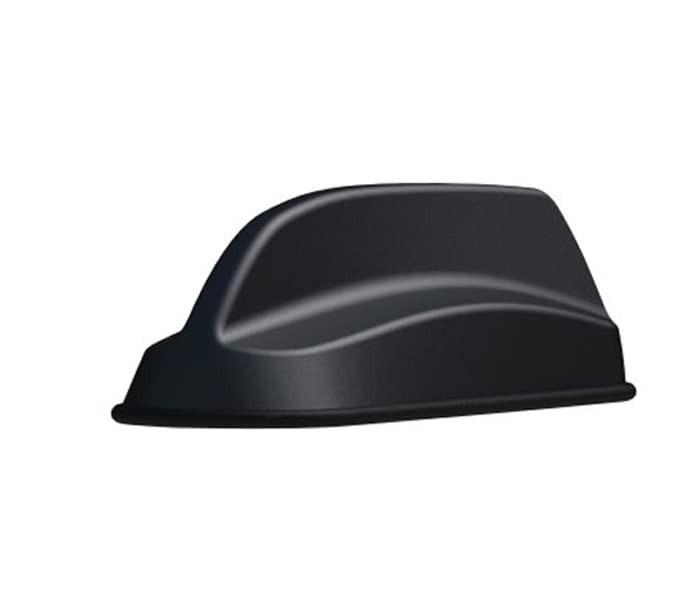
Figure 1: Sierra Wireless 4-in-1 SharkFin Antenna. This image displays the compact, black, shark-fin shaped antenna unit with its integrated cables extending from the base, ready for installation.
5. ഓപ്പറേഷൻ
Once the antenna is securely mounted and all cables are correctly connected to your router or gateway, the antenna will begin to function automatically upon power-up of the connected device. Ensure your router/gateway is configured to utilize the external antenna for optimal performance.
6. പരിപാലനം
- വൃത്തിയാക്കൽ: Periodically clean the exterior of the antenna with a soft, damp തുണി. കഠിനമായ രാസവസ്തുക്കളോ ഉരച്ചിലുകളോ ഉപയോഗിക്കുന്നത് ഒഴിവാക്കുക.
- പരിശോധന: Regularly inspect the antenna and its cables for any signs of wear, damage, or loose connections.
- പാരിസ്ഥിതിക പരിഗണനകൾ: The antenna is designed for outdoor use with an IP66 rating. While robust, avoid unnecessary exposure to extreme conditions beyond its specified operating temperature range.
7. പ്രശ്നപരിഹാരം
- സിഗ്നൽ ഇല്ല/മോശം സിഗ്നൽ:
- Check all cable connections to ensure they are secure and correctly seated.
- Verify that your router/gateway is configured to use the external antenna.
- Ensure the antenna is mounted in a location with a clear line of sight to cellular towers and GPS satellites.
- Confirm the antenna is compatible with the frequency bands used by your service provider.
- ജിപിഎസ് കൃത്യതയില്ലായ്മ:
- Ensure the antenna has an unobstructed view ആകാശത്തിൻ്റെ.
- Check the GPS cable connection.
8 സ്പെസിഫിക്കേഷനുകൾ
| ഫീച്ചർ | സ്പെസിഫിക്കേഷൻ |
|---|---|
| ആൻ്റിന തരം | 4-in-1 SharkFin (2x2 MiMo 4G LTE, Wi-Fi, GPS) |
| 4G LTE Frequency Range | 698-960MHz (2dBi), 1710-3800MHz (5dBi) |
| Wi-Fi ഫ്രീക്വൻസി ശ്രേണി | 2.4GHz (4dBi), 5.8GHz (6dBi) |
| GPS/GNSS Frequency Range | 1562-1612MHz LNA 26dB |
| Antenna Dimensions (H x L x W) | 47mm (1.9") x 172mm (6.8") x 60mm (2.4") |
| പ്രവർത്തന താപനില | -40°C മുതൽ +80°C വരെ (-40°F മുതൽ 176°F വരെ) |
| പ്രവേശന സംരക്ഷണം | IP66 |
| Cell/LTE/GPS Cable Type | CS29 |
| Cell/LTE/GPS Cable Length | 4 മീ (13 അടി) |
| Cell/LTE/GPS Termination | SMA(m) |
| Wi-Fi Cable Type | CS32 |
| Wi-Fi Cable Length | 4 മീ (13 അടി) |
| Wi-Fi Termination | RP-SMA(m) |
| മൗണ്ടിംഗ് തരം | ബോൾട്ട് മൗണ്ട് |
| മൗണ്ടിംഗ് ഹോൾ വലുപ്പം | 19 മിമി (3/4") |
| പ്രതിരോധം | 50 ഓം |
| ചാനലുകളുടെ എണ്ണം | 4 |
9. വാറൻ്റിയും പിന്തുണയും
For warranty information and technical support, please refer to the documentation provided with your purchase or contact Sierra Wireless directly through their official webസൈറ്റ്. വാറന്റി ക്ലെയിമുകൾക്കായി നിങ്ങളുടെ വാങ്ങലിന്റെ തെളിവ് സൂക്ഷിക്കുക.