
ആമുഖം
The Kipcush K8 White Noise Machine is designed to create a calming environment for improved sleep and relaxation. It features a variety of soothing sounds, a soft night light, and customizable settings to suit individual preferences. This manual provides detailed instructions for the safe and effective use of your device.
സുരക്ഷാ വിവരങ്ങൾ
- Do not use near water to prevent electric shock.
- കേൾവി സംരക്ഷിക്കാൻ ഉയർന്ന ശബ്ദ നിലകൾ ഒഴിവാക്കുക.
- മുതിർന്നവരുടെ മേൽനോട്ടമില്ലാതെ കുട്ടികൾക്ക് ഉപയോഗിക്കാൻ ഉദ്ദേശിച്ചുള്ളതല്ല.
- Use only with a compatible 5V power adapter and the provided USB-A to coaxial connector cable.
പാക്കേജ് ഉള്ളടക്കം
പാക്കേജിൽ ഇനിപ്പറയുന്ന ഇനങ്ങൾ ഉണ്ടോ എന്ന് പരിശോധിക്കുക:
- കിപ്കുഷ് K8 വൈറ്റ് നോയ്സ് മെഷീൻ
- USB-A to Coaxial Connector Cable
- ഉപയോക്തൃ മാനുവൽ
കുറിപ്പ്: A power adapter is not included and must be supplied by the user (5V recommended).
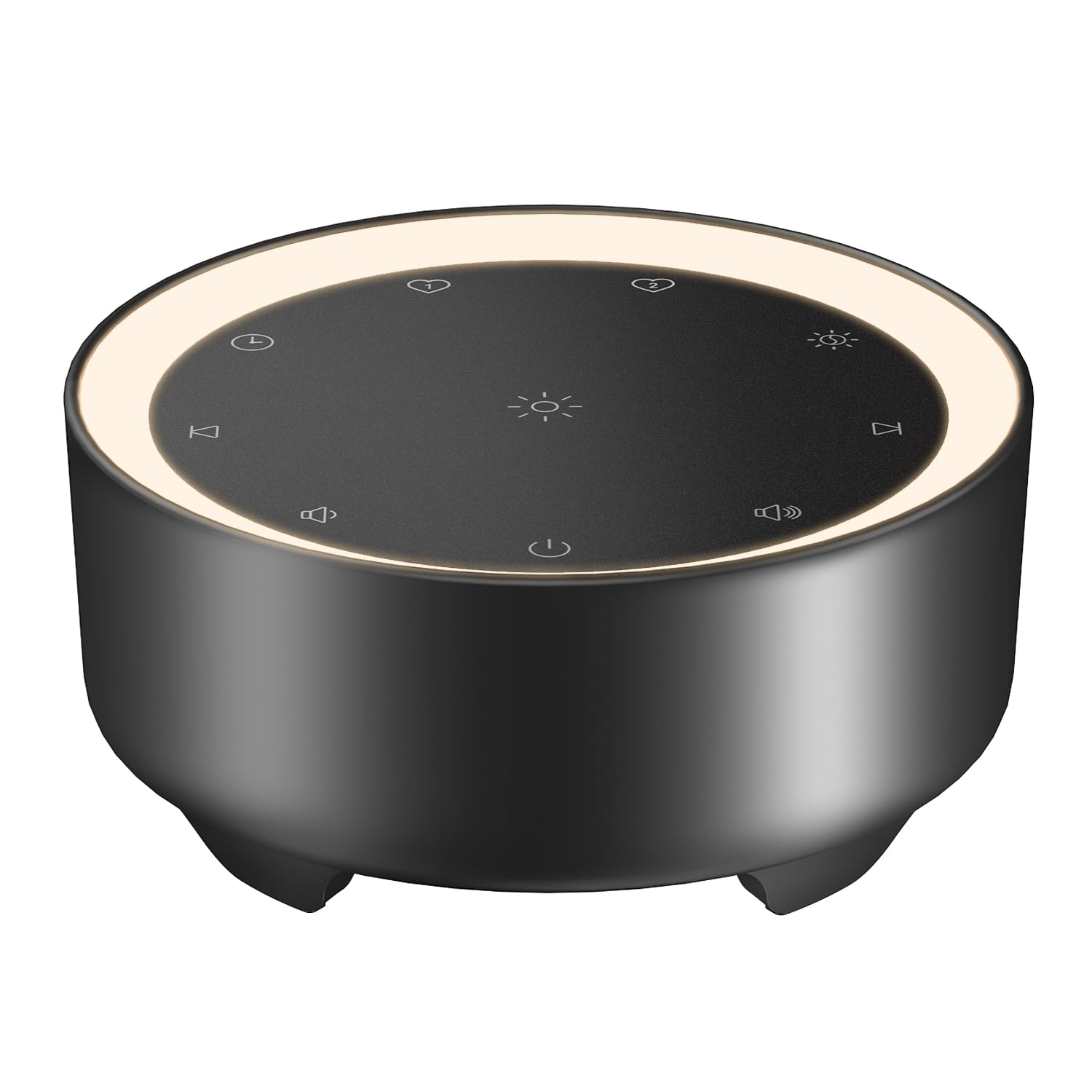
Image: Kipcush K8 White Noise Machine with its USB cable, illustrating the compact design and power connection.
ഉൽപ്പന്ന സവിശേഷതകൾ
- 20 ആശ്വാസകരമായ ശബ്ദങ്ങൾ: Includes white noise, fan sounds, nature recordings, and lullabies.
- 2 Customizable Shortcuts: Save your favorite sounds for instant playback.
- Soft Glow Night Light: Three adjustable brightness levels for a calm environment.
- ഒന്നിലധികം ടൈമർ ഓപ്ഷനുകൾ: 15, 30, 60, 90, 120 minutes, or continuous 8-hour playback.
- മെമ്മറി പ്രവർത്തനം: Automatically saves last sound, volume, and light settings.
- USB പവർ: Flexible use with power banks, laptops, wall chargers, or car USB ports.
- ഒതുക്കമുള്ളതും പോർട്ടബിൾ: Small size for easy travel and placement.

Image: A visual representation of the 20 distinct sound options, including various white noises, fan sounds, nature sounds like rain and ocean, and lullabies.

Image: The device highlighting its timer functions, offering various durations from 15 minutes to 8 hours for automatic shut-off.
സജ്ജമാക്കുക
- പവർ കണക്ഷൻ: Connect the provided USB-A to coaxial connector cable to the device. Plug the USB-A end into a compatible 5V power adapter (not included), power bank, laptop, or car USB port.
- പ്ലേസ്മെൻ്റ്: Place the device on a stable, flat surface away from water or excessive heat.
Video: An official Kipcush video demonstrating the white noise sound machine in various usage scenarios, including setup and operation.
പ്രവർത്തന നിർദ്ദേശങ്ങൾ

ചിത്രം: വിശദമായത് view of the touch-sensitive control panel with labels for each function.
- പവർ ഓൺ/ഓഫ്: ടാപ്പ് ചെയ്യുക പവർ ബട്ടൺ (circle with vertical line) to turn the device on or off.
- ശബ്ദ തിരഞ്ഞെടുപ്പ്: ടാപ്പ് ചെയ്യുക അടുത്ത ട്രാക്ക് (right arrow) or മുമ്പത്തെ ട്രാക്ക് (left arrow) buttons to cycle through the 20 available sounds.
- വോളിയം ക്രമീകരണം: ടാപ്പ് ചെയ്യുക വോളിയം + (speaker with plus) or വ്യാപ്തം - (speaker with minus) buttons to adjust the sound level.
- രാത്രി വെളിച്ച നിയന്ത്രണം: ടാപ്പ് ചെയ്യുക രാത്രി വെളിച്ചം (sun icon) button to turn the light on/off and cycle through three brightness levels.
- ടൈമർ ക്രമീകരണം: ടാപ്പ് ചെയ്യുക ടൈമർ (clock icon) button to select a desired duration (15, 30, 60, 90, 120 minutes, or 8 hours continuous play). The device will automatically turn off after the selected time.
- Customizable Shortcuts (Favorite Sounds):
- To save a favorite sound: While a sound is playing, long-press either പ്രിയപ്പെട്ട 1 (heart icon 1) or പ്രിയപ്പെട്ട 2 (heart icon 2) button until you hear a confirmation tone.
- To play a favorite sound: Tap the corresponding പ്രിയപ്പെട്ട 1 or പ്രിയപ്പെട്ട 2 button for instant playback.
- മെമ്മറി പ്രവർത്തനം: The device automatically remembers your last sound, volume, and light settings when powered off and will resume these settings upon restart.

Image: The device showcasing the unique Favorite Button feature for quick sound recall.
മെയിൻ്റനൻസ്
- വൃത്തിയാക്കൽ: മൃദുവായതും ഉണങ്ങിയതുമായ തുണി ഉപയോഗിച്ച് ഉപകരണം തുടയ്ക്കുക. ലിക്വിഡ് ക്ലീനറുകളോ ഉരച്ചിലുകളുള്ള വസ്തുക്കളോ ഉപയോഗിക്കരുത്.
- സംഭരണം: ഉപയോഗത്തിലില്ലാത്തപ്പോൾ തണുത്തതും ഉണങ്ങിയതുമായ സ്ഥലത്ത് ഉപകരണം സൂക്ഷിക്കുക.
- കേബിൾ കെയർ: Avoid bending or twisting the power cable excessively to prevent damage.
ട്രബിൾഷൂട്ടിംഗ്
| പ്രശ്നം | സാധ്യമായ കാരണം | പരിഹാരം |
|---|---|---|
| ഉപകരണം പവർ ഓണാക്കുന്നില്ല. | വൈദ്യുതിയില്ല അല്ലെങ്കിൽ കണക്ഷൻ അയഞ്ഞിട്ടില്ല. | Ensure the USB cable is securely connected to both the device and a working 5V power source. Try a different power adapter or USB port. |
| ശബ്ദമില്ല. | ശബ്ദം വളരെ കുറവാണ് അല്ലെങ്കിൽ മ്യൂട്ട് ചെയ്തിരിക്കുന്നു. | Increase the volume using the Volume + button. Ensure a sound is selected. |
| രാത്രി വിളക്ക് പ്രവർത്തിക്കുന്നില്ല. | Light is off or at lowest setting. | Tap the Night Light button to cycle through brightness levels or turn it on. |
| ഉപകരണം അപ്രതീക്ഷിതമായി ഓഫാകുന്നു. | Timer activated. | Check the timer setting. If continuous play is desired, ensure the 8-hour option is selected or no timer is set. |
സ്പെസിഫിക്കേഷനുകൾ
- മോഡലിൻ്റെ പേര്: K8
- ബ്രാൻഡ്: കിപ്കുഷ്
- ഊർജ്ജ സ്രോതസ്സ്: Corded Electric (USB-powered, 5V)
- മെറ്റീരിയൽ: പ്ലാസ്റ്റിക്
- നിറം: കറുപ്പ് (ഉൽപ്പന്ന വകഭേദം അനുസരിച്ച്)
- പാക്കേജ് അളവുകൾ: 4.37 x 4.29 x 2.99 ഇഞ്ച്
- ഇനത്തിൻ്റെ ഭാരം: 9.14 ഔൺസ്
- ശബ്ദ ഓപ്ഷനുകൾ: 20 (White Noise, Fan, Nature, Lullabies)
- ടൈമർ ഓപ്ഷനുകൾ: 15, 30, 60, 90, 120 minutes, 8 hours continuous
- രാത്രി വെളിച്ചം: 3 ക്രമീകരിക്കാവുന്ന തെളിച്ച നിലകൾ
വാറൻ്റിയും പിന്തുണയും
The Kipcush K8 White Noise Machine comes with a 24 മാസ വാറൻ്റി വാങ്ങിയ തീയതി മുതൽ. ഈ വാറന്റി നിർമ്മാണ വൈകല്യങ്ങൾ ഉൾക്കൊള്ളുകയും ദീർഘകാല വിശ്വാസ്യത ഉറപ്പാക്കുകയും ചെയ്യുന്നു.
For professional customer support, please contact Kipcush directly through their official channels. Refer to the product packaging or the Kipcush webബന്ധപ്പെടാനുള്ള വിവരങ്ങൾക്കുള്ള സൈറ്റ്.