
1. ഉൽപ്പന്നം കഴിഞ്ഞുview
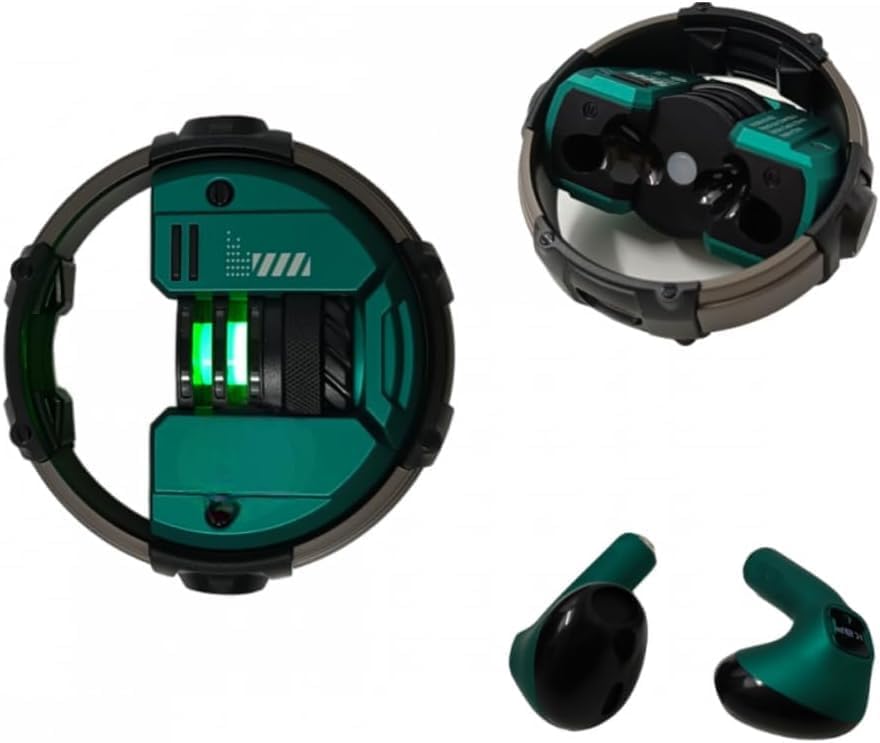
The KA-892 Bluetooth Gaming Earbuds are designed to provide an immersive audio experience for gaming and everyday use. Featuring a compact in-ear design, these earbuds deliver clear sound and are ideal for users seeking a wireless audio solution with a built-in microphone for communication.
Key features include Bluetooth 5.0 connectivity for stable connections, a durable and resistant build, and an integrated microphone for hands-free calls and in-game chat.
2. പാക്കേജ് ഉള്ളടക്കം
പാക്കേജിൽ എല്ലാ ഇനങ്ങളും ഉണ്ടെന്ന് ദയവായി പരിശോധിക്കുക:
- KA-892 Bluetooth Gaming Earbuds (1 pair)
- Wireless Charging Case (1 unit)
- ചാർജിംഗ് കേബിൾ (1 യൂണിറ്റ്)
- ഉപയോക്തൃ മാനുവൽ (ഈ പ്രമാണം)
3. സജ്ജീകരണവും ആദ്യ ഉപയോഗവും
3.1 ഇയർബഡുകളും കേസും ചാർജ് ചെയ്യുന്നു
ആദ്യമായി ഉപയോഗിക്കുന്നതിന് മുമ്പ്, ഇയർബഡുകളും ചാർജിംഗ് കേസും പൂർണ്ണമായും ചാർജ് ചെയ്തിട്ടുണ്ടെന്ന് ഉറപ്പാക്കുക.
- ഇയർബഡുകൾ ചാർജിംഗ് കേസിൽ വയ്ക്കുക, അവ ശരിയായി ഇട്ടിട്ടുണ്ടെന്ന് ഉറപ്പാക്കുക.
- Connect the provided charging cable to the charging port on the case and the other end to a USB power source (e.g., computer USB port, wall adapter).
- കേസിലെ ഇൻഡിക്കേറ്റർ ലൈറ്റ് ചാർജിംഗ് നില കാണിക്കും. പൂർണ്ണമായി ചാർജ് ചെയ്യാൻ സാധാരണയായി ഏകദേശം 1-2 മണിക്കൂർ എടുക്കും.
- പൂർണ്ണമായി ചാർജ് ചെയ്തുകഴിഞ്ഞാൽ, ചാർജിംഗ് കേബിൾ വിച്ഛേദിക്കുക.
3.2 ഒരു ഉപകരണവുമായി ജോടിയാക്കൽ
To connect the earbuds to your smartphone, tablet, or other Bluetooth-enabled device:
- Open the charging case. The earbuds will automatically enter pairing mode, indicated by a flashing light (refer to product for specific light patterns).
- നിങ്ങളുടെ ഉപകരണത്തിൽ, ബ്ലൂടൂത്ത് ക്രമീകരണങ്ങളിലേക്ക് നാവിഗേറ്റ് ചെയ്യുക.
- ബ്ലൂടൂത്ത് ഓണാക്കുക.
- ഇതിനായി തിരയുക available devices. You should see "KA-892" or a similar name appear in the list.
- Select "KA-892" to connect. Once connected, the earbud indicator light will stop flashing or change to a solid light.
- പാസ്വേഡ് ആവശ്യപ്പെടുകയാണെങ്കിൽ, "0000" എന്ന് നൽകുക.
ഉപകരണത്തിൽ ബ്ലൂടൂത്ത് പ്രവർത്തനക്ഷമമാക്കിയിട്ടുണ്ടെങ്കിൽ, കേസിൽ നിന്ന് പുറത്തെടുക്കുമ്പോൾ ഇയർബഡുകൾ അവസാനം ജോടിയാക്കിയ ഉപകരണവുമായി യാന്ത്രികമായി വീണ്ടും കണക്റ്റുചെയ്യും.
4. പ്രവർത്തന നിർദ്ദേശങ്ങൾ
4.1 അടിസ്ഥാന പ്രവർത്തനങ്ങൾ
The KA-892 earbuds feature touch controls for various functions:
| ആക്ഷൻ | ഫംഗ്ഷൻ |
|---|---|
| ഒറ്റ ടാപ്പ് (ഇടത്/വലത് ഇയർബഡ്) | സംഗീതം പ്ലേ ചെയ്യുക/താൽക്കാലികമായി നിർത്തുക, കോൾ സ്വീകരിക്കുക/അവസാനിപ്പിക്കുക |
| ഡബിൾ ടാപ്പ് (വലത് ഇയർബഡ്) | അടുത്ത ട്രാക്ക് |
| ഡബിൾ ടാപ്പ് (ഇടത് ഇയർബഡ്) | മുമ്പത്തെ ട്രാക്ക് |
| ട്രിപ്പിൾ ടാപ്പ് (ഇടത്/വലത് ഇയർബഡ്) | വോയ്സ് അസിസ്റ്റന്റ് (സിരി, ഗൂഗിൾ അസിസ്റ്റന്റ്) സജീവമാക്കുക |
| ദീർഘനേരം അമർത്തുക (2 സെക്കൻഡ്) | കോൾ നിരസിക്കുക |
| ദീർഘനേരം അമർത്തുക (3 സെക്കൻഡ്) | പവർ ഓൺ/ഓഫ് (അല്ലാത്തപ്പോൾ) |
4.2 ഗെയിമിംഗ് മോഡ്
The KA-892 earbuds are optimized for gaming. To activate gaming mode (if available, refer to product specific features for confirmation):
- Specific gesture for gaming mode activation (e.g., Quadruple Tap or specific long press combination). Please refer to the quick start guide included in your package for the exact gesture.
Gaming mode typically reduces audio latency, providing a more synchronized experience between game visuals and sound.
5. പരിപാലനവും പരിചരണവും
ശരിയായ അറ്റകുറ്റപ്പണി നിങ്ങളുടെ ഇയർബഡുകളുടെ ദീർഘായുസ്സും മികച്ച പ്രകടനവും ഉറപ്പാക്കുന്നു:
- വൃത്തിയാക്കൽ: ഇയർബഡുകളും ചാർജിംഗ് കെയ്സും മൃദുവായതും ഉണങ്ങിയതും ലിന്റ് രഹിതവുമായ തുണി ഉപയോഗിച്ച് പതിവായി വൃത്തിയാക്കുക. അബ്രാസീവ് ക്ലീനറുകൾ, ആൽക്കഹോൾ അല്ലെങ്കിൽ കെമിക്കൽ ലായകങ്ങൾ എന്നിവ ഉപയോഗിക്കരുത്.
- സംഭരണം: ഉപയോഗത്തിലില്ലാത്തപ്പോൾ, ഇയർബഡുകൾ ചാർജിംഗ് കേസിൽ സൂക്ഷിക്കുക, അതുവഴി അവയെ സംരക്ഷിക്കുകയും ചാർജ്ജ് ചെയ്ത് നിലനിർത്തുകയും ചെയ്യുക. നേരിട്ടുള്ള സൂര്യപ്രകാശത്തിൽ നിന്നും ഉയർന്ന താപനിലയിൽ നിന്നും അകന്ന് തണുത്തതും വരണ്ടതുമായ സ്ഥലത്ത് സൂക്ഷിക്കുക.
- ജല പ്രതിരോധം: ഈ ഇയർബഡുകൾ വാട്ടർപ്രൂഫ് അല്ല. വെള്ളം, മഴ, അമിതമായ ഈർപ്പം എന്നിവയിൽ സമ്പർക്കം ഒഴിവാക്കുക.
- ചാർജിംഗ്: Use only the provided charging cable or a certified equivalent. Avoid overcharging the device.
6. പ്രശ്നപരിഹാരം
If you encounter issues with your KA-892 earbuds, please refer to the following common solutions:
| പ്രശ്നം | സാധ്യമായ പരിഹാരം |
|---|---|
| ഇയർബഡുകൾ ജോടിയാക്കുന്നില്ല |
|
| ഒരു ഇയർബഡിൽ നിന്ന് ശബ്ദമില്ല |
|
| കുറഞ്ഞ ശബ്ദം അല്ലെങ്കിൽ മോശം ശബ്ദ നിലവാരം |
|
| ചാർജിംഗ് കേസ് ചാർജുചെയ്യുന്നില്ല |
|
പ്രശ്നം നിലനിൽക്കുകയാണെങ്കിൽ, ദയവായി ഉപഭോക്തൃ പിന്തുണയുമായി ബന്ധപ്പെടുക.
7 സ്പെസിഫിക്കേഷനുകൾ
| ഫീച്ചർ | വിശദാംശങ്ങൾ |
|---|---|
| മോഡലിൻ്റെ പേര് | KAapbom KA-892 |
| കണക്റ്റിവിറ്റി ടെക്നോളജി | വയർലെസ്സ് (ബ്ലൂടൂത്ത് 5.0) |
| ഹെഡ്ഫോൺ ഫോം ഫാക്ടർ | In-Ear (Auriculares) |
| നിറം | പച്ച |
| പവർ ഉറവിടം | റീചാർജ് ചെയ്യാവുന്ന ബാറ്ററി |
| ഉൽപ്പന്ന ഭാരം | 165 ഗ്രാം |
| ഉൽപ്പന്ന അളവുകൾ | 12.5 x 11 x 4.5 സെ.മീ |
| ഉൾപ്പെടുത്തിയ ഘടകങ്ങൾ | Charging Cable, Wireless Charging Case |
| മൈക്രോഫോൺ | അന്തർനിർമ്മിത |
| സർട്ടിഫിക്കേഷൻ | Anatel Approval: 02609-23-14629 |
8. വാറൻ്റിയും പിന്തുണയും
8.1 നിർമ്മാതാവിന്റെ വാറന്റി
This product comes with a manufacturer's warranty of 30 ദിവസം വാങ്ങിയ തീയതി മുതൽ. സാധാരണ ഉപയോഗത്തിലുള്ള നിർമ്മാണ വൈകല്യങ്ങളും തകരാറുകളും ഈ വാറന്റി ഉൾക്കൊള്ളുന്നു. ദുരുപയോഗം, അപകടങ്ങൾ, അനധികൃത പരിഷ്കാരങ്ങൾ, അല്ലെങ്കിൽ സാധാരണ തേയ്മാനം എന്നിവ മൂലമുണ്ടാകുന്ന നാശനഷ്ടങ്ങൾക്ക് ഇത് പരിരക്ഷ നൽകുന്നില്ല.
വാറൻ്റി ക്ലെയിമുകൾക്കായി നിങ്ങളുടെ വാങ്ങിയതിൻ്റെ തെളിവ് സൂക്ഷിക്കുക.
8.2 ഉപഭോക്തൃ പിന്തുണ
For technical assistance, warranty claims, or any other inquiries, please contact your retailer or the manufacturer's customer support. Refer to the packaging or purchase documentation for contact details.
Note: As this product is listed under a "Generic" brand, specific support contact information may vary. Please refer to the seller's information on your purchase platform.
9. ഉൽപ്പന്ന ചിത്രങ്ങൾ

10. ഔദ്യോഗിക ഉൽപ്പന്ന വീഡിയോകൾ
There are no official product videos from the seller available for this item at this time.