
ആമുഖം
This manual provides detailed instructions for the BEITONG Asura 2 Pro Plus PC Gaming Controller. Please read this manual thoroughly before using the product to ensure proper operation and to maximize your gaming experience. This controller is designed for high-performance gaming across multiple platforms.

ചിത്രം 1: ഓവർview of the BEITONG Asura 2 Pro Plus Controller with key features labeled.
സജ്ജമാക്കുക
പാക്കേജ് ഉള്ളടക്കം
- BEITONG Asura 2 Pro Plus Game Controller
- 2.4G Wireless Receiver (Dongle)
- യുഎസ്ബി കേബിൾ (ടൈപ്പ്-എ മുതൽ ടൈപ്പ്-സി വരെ)
- ഉപയോക്തൃ മാനുവൽ
കണക്റ്റിവിറ്റി ഓപ്ഷനുകൾ
The BEITONG Asura 2 Pro Plus controller offers versatile connectivity for various devices:
- 2.4GHz Wireless (via Dongle): For PC, Nintendo Switch, and Steam Deck. Insert the 2.4G wireless receiver into an available USB port on your device. The controller will automatically connect.
- Bluetooth 5.0 Wireless: For PC, Android, and iOS devices. Enable Bluetooth on your device and search for "BEITONG Asura 2 Pro+ Controller" to pair.
- USB വയർഡ് കണക്ഷൻ: Connect the controller directly to your PC or other compatible device using the provided USB Type-A to Type-C cable. This allows for plug-and-play functionality and simultaneous charging.
കുറിപ്പ്: This controller does NOT support MAC, Xbox consoles (Xbox One, Xbox Series X/S), or PlayStation consoles (PS4, PS5).

Figure 2: The controller supports PC, Android, iOS, Nintendo Switch, and Steam Deck.
പ്രാരംഭ ജോടിയാക്കൽ
For first-time use, ensure the controller is charged. Select your preferred connection method (2.4GHz dongle or Bluetooth) and follow the device's pairing instructions. The controller's indicator light will confirm a successful connection.
കൺട്രോളർ പ്രവർത്തിപ്പിക്കുന്നു
പ്രധാന സവിശേഷതകളും പ്രവർത്തനങ്ങളും
- Hall Effect Joysticks & Triggers: Experience anti-drift precision with a 600Hz polling rate in overclocking mode. Hall triggers offer 0.1mm accuracy for faster response.
- മെക്കാനിക്കൽ കീകൾ: The A/B/X/Y buttons feature a 0.7mm trigger stroke, providing a crisp and responsive feel.
- 6-Axis Motion Control: Utilize the built-in gyroscope for motion-sensing games, particularly useful on Nintendo Switch and PC.
- Macro Keys (M1/M2): Two programmable back paddles (M1 and M2) can be remapped to any button or complex macro sequences using the BEITONG Gamepad Assistant software.
- ടർബോ ഫംഗ്ഷൻ: Activate rapid-fire input for any button. The turbo speed can be customized via the Gamepad Assistant.
- ഷിഫ്റ്റ് പ്രവർത്തനം: Allows for switching between different joystick modes or button mappings.

Figure 3: Hall Effect technology ensures precise, anti-drift control for joysticks and triggers.

Figure 4: Mechanical keys provide fast response and durability.
BEITONG Gamepad Assistant Software
Enhance your controller's performance and personalize your gaming experience with the BEITONG Gamepad Assistant software. This application allows you to:
- Customize macro keys (M1/M2)
- Set overclocking mode
- Adjust joystick dead zones and sensitivity curves
- Configure turbo speed
- Control vibration strength
- Manage RGB light effects
The software is available for PC, iOS, and Android. Refer to the included user manual for download links and detailed instructions on using the Gamepad Assistant.
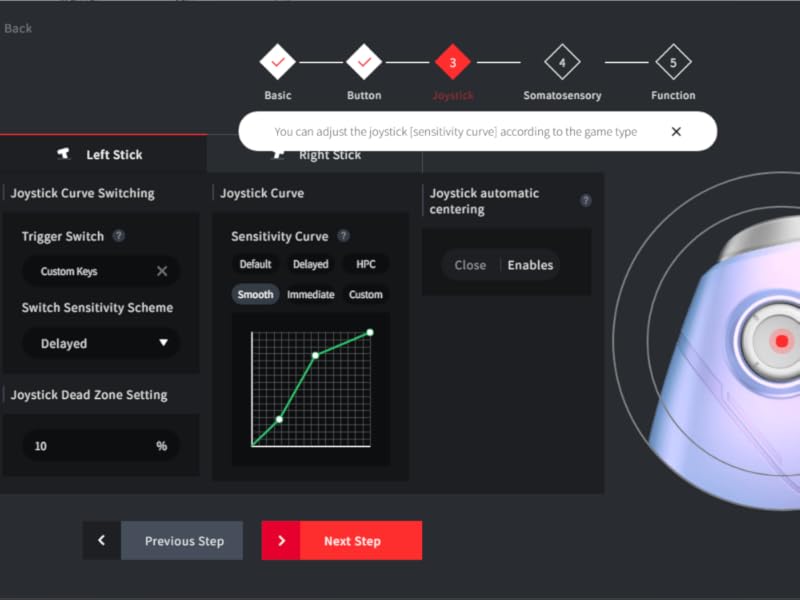
Figure 5: Customize joystick sensitivity and dead zones using the Gamepad Assistant.
Video Demonstration: BEITONG ASURA 2 Pro Game Controller
വീഡിയോ 1: ഒരു ഉദ്യോഗസ്ഥൻview of the BEITONG ASURA 2 Pro Game Controller, highlighting its features and performance.
മെയിൻ്റനൻസ്
ബാറ്ററി മാനേജ്മെൻ്റ്
The controller is equipped with a 600mAh battery, providing 12-17 hours of gameplay on a 2-hour charge. It features a smart sleep function to conserve battery life when idle.
- To charge, connect the controller using the provided USB cable to a power source (e.g., PC, USB wall adapter).
- The controller can be used while charging via wired connection.
- തീവ്രമായ താപനിലയിലോ നേരിട്ടുള്ള സൂര്യപ്രകാശത്തിലോ ബാറ്ററി തുറന്നുകാട്ടുന്നത് ഒഴിവാക്കുക.
വൃത്തിയാക്കലും സംഭരണവും
- Wipe the controller with a soft, dry cloth. Do not use harsh chemicals or abrasive materials.
- Store the controller in a cool, dry place away from direct sunlight and moisture.
- When not in use for extended periods, ensure the controller is fully charged before storage to prolong battery life.
ട്രബിൾഷൂട്ടിംഗ്
- കൺട്രോളർ കണക്റ്റുചെയ്യുന്നില്ല: Ensure the controller is charged. For 2.4GHz, verify the dongle is securely inserted. For Bluetooth, ensure Bluetooth is enabled on your device and the controller is in pairing mode. Try restarting both the controller and the device.
- Left stick not working: Check if the SHIFT key on the controller has been accidentally pressed. This can sometimes affect left stick functionality.
- ഇൻപുട്ട് കാലതാമസം അല്ലെങ്കിൽ പ്രതികരണമില്ലായ്മ: Ensure the controller is fully charged. For wireless connections, try moving closer to the receiver or device. If using Bluetooth, ensure no other devices are causing interference. Consider using a wired connection for the lowest latency.
- സ്റ്റിക്ക് ഡ്രിഫ്റ്റ്: The Hall Effect joysticks are designed to prevent stick drift. If you experience unexpected movement, ensure the controller's firmware is up to date via the Gamepad Assistant. You can also recalibrate joysticks within the Gamepad Assistant.
- ബട്ടണുകൾ പ്രതികരിക്കുന്നില്ല: Check the button mappings in the BEITONG Gamepad Assistant. A reset of the controller may resolve temporary issues.
For further assistance, please contact BEITONG customer support.
സ്പെസിഫിക്കേഷനുകൾ
| ഫീച്ചർ | വിശദാംശങ്ങൾ |
|---|---|
| മോഡലിൻ്റെ പേര് | Asura 2 Pro Plus |
| കണക്റ്റിവിറ്റി ടെക്നോളജി | 2.4G Dongle, Bluetooth 5.0, USB Type-A to Type-C |
| അനുയോജ്യമായ ഉപകരണങ്ങൾ | PC, Android, iOS, Nintendo Switch, Steam Deck |
| കൺട്രോളർ തരം | Gamepad, Joystick, PC Game Controller |
| പ്രത്യേക സവിശേഷതകൾ | Hall Effect Joysticks & Triggers, Mechanical Buttons, 6-Axis Motion Sensing, Rumble Vibration, Macro Keys (M1/M2), Turbo Function |
| ബാറ്ററി ശേഷി | 600mAh |
| ബാറ്ററി ലൈഫ് | 12-17 മണിക്കൂർ (ഏകദേശം) |
| ചാർജിംഗ് സമയം | 2 മണിക്കൂർ (ഏകദേശം) |
| പോളിംഗ് നിരക്ക് | Up to 600Hz (overclocking mode on PC) |
| ഇനത്തിൻ്റെ ഭാരം | 0.42 കിലോഗ്രാം |
വാറൻ്റിയും പിന്തുണയും
BEITONG is committed to providing high-quality products and customer satisfaction. The BEITONG technology team is available to provide support for any issues you may encounter with your controller.
For technical assistance, troubleshooting, or warranty inquiries, please refer to the contact information provided in the original product packaging or visit the official BEITONG webസൈറ്റ്.