
1. ആമുഖം
Thank you for choosing the T12 Touch-Control Clip-on Wireless Bluetooth Headset. This manual provides essential information for the proper use, setup, and maintenance of your new headset. Designed for sports and gaming, the T12 headset offers a seamless wireless audio experience with its compact design, digital battery display, and touch controls. Its waterproof and sweatproof construction ensures durability during active use.
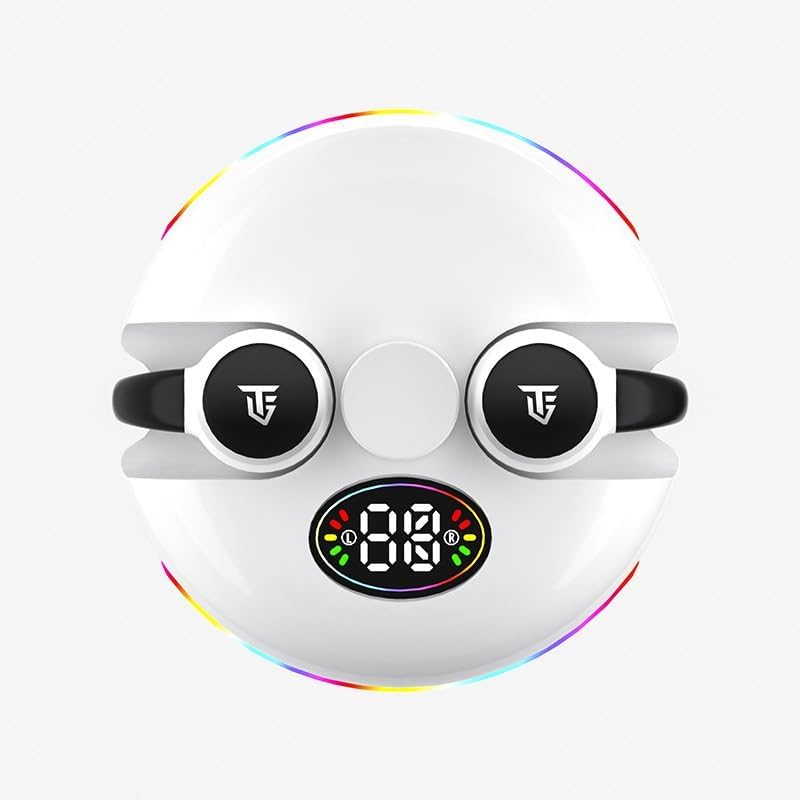
ചിത്രം: മുൻഭാഗം view of the T12 headset, showcasing its digital display and clip-on design.
ബോക്സിൽ എന്താണുള്ളത്:
- T12 Wireless Bluetooth Earbuds (2)
- Charging Case (integrated with earbuds)
- ഉപയോക്തൃ മാനുവൽ
പ്രധാന സവിശേഷതകൾ:
- വയർലെസ് ബ്ലൂടൂത്ത് 5.3 കണക്റ്റിവിറ്റി
- Touch-Control Interface
- ഡിജിറ്റൽ ബാറ്ററി ഡിസ്പ്ലേ
- Waterproof and Sweatproof Design
- നീണ്ട ബാറ്ററി ലൈഫ്
- സജീവ നോയ്സ് റദ്ദാക്കൽ
- Ergonomic Clip-on Design

ചിത്രം: ക്ലോസ്-അപ്പ് view illustrating the ergonomic clip-on design of the T12 headset for comfortable and secure fit.
2. സജ്ജീകരണം
2.1 ഹെഡ്സെറ്റ് ചാർജ് ചെയ്യുന്നു
Before first use, fully charge the T12 headset. Place the earbuds into the charging case. Connect the charging case to a USB power source using a compatible cable (not included). The digital display on the case will indicate the charging status and battery level. A full charge takes approximately 2 hours.

Image: Illustration depicting the long battery life of the T12 headset, showing play time, endurance time, and standby time.
2.2 ഒരു ഉപകരണവുമായി ജോടിയാക്കൽ
- ഇയർബഡുകൾ ചാർജ് ചെയ്തിട്ടുണ്ടെന്നും ചാർജിംഗ് കെയ്സിനുള്ളിലാണെന്നും ഉറപ്പാക്കുക.
- Open the charging case. The earbuds will automatically enter pairing mode, indicated by a flashing light on the earbuds or case.
- നിങ്ങളുടെ ഉപകരണത്തിൽ (സ്മാർട്ട്ഫോൺ, ടാബ്ലെറ്റ്, ലാപ്ടോപ്പ്), ബ്ലൂടൂത്ത് പ്രവർത്തനക്ഷമമാക്കുക.
- ഇതിനായി തിരയുക available Bluetooth devices. Select "T12" or "S190" from the list.
- കണക്റ്റ് ചെയ്തുകഴിഞ്ഞാൽ, ഇയർബഡുകളിലെ ഇൻഡിക്കേറ്റർ ലൈറ്റ് മിന്നുന്നത് നിർത്തും, നിങ്ങളുടെ ഉപകരണം കണക്ഷൻ സ്ഥിരീകരിക്കും.
The T12 headset is widely compatible with Android, Apple iOS, HarmonyOS, and Windows systems, as well as other Bluetooth-enabled devices.

Image: The T12 headset shown alongside logos for Android, iOS, HarmonyOS, and Windows, highlighting its broad compatibility.
3. പ്രവർത്തന നിർദ്ദേശങ്ങൾ
3.1 ടച്ച് നിയന്ത്രണങ്ങൾ
The T12 headset features intuitive touch controls on each earbud.
| ആക്ഷൻ | ഫംഗ്ഷൻ |
|---|---|
| ഒറ്റ ടാപ്പ് (ഇടത്/വലത്) | സംഗീതം പ്ലേ ചെയ്യുക/താൽക്കാലികമായി നിർത്തുക, കോൾ സ്വീകരിക്കുക/അവസാനിപ്പിക്കുക |
| ഡബിൾ ടാപ്പ് (വലത്) | അടുത്ത ട്രാക്ക് |
| ഡബിൾ ടാപ്പ് (ഇടത്) | മുമ്പത്തെ ട്രാക്ക് |
| ട്രിപ്പിൾ ടാപ്പ് (ഇടത്/വലത്) | വോയ്സ് അസിസ്റ്റൻ്റ് സജീവമാക്കുക |
| ദീർഘനേരം അമർത്തുക (2 സെക്കൻഡ്) | കോൾ നിരസിക്കുക |
| ദീർഘനേരം അമർത്തുക (3 സെക്കൻഡ്) | ഗെയിമിംഗ്/സംഗീത മോഡ് മാറ്റുക |
3.2 ഗെയിമിംഗ് മോഡ്
The T12 headset features a dedicated gaming mode to minimize audio latency, providing a more synchronized sound and picture experience. To activate or deactivate gaming mode, long press the touch area for approximately 3 seconds.

Image: Visual representation of the T12 headset enhancing an e-sports level game experience with sound and picture synchronization.
4. പരിപാലനം
4.1 വൃത്തിയാക്കൽ
Regular cleaning helps maintain the performance and longevity of your headset.
- ഇയർബഡുകളും ചാർജിംഗ് കെയ്സും തുടയ്ക്കാൻ മൃദുവായതും ഉണങ്ങിയതും ലിന്റ് രഹിതവുമായ ഒരു തുണി ഉപയോഗിക്കുക.
- അബ്രാസീവ് ക്ലീനറുകൾ, ആൽക്കഹോൾ, കെമിക്കൽ ലായകങ്ങൾ എന്നിവ ഉപയോഗിക്കരുത്.
- ആവശ്യമെങ്കിൽ, ഇയർബഡുകളിലെയും കെയ്സിലെയും ചാർജിംഗ് കോൺടാക്റ്റുകൾ ഉണങ്ങിയ കോട്ടൺ സ്വാബ് ഉപയോഗിച്ച് സൌമ്യമായി വൃത്തിയാക്കുക.
4.2 സംഭരണം
When not in use, store the headset in its charging case to protect it from dust and damage. Store in a cool, dry place away from direct sunlight and extreme temperatures.
4.3 ജല പ്രതിരോധം
The T12 headset is designed to be waterproof and sweatproof, making it suitable for sports and active use. However, it is not designed for submersion in water. Avoid prolonged exposure to water and ensure the earbuds are dry before placing them back in the charging case to prevent damage.
5. പ്രശ്നപരിഹാരം
If you encounter any issues with your T12 headset, please refer to the following common solutions:
- ഹെഡ്സെറ്റ് ജോടിയാക്കുന്നില്ല:
- ഇയർബഡുകൾ ചാർജ്ജ് ചെയ്തിട്ടുണ്ടെന്ന് ഉറപ്പാക്കുക.
- നിങ്ങളുടെ ഉപകരണത്തിൽ ബ്ലൂടൂത്ത് ഓഫാക്കി ഓണാക്കുക.
- ഇയർബഡുകൾ കെയ്സിൽ തിരികെ വയ്ക്കുക, അടയ്ക്കുക, തുടർന്ന് ജോടിയാക്കൽ മോഡിൽ വീണ്ടും പ്രവേശിക്കാൻ വീണ്ടും തുറക്കുക.
- Forget "T12" or "S190" from your device's Bluetooth list and try pairing again.
- ഒരു ഇയർബഡിൽ നിന്ന് ശബ്ദമില്ല:
- രണ്ട് ഇയർബഡുകളും ചാർജ്ജ് ചെയ്തിട്ടുണ്ടെന്ന് ഉറപ്പാക്കുക.
- രണ്ട് ഇയർബഡുകളും തിരികെ കെയ്സിൽ വച്ച ശേഷം വീണ്ടും പുറത്തെടുക്കാൻ ശ്രമിക്കുക.
- നിങ്ങളുടെ കണക്റ്റുചെയ്ത ഉപകരണം പുനരാരംഭിക്കുക.
- ചാർജിംഗ് പ്രശ്നങ്ങൾ:
- ചാർജിംഗ് കേബിളും പവർ അഡാപ്റ്ററും പരിശോധിക്കുക.
- ഇയർബഡുകളിലെയും കെയ്സിലെയും ചാർജിംഗ് കോൺടാക്റ്റുകൾ വൃത്തിയുള്ളതും അവശിഷ്ടങ്ങൾ ഇല്ലാത്തതുമാണെന്ന് ഉറപ്പാക്കുക.
- ടച്ച് നിയന്ത്രണങ്ങൾ പ്രതികരിക്കുന്നില്ല:
- നിങ്ങളുടെ വിരലുകൾ വൃത്തിയുള്ളതും വരണ്ടതുമാണെന്ന് ഉറപ്പാക്കുക.
- ഇയർബഡുകൾ കേസിൽ വച്ച ശേഷം പുറത്തെടുത്ത് വീണ്ടും ആരംഭിക്കുക.
6 സ്പെസിഫിക്കേഷനുകൾ
| ഫീച്ചർ | വിശദാംശങ്ങൾ |
|---|---|
| മോഡലിൻ്റെ പേര് | എസ് 190 |
| കണക്റ്റിവിറ്റി ടെക്നോളജി | ബ്ലൂടൂത്ത് 5.3 |
| ശബ്ദ നിയന്ത്രണം | സജീവ നോയ്സ് റദ്ദാക്കൽ |
| നിയന്ത്രണ തരം | ടച്ച് നിയന്ത്രണം |
| ചെവി പ്ലേസ്മെൻ്റ് | ചെവിയിൽ |
| ഫോം ഫാക്ടർ | ചെവിയിൽ |
| മെറ്റീരിയൽ | പ്ലാസ്റ്റിക് |
| ജല പ്രതിരോധ നില | വാട്ടർപ്രൂഫ് |
| ചാർജിംഗ് സമയം | ഏകദേശം 2 മണിക്കൂർ |
| കളിക്കുന്ന സമയം | 5-6 Hours (approx.) |
| Endurance Time (with case) | 48 മണിക്കൂർ (ഏകദേശം) |
| സ്റ്റാൻഡ്ബൈ സമയം | 500 മണിക്കൂർ (ഏകദേശം) |
| ഓഡിയോ ഡ്രൈവർ തരം | ഡൈനാമിക് ഡ്രൈവർ |
| പ്രതിരോധം | 140 ഓം |
| നിർമ്മാതാവ് | Guangzhou Changhong Huixin Technology Co., Ltd. |
7. വാറൻ്റിയും പിന്തുണയും
For warranty information and customer support, please refer to the terms and conditions provided by your retailer or contact the manufacturer directly. Keep your proof of purchase for any warranty claims.
നിർമ്മാതാവ്: Guangzhou Changhong Huixin Technology Co., Ltd.