
എ-100
User Manual for Generic Aigo A100 Gaming Mechanical Keyboard
മോഡൽ: എ-100
1. ഉൽപ്പന്നം കഴിഞ്ഞുview
The Generic Aigo A100 is a high-performance mechanical gaming keyboard designed for an optimal typing and gaming experience. It features a compact 100-key layout, hot-swappable switches, durable PBT keycaps, and vibrant RGB backlighting. Its robust construction ensures longevity and responsiveness for demanding users.
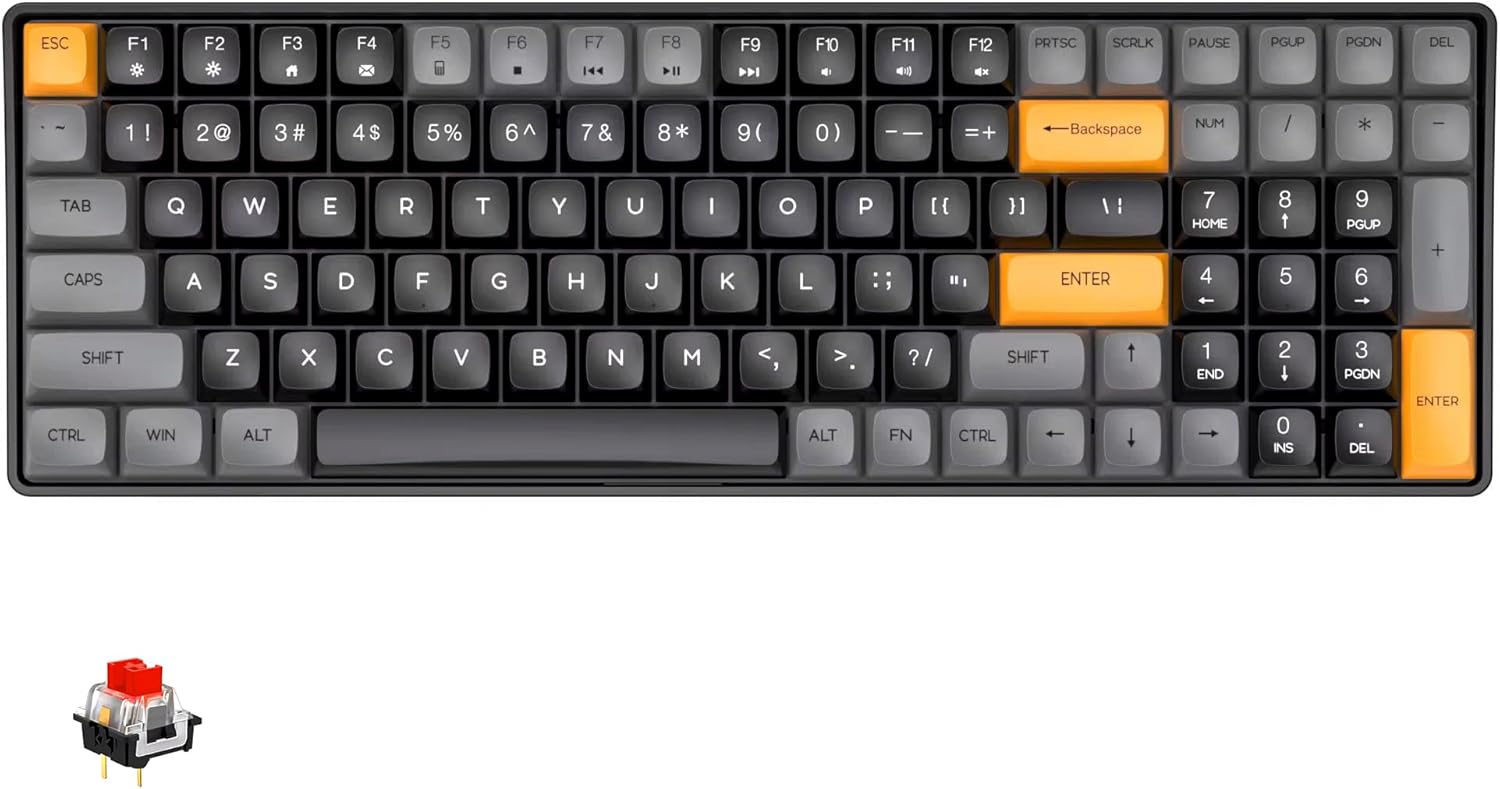
Figure 1: Generic Aigo A100 Gaming Mechanical Keyboard with its 100-key layout and distinct orange accent keys.
2. പാക്കേജ് ഉള്ളടക്കം
- ഐഗോ എ100 മെക്കാനിക്കൽ കീബോർഡ്
- വേർപെടുത്താവുന്ന USB-C കേബിൾ
- കീക്യാപ് പുള്ളർ
- സ്വിച്ച് പുള്ളർ
- ഉപയോക്തൃ മാനുവൽ (ഈ പ്രമാണം)
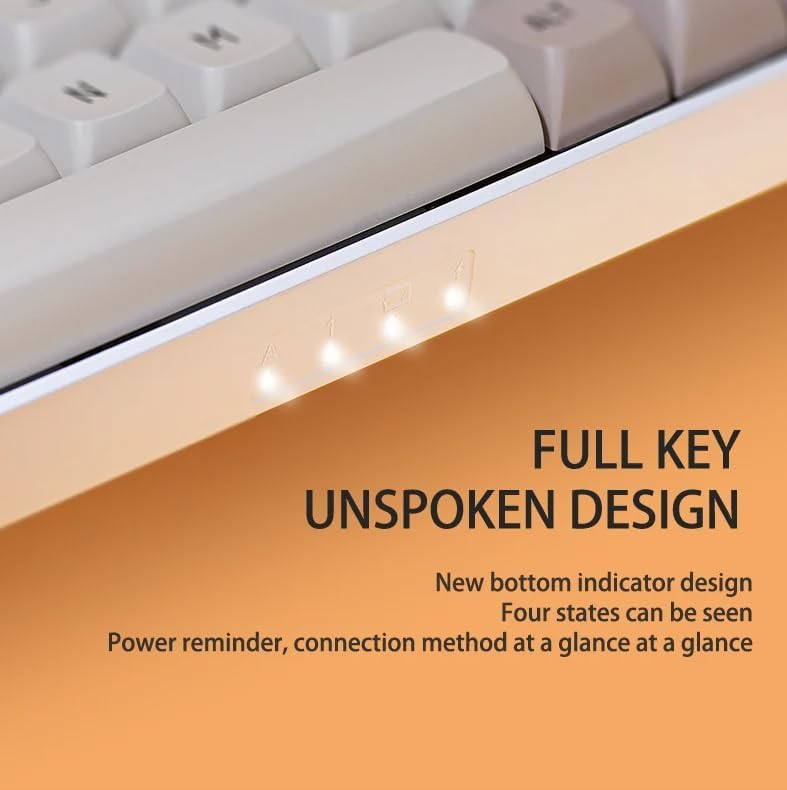
Figure 2: The Aigo A100 keyboard, its packaging, and the included detachable USB-C cable.
3. സജ്ജീകരണ ഗൈഡ്
3.1 കീബോർഡ് ബന്ധിപ്പിക്കുന്നു
- പാക്കേജിൽ നൽകിയിരിക്കുന്ന വേർപെടുത്താവുന്ന USB-C കേബിൾ കണ്ടെത്തുക.
- കേബിളിന്റെ USB-C അറ്റം കീബോർഡിലെ പോർട്ടുമായി ബന്ധിപ്പിക്കുക.
- നിങ്ങളുടെ കമ്പ്യൂട്ടറിൽ ലഭ്യമായ ഒരു USB പോർട്ടിലേക്ക് കേബിളിന്റെ USB-A അറ്റം ബന്ധിപ്പിക്കുക.
- നിങ്ങളുടെ ഓപ്പറേറ്റിംഗ് സിസ്റ്റം കീബോർഡ് യാന്ത്രികമായി തിരിച്ചറിയും.
3.2 ഹോട്ട്-സ്വാപ്പബിൾ സ്വിച്ചുകൾ
The Aigo A100 features a hot-swappable design, allowing you to change mechanical switches without soldering. This provides flexibility to customize your typing feel.

ചിത്രം 3: ക്ലോസപ്പ് view demonstrating the hot-swappable switch sockets and the durable PBT keycaps.
Changing Switches:
- നൽകിയിരിക്കുന്ന കീക്യാപ്പ് പുള്ളർ ഉപയോഗിച്ച് കീക്യാപ്പ് സൌമ്യമായി നീക്കം ചെയ്യുക.
- മുകളിലും താഴെയുമുള്ള ക്ലിപ്പുകളിൽ നിന്ന് സ്വിച്ച് പുള്ളർ ഉപയോഗിച്ച് ശ്രദ്ധാപൂർവ്വം പിടിക്കുക.
- പിസിബിയിൽ നിന്ന് നീക്കം ചെയ്യാൻ സ്വിച്ച് നേരെ മുകളിലേക്ക് വലിക്കുക.
- പിസിബിയിലെ ദ്വാരങ്ങളുമായി പുതിയ സ്വിച്ചിന്റെ പിന്നുകൾ വിന്യസിക്കുക.
- Press the new switch firmly into place until it clicks. Ensure it is seated properly.
Note: Only optical switches are compatible with the hot-swap sockets on this keyboard.
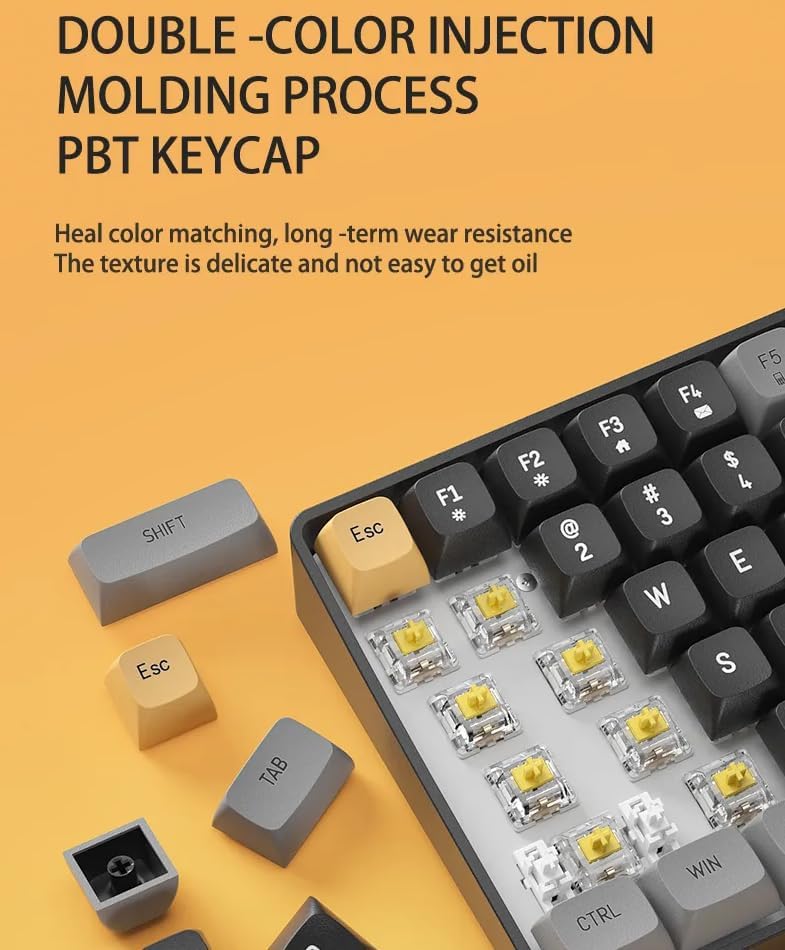
Figure 4: An individual red mechanical switch, commonly found in the Aigo A100 keyboard, known for its linear and quiet operation.
5. പ്രവർത്തന നിർദ്ദേശങ്ങൾ
5.1 കീബോർഡ് ലേഔട്ടും സവിശേഷതകളും
The Aigo A100 features a compact 100-key layout, which optimizes desk space while retaining essential keys including a numeric keypad and dedicated arrow keys. This design is more streamlined than traditional 108-key layouts.

Figure 5: Visual comparison illustrating the compact 100-key layout of the Aigo A100 versus a standard 108-key keyboard, highlighting space efficiency.
5.2 എൻ-കീ റോൾഓവറും ആന്റി-ഗോസ്റ്റിംഗും
The keyboard supports N-Key Rollover (NKRO) and anti-ghosting, ensuring that every key press is registered accurately, even when multiple keys are pressed simultaneously. This is crucial for fast-paced gaming and typing.
5.3 RGB ബാക്ക്ലൈറ്റിംഗ്
The Aigo A100 is equipped with vibrant RGB backlighting, offering over 16.8 million colors and various lighting effects. These effects can be customized and updated via the dedicated software application.
5.4 സോഫ്റ്റ്വെയറും ഇഷ്ടാനുസൃതമാക്കലും
Utilize the accompanying software (Drive AP) to unlock the full potential of your keyboard. Features include:
- DIY light effects customization.
- ശക്തമായ ഗെയിം മാക്രോകളുടെ സൃഷ്ടി.
- Access to hundreds of downloadable light effects (continuously updated).
- Full-key programmability for remapping keys.
5.5 സ്റ്റാറ്റസ് ഇൻഡിക്കേറ്ററുകൾ
The keyboard features bottom status indicators that provide quick visual feedback on power status and connection method.
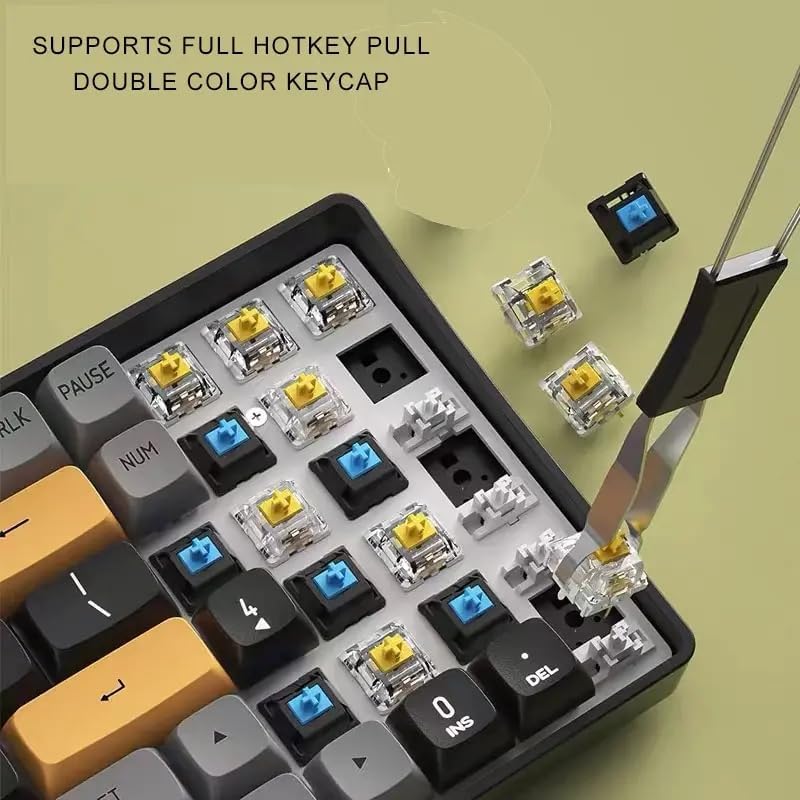
Figure 6: Close-up of the bottom-mounted indicator lights, providing clear status information for the keyboard.
6. പരിപാലനവും പരിചരണവും
6.1 കീബോർഡ് വൃത്തിയാക്കൽ
- വൃത്തിയാക്കുന്നതിനുമുമ്പ് നിങ്ങളുടെ കമ്പ്യൂട്ടറിൽ നിന്ന് കീബോർഡ് വിച്ഛേദിക്കുക.
- കീക്യാപ്പുകൾക്കിടയിൽ നിന്ന് പൊടിയും അവശിഷ്ടങ്ങളും ഊതിക്കെടുത്താൻ ഒരു കംപ്രസ് ചെയ്ത വായു ക്യാൻ ഉപയോഗിക്കുക.
- For surface cleaning, wipe the keycaps and keyboard body with a soft, slightly damp തുണി. അമിതമായ ഈർപ്പം ഒഴിവാക്കുക.
- The PBT keycaps are designed to be durable and oil-proof, resisting fading over time.
6.2 പൊടി, ജല പ്രതിരോധം
The keyboard features an IPX6 dustproof mainboard design, offering protection against dust ingress. While it has some resistance, it is not fully waterproof. Avoid exposing the keyboard to liquids.
7. പ്രശ്നപരിഹാരം
7.1 കീബോർഡ് പ്രതികരിക്കുന്നില്ല
- USB-C കേബിൾ കീബോർഡിലേക്കും കമ്പ്യൂട്ടറിലേക്കും സുരക്ഷിതമായി ബന്ധിപ്പിച്ചിട്ടുണ്ടെന്ന് ഉറപ്പാക്കുക.
- നിങ്ങളുടെ കമ്പ്യൂട്ടറിലെ മറ്റൊരു USB പോർട്ടിലേക്ക് കീബോർഡ് ബന്ധിപ്പിക്കാൻ ശ്രമിക്കുക.
- സിസ്റ്റം-നിർദ്ദിഷ്ട പ്രശ്നങ്ങൾ ഒഴിവാക്കാൻ മറ്റൊരു കമ്പ്യൂട്ടറിൽ കീബോർഡ് പരിശോധിക്കുക.
7.2 Stuck or Unresponsive Keys
- Remove the keycap and inspect the switch for any visible debris or obstruction.
- If the switch feels stiff or stuck, it may require lubrication. Carefully apply a small amount of switch lubricant to the stem of the switch.
- If the issue persists, consider replacing the switch with a new one, utilizing the hot-swappable feature.
7.3 ബാക്ക്ലൈറ്റിംഗ് പ്രശ്നങ്ങൾ
- Ensure the keyboard software (Drive AP) is installed and up to date.
- Check the software settings to ensure backlighting is enabled and configured correctly.
- കീബോർഡിന്റെ ലൈറ്റിംഗ് പ്രോ റീസെറ്റ് ചെയ്യാൻ ശ്രമിക്കുക.file സോഫ്റ്റ്വെയർ വഴി.
8 സ്പെസിഫിക്കേഷനുകൾ
| ഫീച്ചർ | വിശദാംശങ്ങൾ |
|---|---|
| മോഡൽ | എ-100 |
| ബ്രാൻഡ് | ജനറിക് |
| കണക്റ്റിവിറ്റി | Wired, USB-C Detachable Cable |
| കീബോർഡ് തരം | മെക്കാനിക്കൽ |
| കീകളുടെ എണ്ണം | 100 |
| കീക്യാപ് മെറ്റീരിയൽ | പിബിടി (ഇരട്ട-വർണ്ണ ഇഞ്ചക്ഷൻ മോൾഡിംഗ്) |
| സ്വിച്ച് തരം | Red Switch (Hot-Swappable, Optical switches only) |
| ബാക്ക്ലൈറ്റിംഗ് | RGB (16.8 ദശലക്ഷം നിറങ്ങൾ) |
| ജീവിതകാലയളവ് | Over 100 million keystrokes |
| അളവുകൾ (L x W x H) | 41.29 x 17.5 x 6.2 സെ.മീ |
| ഭാരം | 1 കി.ഗ്രാം |
| പ്രത്യേക സവിശേഷതകൾ | Hot-Swappable, IPX6 Dustproof Mainboard, N-Key Rollover, Anti-Ghosting, Programmable Keys |
9. വാറൻ്റിയും പിന്തുണയും
Specific warranty information for the Generic Aigo A100 Gaming Mechanical Keyboard is not provided in this manual. Please refer to the retailer or manufacturer's official webവിശദമായ വാറന്റി നിബന്ധനകൾക്കും വ്യവസ്ഥകൾക്കും സൈറ്റ്.
For technical support, troubleshooting assistance, or further inquiries, please contact the seller or the manufacturer's customer service department. Keep your purchase receipt or order details handy for faster service.
Ask a question about this manual
Ask about setup, troubleshooting, compatibility, parts, safety, or missing instructions. Manuals+ will review the question and use this page’s manual context to help answer it.