
DOOGEE V Max Pro
DOOGEE V Max Pro Rugged Phone User Manual
Model: V Max Pro
ആമുഖം
This manual provides comprehensive instructions for the safe and efficient use of your DOOGEE V Max Pro Rugged Phone. Please read this manual thoroughly before operating the device to ensure optimal performance and longevity. The DOOGEE V Max Pro is designed for durability and high performance, featuring a robust build and advanced mobile technology.

Figure 1: DOOGEE V Max Pro Rugged Phone and included Tablet Stand.
സജ്ജമാക്കുക
1. അൺബോക്സിംഗും പ്രാരംഭ പരിശോധനയും
Carefully unpack all components from the box. Verify that the package contains the DOOGEE V Max Pro phone, the tablet stand, a charging cable, and a power adapter. Inspect all items for any signs of damage.
2. പ്രാരംഭ ചാർജിംഗ്
Before first use, fully charge the phone. Connect the charging cable to the phone's charging port and the power adapter, then plug the adapter into a wall outlet. The phone supports 33W fast charging. A full charge ensures optimal battery calibration.
3. സിം കാർഡും മൈക്രോ എസ്ഡി കാർഡും ഇൻസ്റ്റാൾ ചെയ്യൽ
Locate the SIM card tray on the side of the phone. Use the provided SIM ejector tool to open the tray. Insert your Nano-SIM card(s) and/or a MicroSD card (up to 2TB supported) into the designated slots. Ensure the cards are correctly oriented before reinserting the tray firmly into the phone.
4. പവർ ചെയ്യുന്നു
Press and hold the power button located on the side of the phone until the DOOGEE logo appears on the screen. Follow the on-screen prompts to complete the initial setup, including language selection, Wi-Fi connection, and Google account setup.
5. Tablet Stand Assembly and Usage
The included tablet stand is designed for versatile viewing. Unfold the stand to its desired angle. Place your DOOGEE V Max Pro or a compatible tablet onto the stand's cradle. The stand features a sturdy base and adjustable angles for comfortable viewing.
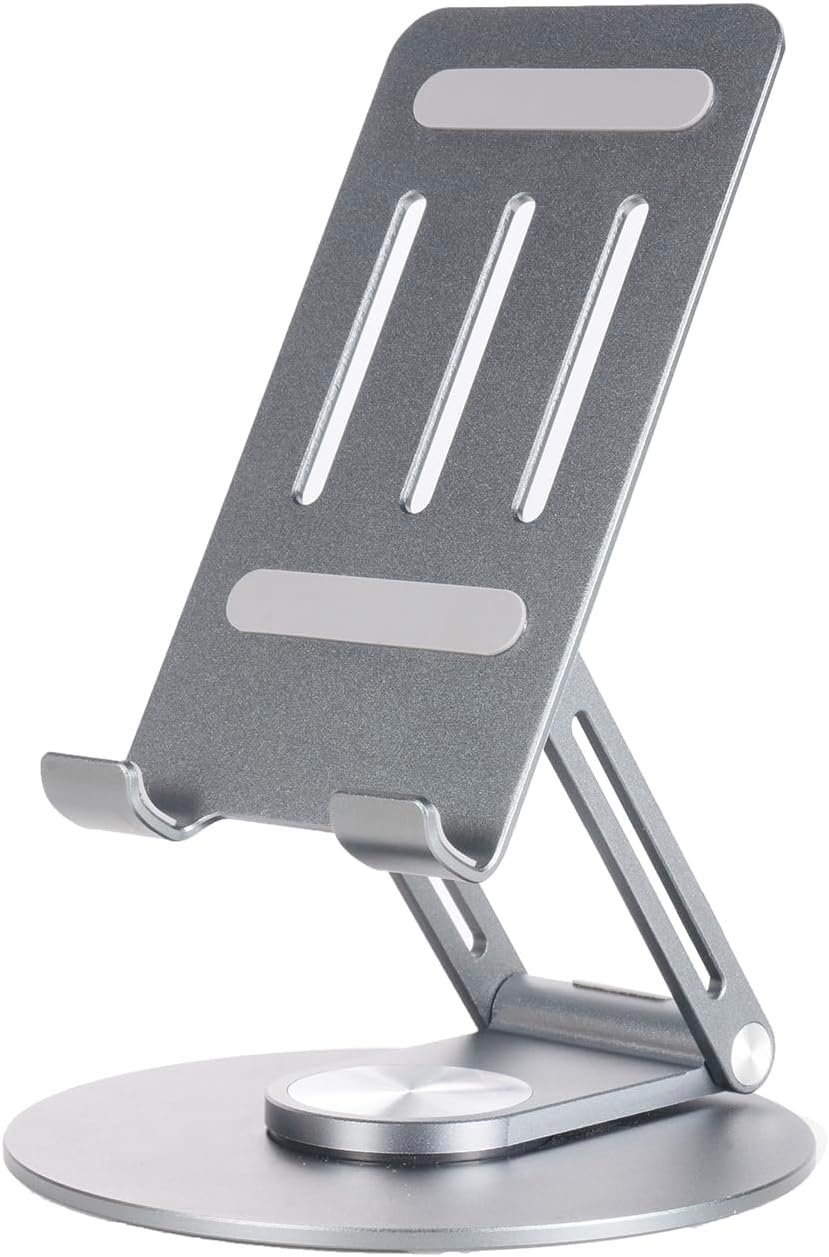
Figure 2: The adjustable tablet stand.

Figure 3: Tablet stand in use with a device.
പ്രവർത്തന നിർദ്ദേശങ്ങൾ
1. ഫോണിന്റെ അടിസ്ഥാന പ്രവർത്തനങ്ങൾ
- കോളുകൾ ചെയ്യുന്നു: ഫോൺ ആപ്പ് തുറന്ന് നമ്പർ ഡയൽ ചെയ്യുക, തുടർന്ന് കോൾ ബട്ടൺ അമർത്തുക.
- സന്ദേശങ്ങൾ അയയ്ക്കുന്നു: Open the Messages app, start a new conversation, enter the recipient and your message.
- ഇന്റർനെറ്റ് കണക്റ്റിവിറ്റി: Connect to Wi-Fi via Settings > Network & internet > Wi-Fi, or enable mobile data via Settings > Network & internet > Mobile network. The phone supports 5G connectivity for fast data speeds.
2. ഡിസ്പ്ലേ സവിശേഷതകൾ
The DOOGEE V Max Pro features a 6.58-inch FHD+ IPS Waterdrop Display with a 120Hz high refresh rate for smooth visuals. It offers 2.4K screen resolution, 401 PPI, 16.7 million colors, and a 1500:1 contrast ratio, ensuring vibrant and clear images. The display has an 85% screen-to-body ratio for an immersive viewഅനുഭവം.

Figure 4: Visual representation of the 120Hz display and its specifications.
3. ക്യാമറ ഉപയോഗം
The phone is equipped with a versatile camera system:
- 108MP AI പ്രധാന ക്യാമറ: For high-resolution photos with AI enhancements.
- 20MP നൈറ്റ് വിഷൻ ക്യാമറ: Captures clear images in low-light or complete darkness.
- 8MP Wide Angle & Macro Camera: For expansive landscape shots or detailed close-ups.
- 16MP മുൻ ക്യാമറ: സെൽഫികൾക്കും വീഡിയോ കോളുകൾക്കും.
Open the Camera app and select your desired mode (Photo, Video, Night Vision, Macro, etc.). Tap the shutter button to capture images or start/stop video recording.

ചിത്രം 5: ഓവർview of the phone's multi-camera system.
4. ബാറ്ററി മാനേജ്മെന്റ്
The DOOGEE V Max Pro features a massive 22000mAh battery, providing extended usage times. It supports 33W fast charging. The phone also supports OTG (On-The-Go) reverse charging, allowing you to use it as a power bank to charge other devices.
- സ്റ്റാൻഡ് ബൈ: 1540 മണിക്കൂർ വരെ
- വിളിക്കുന്നു: 156 മണിക്കൂർ വരെ
- സംഗീതം പ്ലേ ചെയ്യുന്നു: 142 മണിക്കൂർ വരെ
- Video Watching: 45 മണിക്കൂർ വരെ
- Web ബ്രൗസിംഗ്: 18 മണിക്കൂർ വരെ

ചിത്രം 6: ബാറ്ററി ശേഷിയും കണക്കാക്കിയ ഉപയോഗ സമയവും.
5. Smart Interaction Lights
The phone features smart interaction lights that provide visual notifications for various events:
- ഇൻകമിംഗ് കോളുകൾ
- SMS അറിയിപ്പുകൾ
- സംഗീത പ്ലേബാക്ക്
- ചാർജിംഗ് നില

ചിത്രം 7: ഉദാamples of smart interaction light indications.
6. പ്രോസസ്സറും പ്രകടനവും
The DOOGEE V Max Pro is powered by the Dimensity 7050 5G Octa-core Processor, designed for boosted performance and reduced power consumption. This ensures smooth multitasking, gaming, and overall system responsiveness.

Figure 8: Illustration of the Dimensity 7050 5G Octa-core Processor.
7. സംഭരണം
The phone offers massive storage with up to 32GB RAM (12GB physical + 20GB extended RAM) and 512GB ROM. It also supports an external MicroSD card up to 2TB, providing ampആപ്ലിക്കേഷനുകൾ, മീഡിയ, ഡോക്യുമെന്റുകൾ എന്നിവയ്ക്കുള്ള le സ്പേസ്.

Figure 9: Visual representation of RAM and ROM capacities.
മെയിൻ്റനൻസ്
1. വൃത്തിയാക്കൽ
നിങ്ങളുടെ ഫോൺ വൃത്തിയാക്കാൻ, മൃദുവായതും ലിന്റ് രഹിതവുമായ ഒരു തുണി ഉപയോഗിക്കുക. കഠിനമായ പാടുകൾക്ക്, ചെറുതായി dampen the cloth with water or a screen cleaner. Avoid using harsh chemicals, abrasive materials, or excessive moisture, especially near ports.
2. Ruggedness and Protection
The DOOGEE V Max Pro is designed as a rugged phone, featuring a durable construction of metal or strong plastic composite. While it is built to withstand harsh environments, avoid intentional drops, extreme temperatures, or prolonged submersion in water beyond its rated capabilities (if any specific IP rating is available, it would be mentioned here, but it's not in the provided data). Ensure all port covers are securely closed to maintain water and dust resistance.
3. സോഫ്റ്റ്വെയർ അപ്ഡേറ്റുകൾ
Regularly check for and install software updates to ensure your phone has the latest features, security patches, and performance improvements. You can usually find this option in Settings > System > System update.
ട്രബിൾഷൂട്ടിംഗ്
പൊതുവായ പ്രശ്നങ്ങളും പരിഹാരങ്ങളും
- ഫോൺ ഓണാക്കുന്നില്ല: ബാറ്ററി ചാർജ്ജ് ചെയ്തിട്ടുണ്ടെന്ന് ഉറപ്പാക്കുക. വീണ്ടും പവർ ഓൺ ചെയ്യാൻ ശ്രമിക്കുന്നതിന് മുമ്പ് കുറഞ്ഞത് 15 മിനിറ്റെങ്കിലും ചാർജറുമായി കണക്റ്റ് ചെയ്യുക.
- സ്ക്രീൻ പ്രതികരിക്കുന്നില്ല: Try restarting the phone by holding the power button for about 10-15 seconds.
- Poor signal/connectivity: Check if SIM card is properly inserted. Try restarting the phone or toggling Airplane Mode on/off. Ensure you are in an area with network coverage.
- ആപ്പുകൾ ക്രാഷാകുന്നു: പ്രശ്നമുള്ള ആപ്പിന്റെ കാഷെ മായ്ക്കുക (ക്രമീകരണങ്ങൾ > ആപ്പുകൾ > [ആപ്പ് നാമം] > സംഭരണവും കാഷെയും > കാഷെ മായ്ക്കുക). പ്രശ്നം നിലനിൽക്കുകയാണെങ്കിൽ, ആപ്പ് വീണ്ടും ഇൻസ്റ്റാൾ ചെയ്യാൻ ശ്രമിക്കുക.
- ബാറ്ററി വേഗത്തിൽ തീർന്നു: സ്ക്രീൻ തെളിച്ചം കുറയ്ക്കുക, പശ്ചാത്തലത്തിൽ പ്രവർത്തിക്കുന്ന ഉപയോഗിക്കാത്ത ആപ്പുകൾ അടയ്ക്കുക, ഉപയോഗത്തിലില്ലാത്തപ്പോൾ GPS അല്ലെങ്കിൽ ബ്ലൂടൂത്ത് പോലുള്ള അനാവശ്യ സവിശേഷതകൾ പ്രവർത്തനരഹിതമാക്കുക.
For issues not listed here, please refer to the official DOOGEE support webസൈറ്റ് അല്ലെങ്കിൽ ഉപഭോക്തൃ സേവനവുമായി ബന്ധപ്പെടുക.
സ്പെസിഫിക്കേഷനുകൾ
| ഫീച്ചർ | സ്പെസിഫിക്കേഷൻ |
|---|---|
| മോഡൽ | DOOGEE V Max Pro |
| ബാറ്ററി ശേഷി | 22000mAh |
| ചാർജിംഗ് | 33W ഫാസ്റ്റ് ചാർജിംഗ്, OTG റിവേഴ്സ് ചാർജിംഗ് |
| പ്രോസസ്സർ | Dimensity 7050 5G Octa-core |
| റാം | Up to 32GB (12GB physical + 20GB extended) |
| ROM | 512 ജിബി |
| വികസിപ്പിക്കാവുന്ന സംഭരണം | Supports up to 2TB MicroSD Card |
| പ്രദർശിപ്പിക്കുക | 6.58" FHD+ 120Hz IPS Waterdrop Display |
| ഡിസ്പ്ലേ റെസല്യൂഷൻ | 2.4K Screen Resolution, 401 PPI |
| പ്രധാന ക്യാമറ | 108MP AI Main Camera |
| നൈറ്റ് വിഷൻ ക്യാമറ | 20എംപി |
| Wide Angle & Macro Camera | 8എംപി |
| മുൻ ക്യാമറ | 16എംപി |
| കണക്റ്റിവിറ്റി | 5G |
| മെറ്റീരിയൽ | Metal or Strong Plastic Composite |
| ASIN | B0DR8DRWF7 |
| ആദ്യം ലഭ്യമായ തീയതി | ഡിസംബർ 23, 2024 |
Ask a question about this manual
Ask about setup, troubleshooting, compatibility, parts, safety, or missing instructions. Manuals+ will review the question and use this page’s manual context to help answer it.