
AINAVIGO 10.2'' TouchScreen 2+32G
AINAVIGO 10.2-inch TouchScreen Car Radio Stereo Upgrade User Manual
Model: 10.2'' TouchScreen 2+32G
1. ആമുഖം
This manual provides detailed instructions for the installation, operation, and maintenance of your AINAVIGO 10.2-inch TouchScreen Car Radio Stereo Upgrade. This advanced system features Android 12, Wireless CarPlay, Android Auto, GPS Navigation, and support for a backup camera, designed to enhance your driving experience with modern connectivity and entertainment options.
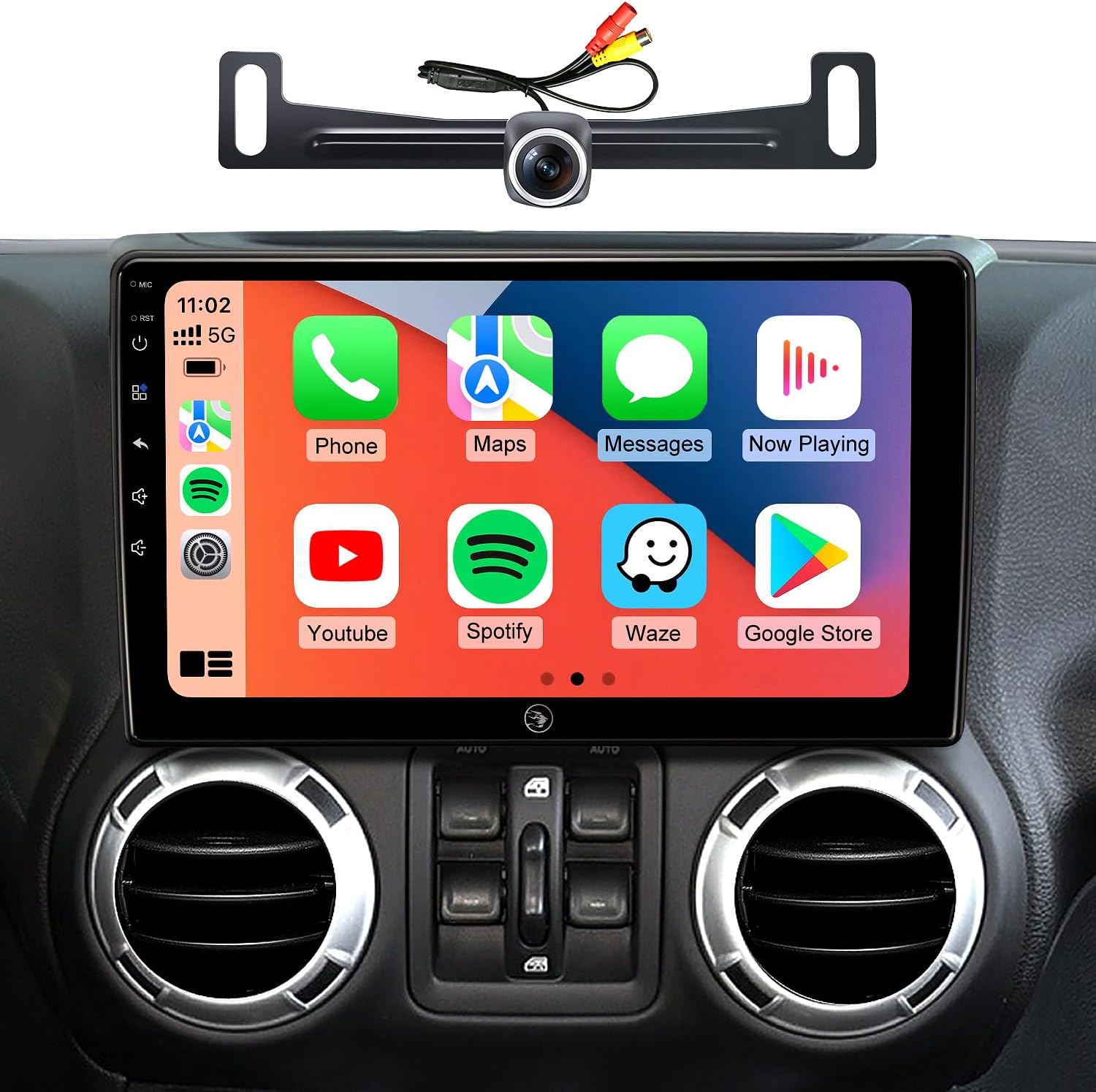
Image 1.1: AINAVIGO 10.2-inch TouchScreen Car Radio Stereo with CarPlay interface.
2. വാഹന അനുയോജ്യത
This car radio stereo upgrade is compatible with the following vehicle models:
- Jeep Wrangler JK/Unlimited: 2007-2018
- Jeep Compass: 2009-2016
- Jeep Patriot: 2009-2016
- ജീപ്പ് ഗ്രാൻഡ് ചെറോക്കി: 2011-2013
- Jeep Liberty: 2008-2011
- Jeep Commander: 2008-2011
- Chrysler Sebring: 2007-2010
- Chrysler Town & Country: 2007-2010
- Dodge Grand Caravan: 2011-2014
- Dodge Charger: 2008-2010
- Dodge Ram Pickup 1500/2500/3500: 2009-2012

Image 2.1: Before and After installation comparison, demonstrating the 1:1 replica fit.
3. എന്താണ് ഉൾപ്പെടുത്തിയിരിക്കുന്നത്
ഇൻസ്റ്റാളേഷനും പ്രവർത്തനത്തിനും ആവശ്യമായ എല്ലാ ഘടകങ്ങളും പാക്കേജിൽ അടങ്ങിയിരിക്കുന്നു:
- 1x AINAVIGO Car Radio Stereo GPS Navigation Head Unit
- 1x ആർസിഎ കേബിൾ
- 1x പവർ കേബിൾ
- 1x Car Microphone
- 1x പിൻഭാഗം View 1080P ക്യാമറ
- 1x Reversing Control Cable (approximately 16.40 ft)
- 1x ജിപിഎസ് ആന്റിന
- 1x Frame Removal Tool
- 2x യുഎസ്ബി കേബിളുകൾ
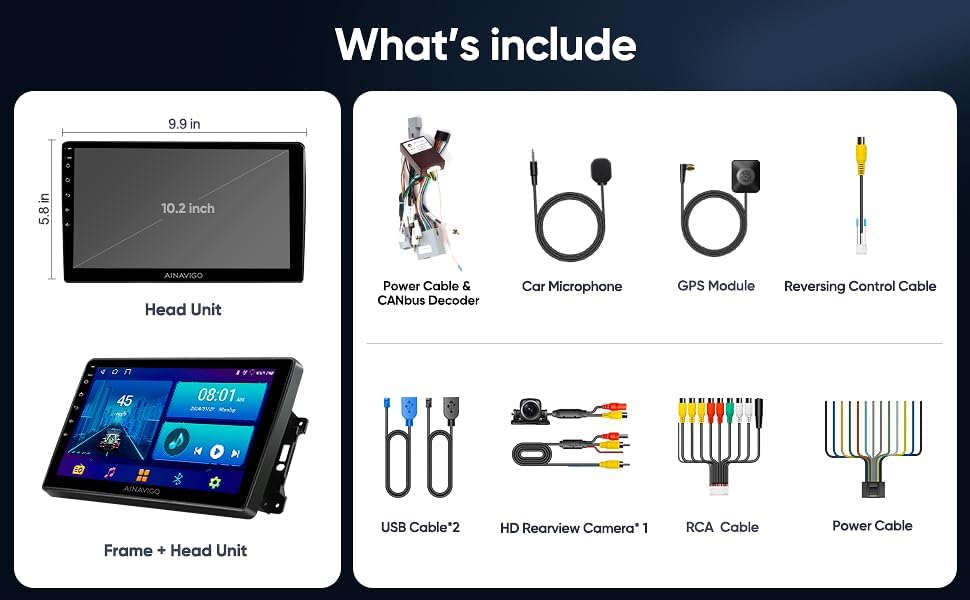
ചിത്രം 3.1: കഴിഞ്ഞുview of included accessories and the head unit dimensions.
4. സജ്ജീകരണവും ഇൻസ്റ്റാളേഷനും
Installation of the AINAVIGO car radio requires basic automotive electrical knowledge. It is recommended to consult a professional installer if you are unfamiliar with car stereo installations.
4.1 പ്രീ-ഇൻസ്റ്റലേഷൻ ചെക്ക്ലിസ്റ്റ്
- ഇൻസ്റ്റാളേഷൻ ആരംഭിക്കുന്നതിന് മുമ്പ് വാഹനത്തിന്റെ ബാറ്ററി വിച്ഛേദിച്ചിട്ടുണ്ടെന്ന് ഉറപ്പാക്കുക.
- Verify all included components are present as listed in Section 3.
- Identify the existing car radio and dashboard panel for removal.
4.2 ഇൻസ്റ്റലേഷൻ ഘട്ടങ്ങൾ
- നിലവിലുള്ള യൂണിറ്റ് നീക്കം ചെയ്യുക: Use the provided frame removal tool to carefully pry open and remove the original car radio and dashboard trim. Disconnect all wiring harnesses.
- വയറിംഗ് ബന്ധിപ്പിക്കുക: Connect the new power cable, RCA cable, USB cables, GPS antenna, and microphone to the corresponding ports on the AINAVIGO head unit. Ensure all connections are secure.
- ബാക്കപ്പ് ക്യാമറ ഇൻസ്റ്റാളേഷൻ (ഓപ്ഷണൽ): If installing the backup camera, route the reversing control cable from the rear of the vehicle to the head unit. Connect the camera to the designated input.
- Mount Head Unit: Secure the AINAVIGO head unit into the dashboard opening. Ensure a snug and stable fit.
- ബാറ്ററി വീണ്ടും ബന്ധിപ്പിക്കുക: വാഹനത്തിന്റെ ബാറ്ററി വീണ്ടും ബന്ധിപ്പിക്കുക.
- പ്രാരംഭ പവർ ഓൺ: Turn on the vehicle's ignition and power on the head unit. Follow any on-screen prompts for initial setup.
For detailed wiring diagrams specific to your vehicle model, please refer to your vehicle's service manual or consult with a professional installer.
5. പ്രവർത്തന നിർദ്ദേശങ്ങൾ
5.1 സിസ്റ്റം കഴിഞ്ഞുview
The AINAVIGO unit runs on ആൻഡ്രോയിഡ് 12, providing a familiar and customizable interface. It features a 10.2 ഇഞ്ച് എച്ച്ഡി ഡിസ്പ്ലേ കൂടെ 2 ജിബി റാം ഒപ്പം 32 ജിബി സ്റ്റോറേജ്, allowing for smooth operation and app installation from the Google Play Store.

Image 5.1: Key features of the AINAVIGO Car Radio.
5.2 Wired/Wireless CarPlay & Android Auto
Seamlessly integrate your smartphone with the car's infotainment system using CarPlay or Android Auto. This allows access to navigation, music, messages, and calls directly from the unit's display.
- കണക്ഷൻ: Connect your smartphone via USB for wired connection or pair via Bluetooth and Wi-Fi for wireless functionality.
- ശബ്ദ നിയന്ത്രണം: Activate Siri or Google Assistant for hands-free operation, including making calls, sending messages, getting directions, and controlling music.
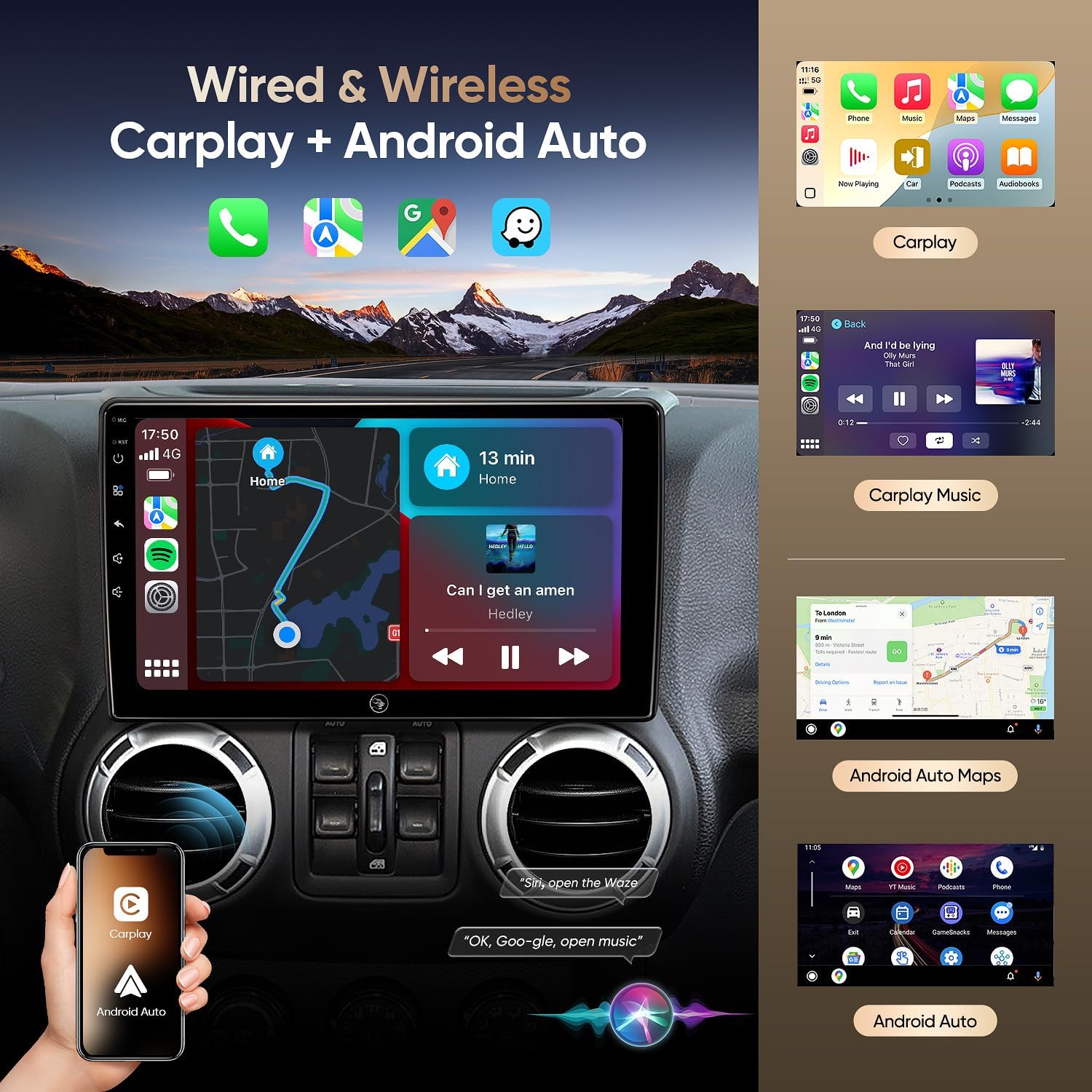
Image 5.2: Wired & Wireless CarPlay and Android Auto functionality.
5.3 ജിപിഎസ് നാവിഗേഷൻ
The unit comes pre-loaded with North American maps and supports various online navigation apps. The included GPS antenna ensures accurate positioning.
- ഓൺലൈൻ നാവിഗേഷൻ: Connect to Wi-Fi to use apps like Google Maps, Waze, or other preferred navigation services.
- ഓഫ്ലൈൻ നാവിഗേഷൻ: Download maps for offline use to navigate without an internet connection.

Image 5.3: Online and Offline GPS Navigation capabilities.
5.4 ബ്ലൂടൂത്ത് 5.0
Connect your smartphone via Bluetooth 5.0 for faster data transfer speeds and stable connections.
- ഹാൻഡ്സ് ഫ്രീ കോളിംഗ്: Make and receive calls using the built-in and external microphones for clear audio.
- ഓഡിയോ സ്ട്രീമിംഗ്: Play music from your phone directly through the car's speakers.
- Contact Sync: Download your phone's contact book to the unit.
5.5 എഫ്എം റേഡിയോ
Tune into FM radio stations to stay updated with real-time traffic, news broadcasts, and weather forecasts.
5.6 Built-in DSP (Digital Sound Processor)
Adjust audio settings precisely to your preference with the built-in DSP, enhancing the acoustics of your vehicle for an immersive sound experience.

Image 5.4: Built-in DSP interface for sound customization.
5.7 AHD 1080P Rear Camera
The included AHD 1080P waterproof backup camera provides a 170° viewing angle. When reversing, the unit automatically displays a clear image on the screen, aiding in safer parking.

Image 5.5: AHD 1080P Rear View Camera display.
5.8 വൈ-ഫൈ കണക്റ്റിവിറ്റി
Utilize the built-in Wi-Fi hotspot feature to connect to the internet, browse, and download online navigation apps or social media platforms from the Play Store.
5.9 സ്പ്ലിറ്റ് സ്ക്രീൻ ഫംഗ്ഷൻ
Multitask efficiently by using the split-screen function, allowing you to run two applications simultaneously, such as navigation and music playback.
5.10 ശബ്ദ നിയന്ത്രണം
Enhance driving safety and convenience with voice control features. Use commands to play music, check the weather, or navigate to destinations without taking your hands off the wheel.

ചിത്രം 5.6: കഴിഞ്ഞുview of 5G WiFi, Split Screen, FM Radio, and Voice Control.
6. പരിപാലനം
6.1 സ്ക്രീൻ വൃത്തിയാക്കൽ
ടച്ച്സ്ക്രീൻ മൃദുവായി തുടയ്ക്കാൻ മൃദുവായ, ലിന്റ് രഹിത തുണി ഉപയോഗിക്കുക. കഠിനമായ പാടുകൾക്ക്, ചെറുതായി dampതുണിയിൽ വെള്ളം അല്ലെങ്കിൽ സ്ക്രീൻ-സേഫ് ക്ലീനർ ഉപയോഗിക്കുക. കഠിനമായ രാസവസ്തുക്കളോ ഉരച്ചിലുകളോ ഉള്ള വസ്തുക്കൾ ഒഴിവാക്കുക.
6.2 സോഫ്റ്റ്വെയർ അപ്ഡേറ്റുകൾ
Periodically check for software updates through the system settings to ensure optimal performance and access to the latest features and security patches. Connect to a stable Wi-Fi network for updates.
6.3 പൊതു പരിചരണം
Avoid exposing the unit to extreme temperatures, direct sunlight for prolonged periods, or excessive moisture. Ensure all cables are securely connected and not pinched.
7. പ്രശ്നപരിഹാരം
If you encounter issues with your AINAVIGO car radio, refer to the following common solutions:
- ശക്തിയില്ല: Check all power connections and ensure the vehicle's battery is properly connected. Verify fuses are intact.
- ശബ്ദമില്ല: Check speaker connections, volume levels, and audio settings (including DSP). Ensure the correct audio source is selected.
- ടച്ച്സ്ക്രീൻ പ്രതികരിക്കുന്നില്ല: Try restarting the unit. If the issue persists, perform a system reset (refer to the system settings for this option).
- CarPlay/Android Auto Disconnection: Ensure your phone's Bluetooth and Wi-Fi are enabled and properly paired. Check for any software updates on your phone or the head unit. Try reconnecting the USB cable if using a wired connection.
- ജിപിഎസ് സിഗ്നൽ നഷ്ടം: ജിപിഎസ് ആന്റിന ശരിയായി ഇൻസ്റ്റാൾ ചെയ്തിട്ടുണ്ടെന്നും വ്യക്തമായ ഒരു ലൈൻ ഉണ്ടെന്നും ഉറപ്പാക്കുക. view of the sky. Check for obstructions.
- ബാക്കപ്പ് ക്യാമറ പ്രദർശിപ്പിക്കുന്നില്ല: Verify the camera's power and video connections. Ensure the reversing control cable is correctly wired to trigger the display when in reverse gear.
- Unit Shuts Down Randomly: This could indicate a power supply issue. Check wiring for loose connections or insufficient power. In some cases, a hard reset (disconnecting and reconnecting power) may be necessary.
If these steps do not resolve the issue, please contact technical support.
8 സ്പെസിഫിക്കേഷനുകൾ
| ഫീച്ചർ | സ്പെസിഫിക്കേഷൻ |
|---|---|
| മോഡലിൻ്റെ പേര് | HC-JEEP |
| ഓപ്പറേറ്റിംഗ് സിസ്റ്റം | ആൻഡ്രോയിഡ് 12 |
| റാം | 2 ജിബി |
| സംഭരണം | 32 ജിബി |
| സ്ക്രീൻ വലിപ്പം | 10.2 ഇഞ്ച് |
| ഡിസ്പ്ലേ റെസല്യൂഷൻ | 1280*720 ഐ.പി.എസ് |
| കണക്റ്റിവിറ്റി ടെക്നോളജി | Bluetooth 5.0, Wi-Fi, Wired/Wireless CarPlay & Android Auto |
| പ്രത്യേക സവിശേഷതകൾ | HD Backup Camera Support, Touchscreen, Built-in DSP, GPS Navigation |
| മാപ്പ് തരം | വടക്കേ അമേരിക്ക |
| ഓഡിയോ put ട്ട്പുട്ട് മോഡ് | സ്റ്റീരിയോ |
| മൗണ്ടിംഗ് തരം | ഡാഷ്ബോർഡ് മ .ണ്ട് |
| ഇനത്തിൻ്റെ ഭാരം | 4.29 പൗണ്ട് |
| പാക്കേജ് അളവുകൾ | 13.78 x 9.76 x 5.28 ഇഞ്ച് |
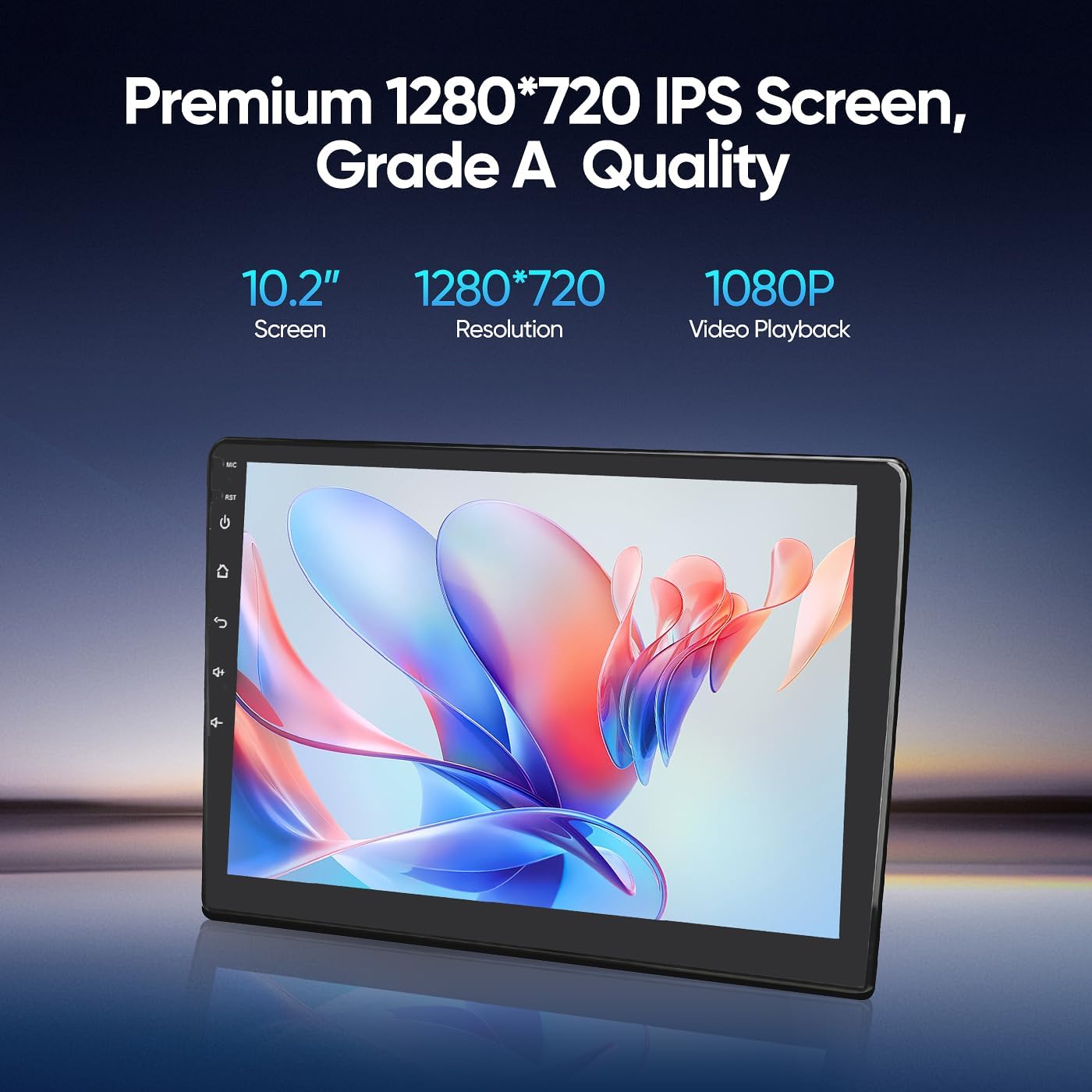
Image 8.1: Premium 1280*720 IPS Screen details.

Image 8.2: G+G Full Fit Ultra Clear Screen technology.
9. വാറൻ്റി വിവരങ്ങൾ
The AINAVIGO 10.2-inch TouchScreen Car Radio Stereo Upgrade comes with a 12 മാസ വാറൻ്റി വാങ്ങിയ തീയതി മുതൽ. സാധാരണ ഉപയോഗത്തിലുള്ള നിർമ്മാണ വൈകല്യങ്ങളും തകരാറുകളും ഈ വാറന്റി ഉൾക്കൊള്ളുന്നു. അനുചിതമായ ഇൻസ്റ്റാളേഷൻ, ദുരുപയോഗം, അപകടങ്ങൾ അല്ലെങ്കിൽ അനധികൃത പരിഷ്കാരങ്ങൾ എന്നിവ മൂലമുണ്ടാകുന്ന നാശനഷ്ടങ്ങൾക്ക് ഇത് പരിരക്ഷ നൽകുന്നില്ല.
വാറൻ്റി ക്ലെയിമുകൾക്കായി നിങ്ങളുടെ വാങ്ങിയതിൻ്റെ തെളിവ് സൂക്ഷിക്കുക.
10. സാങ്കേതിക പിന്തുണ
For any installation assistance or technical inquiries, our professional technical support team is available to help. Please follow these steps to contact us:
- Visit the AINAVIGO Store page on Amazon.
- Locate and click the "Ask a question" button to send your inquiry.
We aim to respond to all queries as soon as possible.

Image 10.1: Steps to contact technical support.
Ask a question about this manual
Ask about setup, troubleshooting, compatibility, parts, safety, or missing instructions. Manuals+ will review the question and use this page’s manual context to help answer it.