1. ഉൽപ്പന്നം കഴിഞ്ഞുview
പുതിയ S10 ബോൺ കണ്ടക്ഷൻ സ്വിമ്മിംഗ് ഇൻ-ഇയർ ബ്ലൂടൂത്ത് 5.4 വയർലെസ് സ്പോർട്സ് ഹെഡ്ഫോണുകൾക്കുള്ള വിശദമായ നിർദ്ദേശങ്ങൾ ഈ മാനുവൽ നൽകുന്നു. സജീവമായ ജീവിതശൈലികൾക്കായി രൂപകൽപ്പന ചെയ്തിരിക്കുന്ന ഈ ഹെഡ്ഫോണുകളിൽ വിപുലമായ ബോൺ കണ്ടക്ഷൻ സാങ്കേതികവിദ്യ, ഡിജിറ്റൽ ഡിസ്പ്ലേ, ഉയർന്ന വാട്ടർപ്രൂഫ് റേറ്റിംഗ് എന്നിവയുണ്ട്, ഇത് വിവിധ സ്പോർട്സിനും ജല പ്രവർത്തനങ്ങൾക്കും അനുയോജ്യമാക്കുന്നു.
പ്രധാന സവിശേഷതകൾ:
- വയർലെസ് കണക്റ്റിവിറ്റി: സുസ്ഥിരവും സുസ്ഥിരവുമായ വയർലെസ് കണക്റ്റിവിറ്റിക്കായി ബ്ലൂടൂത്ത് 5.4 സാങ്കേതികവിദ്യ കൊണ്ട് സജ്ജീകരിച്ചിരിക്കുന്നു.
- അസ്ഥി ചാലക രൂപകൽപ്പന: നൂതനമായ അസ്ഥി ചാലക സാങ്കേതികവിദ്യ കവിൾത്തടങ്ങളിലൂടെ ശബ്ദ തരംഗങ്ങൾ നേരിട്ട് ആന്തരിക ചെവിയിലേക്ക് കടത്തിവിടുന്നു, ഇത് നിങ്ങളുടെ ചെവികൾ അടയ്ക്കാതെ സംഗീതം ആസ്വദിക്കാൻ നിങ്ങളെ അനുവദിക്കുന്നു.
- വെള്ളത്തെ പ്രതിരോധിക്കുന്ന: IPX8 വാട്ടർപ്രൂഫ് റേറ്റിംഗുള്ള ഈ ഹെഡ്ഫോണുകൾക്ക് 3.28 അടി (1 മീറ്റർ) വരെ വെള്ളത്തിൽ മുങ്ങുന്നത് നേരിടാൻ കഴിയും, ഇത് നീന്തലിനും മറ്റ് ജല പ്രവർത്തനങ്ങൾക്കും അനുയോജ്യമാക്കുന്നു.
- ഡിജിറ്റൽ ഡിസ്പ്ലേ: ബാറ്ററി ലൈഫ്, ബ്ലൂടൂത്ത് കണക്റ്റിവിറ്റി സ്റ്റാറ്റസ്, മറ്റ് ഉപയോഗപ്രദമായ വിവരങ്ങൾ എന്നിവ കാണിക്കുന്ന ഒരു ഡിജിറ്റൽ ഡിസ്പ്ലേ ഇതിന്റെ സവിശേഷതയാണ്.
- ശബ്ദം കുറയ്ക്കൽ: ബാഹ്യ ശബ്ദ ഇടപെടൽ കുറയ്ക്കുന്നതിന് ടു-വേ സൗണ്ട് വേവ് നോയ്സ് റിഡക്ഷൻ സാങ്കേതികവിദ്യ ഉപയോഗിക്കുന്നു, ഇത് വ്യക്തമായ ഓഡിയോ ഗുണനിലവാരം ഉറപ്പാക്കുന്നു.

ചിത്രം 1.1: ഓവർview S10 ബോൺ കണ്ടക്ഷൻ ഹെഡ്ഫോണുകളുടെ. ഈ ഹെഡ്ഫോണുകളിൽ സ്പോർട്സ് പ്രവർത്തനങ്ങൾക്ക് അനുയോജ്യമായ, ഫ്ലെക്സിബിൾ നെക്ക്ബാൻഡും ഇയർ ഹുക്കുകളും ഉള്ള ഒരു എർഗണോമിക് ഡിസൈൻ ഉണ്ട്.
2. ആരംഭിക്കുന്നു
2.1 ബോക്സിൽ എന്താണുള്ളത്
- ഇയർബഡുകൾ (S10 ബോൺ കണ്ടക്ഷൻ ഹെഡ്ഫോണുകൾ)
- ചാർജിംഗ് കേബിൾ (മാഗ്നറ്റിക് ചാർജർ)
- ഉപയോക്തൃ മാനുവൽ (ഈ പ്രമാണം)
2.2 പ്രാരംഭ ചാർജിംഗ്
ആദ്യ ഉപയോഗത്തിന് മുമ്പ്, ഹെഡ്ഫോണുകൾ പൂർണ്ണമായും ചാർജ് ചെയ്യുക. മാഗ്നറ്റിക് ചാർജിംഗ് കേബിൾ ഹെഡ്ഫോണുകളിലെ ചാർജിംഗ് പോർട്ടുമായി ബന്ധിപ്പിച്ച് മറ്റേ അറ്റം ഒരു USB പവർ സ്രോതസ്സിലേക്ക് പ്ലഗ് ചെയ്യുക. ഡിജിറ്റൽ ഡിസ്പ്ലേ ചാർജിംഗ് നില സൂചിപ്പിക്കും. പൂർണ്ണമായി ചാർജ് ചെയ്യാൻ ഏകദേശം 2 മണിക്കൂർ എടുക്കും.
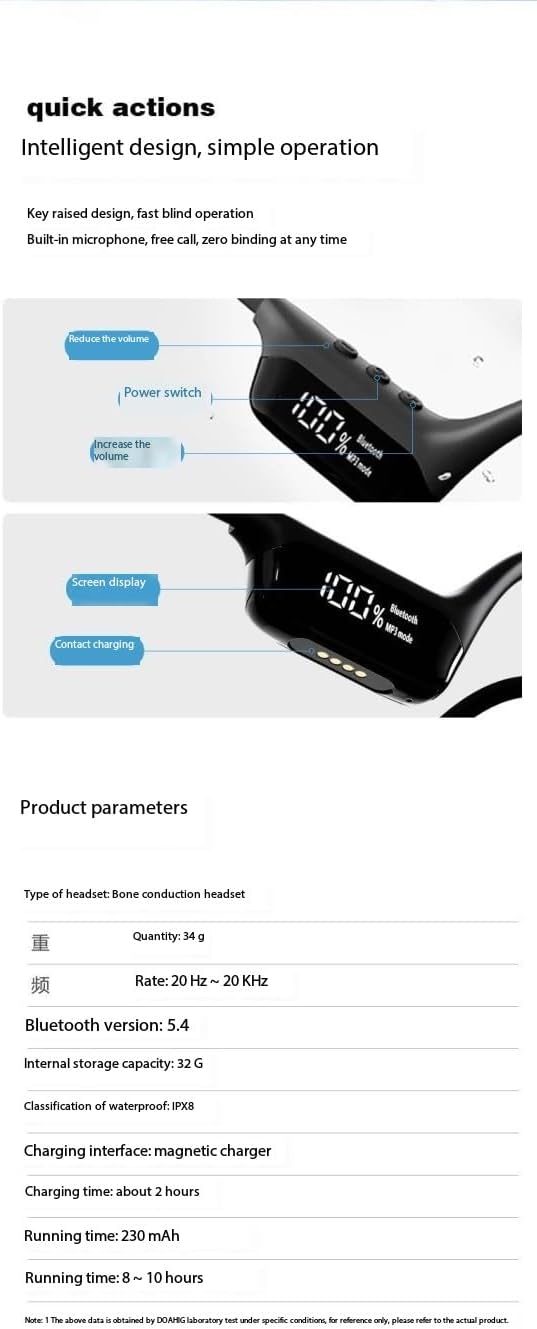
ചിത്രം 2.1: ഹെഡ്ഫോണിന്റെ ഡിജിറ്റൽ ഡിസ്പ്ലേയുടെയും മാഗ്നറ്റിക് ചാർജിംഗ് കോൺടാക്റ്റ് പോയിന്റുകളുടെയും വിശദാംശങ്ങൾ. ഡിസ്പ്ലേ ബാറ്ററി ശതമാനം കാണിക്കുന്നു.tage, മോഡ്, പവർ, വോളിയം നിയന്ത്രണങ്ങൾ എന്നിവയ്ക്കൊപ്പം.
2.3 പവർ ഓൺ/ഓഫ്
- പവർ ഓൺ: ഡിജിറ്റൽ ഡിസ്പ്ലേ പ്രകാശിക്കുന്നത് വരെ ഏകദേശം 3 സെക്കൻഡ് നേരത്തേക്ക് പവർ ബട്ടൺ (സ്ഥാനത്തിനായി ചിത്രം 2.1 കാണുക) അമർത്തിപ്പിടിക്കുക.
- പവർ ഓഫ്: ഡിജിറ്റൽ ഡിസ്പ്ലേ ഓഫാകുന്നത് വരെ ഏകദേശം 5 സെക്കൻഡ് നേരത്തേക്ക് പവർ ബട്ടൺ അമർത്തിപ്പിടിക്കുക.
2.4 ബ്ലൂടൂത്ത് ജോടിയാക്കൽ
- ഹെഡ്ഫോണുകൾ ഓഫാണെന്ന് ഉറപ്പാക്കുക.
- ഡിജിറ്റൽ ഡിസ്പ്ലേയിൽ "ബ്ലൂടൂത്ത്" കാണിക്കുകയും ഇൻഡിക്കേറ്റർ ലൈറ്റ് മിന്നുകയും ചെയ്യുന്നത് വരെ പവർ ബട്ടൺ ഏകദേശം 5-7 സെക്കൻഡ് അമർത്തിപ്പിടിക്കുക, ഇത് പെയറിംഗ് മോഡിനെ സൂചിപ്പിക്കുന്നു.
- നിങ്ങളുടെ ഉപകരണത്തിൽ (സ്മാർട്ട്ഫോൺ, ടാബ്ലെറ്റ്, ലാപ്ടോപ്പ്), ബ്ലൂടൂത്ത് പ്രവർത്തനക്ഷമമാക്കി ലഭ്യമായ ഉപകരണങ്ങൾക്കായി തിരയുക.
- കണ്ടെത്തിയ ഉപകരണങ്ങളുടെ പട്ടികയിൽ നിന്ന് "S10 ഹെഡ്ഫോണുകൾ" (അല്ലെങ്കിൽ സമാനമായ പേര്) തിരഞ്ഞെടുക്കുക.
- കണക്റ്റ് ചെയ്തുകഴിഞ്ഞാൽ, ഡിജിറ്റൽ ഡിസ്പ്ലേ ഒരു സ്ഥിരതയുള്ള ബ്ലൂടൂത്ത് ഐക്കൺ കാണിക്കും.
3. പ്രവർത്തന നിർദ്ദേശങ്ങൾ
3.1 വോളിയം നിയന്ത്രണം
ഹെഡ്ഫോണുകളിൽ പ്രത്യേക വോളിയം ബട്ടണുകൾ ഉണ്ട്. ബട്ടൺ സ്ഥാനങ്ങൾക്കായി ചിത്രം 2.1 കാണുക.
- വോളിയം വർദ്ധിപ്പിക്കുക: '+' ബട്ടൺ അമർത്തുക.
- വോളിയം കുറയ്ക്കുക: '-' ബട്ടൺ അമർത്തുക.
3.2 പ്ലേബാക്ക് മോഡുകൾ (ബ്ലൂടൂത്ത് / MP3)
ബിൽറ്റ്-ഇൻ 32 ജിബി മെമ്മറി വഴി ബ്ലൂടൂത്ത് സ്ട്രീമിംഗും ലോക്കൽ എംപി3 പ്ലേബാക്കും എസ്10 ഹെഡ്ഫോണുകൾ പിന്തുണയ്ക്കുന്നു.
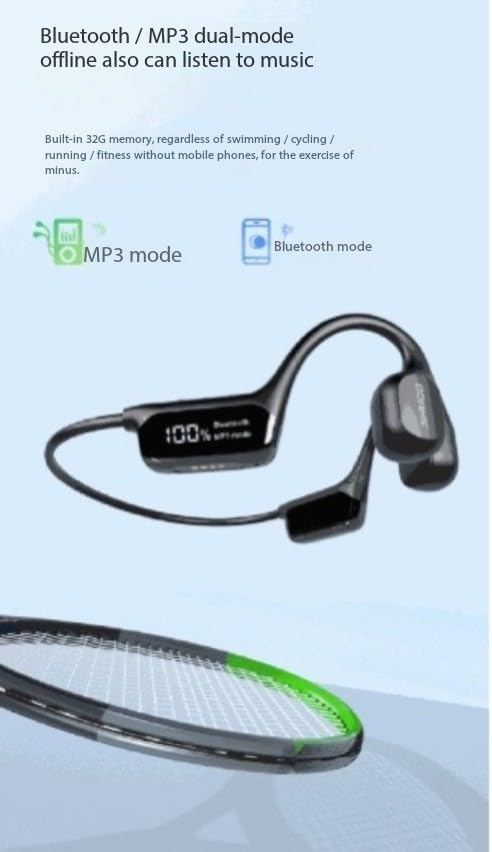
ചിത്രം 3.1: MP3 അല്ലെങ്കിൽ Bluetooth എന്നിവയിൽ ഏതെങ്കിലും സജീവ പ്ലേബാക്ക് മോഡ് സൂചിപ്പിക്കുന്ന ഡിജിറ്റൽ ഡിസ്പ്ലേ. ഓഫ്ലൈൻ സംഗീതത്തിനായി ഹെഡ്ഫോണുകളിൽ 32GB ഇന്റേണൽ സ്റ്റോറേജ് ഉണ്ട്.
- സ്വിച്ചിംഗ് മോഡുകൾ: ബ്ലൂടൂത്ത് മോഡിനും MP3 മോഡിനും ഇടയിൽ ടോഗിൾ ചെയ്യാൻ ഡെഡിക്കേറ്റഡ് മോഡ് ബട്ടൺ ഉപയോഗിക്കുക (ചിത്രം 2.1 കാണുക).
- MP3 പ്ലേബാക്ക്: MP3 മോഡിൽ ആയിരിക്കുമ്പോൾ, ഹെഡ്ഫോണുകൾ അവയുടെ ആന്തരിക 32GB മെമ്മറിയിൽ സംഭരിച്ചിരിക്കുന്ന സംഗീതം പ്ലേ ചെയ്യും. ഫോൺ ഇല്ലാത്ത സ്ഥലങ്ങളിൽ നീന്തൽ പോലുള്ള പ്രവർത്തനങ്ങൾക്ക് ഇത് അനുയോജ്യമാണ്.
- ബ്ലൂടൂത്ത് പ്ലേബാക്ക്: ബ്ലൂടൂത്ത് മോഡിലായിരിക്കുമ്പോൾ, നിങ്ങളുടെ ജോടിയാക്കിയ ഉപകരണത്തിൽ നിന്ന് ഹെഡ്ഫോണുകൾ ഓഡിയോ സ്ട്രീം ചെയ്യും.
3.3 ശബ്ദ കുറയ്ക്കൽ സാങ്കേതികവിദ്യ
ആംബിയന്റ് നോയ്സ് കുറയ്ക്കുന്നതിനും വ്യക്തമായ ഓഡിയോ നൽകുന്നതിനും വേണ്ടി ഈ ഹെഡ്ഫോണുകളിൽ ടു-വേ സൗണ്ട് വേവ് നോയ്സ് റിഡക്ഷൻ സാങ്കേതികവിദ്യ ഉൾപ്പെടുത്തിയിട്ടുണ്ട്. നിങ്ങളുടെ ശ്രവണ അനുഭവം മെച്ചപ്പെടുത്തുന്നതിന് ഈ സവിശേഷത യാന്ത്രികമായി പ്രവർത്തിക്കുന്നു.

ചിത്രം 3.2: ശബ്ദം കുറയ്ക്കുന്നതിനും ആശയവിനിമയ വ്യക്തത മെച്ചപ്പെടുത്തുന്നതിനും ഉപയോഗിക്കുന്ന ദ്വിദിശ അക്കോസ്റ്റിക് തരംഗ സാങ്കേതികവിദ്യയുടെ ദൃശ്യ പ്രാതിനിധ്യം.
3.4 ജല പ്രതിരോധം (IPX8)
IPX8 വാട്ടർപ്രൂഫ് റേറ്റിംഗുള്ള ഈ ഹെഡ്ഫോണുകൾ വെള്ളത്തിൽ ഉപയോഗിക്കുന്നതിനായി രൂപകൽപ്പന ചെയ്തിരിക്കുന്നു. 1 മീറ്റർ (3.28 അടി) വരെ ദീർഘനേരം മുങ്ങുന്നത് ഇവയ്ക്ക് നേരിടാൻ കഴിയും, ഇത് നീന്തൽ, സർഫിംഗ്, മറ്റ് ജല കായിക വിനോദങ്ങൾ എന്നിവയ്ക്ക് അനുയോജ്യമാക്കുന്നു.

ചിത്രം 3.3: വെള്ളത്തിൽ കാണിച്ചിരിക്കുന്ന ഹെഡ്ഫോണുകൾ, അവയുടെ IPX8 വാട്ടർപ്രൂഫ് ശേഷി എടുത്തുകാണിക്കുന്നു, നീന്തൽ, മറ്റ് ജല പ്രവർത്തനങ്ങൾ എന്നിവയിൽ ഉപയോഗിക്കാൻ അനുവദിക്കുന്നു.
ഒപ്റ്റിമൽ പ്രകടനത്തിനും ദീർഘായുസ്സിനും, വെള്ളം കയറിയതിനുശേഷം ചാർജിംഗ് കേബിൾ ബന്ധിപ്പിക്കുന്നതിന് മുമ്പ് ചാർജിംഗ് പോർട്ട് വരണ്ടതാണെന്ന് ഉറപ്പാക്കുക.
3.5 ഉപയോഗ സാഹചര്യങ്ങൾ
S10 ഹെഡ്ഫോണുകൾ വൈവിധ്യമാർന്നതും വൈവിധ്യമാർന്ന പ്രവർത്തനങ്ങൾക്ക് അനുയോജ്യവുമാണ്:
- ഓട്ടവും നടത്തവും: ഔട്ട്ഡോർ വ്യായാമത്തിന് ഭാരം കുറഞ്ഞതും സുരക്ഷിതവുമായ ഫിറ്റ്.
- ഹൈക്കിംഗ് & ക്ലൈംബിംഗ്: പരുക്കൻ ചുറ്റുപാടുകൾക്ക് അനുയോജ്യമായ ഈടുനിൽക്കുന്ന രൂപകൽപ്പന.
- നീന്തലും ഡൈവിംഗും: IPX8 വാട്ടർപ്രൂഫ് റേറ്റിംഗ് വെള്ളത്തിനടിയിൽ ഉപയോഗിക്കാൻ അനുവദിക്കുന്നു.
- മറ്റ് കായിക വിനോദങ്ങൾ: ടെന്നീസ്, ബാഡ്മിന്റൺ, പൊതുവായ ഔട്ട്ഡോർ സ്പോർട്സ് എന്നിവയ്ക്ക് അനുയോജ്യം.
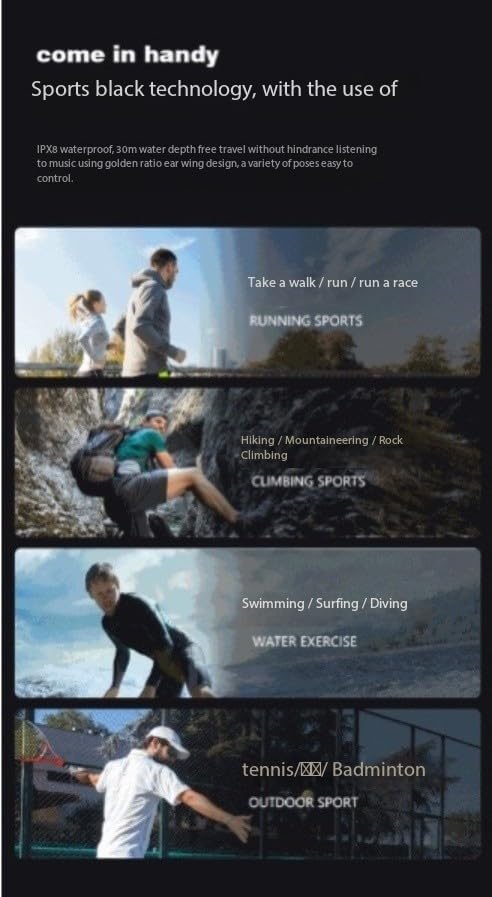
ചിത്രം 3.4: ഉദാampഓട്ടം, കയറ്റം, നീന്തൽ, റാക്കറ്റ് സ്പോർട്സ് എന്നിവയുൾപ്പെടെ S10 ഹെഡ്ഫോണുകൾ ഉപയോഗിക്കാൻ കഴിയുന്ന നിരവധി കായിക പ്രവർത്തനങ്ങൾ.
4. പരിപാലനവും പരിചരണവും
- വൃത്തിയാക്കൽ: ഒരു സോഫ്റ്റ്, ഡി ഉപയോഗിച്ച് ഹെഡ്ഫോണുകൾ തുടയ്ക്കുകamp തുണി. കഠിനമായ രാസവസ്തുക്കളോ അബ്രാസീവ് ക്ലീനറുകളോ ഉപയോഗിക്കരുത്. ചാർജ് ചെയ്യുന്നതിന് മുമ്പ് ഹെഡ്ഫോണുകൾ ഉണങ്ങിയെന്ന് ഉറപ്പാക്കുക.
- സംഭരണം: നേരിട്ടുള്ള സൂര്യപ്രകാശത്തിൽ നിന്നും കടുത്ത താപനിലയിൽ നിന്നും മാറി തണുത്തതും വരണ്ടതുമായ സ്ഥലത്ത് ഹെഡ്ഫോണുകൾ സൂക്ഷിക്കുക.
- ബാറ്ററി കെയർ: ബാറ്ററി ലൈഫ് വർദ്ധിപ്പിക്കാൻ, ബാറ്ററി ഇടയ്ക്കിടെ പൂർണ്ണമായും ഡിസ്ചാർജ് ചെയ്യുന്നത് ഒഴിവാക്കുക. ദീർഘനേരം ഉപയോഗത്തിലില്ലെങ്കിൽ പോലും ഹെഡ്ഫോണുകൾ പതിവായി ചാർജ് ചെയ്യുക.
- വാട്ടർ എക്സ്പോഷർ: വെള്ളത്തിൽ ഉപയോഗിച്ചതിന് ശേഷം, ശുദ്ധജലം ഉപയോഗിച്ച് കഴുകിക്കളയുക, ചാർജ് ചെയ്യുന്നതിനോ സൂക്ഷിക്കുന്നതിനോ മുമ്പ് പൂർണ്ണമായും വായുവിൽ ഉണങ്ങാൻ അനുവദിക്കുക.
5. പ്രശ്നപരിഹാരം
| പ്രശ്നം | സാധ്യമായ കാരണം | പരിഹാരം |
|---|---|---|
| ഹെഡ്ഫോണുകൾ പവർ ഓൺ ചെയ്യുന്നില്ല. | കുറഞ്ഞ ബാറ്ററി. | ഹെഡ്ഫോണുകൾ പൂർണ്ണമായും ചാർജ് ചെയ്യുക. |
| ഉപകരണവുമായി ജോടിയാക്കാൻ കഴിയില്ല. | ഹെഡ്ഫോണുകൾ ജോടിയാക്കൽ മോഡിൽ ഇല്ല; ഉപകരണത്തിൽ ബ്ലൂടൂത്ത് ഓഫാണ്; ഉപകരണം വളരെ അകലെയാണ്. | ഹെഡ്ഫോണുകൾ ജോടിയാക്കൽ മോഡിലാണെന്ന് ഉറപ്പാക്കുക. ഉപകരണത്തിൽ ബ്ലൂടൂത്ത് ഓൺ/ഓഫ് ചെയ്യുക. ഉപകരണം ഹെഡ്ഫോണുകൾക്ക് അടുത്തേക്ക് നീക്കുക. |
| ശബ്ദമില്ല. | ശബ്ദം വളരെ കുറവാണ്; തെറ്റായ മോഡ് തിരഞ്ഞെടുത്തു; കണക്റ്റ് ചെയ്തിട്ടില്ല. | ശബ്ദം വർദ്ധിപ്പിക്കുക. ശരിയായ പ്ലേബാക്ക് മോഡിലേക്ക് മാറുക (ബ്ലൂടൂത്ത്/MP3). ഹെഡ്ഫോണുകൾ വീണ്ടും ബന്ധിപ്പിക്കുക. |
| ചാർജിംഗ് പ്രവർത്തിക്കുന്നില്ല. | കേബിൾ ശരിയായി ബന്ധിപ്പിച്ചിട്ടില്ല; ചാർജിംഗ് പോർട്ട് നനഞ്ഞിരിക്കുന്നു; കേബിൾ/അഡാപ്റ്റർ തകരാറിലായി. | കേബിൾ സുരക്ഷിതമായി ബന്ധിപ്പിച്ചിട്ടുണ്ടെന്ന് ഉറപ്പാക്കുക. ചാർജിംഗ് പോർട്ട് പൂർണ്ണമായും ഉണക്കുക. മറ്റൊരു USB പോർട്ട് അല്ലെങ്കിൽ അഡാപ്റ്റർ പരീക്ഷിക്കുക. |
6 സ്പെസിഫിക്കേഷനുകൾ
| ഫീച്ചർ | വിശദാംശങ്ങൾ |
|---|---|
| മോഡലിൻ്റെ പേര് | എസ് 190 |
| ബ്രാൻഡ് | ജനറിക് |
| കണക്റ്റിവിറ്റി ടെക്നോളജി | ബ്ലൂടൂത്ത് 5.4 |
| ജല പ്രതിരോധ നില | IPX8 (വാട്ടർപ്രൂഫ്) |
| ആന്തരിക സംഭരണം | 32GB (MP3 മോഡിനായി) |
| ശബ്ദ നിയന്ത്രണം | സജീവ ശബ്ദ റദ്ദാക്കൽ / ടു-വേ ശബ്ദ തരംഗ ശബ്ദ കുറവ് |
| ചാർജിംഗ് സമയം | ഏകദേശം 2 മണിക്കൂർ |
| റണ്ണിംഗ് ടൈം | 8-10 മണിക്കൂർ |
| മെറ്റീരിയൽ | പ്ലാസ്റ്റിക് |
| നിയന്ത്രണ തരം | ടച്ച് നിയന്ത്രണം |
| ഭാരം | 34 ഗ്രാം |
| ഫ്രീക്വൻസി നിരക്ക് | 20 Hz ~ 20 KHz |
കുറിപ്പ്: അറിയിപ്പുകൾ കൂടാതെ സവിശേഷതകൾ മാറ്റത്തിന് വിധേയമാണ്.
7. വാറൻ്റിയും പിന്തുണയും
ലഭ്യമായ ഡോക്യുമെന്റേഷനിൽ ഈ ഉൽപ്പന്നത്തിനായുള്ള പ്രത്യേക വാറന്റി വിവരങ്ങൾ നൽകിയിട്ടില്ല. വാറന്റി കവറേജ്, റിട്ടേണുകൾ അല്ലെങ്കിൽ സാങ്കേതിക പിന്തുണ എന്നിവയെക്കുറിച്ചുള്ള വിശദാംശങ്ങൾക്ക്, ദയവായി നിർമ്മാതാവിനെയോ നിങ്ങളുടെ വാങ്ങൽ കേന്ദ്രത്തെയോ നേരിട്ട് ബന്ധപ്പെടുക.
നിർമ്മാതാവ്: Guangzhou Changhong Huixin Technology Co., Ltd.


