1. ആമുഖം
വാങ്ങിയതിന് നന്ദി.asing പോർട്ടബിൾ മിനി പ്രൊജക്ടർ. വൈവിധ്യമാർന്നതും ആഴത്തിലുള്ളതുമായ ഒരു ഉപകരണം നൽകുന്നതിനാണ് ഈ ഉപകരണം രൂപകൽപ്പന ചെയ്തിരിക്കുന്നത്. viewഇൻഡോർ, ഔട്ട്ഡോർ ഉപയോഗത്തിനായി ഹൈ-ഡെഫനിഷൻ ഡീകോഡിംഗിനെയും വിവിധ കണക്റ്റിവിറ്റി ഓപ്ഷനുകളെയും പിന്തുണയ്ക്കുന്ന അനുഭവപരിചയം. പ്രൊജക്ടർ പ്രവർത്തിപ്പിക്കുന്നതിന് മുമ്പ് ശരിയായ ഉപയോഗം ഉറപ്പാക്കുന്നതിനും അതിന്റെ പ്രകടനവും ആയുസ്സും പരമാവധിയാക്കുന്നതിനും ദയവായി ഈ മാനുവൽ നന്നായി വായിക്കുക.
2 സുരക്ഷാ വിവരങ്ങൾ
തീപിടുത്തം, വൈദ്യുതാഘാതം, പ്രൊജക്ടറിന് കേടുപാടുകൾ എന്നിവ ഒഴിവാക്കാൻ, ദയവായി ഇനിപ്പറയുന്ന സുരക്ഷാ മുൻകരുതലുകൾ പാലിക്കുക:
- വെന്റിലേഷൻ ദ്വാരങ്ങൾ അടയ്ക്കരുത്. പ്രൊജക്ടറിന് ചുറ്റും മതിയായ വായുസഞ്ചാരം ഉറപ്പാക്കുക.
- പ്രൊജക്ടറിൽ മഴയോ ഈർപ്പമോ ഏൽക്കരുത്. ജലസ്രോതസ്സുകളിൽ നിന്ന് മാറ്റി വയ്ക്കുക.
- പ്രൊജക്ടറിനൊപ്പം നൽകിയിരിക്കുന്ന പവർ അഡാപ്റ്റർ മാത്രം ഉപയോഗിക്കുക.
- എൽ ചെയ്യുമ്പോൾ പ്രൊജക്ടർ ലെൻസിലേക്ക് നേരിട്ട് നോക്കുന്നത് ഒഴിവാക്കുകamp തിളക്കമുള്ള വെളിച്ചം കണ്ണിന് ആയാസമോ കേടുപാടുകളോ ഉണ്ടാക്കുമെന്നതിനാൽ ഓണാണ്.
- പ്രൊജക്ടർ വേർപെടുത്താനോ പരിഷ്കരിക്കാനോ ശ്രമിക്കരുത്. എല്ലാ സേവനങ്ങളും യോഗ്യതയുള്ള ഉദ്യോഗസ്ഥർക്ക് റഫർ ചെയ്യുക.
- പ്രൊജക്ടർ വീഴാതിരിക്കാൻ ഒരു സ്ഥിരതയുള്ള, നിരപ്പായ പ്രതലത്തിൽ വയ്ക്കുക.
- നേരിട്ടുള്ള സൂര്യപ്രകാശം, താപ സ്രോതസ്സുകൾ, തീവ്രമായ താപനില എന്നിവയിൽ നിന്ന് പ്രൊജക്ടറിനെ അകറ്റി നിർത്തുക.
3. പാക്കേജ് ഉള്ളടക്കം
അൺബോക്സിംഗ് ചെയ്യുമ്പോൾ പാക്കേജ് ഉള്ളടക്കങ്ങൾ പരിശോധിക്കുക:
- പോർട്ടബിൾ മിനി പ്രൊജക്ടർ
- പവർ അഡാപ്റ്റർ
- വിദൂര നിയന്ത്രണം (ബാറ്ററികൾ ഉൾപ്പെടുത്തിയിട്ടില്ല)
- HDMI കേബിൾ
- ഉപയോക്തൃ മാനുവൽ
4. ഉൽപ്പന്ന സവിശേഷതകളും ഘടകങ്ങളും
പ്രൊജക്ടറിന്റെ പ്രധാന സവിശേഷതകളും ഘടകങ്ങളും പരിചയപ്പെടുക:
- പ്രൊജക്ഷൻ ലെൻസ്: ചിത്രം സ്ക്രീനിലേക്കോ പ്രതലത്തിലേക്കോ പുറപ്പെടുവിക്കുന്നു.
- ഫോക്കസ് റിംഗ്: പ്രൊജക്റ്റ് ചെയ്ത ചിത്രത്തിന്റെ വ്യക്തത ക്രമീകരിക്കുന്നു.
- ഇൻപുട്ട് പോർട്ടുകൾ: വിവിധ ഉപകരണ കണക്ഷനുകൾക്കായി HDMI, USB, AV, മെമ്മറി കാർഡ് സ്ലോട്ട്.
- ബിൽറ്റ്-ഇൻ സ്പീക്കർ: ഓഡിയോ ഔട്ട്പുട്ട് നൽകുന്നു.
- വെന്റിലേഷൻ ഗ്രില്ലുകൾ: താപ വിസർജ്ജനത്തിനായി.
- പവർ ബട്ടൺ: പ്രൊജക്ടർ ഓൺ/ഓഫ് ചെയ്യുന്നു.
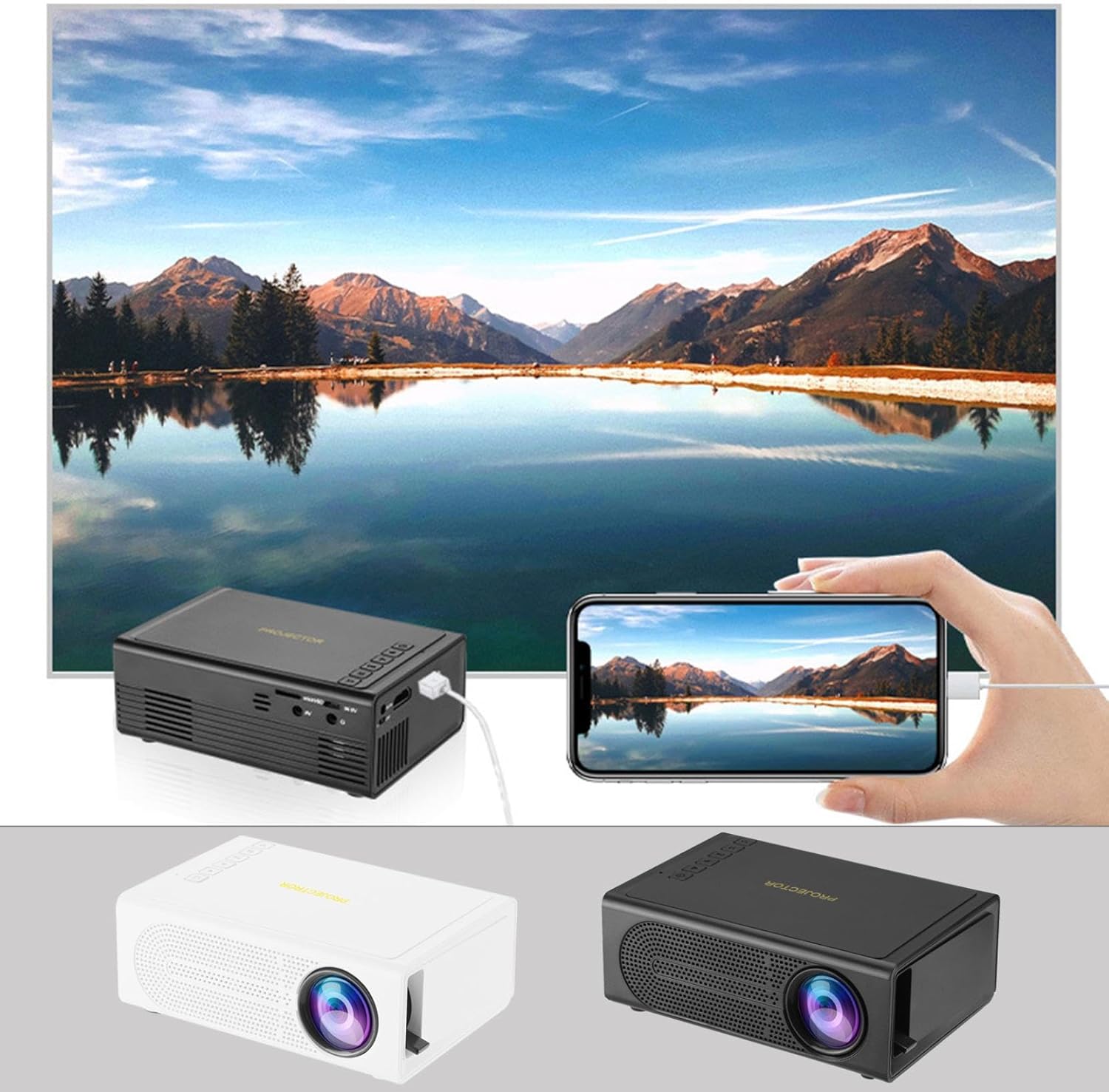
ചിത്രം: ഉപയോഗത്തിലുള്ള പോർട്ടബിൾ മിനി പ്രൊജക്ടർ, ഒരു വലിയ ഡിസ്പ്ലേയിൽ ഒരു സ്മാർട്ട്ഫോൺ സ്ക്രീൻ മിറർ ചെയ്യാനുള്ള കഴിവ് പ്രകടമാക്കുന്നു. പ്രൊജക്ടറിന്റെ കറുപ്പും വെളുപ്പും നിറങ്ങൾ കാണിച്ചിരിക്കുന്നു.

ചിത്രം: പ്രൊജക്ടറിന്റെ ഭൗതിക അളവുകൾ, അതിന്റെ ഒതുക്കമുള്ള വലിപ്പത്തെ സൂചിപ്പിക്കുന്നു.
5. സജ്ജീകരണം
- പവർ കണക്ഷൻ: വിതരണം ചെയ്ത പവർ അഡാപ്റ്റർ പ്രൊജക്ടറിന്റെ പവർ ഇൻപുട്ട് പോർട്ടുമായി ബന്ധിപ്പിച്ച് ഒരു പവർ ഔട്ട്ലെറ്റിലേക്ക് പ്ലഗ് ചെയ്യുക.
- പ്ലേസ്മെൻ്റ്: പ്രൊജക്ടർ ഒരു സ്ഥിരതയുള്ളതും പരന്നതുമായ പ്രതലത്തിൽ സ്ഥാപിക്കുക. ഒപ്റ്റിമൽ ആയി viewപ്രൊജക്ടർ പ്രതലത്തിന് (ചുവർ അല്ലെങ്കിൽ സ്ക്രീൻ) ലംബമായി സ്ഥാപിക്കുക.
- പവർ ഓൺ: ഉപകരണം ഓണാക്കാൻ പ്രൊജക്ടറിലോ റിമോട്ട് കൺട്രോളിലോ പവർ ബട്ടൺ അമർത്തുക.
- ഫോക്കസ് അഡ്ജസ്റ്റ്മെന്റ്: പവർ ഓൺ ചെയ്തുകഴിഞ്ഞാൽ, പ്രൊജക്റ്റ് ചെയ്ത ചിത്രം വ്യക്തവും മൂർച്ചയുള്ളതുമായി കാണപ്പെടുന്നതുവരെ പ്രൊജക്ടറിലെ ഫോക്കസ് റിംഗ് തിരിക്കുക.
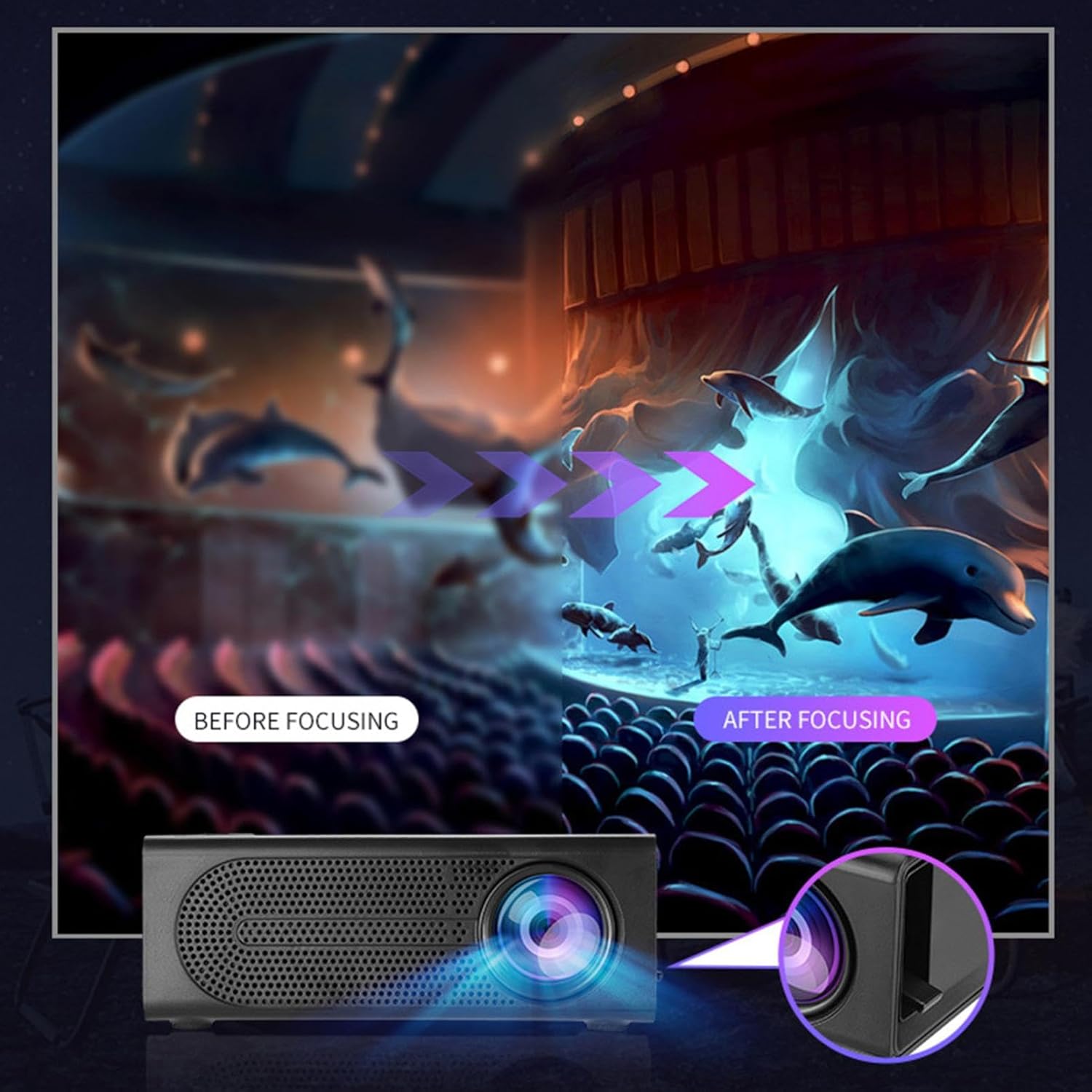
ചിത്രം: മങ്ങിയ ചിത്രവും മൂർച്ചയുള്ള ചിത്രവും തമ്മിലുള്ള വ്യത്യാസം കാണിക്കുന്ന ഫോക്കസ് ക്രമീകരണത്തിന്റെ ദൃശ്യ പ്രദർശനം.
6. പ്രവർത്തന നിർദ്ദേശങ്ങൾ
6.1 ഉപകരണങ്ങൾ ബന്ധിപ്പിക്കുന്നു
പ്രൊജക്ടർ വിവിധ ഇൻപുട്ട് സ്രോതസ്സുകളെ പിന്തുണയ്ക്കുന്നു. നിങ്ങളുടെ ഉപകരണം കണക്റ്റുചെയ്തതിനുശേഷം പ്രൊജക്ടറിന്റെ മെനുവിൽ നിന്ന് ഉചിതമായ ഇൻപുട്ട് മോഡ് തിരഞ്ഞെടുക്കുക.
- എച്ച്ഡിഎംഐ: ഒരു HDMI കേബിൾ ഉപയോഗിച്ച് ലാപ്ടോപ്പുകൾ, ഗെയിമിംഗ് കൺസോളുകൾ, DVD പ്ലെയറുകൾ അല്ലെങ്കിൽ മറ്റ് HDMI- പ്രാപ്തമാക്കിയ ഉപകരണങ്ങൾ എന്നിവ ബന്ധിപ്പിക്കുക.
- USB: മീഡിയ പ്ലേ ചെയ്യാൻ ഒരു യുഎസ്ബി ഫ്ലാഷ് ഡ്രൈവ് ഇടുക. fileനേരിട്ട്.
- ഓഫ്: VCR-കൾ അല്ലെങ്കിൽ ചില സെറ്റ്-ടോപ്പ് ബോക്സുകൾ പോലുള്ള പഴയ ഉപകരണങ്ങളെ ബന്ധിപ്പിക്കാൻ ഒരു AV കേബിൾ ഉപയോഗിക്കുക.
- മെമ്മറി കാർഡ്: അനുയോജ്യമായ ഒരു മെമ്മറി കാർഡ് ഇടുക view ഫോട്ടോകൾ അല്ലെങ്കിൽ വീഡിയോകൾ.
- സ്മാർട്ട്ഫോൺ/ടാബ്ലെറ്റ്: വയർഡ് ഫോണിലൂടെ ഒരേ സ്ക്രീൻ പ്ലേബാക്കിനായി, നിങ്ങളുടെ സ്മാർട്ട്ഫോണോ ടാബ്ലെറ്റോ ഒരു അനുയോജ്യമായ കേബിൾ വഴി ബന്ധിപ്പിക്കുക (ഉദാഹരണത്തിന്, സ്ക്രീൻ മിററിംഗിനായി USB-യിൽ നിന്ന് ലൈറ്റ്നിംഗ്/USB-C-യിലേക്ക്, നിങ്ങളുടെ ഉപകരണവും പ്രൊജക്ടറും പിന്തുണയ്ക്കുന്നുണ്ടെങ്കിൽ).

ചിത്രം: പ്രൊജക്ടറുമായി പൊരുത്തപ്പെടുന്ന വിവിധ ഉപകരണങ്ങളെ ചിത്രീകരിക്കുന്ന കണക്റ്റിവിറ്റി ഡയഗ്രം.
6.2 പ്രൊജക്ഷൻ വലുപ്പം ക്രമീകരിക്കൽ
പ്രൊജക്ടറിന് 32 മുതൽ 100 ഇഞ്ച് വരെയുള്ള ചിത്രങ്ങൾ പ്രൊജക്റ്റ് ചെയ്യാൻ കഴിയും. പ്രൊജക്ടറും പ്രൊജക്ഷൻ പ്രതലവും തമ്മിലുള്ള ദൂരം അനുസരിച്ചാണ് പ്രൊജക്ഷൻ വലുപ്പം നിർണ്ണയിക്കുന്നത്. ചെറിയ ചിത്രത്തിനായി പ്രൊജക്ടർ ഉപരിതലത്തോട് കൂടുതൽ അടുപ്പിക്കുകയും വലിയ ചിത്രത്തിനായി കൂടുതൽ അകലുകയും ചെയ്യുക.
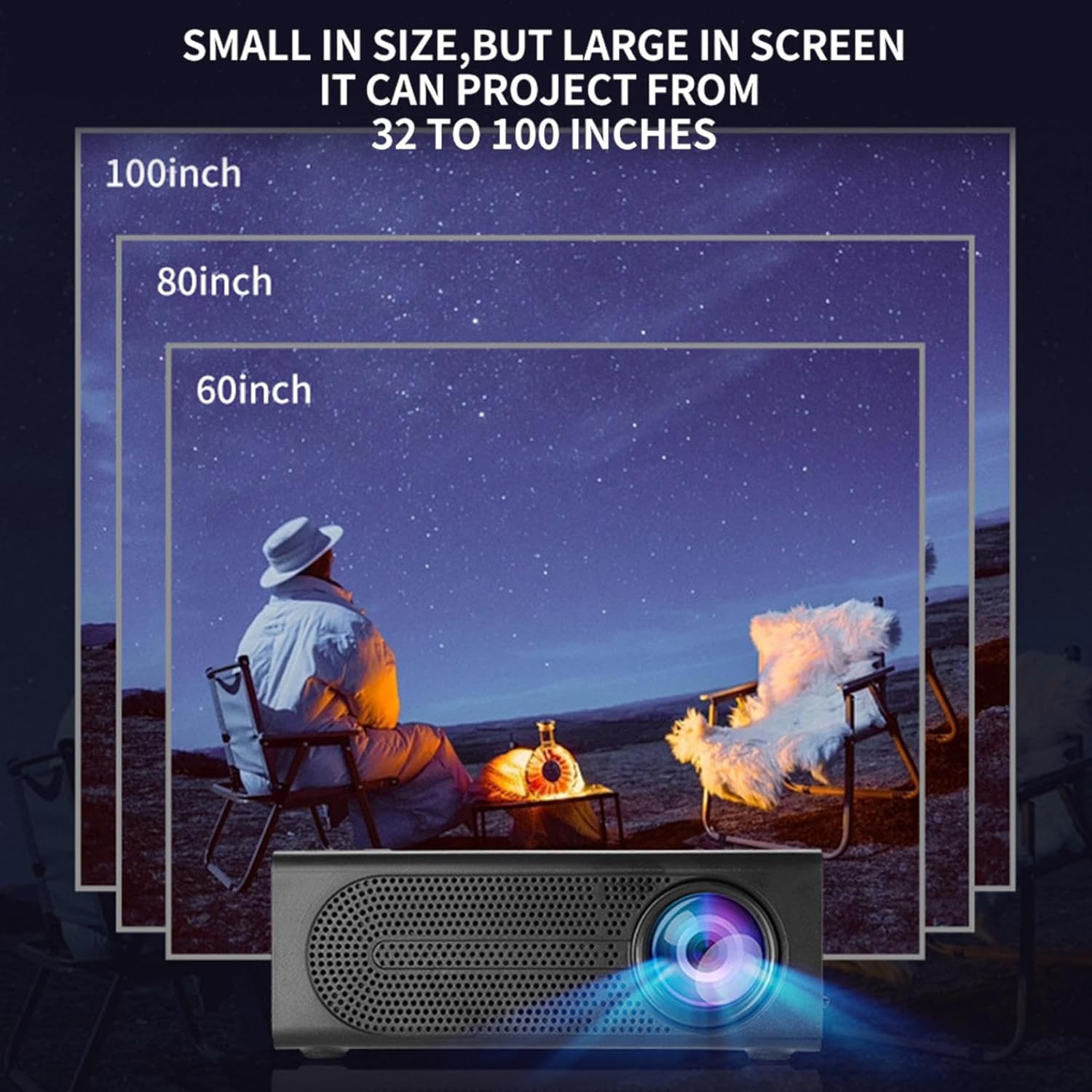
ചിത്രം: പ്രൊജക്ടർ ഉപയോഗിച്ച് സാധ്യമാകുന്ന വിവിധ പ്രൊജക്ഷൻ വലുപ്പങ്ങളുടെ ചിത്രീകരണം, 32 മുതൽ 100 ഇഞ്ച് വരെ.
6.3 ഉപയോഗ സാഹചര്യങ്ങൾ
ഈ പ്രൊജക്ടർ വിവിധ പരിതസ്ഥിതികൾക്കും ഉപയോഗങ്ങൾക്കും അനുയോജ്യമാണ്:
- മാതാപിതാക്കളും കുട്ടികളും തമ്മിലുള്ള ഇടപെടൽ: കുടുംബത്തോടൊപ്പം സിനിമകളോ വിദ്യാഭ്യാസ ഉള്ളടക്കമോ ആസ്വദിക്കൂ.
- ഔട്ട്ഡോർ സിനിമ: നിങ്ങളുടെ പിൻമുറ്റത്ത് ഒരു സിനിമാ രാത്രി ക്രമീകരിക്കുക.
- കിടപ്പുമുറി പ്രൊജക്ഷൻ: നിങ്ങളുടെ കിടക്കയിലിരുന്ന് സുഖകരമായി ഉള്ളടക്കം കാണുക.
- ലിവിംഗ് റൂം സിനിമ: നിങ്ങളുടെ താമസസ്ഥലം ഒരു ഹോം തിയേറ്ററാക്കി മാറ്റൂ.

ചിത്രം: ഉദാampഇൻഡോർ ഹോം തിയേറ്റർ മുതൽ ഔട്ട്ഡോർ വിനോദം വരെ പ്രൊജക്ടറിനായി നിരവധി വൈവിധ്യമാർന്ന ഉപയോഗ സാഹചര്യങ്ങൾ.

ചിത്രം: പ്രൊജക്ടർ ഉപയോഗിച്ചുള്ള കുടുംബ വിനോദത്തിന്റെ ചിത്രീകരണം, ടിവിയിൽ നിന്നുള്ള നേരിട്ടുള്ള കിരണ പ്രകാശവുമായി താരതമ്യപ്പെടുത്തുമ്പോൾ കണ്ണിന് സുഖകരമാക്കുന്നതിന് ഡിഫ്യൂസ് പ്രതിഫലനത്തിന്റെ പ്രയോജനം വിശദീകരിക്കുന്ന ഒരു സാങ്കേതിക ഡയഗ്രാമിനൊപ്പം.
7. പരിപാലനം
ശരിയായ അറ്റകുറ്റപ്പണി നിങ്ങളുടെ പ്രൊജക്ടറിന്റെ ദീർഘായുസ്സും മികച്ച പ്രകടനവും ഉറപ്പാക്കുന്നു:
- ലെൻസ് ക്ലീനിംഗ്: പ്രൊജക്ടർ ലെൻസ് മൃദുവായി തുടയ്ക്കാൻ ഒപ്റ്റിക്കൽ ലെൻസുകൾക്കായി പ്രത്യേകം രൂപകൽപ്പന ചെയ്ത മൃദുവായ, ലിന്റ് രഹിത തുണി ഉപയോഗിക്കുക. അബ്രസീവ് ക്ലീനറുകളോ അമിത ബലമോ ഉപയോഗിക്കരുത്.
- പൊടി നീക്കം: പൊടി അടിഞ്ഞുകൂടുന്നത് തടയാൻ മൃദുവായ ബ്രഷ് അല്ലെങ്കിൽ കംപ്രസ് ചെയ്ത വായു ഉപയോഗിച്ച് വെന്റിലേഷൻ ഗ്രില്ലുകൾ പതിവായി വൃത്തിയാക്കുക, ഇത് തണുപ്പിനെയും പ്രകടനത്തെയും ബാധിക്കും.
- സംഭരണം: ദീർഘനേരം ഉപയോഗിക്കാത്തപ്പോൾ, പ്രൊജക്ടർ തണുത്തതും വരണ്ടതുമായ സ്ഥലത്ത് സൂക്ഷിക്കുക, നേരിട്ടുള്ള സൂര്യപ്രകാശത്തിൽ നിന്നും കടുത്ത താപനിലയിൽ നിന്നും അകറ്റി നിർത്തുക.
- പവർ ഓഫ് ശരിയായി: പ്രൊജക്ടർ എപ്പോഴും പവർ ബട്ടൺ ഉപയോഗിച്ച് ഓഫാക്കി, പ്ലഗ് അൺപ്ലഗ് ചെയ്യുന്നതിനോ നീക്കുന്നതിനോ മുമ്പ് അത് തണുക്കാൻ അനുവദിക്കുക.
8. പ്രശ്നപരിഹാരം
നിങ്ങളുടെ പ്രൊജക്ടറിൽ പ്രശ്നങ്ങൾ നേരിടുകയാണെങ്കിൽ, ഇനിപ്പറയുന്ന പൊതുവായ പ്രശ്നങ്ങളും പരിഹാരങ്ങളും പരിശോധിക്കുക:
| പ്രശ്നം | സാധ്യമായ കാരണം | പരിഹാരം |
|---|---|---|
| ഒരു ചിത്രവും പ്രൊജക്റ്റ് ചെയ്തിട്ടില്ല. | പവർ കണക്റ്റ് ചെയ്തിട്ടില്ല; ഇൻപുട്ട് ഉറവിടം തിരഞ്ഞെടുത്തിട്ടില്ല; ലെൻസ് ക്യാപ്പ് ഓണാണ്. | പവർ കണക്റ്റ് ചെയ്തിട്ടുണ്ടെന്നും യൂണിറ്റ് ഓണാണെന്നും ഉറപ്പാക്കുക; ശരിയായ ഇൻപുട്ട് ഉറവിടം തിരഞ്ഞെടുക്കുക; ലെൻസ് ക്യാപ്പ് നീക്കം ചെയ്യുക. |
| ചിത്രം മങ്ങിയതാണ് | ഫോക്കസ് ക്രമീകരിച്ചിട്ടില്ല; പ്രൊജക്ടർ സ്ക്രീനിൽ നിന്ന് വളരെ അടുത്താണ്/അകലെയാണ്. | ഫോക്കസ് റിംഗ് ക്രമീകരിക്കുക; പ്രൊജക്ഷൻ ദൂരം ക്രമീകരിക്കുക. |
| ശബ്ദമില്ല | ശബ്ദം വളരെ കുറവാണ്; ഓഡിയോ കേബിൾ ബന്ധിപ്പിച്ചിട്ടില്ല; മ്യൂട്ട് ചെയ്തിരിക്കുന്നു. | ശബ്ദം കൂട്ടുക; ഓഡിയോ കണക്ഷനുകൾ പരിശോധിക്കുക; പ്രൊജക്ടർ/സോഴ്സ് ഉപകരണം അൺമ്യൂട്ട് ചെയ്യുക. |
| റിമോട്ട് കൺട്രോൾ പ്രവർത്തിക്കുന്നില്ല | ബാറ്ററികൾ ഡെഡ്/തെറ്റായി ചേർത്തിട്ടില്ല; റിമോട്ടിനും പ്രൊജക്ടറിനും ഇടയിലുള്ള തടസ്സം. | ബാറ്ററികൾ മാറ്റിസ്ഥാപിക്കുക; ഐആർ റിസീവറിലേക്കുള്ള കാഴ്ചയുടെ വ്യക്തമായ രേഖ ഉറപ്പാക്കുക. |
ഈ പരിഹാരങ്ങൾ പരീക്ഷിച്ചതിന് ശേഷവും പ്രശ്നം നിലനിൽക്കുകയാണെങ്കിൽ, ദയവായി ഉപഭോക്തൃ പിന്തുണയുമായി ബന്ധപ്പെടുക.
9 സ്പെസിഫിക്കേഷനുകൾ
- ഉൽപ്പന്ന തരം: പോർട്ടബിൾ മിനി പ്രൊജക്ടർ
- ബ്രാൻഡ്: ജനറിക്
- അനുയോജ്യമായ ഉപകരണങ്ങൾ: ലാപ്ടോപ്പ്, ഗെയിമിംഗ് കൺസോൾ, ടാബ്ലെറ്റ്, ക്യാമറ, സ്മാർട്ട്ഫോൺ
- ഇമേജ് കോൺട്രാസ്റ്റ് അനുപാതം: ഉയർന്നത്
- പ്രൊജക്ഷൻ വലുപ്പം: 32 മുതൽ 100 ഇഞ്ച് വരെ
- വീഡിയോ ഡീകോഡിംഗ്: H.264, H.265
- കണക്റ്റിവിറ്റി: HDMI, USB, AV, മെമ്മറി കാർഡ്
- അളവുകൾ: ഏകദേശം 5 ഇഞ്ച് (L) x 3.2 ഇഞ്ച് (W) x 1.9 ഇഞ്ച് (H) / 12.7 സെ.മീ (L) x 8.15 സെ.മീ (W) x 4.85 സെ.മീ (H)
10. വാറൻ്റിയും പിന്തുണയും
ഈ ഉൽപ്പന്നം ഒരു സ്റ്റാൻഡേർഡ് നിർമ്മാതാവിന്റെ വാറണ്ടിയോടെയാണ് വരുന്നത്. നിർദ്ദിഷ്ട നിബന്ധനകൾക്കും വ്യവസ്ഥകൾക്കും നിങ്ങളുടെ പാക്കേജിൽ ഉൾപ്പെടുത്തിയിരിക്കുന്ന വാറണ്ടി കാർഡ് പരിശോധിക്കുക. സാങ്കേതിക പിന്തുണ, ട്രബിൾഷൂട്ടിംഗ് സഹായം അല്ലെങ്കിൽ വാറന്റി ക്ലെയിമുകൾ എന്നിവയ്ക്കായി, ദയവായി റീട്ടെയിലറെയോ നിർമ്മാതാവിന്റെ ഉപഭോക്തൃ സേവന വിഭാഗത്തെയോ ബന്ധപ്പെടുക.
ഉപഭോക്തൃ പിന്തുണയുമായി ബന്ധപ്പെടുക: ദയവായി റീട്ടെയിലറെയോ നിർമ്മാതാവിനെയോ റഫർ ചെയ്യുക. webബന്ധപ്പെടാനുള്ള വിശദാംശങ്ങൾക്കുള്ള സൈറ്റ്.