
1. ആമുഖം
This manual provides detailed instructions for the operation and maintenance of your OnRetul V500 OBD2 Scanner Diagnostic Tool. The V500 is designed to assist in diagnosing vehicle issues by reading and clearing diagnostic trouble codes (DTCs), monitoring live data streams, and performing various system tests. It is compatible with most vehicles manufactured since 1996 that support OBD2 protocols.
Please read this manual thoroughly before using the device to ensure proper and safe operation.
2 സുരക്ഷാ വിവരങ്ങൾ
- Always perform automotive repairs in a safe environment.
- ഉചിതമായ കണ്ണ് സംരക്ഷണവും സംരക്ഷണ വസ്ത്രങ്ങളും ധരിക്കുക.
- Do not operate the tool while driving.
- Keep the tool away from moisture, oil, and extreme temperatures.
- Ensure the vehicle's ignition is off before connecting or disconnecting the scanner.
- Refer to your vehicle's service manual for specific diagnostic procedures and safety precautions.
3. പാക്കേജ് ഉള്ളടക്കം
The OnRetul V500 OBD2 Scanner package typically includes:
- OnRetul V500 OBD2 Diagnostic Tool
- ഉപയോക്തൃ മാനുവൽ (ഈ പ്രമാണം)
4. ഉൽപ്പന്നം കഴിഞ്ഞുview
The OnRetul V500 features a compact design with a color display and intuitive button layout for easy navigation.

ചിത്രം 4.1: ഫ്രണ്ട് view of the OnRetul V500 OBD2 Scanner Diagnostic Tool, showing the color display and control buttons.
4.1 ഉപകരണ ഘടകങ്ങൾ

ചിത്രം 4.2: OnRetul V500 OBD2 Scanner showing the display, control buttons (DTC, EXIT, OK, Up, Down, Left, Right), and the universal OBD interface cable.
- ഡിസ്പ്ലേ സ്ക്രീൻ: 2.8-inch high-definition color screen for displaying diagnostic information.
- DTC ബട്ടൺ: Shortcut key to access Diagnostic Trouble Codes.
- എക്സിറ്റ് ബട്ടൺ: Returns to the previous menu or exits the current function.
- ശരി ബട്ടൺ: Confirms selections or enters a menu.
- നാവിഗേഷൻ ബട്ടണുകൾ (മുകളിലേക്ക്, താഴേക്ക്, ഇടത്, വലത്): Used to scroll through menus and select options.
- OBD-II Connector: Standard 16-pin connector for connecting to the vehicle's OBD-II port.
5. സജ്ജീകരണവും കണക്ഷനും
- OBD-II പോർട്ട് കണ്ടെത്തുക: The OBD-II port is typically located under the dashboard on the driver's side of the vehicle. Refer to your vehicle's manual if you cannot locate it.
- ഇഗ്നിഷൻ ഓഫ് ചെയ്യുക: വാഹനത്തിന്റെ ഇഗ്നിഷൻ ഓഫ് പൊസിഷനിൽ ആണെന്ന് ഉറപ്പാക്കുക.
- സ്കാനർ ബന്ധിപ്പിക്കുക: Plug the V500's OBD-II connector firmly into the vehicle's OBD-II port.
- ഇഗ്നിഷൻ ഓണാക്കുക: വാഹനത്തിന്റെ ഇഗ്നിഷൻ ഓൺ സ്ഥാനത്തേക്ക് തിരിക്കുക (എഞ്ചിൻ ഓഫ്). സ്കാനർ യാന്ത്രികമായി പവർ ഓൺ ആകും.
- ആശയവിനിമയം സ്ഥാപിക്കുക: The scanner will attempt to establish communication with the vehicle's onboard computer. This may take a few moments.
6. പ്രവർത്തന നിർദ്ദേശങ്ങൾ
The OnRetul V500 offers several diagnostic functions accessible from the main menu. Use the navigation buttons to select an option and the OK button to confirm.
6.1 കോഡുകൾ വായിക്കുക
This function retrieves Diagnostic Trouble Codes (DTCs) from the vehicle's engine control unit (ECU). These codes indicate specific issues detected by the vehicle's diagnostic system.
- From the main menu, select "OBD/EOBD" or "Read Codes".
- The scanner will display any stored DTCs. Each code will have a corresponding description.
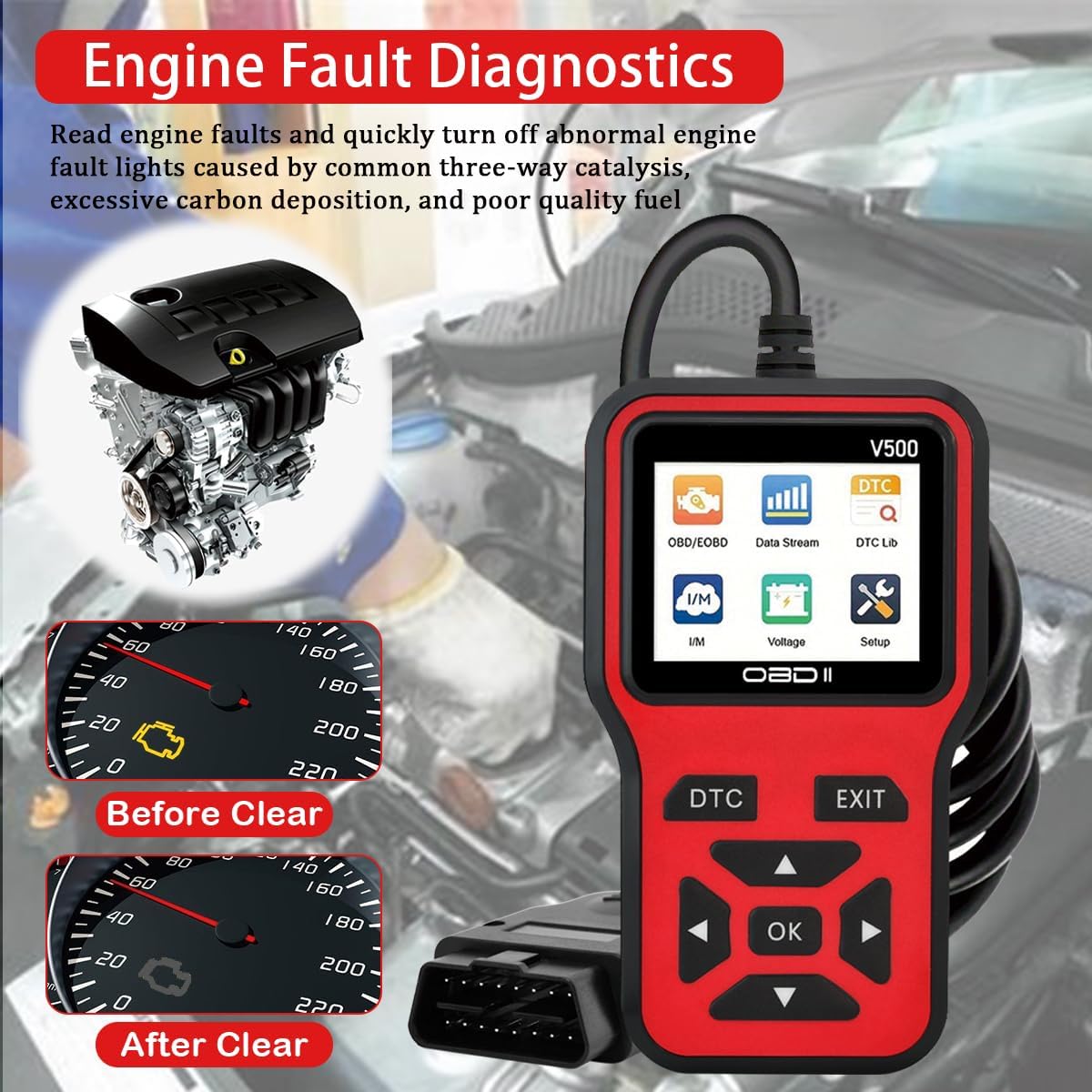
ചിത്രം 6.1: Example of engine fault diagnostics, illustrating how the scanner identifies issues and can clear the check engine light.
6.2 Erase Codes (Clear Check Engine Light)
This function clears all Diagnostic Trouble Codes from the vehicle's ECU and turns off the Check Engine Light (MIL).
- After reading codes, select "Erase Codes" or "Clear DTCs" from the menu.
- ആവശ്യപ്പെടുമ്പോൾ പ്രവർത്തനം സ്ഥിരീകരിക്കുക.
- കുറിപ്പ്: Clearing codes does not fix the underlying problem. If the fault is not resolved, the Check Engine Light will illuminate again.
6.3 Data Stream (Live Data)
View real-time operational parameters from the vehicle's sensors and systems. This can help identify intermittent faults or monitor system performance.
- Select "Data Stream" from the main menu.
- Choose the specific parameters you wish to monitor (e.g., engine RPM, coolant temperature, O2 sensor readings).
- The data will be displayed numerically or graphically.

ചിത്രം 6.2: Live data stream display on the V500, showing real-time curves for various engine parameters like coolant temperature, load value, RPM, and vehicle speed.
6.4 ഐ / എം സന്നദ്ധത
This function checks the status of the vehicle's emission-related monitoring systems to determine if they are ready for an emissions test.
- Select "I/M Readiness" from the main menu.
- The scanner will display the status of various monitors (e.g., EVAP system, O2 sensor, catalytic converter) as "OK" or "INC" (Incomplete).
6.5 ഡിടിസി ലുക്കപ്പ്
Allows you to manually enter a DTC and view അതിന്റെ പൊതുവായ വിവരണം.
- Select "DTC Lib" or "DTC Lookup" from the main menu.
- Enter the desired DTC using the navigation buttons.
- ശരി അമർത്തുക view വിവരണം.
6.6 Battery Test (Voltage)
Measures the vehicle's battery voltagഇ തത്സമയം.
- Select "Voltage" or "Battery Test" from the main menu.
- നിലവിലെ ബാറ്ററി വോള്യംtagഇ പ്രദർശിപ്പിക്കും.

ചിത്രം 6.3: The V500 displaying battery voltage during a battery test, showing a reading of 11.7V.
6.7 മറ്റ് പ്രവർത്തനങ്ങൾ
The V500 also supports additional functions including:
- View ഫ്രീസ് ഫ്രെയിം: Displays a snapshot of vehicle operating conditions at the moment a fault code was set.
- O2 സെൻസർ ടെസ്റ്റ്: O2 സെൻസർ മോണിറ്റർ പരിശോധനാ ഫലങ്ങൾ വീണ്ടെടുക്കുന്നു.
- EVAP സിസ്റ്റം ടെസ്റ്റ്: Initiates a test of the Evaporative Emission Control System.
- വാഹന വിവരം: Retrieves the vehicle identification number (VIN), calibration ID, and calibration verification number (CVN).
- ഓൺ-ബോർഡ് മോണിറ്റർ ടെസ്റ്റ്: നിർദ്ദിഷ്ട ഘടകങ്ങൾ/സിസ്റ്റങ്ങൾക്കായുള്ള ഓൺ-ബോർഡ് ഡയഗ്നോസ്റ്റിക് മോണിറ്ററിംഗ് ടെസ്റ്റുകളുടെ ഫലങ്ങൾ വീണ്ടെടുക്കുന്നു.
7. Supported Vehicles and Protocols
The OnRetul V500 is compatible with most OBD2 compliant vehicles.
- American Manufacturers: Vehicles produced since 1996.
- Japanese Manufacturers: Vehicles produced since 2002.
- European Manufacturers: Vehicles produced since 2008.
7.1 പിന്തുണയ്ക്കുന്ന പ്രോട്ടോക്കോളുകൾ

ചിത്രം 7.1: The V500 displaying a list of supported languages and OBD2 communication protocols.
The tool supports the following OBD2 protocols:
- SAE J1850 PWM (41.6 Kbaud)
- SAE J1850 VPW (10.4 Kbaud)
- ISO9141-2 (5 baud init, 10.4 Kbaud)
- ISO14230-4 KWP (5 baud init, 10.4 Kbaud)
- ISO14230-4 KWP (ഫാസ്റ്റ് ഇനിറ്റ്, 10.4 Kbaud)
- ISO15765-4 CAN (11bit ID, 500 Kbaud)
- ISO15765-4 CAN (29bit ID, 500 Kbaud)
- ISO15765-4 CAN (11bit ID, 250 Kbaud)
- ISO15765-4 CAN (29bit ID, 250 Kbaud)
8. പരിപാലനം
- വൃത്തിയാക്കൽ: Use a soft, dry cloth to clean the tool. Do not use abrasive cleaners or solvents.
- സംഭരണം: Store the tool in a dry, cool environment, away from direct sunlight and extreme temperatures.
- കേബിൾ കെയർ: Avoid bending or twisting the OBD-II cable excessively to prevent damage.
9. പ്രശ്നപരിഹാരം
| പ്രശ്നം | സാധ്യമായ കാരണം | പരിഹാരം |
|---|---|---|
| സ്കാനർ പവർ ഓൺ ചെയ്യുന്നില്ല. |
|
|
| "ലിങ്ക് പിശക്" അല്ലെങ്കിൽ "ആശയവിനിമയ പിശക്" സന്ദേശം. |
|
|
| കോഡുകൾ മായ്ക്കാൻ കഴിയില്ല. |
|
|
10 സ്പെസിഫിക്കേഷനുകൾ
- മോഡൽ: V500
- ഡിസ്പ്ലേ: 2.8 ഇഞ്ച് കളർ സ്ക്രീൻ
- ഓപ്പറേറ്റിംഗ് വോളിയംtage: 9-16V (from vehicle OBD-II port)
- പ്രവർത്തന താപനില: 0°C മുതൽ 60°C വരെ (32°F മുതൽ 140°F വരെ)
- സംഭരണ താപനില: -20°C മുതൽ 70°C വരെ (-4°F മുതൽ 158°F വരെ)
- അളവുകൾ: ഏകദേശം 6 x 1 x 3.4 ഇഞ്ച് (15.24 x 2.54 x 8.64 സെ.മീ)
- ഭാരം: ഏകദേശം 8.1 ഔൺസ് (230 ഗ്രാം)
- പിന്തുണയ്ക്കുന്ന പ്രോട്ടോക്കോളുകൾ: J1850 PWM, J1850 VPW, ISO9141-2, ISO14230-4 KWP (5 baud init, fast init), ISO15765-4 CAN (11bit ID, 29bit ID, 500 Kbaud, 250 Kbaud)
11. ഉപഭോക്തൃ പിന്തുണ
If you encounter any issues or have questions regarding your OnRetul V500 OBD2 Scanner, please contact our customer service team. We aim to respond to all inquiries within 24 hours.
ബന്ധപ്പെടാനുള്ള വിവരങ്ങൾ സാധാരണയായി ഉൽപ്പന്ന പാക്കേജിംഗിലോ റീട്ടെയിലറുടെയോ വിലാസത്തിലോ കാണാം. webഉൽപ്പന്നം വാങ്ങിയ സൈറ്റ്.