
VILCORN R46S
വിൽകോൺ R46S റെട്രോ ഹാൻഡ്ഹെൽഡ് ഗെയിം കൺസോൾ യൂസർ മാനുവൽ
Model: R46S
1. ആമുഖം
This manual provides essential instructions for the setup, operation, and maintenance of your VILCORN R46S Retro Handheld Game Console. Please read this manual thoroughly before using the device to ensure proper functionality and to maximize your gaming experience.

ചിത്രം 1.1: ഫ്രണ്ട് view of the VILCORN R46S console. The screen displays key features such as HD output, battery capacity, dual joysticks, and HD color screen.
2 സുരക്ഷാ വിവരങ്ങൾ
- Keep the device away from water and fire to prevent damage and ensure user safety.
- ഉപകരണം വേർപെടുത്താനോ പരിഷ്ക്കരിക്കാനോ ശ്രമിക്കരുത്. ഇത് വാറന്റി അസാധുവാക്കുകയും കേടുപാടുകൾ വരുത്തുകയും ചെയ്തേക്കാം.
- ഉപകരണം ചാർജ് ചെയ്യാൻ നൽകിയിരിക്കുന്ന ചാർജിംഗ് കേബിളും അഡാപ്റ്ററും മാത്രം ഉപയോഗിക്കുക.
- നേരിട്ടുള്ള സൂര്യപ്രകാശത്തിലോ ഉയർന്ന താപനിലയിലോ ദീർഘനേരം എക്സ്പോഷർ ചെയ്യുന്നത് ഒഴിവാക്കുക.
- ഈ ഉൽപ്പന്നം 3 വയസ്സും അതിൽ കൂടുതലുമുള്ളവർക്ക് ശുപാർശ ചെയ്യുന്നു.
3. ഉൽപ്പന്ന സവിശേഷതകൾ
- ഡിസ്പ്ലേ: 4.0-inch IPS OCA display with 720x720 resolution and 1:1 aspect ratio.
- പ്രോസസ്സർ: High-performance RK3566 quad-core CPU.
- ബാറ്ററി: Built-in 3500mAh 3.8V LiPo battery, providing approximately 3-5 hours of gameplay.
- സംഭരണം: Dual TF card slots for independent system and game storage.
- കണക്റ്റിവിറ്റി: Supports 2.4GHz WiFi and Bluetooth.
- ഓപ്പറേറ്റിംഗ് സിസ്റ്റം: Open Source Linux System, allowing for system upgrades and compatibility with mainstream 64-bit 3D simulators.
- പെരിഫറലുകൾ: Supports Bluetooth handles, speakers, and headsets.
- സ്ട്രീമിംഗ്: Supports WiFi Moonlight streaming function.

ചിത്രം 3.1: The 4-inch IPS OCA fully laminated 2.5D HD MIPL screen with 720*720 high resolution provides clear picture quality and soft colors, designed to reduce eye strain during extended play.
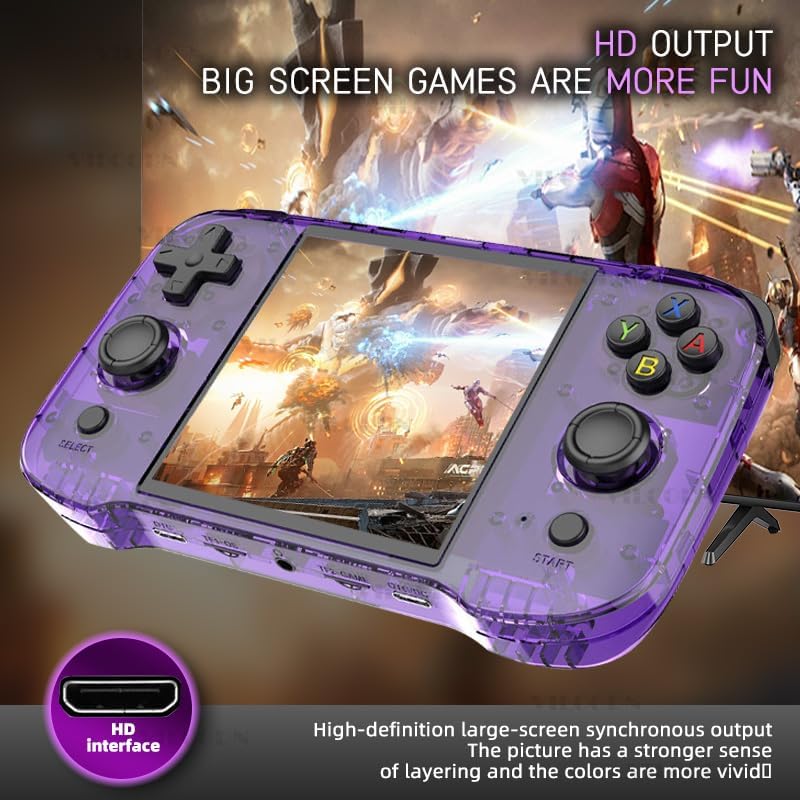
ചിത്രം 3.2: The console features high-definition large-screen synchronous output via an HDMI interface, enhancing the visual experience with greater depth and vivid colors.
4. ഉപകരണ ലേഔട്ടും നിയന്ത്രണങ്ങളും
Familiarize yourself with the buttons and ports on your R46S console:
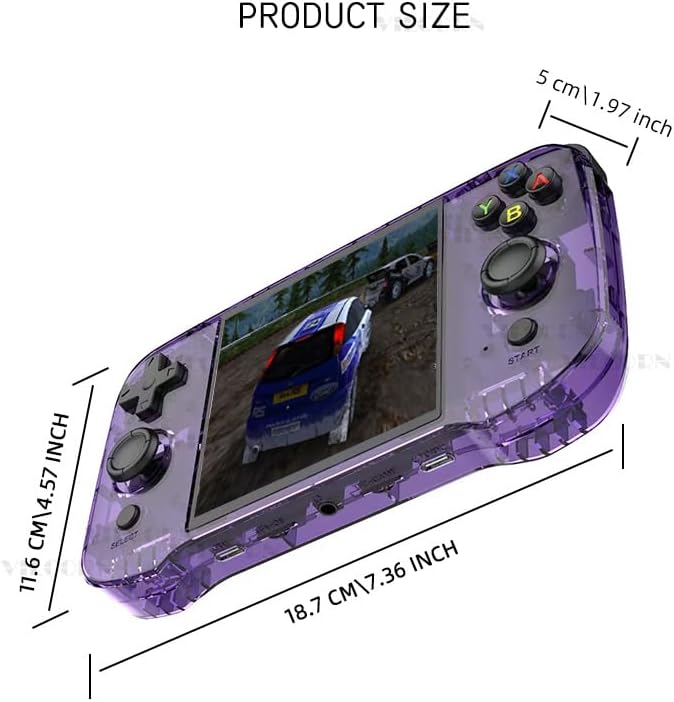
ചിത്രം 4.1: Key Analysis of the VILCORN R46S console.
| ഇല്ല. | ഫീച്ചർ |
|---|---|
| 1 | Top L1/L2 buttons |
| 2 | Top R1/R2 buttons |
| 3 | പവർ കീ |
| 4 | റീസെറ്റ് ബട്ടൺ |
| 5 | എച്ച്ഡിഎംഐ put ട്ട്പുട്ട് പോർട്ട് |
| 6 | വോളിയം ബട്ടൺ |
| 7 | D-Pad (Directional Pad) |
| 8 | Joystick (L) |
| 9 | തിരഞ്ഞെടുക്കൽ ബട്ടൺ |
| 10 | Game function keys (A, B, X, Y) |
| 11 | Joystick (R) |
| 12 | START ബട്ടൺ |
| 13 | Charging level light indicator |
| 14 | OTG പോർട്ട് |
| 15 | TF1-OS (MicroSD card slot for Operating System) |
| 16 | 3.5mm Audio hole (Headphone Jack) |
| 17 | TF2-GAME (MicroSD card slot for Games) |
| 18 | OTG/DC (Charging port) |

ചിത്രം 4.2: The console features dual joysticks with an ergonomic design, allowing for precise game operation and adaptability to various game types.
5. സജ്ജീകരണ നിർദ്ദേശങ്ങൾ
- പ്രാരംഭ ചാർജ്: Before first use, fully charge the console using the provided USB-C cable and a compatible power adapter. The charging level light (13) will indicate charging status.
- Insert MicroSD Cards:
- Insert the MicroSD card containing the operating system into the TF1-OS slot (15).
- Insert the MicroSD card containing your games into the TF2-GAME slot (17).
- പവർ ഓൺ: Press and hold the Power key (3) until the screen illuminates.
- ഭാഷാ തിരഞ്ഞെടുപ്പ് (ബാധകമെങ്കിൽ): Follow on-screen prompts to select your preferred language.
- നെറ്റ്വർക്ക് കണക്ഷൻ (ഓപ്ഷണൽ): To enable WiFi Moonlight streaming or system updates, navigate to the system settings and connect to a 2.4GHz WiFi network.
- ബ്ലൂടൂത്ത് ജോടിയാക്കൽ (ഓപ്ഷണൽ): To connect Bluetooth peripherals (controller, speaker, headset), go to system settings and initiate pairing.
6. പ്രവർത്തന നിർദ്ദേശങ്ങൾ
- മെനു നാവിഗേറ്റ് ചെയ്യുന്നു: Use the D-Pad (7) or Joysticks (8, 11) to navigate through the game system menus. The Game function keys (10) (A, B, X, Y) and SELECT (9) / START (12) buttons are used for selection and confirmation.
- Selecting a Game System: From the main menu, scroll to select your desired game system (e.g., Super Nintendo, Game Boy Advance, PSP). Press the 'A' button (part of 10) to enter.
- Launching a Game: Within a game system, use the D-Pad or Joysticks to browse the list of available games. Select a game and press the 'A' button to launch it.
- In-Game Controls: Controls will vary by game. The console features L1/L2 (1), R1/R2 (2) shoulder buttons, a D-Pad (7), dual joysticks (8, 11), and A, B, X, Y function keys (10).
- വോളിയം ക്രമീകരിക്കുന്നു: Use the Volume button (6) to increase or decrease the audio output.
- Exiting a Game / System: Specific button combinations (often SELECT + START or a dedicated menu button) are typically used to exit a game or return to the main system menu. Refer to the system's on-screen instructions if available.
- പവർ ഓഫ്: Press and hold the Power key (3) until the power-off options appear, then select to shut down the device. A quick press may put the device into sleep mode.
7. പരിപാലനം
- വൃത്തിയാക്കൽ: Use a soft, dry cloth to clean the console's exterior. Do not use liquid cleaners or aerosols.
- സംഭരണം: നേരിട്ടുള്ള സൂര്യപ്രകാശത്തിൽ നിന്നും കടുത്ത താപനിലയിൽ നിന്നും മാറി തണുത്തതും വരണ്ടതുമായ സ്ഥലത്ത് ഉപകരണം സൂക്ഷിക്കുക.
- ബാറ്ററി കെയർ: ബാറ്ററി ലൈഫ് വർദ്ധിപ്പിക്കാൻ, ബാറ്ററി ഇടയ്ക്കിടെ പൂർണ്ണമായും ഡിസ്ചാർജ് ചെയ്യുന്നത് ഒഴിവാക്കുക. ദീർഘനേരം ഉപയോഗത്തിലില്ലെങ്കിൽ പോലും ഉപകരണം പതിവായി ചാർജ് ചെയ്യുക.
- സോഫ്റ്റ്വെയർ അപ്ഡേറ്റുകൾ: Periodically check for system updates through the device's settings menu to ensure optimal performance and access to new features.
8. പ്രശ്നപരിഹാരം
- ഉപകരണം ഇനിപ്പറയുന്നവയിൽ പവർ ഓൺ ആകില്ല:
- ബാറ്ററി ചാർജ്ജ് ചെയ്തിട്ടുണ്ടെന്ന് ഉറപ്പാക്കുക. ചാർജർ കണക്റ്റ് ചെയ്ത് വീണ്ടും പവർ ചെയ്യാൻ ശ്രമിക്കുന്നതിന് മുമ്പ് കുറച്ച് മിനിറ്റ് കാത്തിരിക്കുക.
- If the device is unresponsive, press the RESET button (4) with a thin object (e.g., a paperclip) and then try to power on.
- Games are not loading or performing poorly:
- Verify that the game MicroSD card is correctly inserted into the TF2-GAME slot (17).
- കളി ഉറപ്പാക്കുക file format is compatible with the installed system emulator.
- For performance issues, try restarting the device.
- ശബ്ദമില്ല:
- Check the volume level using the Volume button (6).
- If headphones are connected, ensure they are fully plugged into the 3.5mm Audio hole (16).
- Cannot connect to WiFi/Bluetooth:
- Ensure you are within range of a 2.4GHz WiFi network. The device does not support 5GHz networks.
- Verify correct password entry for WiFi.
- For Bluetooth, ensure the peripheral is in pairing mode and within close proximity to the console.
9 സ്പെസിഫിക്കേഷനുകൾ
| ഫീച്ചർ | വിശദാംശങ്ങൾ |
|---|---|
| മോഡലിൻ്റെ പേര് | R46S |
| ബ്രാൻഡ് | വിൽകോൺ |
| പ്രദർശിപ്പിക്കുക | 4.0-inch IPS OCA, 720x720 resolution, 1:1 aspect ratio |
| പ്രോസസ്സർ | RK3566 Quad-core CPU |
| ബാറ്ററി | 3500mAh 3.8V LiPo (approx. 3-5 hours playtime) |
| സംഭരണം | Dual MicroSD card slots (TF1-OS, TF2-GAME) |
| കണക്റ്റിവിറ്റി | 2.4GHz വൈഫൈ, ബ്ലൂടൂത്ത് |
| ഓപ്പറേറ്റിംഗ് സിസ്റ്റം | Open Source Linux System |
| അളവുകൾ | 7.8 x 5.11 x 1.6 ഇഞ്ച് |
| ശുപാർശ ചെയ്യുന്ന പ്രായം | 3 വർഷവും അതിൽ കൂടുതലും |
| നിർമ്മാതാവ് | Shenzhen Jiajue Technology Co., Ltd |

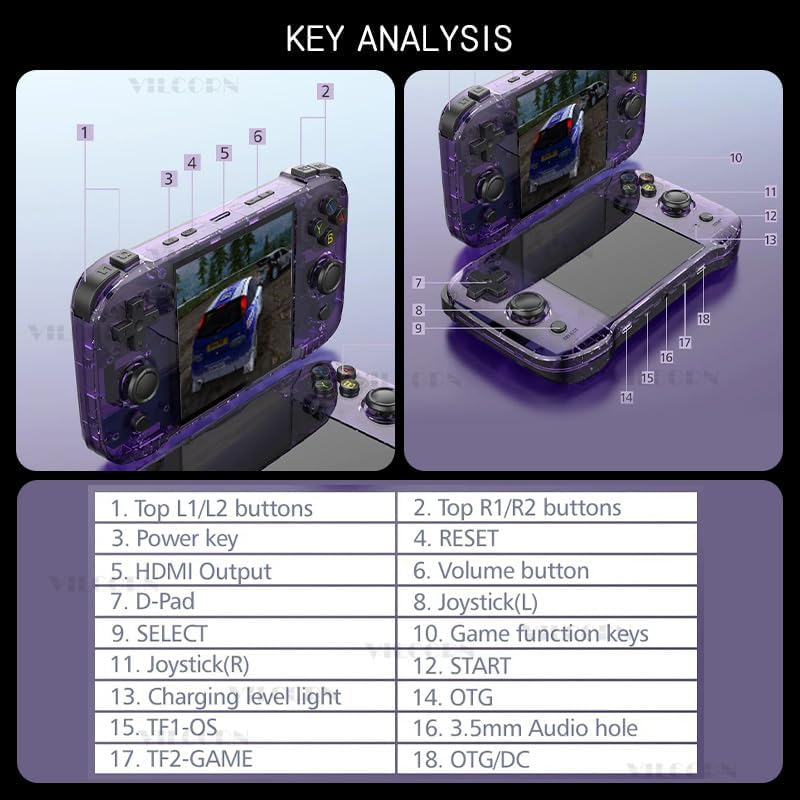
ചിത്രം 9.1: Product dimensions of the VILCORN R46S console: 18.7 cm (7.36 inches) length, 11.6 cm (4.57 inches) width, and 5 cm (1.97 inches) thickness.
ചിത്രം 9.2: The console is equipped with a built-in 3500mAh polymer battery (note: image shows 4000mAh, but product text specifies 3500mAh), featuring two-way protection for charge and discharge, allowing for several hours of play on a single full charge.
10. ബോക്സിൽ എന്താണുള്ളത്?
- 1 x VILCORN R46S Handheld Game Console
- 1 x യുഎസ്ബി-സി ചാർജിംഗ് കേബിൾ
- 1 x ഉപയോക്തൃ മാനുവൽ (ഈ പ്രമാണം)
11. വാറൻ്റിയും പിന്തുണയും
For warranty information and technical support, please refer to the contact details provided by your retailer or visit the official VILCORN webവാറന്റി ക്ലെയിമുകൾക്കുള്ള വാങ്ങലിന്റെ തെളിവായി നിങ്ങളുടെ വാങ്ങൽ രസീത് സൂക്ഷിക്കുക.
Ask a question about this manual
Ask about setup, troubleshooting, compatibility, parts, safety, or missing instructions. Manuals+ will review the question and use this page’s manual context to help answer it.