
pofoto PD14-Black-DE-14.1
POFOTO Portable DVD Player with 14.1-inch HD Swivel Screen
Model: PD14-Black-DE-14.1
ആമുഖം
വാങ്ങിയതിന് നന്ദി.asing the POFOTO Portable DVD Player. This device is designed to provide portable entertainment with its 14.1-inch HD swivel screen, long-lasting battery, and versatile media compatibility. This manual provides essential information for safe operation, setup, and maintenance of your new DVD player.

Image: The POFOTO Portable DVD Player with its screen open, showing a vibrant image.
സുരക്ഷാ വിവരങ്ങൾ
- ഉപകരണം ഉപയോഗിക്കുന്നതിന് മുമ്പ് എല്ലാ നിർദ്ദേശങ്ങളും വായിക്കുക.
- മഴ, ഈർപ്പം, അല്ലെങ്കിൽ തീവ്രമായ താപനില എന്നിവയിൽ ഉപകരണം തുറന്നുകാട്ടരുത്.
- താപ സ്രോതസ്സുകൾക്ക് സമീപം അല്ലെങ്കിൽ നേരിട്ട് സൂര്യപ്രകാശത്തിൽ ഉപകരണം സ്ഥാപിക്കുന്നത് ഒഴിവാക്കുക.
- Use only the provided power adapter and car charger.
- ഉപകരണം സ്വയം ഡിസ്അസംബ്ലിംഗ് ചെയ്യാനോ നന്നാക്കാനോ ശ്രമിക്കരുത്. സഹായത്തിന് ഉപഭോക്തൃ പിന്തുണയുമായി ബന്ധപ്പെടുക.
- കുട്ടികളിൽ നിന്നും വളർത്തുമൃഗങ്ങളിൽ നിന്നും ഉപകരണം അകറ്റി നിർത്തുക.
പാക്കേജ് ഉള്ളടക്കം
പാക്കേജിൽ എല്ലാ ഇനങ്ങളും ഉണ്ടെന്ന് ഉറപ്പാക്കുക:
- 14.1'' Portable DVD Player
- റിമോട്ട് കൺട്രോൾ
- എസി പവർ അഡാപ്റ്റർ
- കാർ ചാർജർ
- 3-ഇൻ-1 AV കേബിൾ
- ദ്രുത ആരംഭ ഗൈഡ്
- ഉപയോക്തൃ മാനുവൽ (ഈ പ്രമാണം)
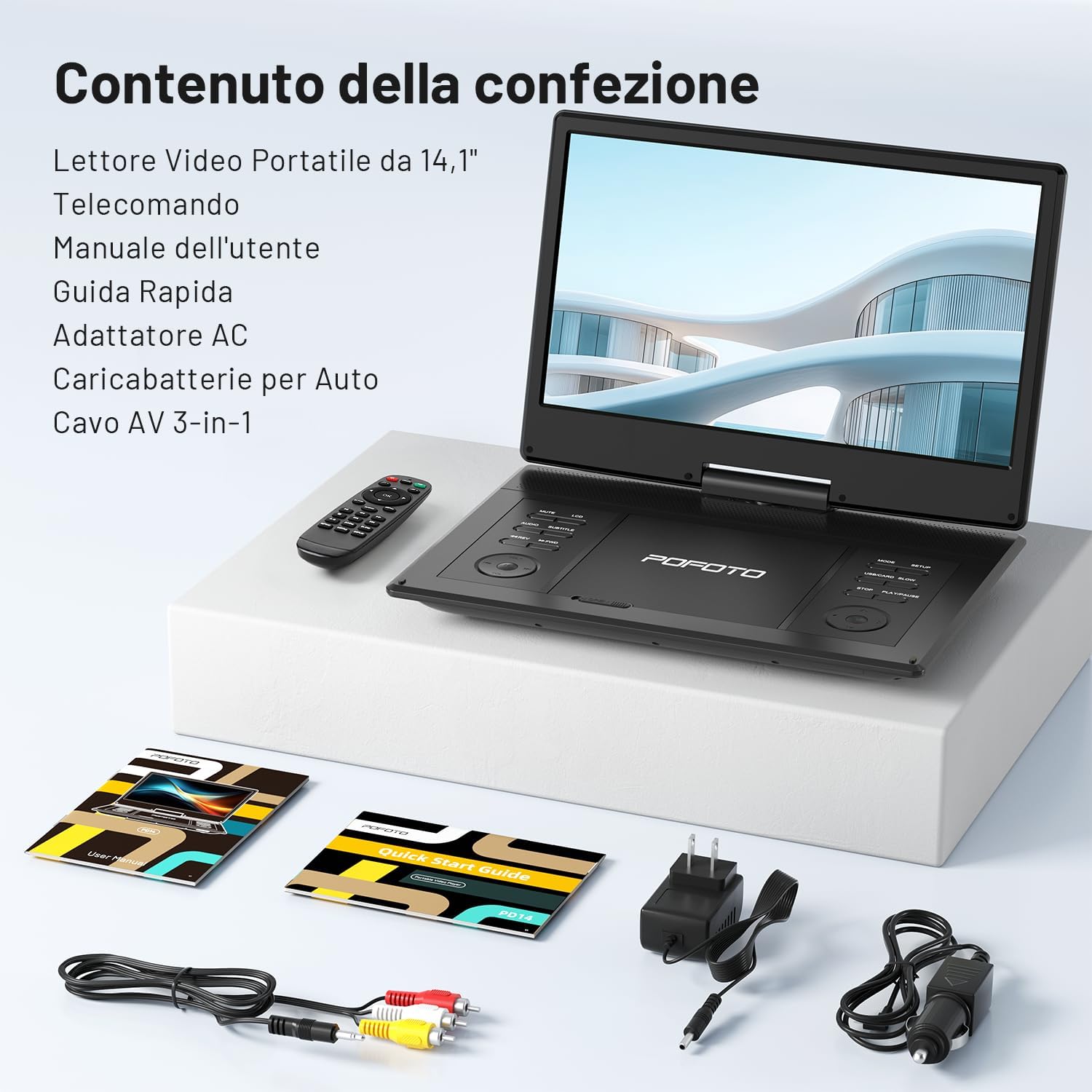
ചിത്രം: ഉൽപ്പന്ന പാക്കേജിംഗിൽ ഉൾപ്പെടുത്തിയിരിക്കുന്ന എല്ലാ ഘടകങ്ങളും.
ഉൽപ്പന്നം കഴിഞ്ഞുview
ഘടകങ്ങളും നിയന്ത്രണങ്ങളും
നിങ്ങളുടെ പോർട്ടബിൾ ഡിവിഡി പ്ലെയറിന്റെ വിവിധ ഭാഗങ്ങളും നിയന്ത്രണങ്ങളും പരിചയപ്പെടുക.

ചിത്രം: വിശദമായത് view of the connectivity ports on the side of the DVD player.
- USB പോർട്ട്: For connecting USB flash drives (up to 32GB).
- SD കാർഡ് സ്ലോട്ട്: For inserting SD memory cards (up to 32GB).
- AV U ട്ട്: Audio/Video output for connecting to a TV or projector.
- AV IN: Audio/Video input for connecting external devices.
- DC IN: Power input for the AC adapter or car charger.
- ഹെഡ്ഫോൺ ജാക്ക് (3.5 മിമി): ഹെഡ്ഫോണുകൾ ബന്ധിപ്പിക്കുന്നതിന്.
- വൈദ്യുതി സ്വിച്ച്: To turn the device ON/OFF.
- നിയന്ത്രണ ബട്ടണുകൾ: Play/Pause, Stop, Skip, Volume, Menu, Setup, etc. (located on the player's base).
സജ്ജമാക്കുക
1 ബാറ്ററി ചാർജ് ചെയ്യുന്നു
Before first use, fully charge the internal 4000 mAh lithium polymer battery. Connect the AC power adapter to the DC IN port and a power outlet. The charging indicator will illuminate. A full charge provides up to 6 hours of playback.
- • For car use, connect the car charger to the DC IN port and your vehicle's 12V power outlet.

Image: Illustration of the device's 6-hour battery life.
2. പവർ ഓൺ/ഓഫ്
Slide the Power Switch to the "ON" position to turn on the device. To turn it off, slide the switch to the "OFF" position.
3. ഒരു ഡിസ്ക് ചേർക്കൽ
Open the disc cover gently. Place a DVD or CD onto the spindle with the label side facing up. Press down lightly until it clicks into place. Close the disc cover firmly.
4. Connecting to a TV or Projector
Use the included 3-in-1 AV cable to connect the DVD player to a larger display. Connect one end of the AV cable to the AV OUT port on the DVD player and the other end to the corresponding AV IN ports (Yellow for Video, Red/White for Audio) on your TV or projector. Select the correct input source on your TV/projector.

Image: The portable DVD player connected to a larger TV screen for shared viewing.
5. USB/SD കാർഡ് ഉപയോഗിക്കൽ
Insert a USB flash drive or SD card (up to 32GB) into the respective port. The player will automatically detect the media and allow you to browse and play supported files.
പ്രവർത്തന നിർദ്ദേശങ്ങൾ
1. അടിസ്ഥാന പ്ലേബാക്ക്
- പ്ലേ/താൽക്കാലികമായി നിർത്തുക: അമർത്തുക പ്ലേ/താൽക്കാലികമായി നിർത്തുക പ്ലേബാക്ക് ആരംഭിക്കുന്നതിനോ താൽക്കാലികമായി നിർത്തുന്നതിനോ ഉള്ള ബട്ടൺ.
- നിർത്തുക: അമർത്തുക നിർത്തുക പ്ലേബാക്ക് നിർത്താനുള്ള ബട്ടൺ.
- ഒഴിവാക്കുക: ഉപയോഗിക്കുക PREV/അടുത്തത് buttons to skip between tracks or chapters.
- ഫാസ്റ്റ് ഫോർവേഡ്/റിവൈൻഡ്: പിടിക്കുക PREV/അടുത്തത് വേഗത്തിൽ മുന്നോട്ട് പോകാനോ പിന്നോട്ട് പോകാനോ ഉള്ള ബട്ടണുകൾ.
2. സ്ക്രീൻ റൊട്ടേഷൻ
The 14.1-inch HD screen can rotate 270 degrees and fold 180 degrees, allowing for multiple viewing angles. Adjust the screen gently to your desired position.

Image: Visual representation of the flexible screen rotation and folding options.
3. വോളിയം നിയന്ത്രണം
ഉപയോഗിക്കുക VOL+ ഒപ്പം വോൾ- buttons on the player or remote control to adjust the volume. The device features dual stereo speakers for immersive sound.

ചിത്രം: പൊട്ടിത്തെറിച്ച ഒരു view highlighting the dual stereo speakers of the device.
4. മെനു നാവിഗേഷൻ
അമർത്തുക മെനു button to access the disc menu. Use the arrow buttons and പ്രവേശിക്കുക button on the player or remote to navigate. Press സജ്ജമാക്കുക സിസ്റ്റം ക്രമീകരണങ്ങൾ ആക്സസ് ചെയ്യാൻ.
5. അവസാന മെമ്മറി പ്രവർത്തനം
The player features a memory function that resumes playback from where it was last stopped, even after powering off. This ensures continuous viewing without losing your place.

Image: Visual explanation of the continuous playback feature, resuming from the last stopped point.
6 പിന്തുണയ്ക്കുന്ന ഫോർമാറ്റുകൾ
The player is region-free and supports a wide range of disc and digital media formats:
- ഡിസ്ക് ഫോർമാറ്റുകൾ: CD, DVD, CD-R/RW, DVD±R/RW, SVCD-R/RW, VCD (Note: Blu-ray discs are not supported).
- Video & Image Formats (USB/SD): VOB, AVI, MPEG, MP3, WMA, JPEG.
- Audio Formats (USB/SD): MP3, WMA, OGG, ACC.

ചിത്രം: ഒരു ഓവർview of the diverse disc and file formats compatible with the player.
മെയിൻ്റനൻസ്
- വൃത്തിയാക്കൽ: പ്ലെയറിന്റെ സ്ക്രീനും പുറംഭാഗവും വൃത്തിയാക്കാൻ മൃദുവായതും ഉണങ്ങിയതുമായ തുണി ഉപയോഗിക്കുക. ലിക്വിഡ് ക്ലീനറുകളോ അബ്രസിവ് വസ്തുക്കളോ ഉപയോഗിക്കരുത്.
- ഡിസ്ക് പരിചരണം: ഡിസ്കുകൾ അവയുടെ അരികുകളിൽ തന്നെ കൈകാര്യം ചെയ്യുക. മൃദുവായ, ലിന്റ് രഹിത തുണി ഉപയോഗിച്ച് ഡിസ്കുകൾ വൃത്തിയാക്കുക, മധ്യഭാഗത്ത് നിന്ന് പുറത്തേക്ക് തുടയ്ക്കുക.
- സംഭരണം: Store the player in a cool, dry place away from direct sunlight and extreme temperatures when not in use.
ട്രബിൾഷൂട്ടിംഗ്
| പ്രശ്നം | പരിഹാരം |
|---|---|
| ശക്തിയില്ല | Ensure the power adapter is securely connected and the power switch is ON. Check if the battery is charged. |
| ഡിസ്ക് പ്ലേബാക്ക് ഇല്ല | Check if the disc is inserted correctly and is clean. Ensure the disc format is supported (not Blu-ray). |
| ശബ്ദമില്ല | Adjust the volume. Check headphone connection if applicable. Ensure AV cables are correctly connected to TV. |
| ടിവിയിൽ ചിത്രമില്ല. | Verify AV cable connections. Ensure the TV input source is correctly selected. |
| USB/SD കാർഡ് തിരിച്ചറിഞ്ഞില്ല. | Ensure the USB drive or SD card is properly inserted and formatted to a compatible file system (e.g., FAT32). Maximum capacity is 32GB. |
സ്പെസിഫിക്കേഷനുകൾ
- ബ്രാൻഡ്: POFOTO
- മോഡൽ: PD14-Black-DE-14.1
- സ്ക്രീൻ വലിപ്പം: 14.1 ഇഞ്ച്
- ഡിസ്പ്ലേ തരം: എൽസിഡി
- സ്ക്രീൻ റെസല്യൂഷൻ: 1366x768
- ബാറ്ററി: 4000 mAh Lithium Polymer (up to 6 hours playback)
- Compatible Disc Media: CD, DVD, CD-R/RW, DVD±R/RW, VCD/SVCD (Excludes Blu-ray)
- Compatible Digital Media (USB/SD): AVI, VOB, MPEG, MP3, WMA, OGG, ACC, JPG
- കണക്റ്റിവിറ്റി: USB, SD Card, AV OUT, AV IN, 3.5mm Headphone Jack
- അളവുകൾ: 34 x 23.2 x 4.6 സെ.മീ
- ഭാരം: 1.44 കി.ഗ്രാം
- ഉൾപ്പെടുത്തിയ ഘടകങ്ങൾ: Portable DVD Player, Remote Control, AC Adapter, Car Charger, 3-in-1 AV Cable, Quick Start Guide
വാറൻ്റിയും പിന്തുണയും
POFOTO offers professional customer service and technical support for all users. Your product is covered by a 24 മാസ വാറൻ്റി. For any issues or inquiries, please contact our customer service team, available 24 മണിക്കൂറും.
For support, please refer to the contact information provided in your Quick Start Guide or visit the official POFOTO webസൈറ്റ്.
Ask a question about this manual
Ask about setup, troubleshooting, compatibility, parts, safety, or missing instructions. Manuals+ will review the question and use this page’s manual context to help answer it.