
Kalobee SK38
Kalobee Watch 4 PRO+ Smart Watch User Manual
മോഡൽ: SK38
Brand: Kalobee
ആമുഖം
Welcome to the user manual for your new Kalobee Watch 4 PRO+ Smart Watch. This guide provides essential information on setting up, operating, maintaining, and troubleshooting your device. Please read this manual thoroughly to ensure optimal performance and longevity of your smartwatch.
The Kalobee Watch 4 PRO+ features a vibrant AMOLED display, versatile interchangeable straps, and convenient wireless charging, designed to seamlessly integrate into your daily life.
പാക്കേജ് ഉള്ളടക്കം
Upon opening your Kalobee Watch 4 PRO+ package, please verify that all the following items are included:
- Kalobee Watch 4 PRO+ Smart Watch (Model SK38)
- Three (3) Interchangeable Straps (e.g., leather, silicone, metal)
- വയർലെസ് ചാർജിംഗ് ഡോക്ക്
- ഉപയോക്തൃ മാനുവൽ (ഈ പ്രമാണം)

Image: The Kalobee Watch 4 PRO+ packaging, displaying the smartwatch alongside its three distinct interchangeable straps, highlighting the complete package contents.
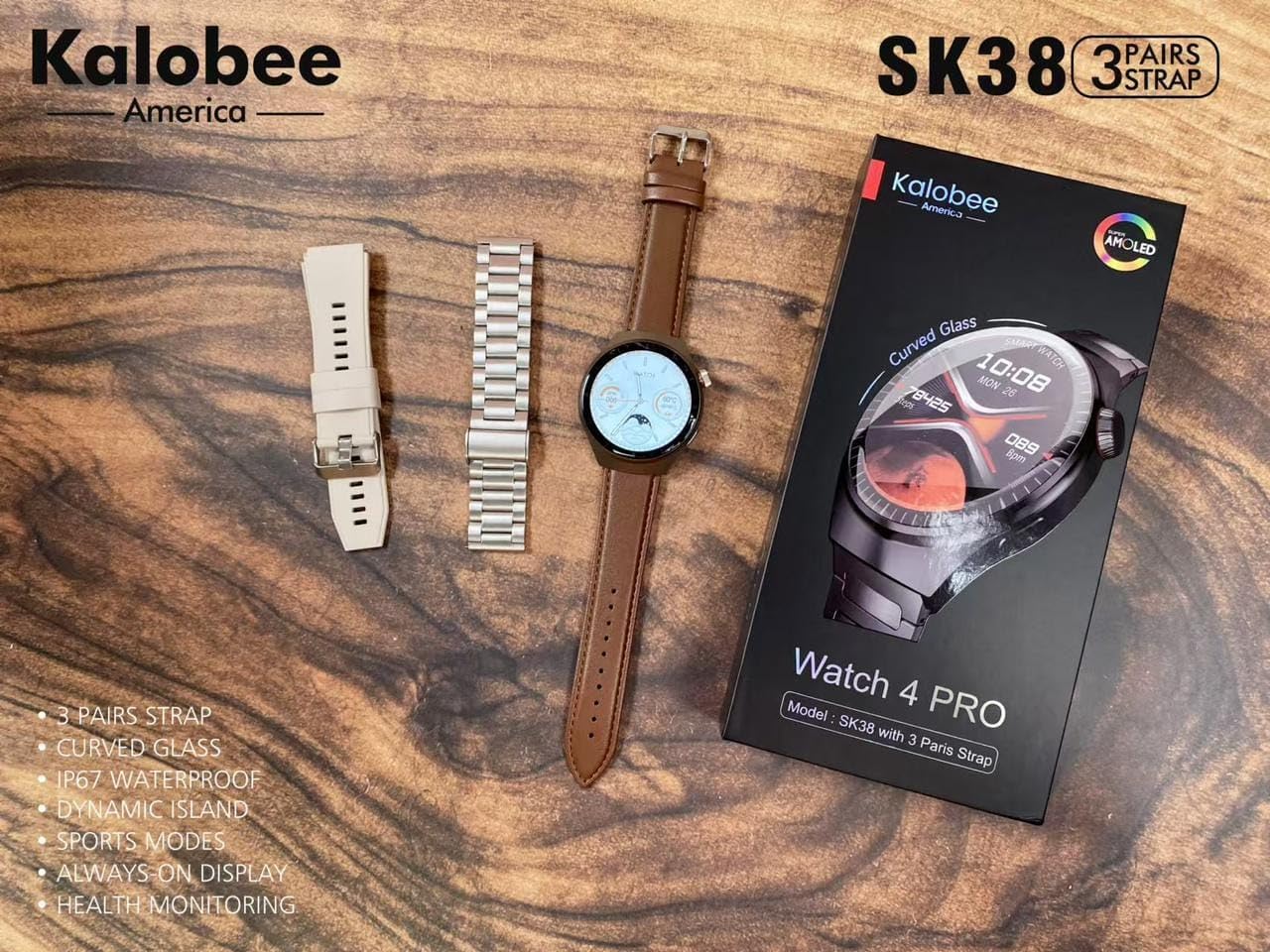
Image: A flat lay of the Kalobee Watch 4 PRO+ components, including the smartwatch, its retail box, and the three different strap options (leather, silicone, and metal), ready for assembly.
സജ്ജമാക്കുക
1. പ്രാരംഭ ചാർജിംഗ്
Before first use, fully charge your Kalobee Watch 4 PRO+. This ensures optimal battery calibration and performance.
- Connect the wireless charging dock to a USB power adapter (not included) and plug it into a power outlet.
- Place your Kalobee Watch 4 PRO+ onto the charging dock. Ensure the watch is properly aligned for charging to begin.
- വാച്ച് ഡിസ്പ്ലേ ചാർജിംഗ് നില സൂചിപ്പിക്കും. പൂർണ്ണമായി ചാർജ് ചെയ്യാൻ സാധാരണയായി ഏകദേശം 2-3 മണിക്കൂർ എടുക്കും.
2. സ്ട്രാപ്പ് ഇൻസ്റ്റാളേഷൻ
The Kalobee Watch 4 PRO+ comes with interchangeable straps, allowing you to customize its appearance. To install or change a strap:
- Locate the quick-release pins on the back of each strap.
- Slide the pin inwards to detach or attach the strap to the watch lugs.
- Ensure the pin clicks securely into place, indicating the strap is properly fastened.

ചിത്രം: ഒരു വശം view of the Kalobee Watch 4 PRO+ featuring a sleek metal strap, demonstrating one of the interchangeable strap options.
3. നിങ്ങളുടെ ഉപകരണവുമായി ജോടിയാക്കൽ (ബ്ലൂടൂത്ത്)
To unlock the full smart features of your watch, pair it with your smartphone via Bluetooth.
- Download the official Kalobee companion app from your smartphone's app store (iOS App Store or Google Play Store).
- നിങ്ങളുടെ സ്മാർട്ട്ഫോണിൽ ബ്ലൂടൂത്ത് പ്രവർത്തനക്ഷമമാക്കിയിട്ടുണ്ടെന്ന് ഉറപ്പാക്കുക.
- Open the Kalobee app and follow the on-screen instructions to add a new device.
- On your watch, navigate to the Bluetooth settings (refer to "Basic Navigation" section if needed).
- Select your watch from the list of available devices in the app. Confirm the pairing request on both your phone and watch.
- Once paired, the watch will synchronize data and notifications with your smartphone.
പ്രവർത്തന നിർദ്ദേശങ്ങൾ
1. അടിസ്ഥാന നാവിഗേഷൻ
The Kalobee Watch 4 PRO+ features an intuitive touch screen and physical buttons for navigation.
- ടച്ച് സ്ക്രീൻ: Swipe left/right, up/down to navigate through menus and widgets. Tap to select an item.
- ക്രൗൺ ബട്ടൺ: Typically used to return to the home screen, scroll through lists, or zoom in/out. Press and hold for power options.
- സൈഡ് ബട്ടൺ: Often customizable, it can be set to quickly access a specific app or feature.

Image: The Kalobee Watch 4 PRO+ displaying its main watch face, showing time, date, steps, and calories, illustrating the primary user interface.
2. വാച്ച് ഫെയ്സുകൾ ഇഷ്ടാനുസൃതമാക്കൽ
Personalize your watch by changing the watch face:
- From the home screen, press and hold the watch face.
- ലഭ്യമായ വാച്ച് ഫെയ്സുകൾ ബ്രൗസ് ചെയ്യാൻ ഇടത്തോട്ടോ വലത്തോട്ടോ സ്വൈപ്പ് ചെയ്യുക.
- Tap on a watch face to select it. Some watch faces may offer further customization options (e.g., complications, colors) which can be adjusted by tapping the "Customize" option.
- Additional watch faces can be downloaded and managed via the Kalobee companion app.
3. ആരോഗ്യ നിരീക്ഷണ സവിശേഷതകൾ
Your Kalobee Watch 4 PRO+ is equipped with various health monitoring capabilities:
- ഹൃദയമിടിപ്പ് നിരീക്ഷണം: Access the heart rate app on your watch to measure your current heart rate. Continuous monitoring can be enabled in the app settings.
- പ്രവർത്തന ട്രാക്കിംഗ്: Tracks steps, distance, and calories burned throughout the day. View daily summaries on the watch or in the companion app.
- ഉറക്ക ട്രാക്കിംഗ്: Wears the watch to bed to monitor sleep patterns, including deep sleep, light sleep, and awake times. Data is available in the app.
- സ്പോർട്സ് മോഡുകൾ: Select from various sports modes (e.g., running, cycling) to track specific workout data.
4. അറിയിപ്പുകൾ
Receive notifications from your paired smartphone directly on your watch:
- Ensure notifications are enabled in the Kalobee companion app for desired applications.
- When a notification arrives, the watch will vibrate and display the content.
- വാച്ച് ഫെയ്സിന്റെ മുകളിൽ നിന്ന് താഴേക്ക് സ്വൈപ്പ് ചെയ്യുക view your notification history.
മെയിൻ്റനൻസ്
1. വാച്ച് വൃത്തിയാക്കൽ
പതിവായി വൃത്തിയാക്കുന്നത് നിങ്ങളുടെ വാച്ചിന്റെ രൂപവും പ്രവർത്തനക്ഷമതയും നിലനിർത്താൻ സഹായിക്കുന്നു.
- വാച്ച് ബോഡി: Wipe the watch body with a soft, lint-free cloth. If necessary, slightly dampതുണിയിൽ വെള്ളം ഒഴിക്കുക. കഠിനമായ രാസവസ്തുക്കളോ ഉരച്ചിലുകളോ ഉള്ള വസ്തുക്കൾ ഉപയോഗിക്കുന്നത് ഒഴിവാക്കുക.
- സ്ട്രാപ്പുകൾ: Clean silicone straps with mild soap and water. Leather straps should be wiped with a dry or slightly damp cloth and allowed to air dry. Metal straps can be cleaned with a soft brush and mild soapy water, then rinsed and dried thoroughly.
- Ensure the watch is completely dry before charging or wearing.
2. ബാറ്ററി പരിചരണം
ബാറ്ററി ആയുസ്സ് വർദ്ധിപ്പിക്കാൻ:
- ബാറ്ററി ഇടയ്ക്കിടെ പൂർണ്ണമായും ഡിസ്ചാർജ് ചെയ്യുന്നത് ഒഴിവാക്കുക.
- Charge the watch regularly, ideally before the battery level drops below 20%.
- Do not expose the watch to extreme temperatures (hot or cold) for extended periods.
3. സംഭരണം
When not in use for an extended period, store your watch in a cool, dry place. It is recommended to charge the watch to about 50% before long-term storage.
ട്രബിൾഷൂട്ടിംഗ്
If you encounter issues with your Kalobee Watch 4 PRO+, refer to the following common solutions:
| പ്രശ്നം | സാധ്യമായ പരിഹാരം |
|---|---|
| വാച്ച് ഓണാകുന്നില്ല | Ensure the watch is fully charged. Connect it to the charging dock for at least 30 minutes. If still unresponsive, perform a forced restart (refer to "Basic Navigation" for button functions). |
| സ്മാർട്ട്ഫോണുമായി ജോടിയാക്കാൻ കഴിയില്ല | Ensure Bluetooth is enabled on both devices. Make sure the watch is in pairing mode. Restart both the watch and smartphone. Clear previous Bluetooth connections on your phone if necessary. |
| കൃത്യമല്ലാത്ത ആരോഗ്യ ഡാറ്റ | Ensure the watch is worn snugly on your wrist, not too loose or too tight. Clean the sensors on the back of the watch. Update the watch firmware via the companion app. |
| അറിയിപ്പുകൾ ദൃശ്യമാകുന്നില്ല | Check notification settings in the Kalobee companion app and your smartphone's system settings. Ensure the watch is connected via Bluetooth. |
| ചെറിയ ബാറ്ററി ലൈഫ് | Reduce screen brightness, disable always-on display, limit background app refresh, and turn off unnecessary features like continuous heart rate monitoring if not needed. |
സ്പെസിഫിക്കേഷനുകൾ
- മോഡൽ: SK38
- ഡിസ്പ്ലേ: AMOLED സ്ക്രീൻ
- ഓപ്പറേറ്റിംഗ് സിസ്റ്റം: ആസ്റ്ററോയിഡ് ഒഎസ്
- കണക്റ്റിവിറ്റി: ബ്ലൂടൂത്ത്
- ബാറ്ററി ശേഷി: 449 Amp മണിക്കൂറുകൾ
- ചാർജിംഗ്: വയർലെസ് ചാർജിംഗ്
- ഉൾപ്പെടുത്തിയ ഘടകങ്ങൾ: Watch Band (3 pairs), Wireless Charging Dock
- നിർമ്മാതാവ്: HUAYING COMMUNICATION CO.,LTD
- മാതൃരാജ്യം: ചൈന
വാറൻ്റിയും പിന്തുണയും
Information regarding product warranty and customer support is not available in this manual. Please refer to the product packaging or the official Kalobee webവാറന്റി കവറേജിനെക്കുറിച്ചും സേവനത്തിനോ അന്വേഷണങ്ങൾക്കോ ഉപഭോക്തൃ പിന്തുണയുമായി എങ്ങനെ ബന്ധപ്പെടാം എന്നതിനെക്കുറിച്ചും വിശദാംശങ്ങൾക്ക് സൈറ്റ്.
Ask a question about this manual
Ask about setup, troubleshooting, compatibility, parts, safety, or missing instructions. Manuals+ will review the question and use this page’s manual context to help answer it.