
1. ഉൽപ്പന്നം കഴിഞ്ഞുview
The LNDU WL01 Smart Lock is a state-of-the-art keyless entry system designed to enhance home security and convenience. It offers multiple unlocking methods, including fingerprint, PIN code, eKey, and traditional mechanical key. With built-in Wi-Fi, it allows for seamless remote management and integration with smart home ecosystems like Amazon Alexa and Google Assistant.
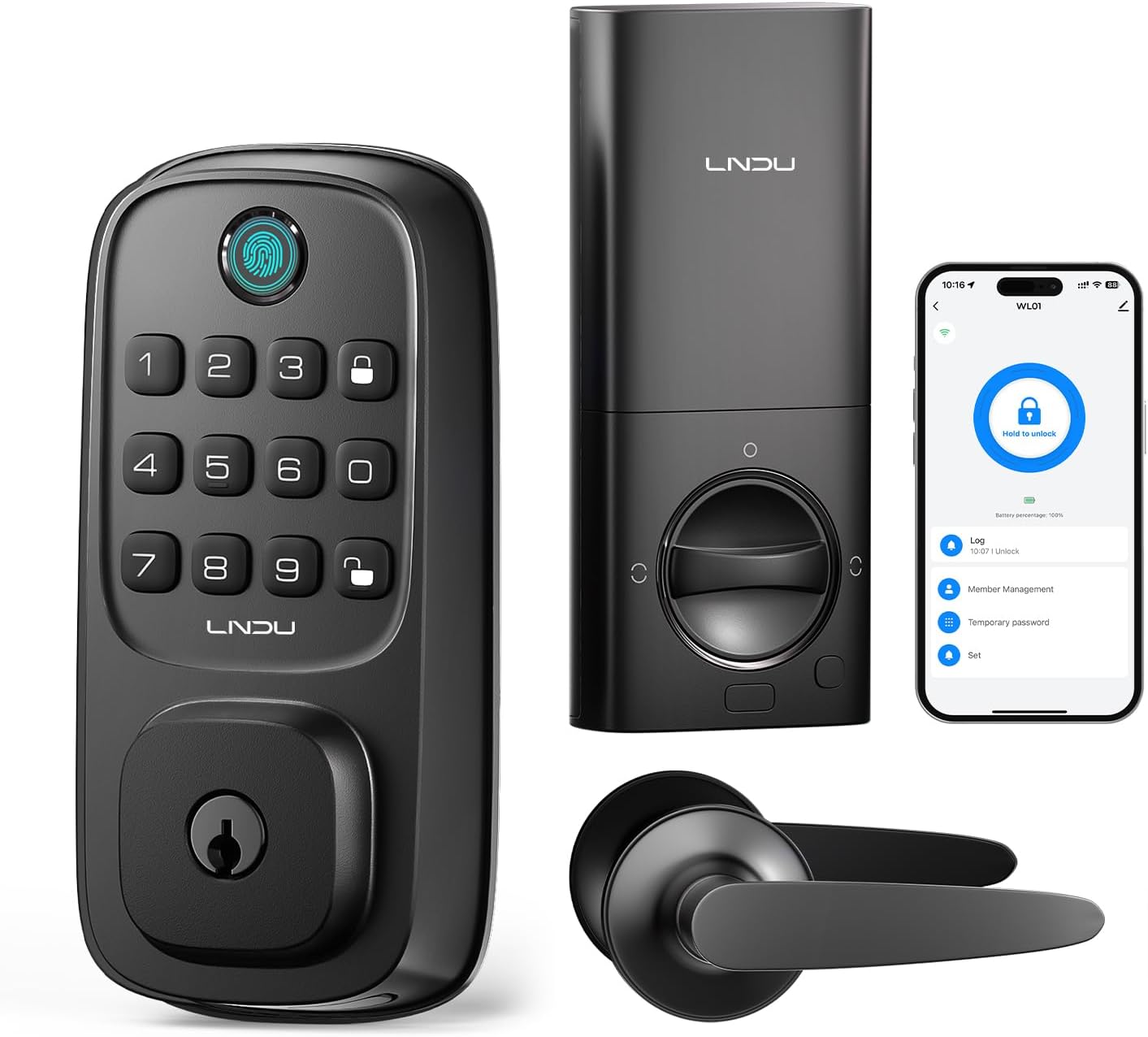
ചിത്രം 1.1: LNDU WL01 Smart Lock and included handle set. This image displays the complete smart lock system, including the exterior keypad with fingerprint sensor, the interior deadbolt mechanism, the accompanying door handle set, and a smartphone screen illustrating the lock's mobile application interface.
2 പ്രധാന സവിശേഷതകൾ
- Versatile Keyless Entry: Unlock using fingerprint, PIN, eKey, or mechanical key. Supports up to 50 fingerprints and over 100 PINs.
- അന്തർനിർമ്മിത വൈഫൈ: Enables remote management via the Tuya app, allowing for creation of temporary/scheduled passcodes, access granting/revoking, and entry tracking from anywhere.
- Advanced Biometric Fingerprint Recognition: 0.3-second unlock time with 99% recognition accuracy, even for aging fingerprints. Includes anti-spoofing technology.
- ഈടുനിൽക്കുന്നതും കാലാവസ്ഥയെ പ്രതിരോധിക്കുന്നതുമായ രൂപകൽപ്പന: ANSI Grade 3 certified for pick/impact resistance. Outdoor panel is IP54 water-resistant, operating reliably from -4°F to 140°F.
- ദീർഘകാല ശക്തി: Powered by 8 AA batteries (not included) with an estimated 8-month lifespan. Features a Type-C emergency port for backup power.
- ആന്റി-പീക്കിംഗ് പാസ്വേഡ്: Allows users to enter random numbers before or after the actual password to prevent unauthorized viewing.
- ഓട്ടോ-ലോക്ക് ഫംഗ്ഷൻ: Configurable auto-lock feature for added security.

ചിത്രം 2.1: Remote unlocking capabilities and key features. This image illustrates the convenience of managing the LNDU smart lock remotely via a mobile application, highlighting features such as user code management, fingerprint access, temporary password generation, and real-time unlocking records.
3. പാക്കേജ് ഉള്ളടക്കം
പാക്കേജ് തുറക്കുമ്പോൾ എല്ലാ ഘടകങ്ങളും നിലവിലുണ്ടെന്നും നല്ല നിലയിലാണെന്നും ദയവായി പരിശോധിക്കുക:
- LNDU WL01 Deadbolt Lock (1)
- Handle Set (1)
- Door Bolt (1)
- ബാക്കപ്പ് കീ (2)
- ഉപയോക്തൃ മാനുവൽ (1)

ചിത്രം 3.1: All components included in the LNDU WL01 Smart Lock package. This visual guide helps users confirm they have received all necessary parts for installation and operation.
4 സ്പെസിഫിക്കേഷനുകൾ
| ഫീച്ചർ | വിശദാംശങ്ങൾ |
|---|---|
| മോഡലിൻ്റെ പേര് | WL01 |
| ലോക്ക് തരം | ബയോമെട്രിക്, ഡെഡ്ബോൾട്ട്, കീപാഡ് |
| കണക്റ്റിവിറ്റി | വൈഫൈ |
| നിയന്ത്രണ രീതി | ആപ്പ്, വോയ്സ് (ആമസോൺ അലക്സ, ഗൂഗിൾ അസിസ്റ്റന്റ്) |
| മെറ്റീരിയൽ | ലോഹം |
| നിറം | മാറ്റ് ബ്ലാക്ക് |
| അളവുകൾ (L x W x H) | 10 x 1.98 x 2.69 ഇഞ്ച് |
| ഇനത്തിൻ്റെ ഭാരം | 3.5 പൗണ്ട് (1.59 കിലോഗ്രാം) |
| പവർ ഉറവിടം | 8 AA ബാറ്ററികൾ (ഉൾപ്പെടുത്തിയിട്ടില്ല) |
| പ്രവർത്തന താപനില | -4°F മുതൽ 140°F വരെ |
| ജല പ്രതിരോധം | IP54 (Outdoor Panel) |
| സുരക്ഷാ ഗ്രേഡ് | ANSI ഗ്രേഡ് 3 |

ചിത്രം 4.1: Durability and weather resistance of the LNDU WL01 Smart Lock. This image highlights the lock's ability to function in various weather conditions and displays its robust testing results for keypad longevity, salt spray resistance, impact strength, and humidity tolerance.
5. ഇൻസ്റ്റാളേഷൻ ഗൈഡ്
The LNDU WL01 Smart Lock is designed for easy installation, typically taking around 15 minutes with a screwdriver. No additional drilling is required for standard door setups.
5.1 വാതിൽ അനുയോജ്യത
This lock fits doors with a thickness of 55–70mm (1.38"–2.17"). It is compatible with both left-handed and right-handed doors, automatically identifying the orientation during installation.
- വാതിൽ കനം: 1.38"–2.17" (35mm–55mm)
- ബോർ ഹോൾ വ്യാസം: 1.5" or 2.13" (38mm–54mm)
- ബോർ ഹോൾ ബാക്ക്സെറ്റ്: 2.36" or 2.76" (60mm–70mm)

ചിത്രം 5.1: Door compatibility measurements for the LNDU Smart Lock. This diagram provides essential dimensions for door thickness, bore hole diameter, and backset, ensuring proper fit and installation.
5.2 ഇൻസ്റ്റലേഷൻ ഘട്ടങ്ങൾ (സംഗ്രഹം)
For detailed step-by-step instructions, please refer to the included printed user manual. A general overview of the installation process is as follows:
- Prepare the door by ensuring the correct bore hole and backset dimensions.
- വാതിലിന്റെ അരികിൽ ഡെഡ്ബോൾട്ട് ലാച്ച് സ്ഥാപിക്കുക.
- എക്സ്റ്റീരിയർ കീപാഡ് അസംബ്ലി മൌണ്ട് ചെയ്യുക.
- Install the interior unit, connecting the necessary cables.
- Attach the handle set.
- Insert the batteries and test the lock's basic functions.

ചിത്രം 5.2: Easy installation guide for the LNDU Smart Lock. This image provides a visual summary of the installation process, including key measurements for door preparation.

ചിത്രം 5.3: Quick installation of the LNDU WL01 Smart Lock. This image shows a user performing the installation, emphasizing the ease and speed of the process, which can be completed in approximately 15 minutes.
6. സജ്ജീകരണവും കോൺഫിഗറേഷനും
After physical installation, configure your LNDU WL01 Smart Lock for optimal use.
6.1 ആപ്പ് കണക്ഷനും പ്രാരംഭ സജ്ജീകരണവും
- Download the Tuya Smart app from your device's app store.
- ഒരു അക്കൗണ്ട് സൃഷ്ടിക്കുക അല്ലെങ്കിൽ ലോഗിൻ ചെയ്യുക.
- Add the LNDU WL01 lock by following the in-app instructions. Ensure your phone is connected to a 2.4GHz Wi-Fi network during setup.
- Perform lockside calibration through the app to ensure proper operation.

ചിത്രം 6.1: Built-in Wi-Fi for seamless app control. This image demonstrates the direct Wi-Fi connectivity of the LNDU smart lock, allowing users to control it remotely via the app without needing an additional gateway.
6.2 Adding Fingerprints
The lock supports up to 50 unique fingerprints. Follow the app's instructions to register new fingerprints. Ensure your finger covers the sensor completely during the registration process.

ചിത്രം 6.2: Fingerprint unlock feature. This image illustrates the ease of using the fingerprint sensor for quick access, highlighting the lock's capacity for 50 fingerprints and its AI intelligent chips for accurate recognition.
6.3 Setting Passcodes
You can set various types of passcodes via the Tuya app:
- Permanent Passcodes: For regular users.
- Timed Passcodes: Valid for specific periods (e.g., for cleaners or contractors).
- ഒറ്റത്തവണ പാസ്കോഡുകൾ: For single use, ideal for deliveries or temporary access.
- Cyclic Passcodes: Valid on recurring days/times.

ചിത്രം 6.3: One-Time Code generation and usage. This image demonstrates how to generate a temporary access code via the app and how a visitor can use it to gain entry, providing secure and flexible access management.
6.4 Anti-Peeking Password Feature
To prevent others from guessing your password, you can enter random numbers before or after your actual PIN code. The lock will still recognize the correct sequence within the longer string of numbers.

ചിത്രം 6.4: Anti-Peeking Keypad functionality. This image visually explains how the anti-peeking feature allows users to input extra digits before or after their actual password, enhancing security by making it harder for onlookers to discern the correct code.
7. പ്രവർത്തന നിർദ്ദേശങ്ങൾ
7.1 വാതിൽ അൺലോക്കുചെയ്യുന്നു
- ഫിംഗർപ്രിന്റ്: Place your registered finger on the sensor. The lock will unlock in approximately 0.3 seconds.
- പിൻ കോഡ്: Enter your registered PIN code on the keypad, optionally adding random numbers before or after for privacy, then press the unlock key.
- ആപ്പ് നിയന്ത്രണം: ടുയ സ്മാർട്ട് ആപ്പ് തുറന്ന് നിങ്ങളുടെ ലോക്ക് തിരഞ്ഞെടുത്ത് അൺലോക്ക് ഐക്കണിൽ ടാപ്പ് ചെയ്യുക.
- മെക്കാനിക്കൽ കീ: ബാക്കപ്പ് കീ കീഹോളിലേക്ക് തിരുകുക, അൺലോക്ക് ചെയ്യാൻ തിരിക്കുക.
- ശബ്ദ നിയന്ത്രണം: Integrate with Amazon Alexa or Google Assistant. Say commands like "Alexa, open the door" (voice password may be required for security).

ചിത്രം 7.1: Voice control via Amazon Alexa and Google Assistant. This image demonstrates the convenience of unlocking the LNDU smart lock using voice commands through compatible smart home devices.
7.2 വാതിൽ പൂട്ടുന്നു
- യാന്ത്രിക ലോക്ക്: The lock will automatically re-lock after a set period (configurable in the app, typically 10 seconds to 3 minutes).
- മാനുവൽ ലോക്ക്: Press and hold the lock button on the keypad or use the interior thumb turn.
- ആപ്പ് നിയന്ത്രണം: Open the Tuya Smart app, select your lock, and tap the lock icon.

ചിത്രം 7.2: Smart lock settings and features. This image displays the various configurable options within the LNDU smart lock app, including auto-lock, secure lockdown, sleep mute mode, and anti-peep functionality.
7.3 ആക്സസ് ലോഗുകൾ
The Tuya app provides a detailed log of all lock and unlock events, including the method used (fingerprint, PIN, remote unlock) and the timestamp. This feature is useful for monitoring access to your property.

ചിത്രം 7.3: സുതാര്യം view of past access. This image shows the access log feature within the LNDU smart lock app, providing a clear record of all lock and unlock events, including the method and time.
8. പരിപാലനം
8.1 ബാറ്ററി മാറ്റിസ്ഥാപിക്കൽ
The LNDU WL01 Smart Lock is powered by 8 AA batteries. When the battery level is low, the lock will provide an alert via the app and potentially an audible/visual indicator on the lock itself. Replace all 8 batteries simultaneously with new, high-quality alkaline AA batteries.

ചിത്രം 8.1: Long battery life of the LNDU Smart Lock. This image highlights the lock's power source, indicating an approximate 8-month battery life based on 10 lock/unlock cycles per day.
8.2 അടിയന്തര വൈദ്യുതി
In case of complete battery depletion, the lock features a Type-C emergency port. Connect a portable power bank to this port to temporarily power the lock and gain access.

ചിത്രം 8.2: Low battery reminder and emergency charging. This image shows the low battery alert on the app and the Type-C port on the lock, which can be used for emergency backup power.
8.3 വൃത്തിയാക്കൽ
ലോക്കിന്റെ പുറം പ്രതലങ്ങൾ മൃദുവായ, d തുണി ഉപയോഗിച്ച് തുടയ്ക്കുക.amp തുണി. അബ്രാസീവ് ക്ലീനറുകളോ ലായകങ്ങളോ ഉപയോഗിക്കുന്നത് ഒഴിവാക്കുക, കാരണം ഇവ ഫിനിഷിനും ഇലക്ട്രോണിക് ഘടകങ്ങൾക്കും കേടുവരുത്തും.
9. പ്രശ്നപരിഹാരം
If you encounter issues with your LNDU WL01 Smart Lock, refer to the following common troubleshooting steps:
- ലോക്ക് പ്രതികരിക്കുന്നില്ല: Check battery level and replace if necessary. Ensure the lock is properly installed and all connections are secure.
- വിരലടയാളം തിരിച്ചറിയാൻ കഴിഞ്ഞില്ല: Ensure your finger is clean and dry. Try re-registering your fingerprint. Ensure the sensor is clean.
- പിൻ കോഡ് പ്രവർത്തിക്കുന്നില്ല: Verify the correct PIN code. Ensure you are pressing the unlock key after entering the code. Check if the anti-peeking feature is causing confusion (try entering only the correct PIN).
- ആപ്പ് കണക്റ്റിവിറ്റി പ്രശ്നങ്ങൾ: Ensure your Wi-Fi network is active and the lock is within range. Restart your router and the lock. Verify the app is updated to the latest version.
- ഓട്ടോ-ലോക്ക് പ്രവർത്തിക്കുന്നില്ല: Check the auto-lock settings in the Tuya app to ensure it is enabled and the delay time is set correctly.
- Lock is making unusual noises: This may indicate a mechanical issue. Contact customer support for assistance.
10. വാറൻ്റിയും പിന്തുണയും
LNDU is committed to providing exceptional support and assurance for your smart lock. Your LNDU WL01 Smart Lock comes with:
- 30-ദിവസത്തെ പണം-ബാക്ക് ഗ്യാരണ്ടി: നിങ്ങളുടെ വാങ്ങലിൽ നിങ്ങൾ തൃപ്തനല്ലെങ്കിൽ.
- 18-Month Assurance: For product defects or malfunctions.
- ആജീവനാന്ത സാങ്കേതിക പിന്തുണ: Dedicated support team available 24/7 via email to assist with any technical queries or issues.
For assistance, please contact LNDU customer service through the contact information provided in your purchase documentation or on the official LNDU webസൈറ്റ്.