
1. ആമുഖം
This manual provides detailed instructions for the setup, operation, and maintenance of your Irfora D1007 TAM Cordless Telephone. Please read this manual thoroughly before using the device to ensure proper functionality and to familiarize yourself with all features. Keep this manual for future reference.
2. പാക്കേജ് ഉള്ളടക്കം
താഴെ ലിസ്റ്റ് ചെയ്തിരിക്കുന്ന എല്ലാ ഇനങ്ങളും നിങ്ങളുടെ പാക്കേജിൽ ഉൾപ്പെടുത്തിയിട്ടുണ്ടെന്ന് ഉറപ്പാക്കുക. ഏതെങ്കിലും ഇനങ്ങൾ നഷ്ടപ്പെട്ടിട്ടുണ്ടെങ്കിലോ കേടായിട്ടുണ്ടെങ്കിലോ, ദയവായി നിങ്ങളുടെ റീട്ടെയിലറെ ബന്ധപ്പെടുക.
- 1 x ഹാൻഡ്സെറ്റ്
- 1 x Cradle (Base Unit)
- 1 x ടെലിഫോൺ ലൈൻ കേബിൾ
- 2 x Rechargeable Batteries (400mAh, 1.2V each)
- 1 x Power Cord (US/EU Plug, as per region)
- 1 x യൂസർ മാനുവൽ (ഇംഗ്ലീഷ്)

Image: The complete package contents of the Irfora D1007 TAM Cordless Telephone, showing the handset, base unit, power adapter, telephone line cable, two rechargeable batteries, and the user manual.
3. ഉൽപ്പന്ന ലേഔട്ടും ഘടകങ്ങളും
Familiarize yourself with the various parts of your cordless telephone and base unit.
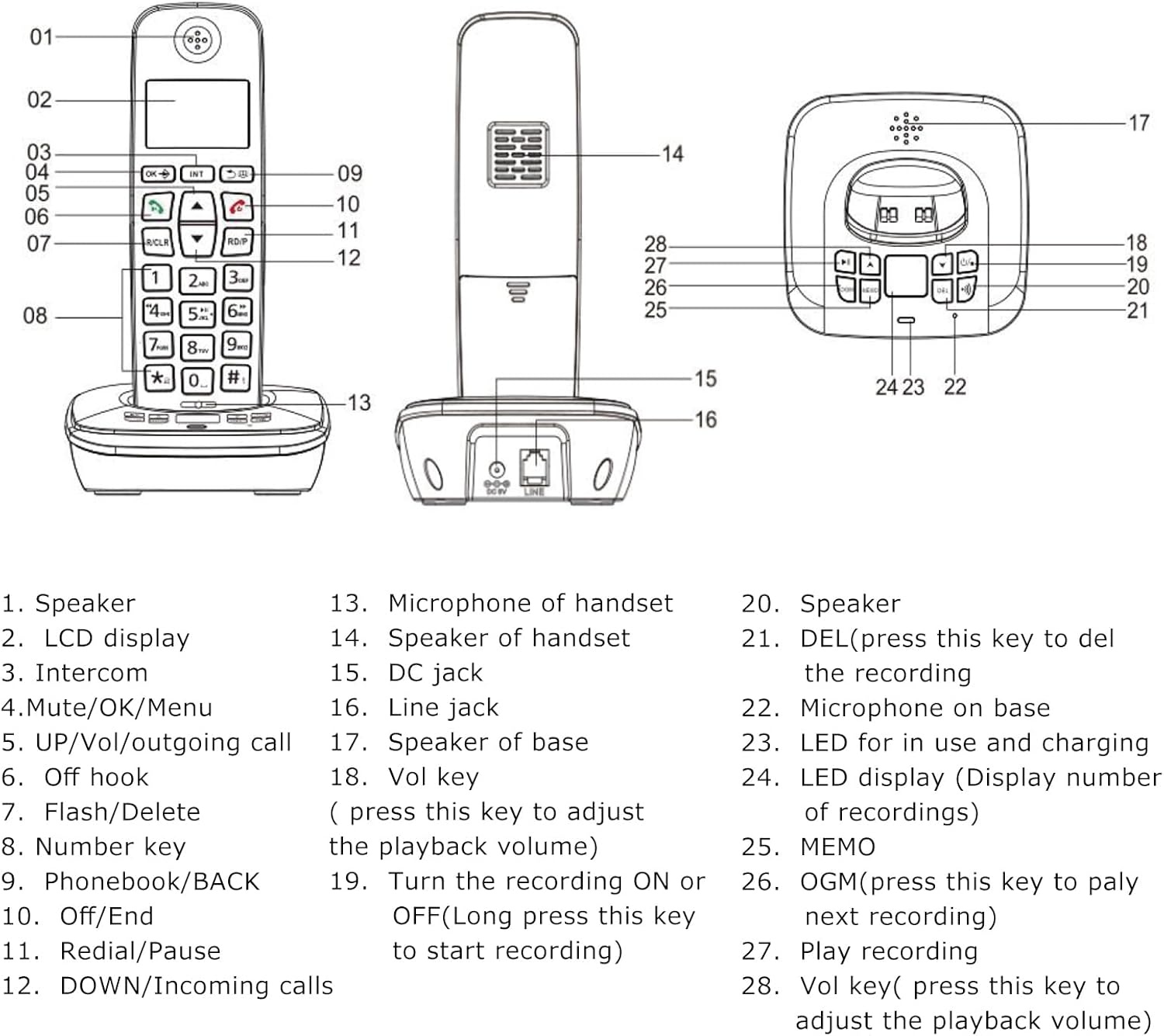
Image: A detailed diagram illustrating the handset and base unit with numbered labels pointing to specific components for easy identification.
Handset Components:
- സ്പീക്കർ
- LCD display (3 lines)
- Intercom button (INT)
- Mute/OK/Menu button
- UP/Vol/Outgoing call button
- Off hook button (Green call button)
- Flash/Delete button (R/CLR)
- Number keys (0-9, *, #)
- Phonebook/BACK button
- Off/End button (Red call button)
- Redial/Pause button (RD/P)
- DOWN/Incoming calls button
- Microphone of handset
Base Unit Components:
- Speaker of handset
- DC jack (Power input)
- Line jack (Telephone line input)
- Speaker of base
- Vol key (Volume adjustment for playback)
- Turn the recording ON or OFF (Long press to start recording)
- DEL (Press to delete the recording)
- Microphone on base
- LED for in use and charging indication
- LED display (Display number of recordings)
- മെമോ ബട്ടൺ
- OGM (Press to play next recording)
- Play recording button
- Vol key (Press to adjust playback volume)
4. സജ്ജീകരണം
4.1 ബാറ്ററി ഇൻസ്റ്റാളേഷൻ
- ഹാൻഡ്സെറ്റിന്റെ പിൻഭാഗത്തുള്ള ബാറ്ററി കമ്പാർട്ട്മെന്റ് കവർ തുറക്കുക.
- Insert the two rechargeable batteries, ensuring correct polarity (+ and -).
- ബാറ്ററി കമ്പാർട്ട്മെൻ്റ് കവർ സുരക്ഷിതമായി അടയ്ക്കുക.
4.2 ബേസ് യൂണിറ്റ് ബന്ധിപ്പിക്കുന്നു
- Connect one end of the telephone line cable to the LINE jack on the base unit and the other end to your telephone wall socket.
- Connect the power cord to the DC jack on the base unit and plug the adapter into a power outlet.
4.3 പ്രാരംഭ ചാർജിംഗ്
Place the handset on the base unit. For the first use, charge the handset for at least 12 hours. A full charge typically takes 10 hours. This ensures optimal battery performance and longevity.
4.4 ഹാൻഡ്സെറ്റ് രജിസ്ട്രേഷൻ
Your handset may be pre-registered. If not, or if you wish to register additional handsets (up to 5 per base unit), refer to the detailed registration steps in the full user manual. The system supports a maximum of 4 base units per handset.

ചിത്രം: ഒരു വശം view of the base unit, highlighting the DC power input and the telephone line jack for connecting to power and the telephone network.
5. പ്രവർത്തന നിർദ്ദേശങ്ങൾ
5.1 അടിസ്ഥാന കോൾ പ്രവർത്തനങ്ങൾ
- ഒരു കോൾ ചെയ്യുന്നു: Press the green call button, then dial the number. Alternatively, dial the number first (pre-dial) and then press the green call button.
- ഒരു കോൾ സ്വീകരിക്കുന്നു: ഫോൺ റിംഗ് ചെയ്യുമ്പോൾ, പച്ച കോൾ ബട്ടൺ അമർത്തുക.
- ഒരു കോൾ അവസാനിപ്പിക്കുന്നു: Press the red call button or place the handset back on the base unit.
- വീണ്ടും ഡയൽ ചെയ്യുക: Press the RD/P button to redial the last number called.
- വോളിയം ക്രമീകരണം: During a call, use the UP/DOWN buttons to adjust the earpiece or hands-free volume.
- നിശബ്ദമാക്കുക: During a call, press the Mute button to temporarily disable your microphone. Press again to unmute.

ചിത്രം: ഒരു ക്ലോസ്-അപ്പ് view of the handset's keypad, emphasizing the design of the buttons for comfortable and easy use.
5.2 Answering Machine (TAM) Functions
The base unit features a digital answering machine with up to 60 minutes of message recording capacity.
- ഔട്ട്ഗോയിംഗ് സന്ദേശം റെക്കോർഡുചെയ്യുന്നു (OGM): The base can record two groups of OGM. Refer to the full manual for detailed steps on recording your personalized outgoing message.
- സന്ദേശങ്ങൾ പ്ലേ ചെയ്യുന്നു: Press the OGM button on the base unit to play recorded messages. Use the Vol keys to adjust playback volume.
- Memo Recording: The system supports memo recording up to 120 seconds.
- സന്ദേശങ്ങൾ ഇല്ലാതാക്കുന്നു: Press the DEL button on the base unit to delete recordings.
- വോയ്സ് നിർദ്ദേശങ്ങൾ: The answering machine provides voice prompts in English, Spanish, French, and German.
5.3 ഫോൺബുക്ക്
Store up to 50 phone book memories, each with a maximum of 12 characters for the name and 20 digits for the number.
- ഒരു എൻട്രി ചേർക്കുന്നു: ഫോൺബുക്ക് മെനുവിലേക്ക് നാവിഗേറ്റ് ചെയ്യുക, 'പുതിയത് ചേർക്കുക' തിരഞ്ഞെടുക്കുക, പേരും നമ്പറും നൽകുക, തുടർന്ന് സേവ് ചെയ്യുക.
- Searching/Dialing: Press the Phonebook button to access your stored contacts. Use the UP/DOWN buttons to scroll, then press the green call button to dial.
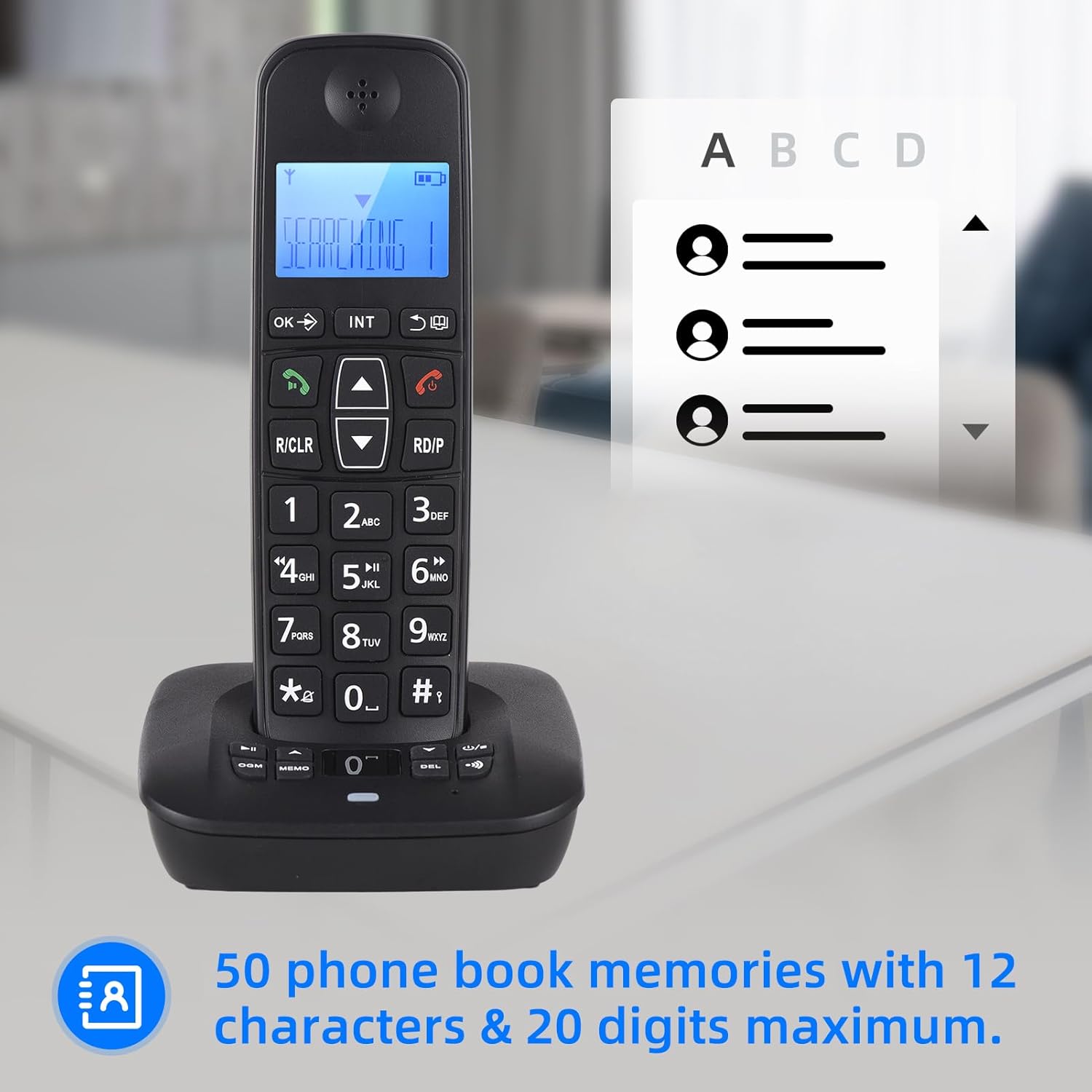
Image: The handset display showing the phonebook feature, indicating the capacity for 50 entries with space for names and numbers.
5.4 കോളർ ഐഡി
The phone stores up to 30 incoming numbers and 10 outgoing numbers.
- Viewing Incoming Calls: Press the DOWN button to access the incoming call list.
- Viewing Outgoing Calls: Press the RD/P button repeatedly to cycle through outgoing calls.

Image: The handset on its base, with icons representing Caller ID, 30 incoming number memories, and 10 outgoing number memories.
5.5 Intercom and Conference Call
- ഇൻ്റർകോം: If you have multiple registered handsets, you can make intercom calls between them. Press the INT button and select the desired handset.
- കോൾ ട്രാൻസ്ഫർ: Transfer an external call to another handset.
- കോൺഫറൻസ് കോൾ: Conduct a three-way conference call involving an external call and two internal handsets.
5.6 Ringing Tones
- തിരഞ്ഞെടുപ്പ്: Choose from 10 different ringing tones.
- ഇഷ്ടാനുസൃതമാക്കൽ: Set different melodies for different types of calls (e.g., internal vs. external).
5.7 എൽസിഡി ഡിസ്പ്ലേ
The handset features a 3-line LCD display for clear visibility of caller ID, menu options, and phonebook entries.

Image: A close-up of the handset's LCD screen, demonstrating its 3-line display capability for showing information clearly.
6. പരിപാലനം
- വൃത്തിയാക്കൽ: ഒരു സോഫ്റ്റ്, ഡി ക്ലീനർ ഉപയോഗിച്ച് ഹാൻഡ്സെറ്റും ബേസ് യൂണിറ്റും തുടയ്ക്കുക.amp തുണി. ഉരച്ചിലുകളുള്ള ക്ലീനറുകളോ ലായകങ്ങളോ ഉപയോഗിക്കരുത്.
- ബാറ്ററി കെയർ: Use only the specified rechargeable batteries. If the phone will not be used for an extended period, remove the batteries.
- പരിസ്ഥിതി: അമിതമായ ചൂട്, നേരിട്ടുള്ള സൂര്യപ്രകാശം, ഈർപ്പം എന്നിവയിൽ നിന്ന് ഫോൺ അകറ്റി നിർത്തുക.
7. പ്രശ്നപരിഹാരം
If you encounter issues with your telephone, try the following basic troubleshooting steps:
- ഡയൽ ടോൺ ഇല്ല: Ensure the telephone line cable is securely connected to both the base unit and the wall socket. Check if the power adapter is properly plugged in.
- കോളുകൾ വിളിക്കാനോ സ്വീകരിക്കാനോ കഴിയില്ല: Verify that the handset is charged. Check if the telephone line is active.
- ഹാൻഡ്സെറ്റ് രജിസ്റ്റർ ചെയ്യുന്നില്ല: Follow the registration steps in the full user manual. Ensure the handset is within range of the base unit.
- മോശം ശബ്ദ നിലവാരം: Check for interference from other electronic devices. Ensure the handset is within optimal range of the base.
- ഉത്തരം നൽകുന്ന യന്ത്രം റെക്കോർഡ് ചെയ്യുന്നില്ല: Check the available memory. Ensure the answering machine function is enabled.
For more complex issues, refer to the comprehensive troubleshooting section in the full user manual or contact customer support.
8 സ്പെസിഫിക്കേഷനുകൾ
- മോഡൽ: D1007 TAM
- നിറം: കറുപ്പ്
- മെറ്റീരിയൽ: പ്ലാസ്റ്റിക്
- ഇൻപുട്ട്: 100-240V, 50/60Hz
- ആവൃത്തി: 1.8/1.9GHz
- ഇന്റർഫേസ് ഭാഷകൾ: Portugu, Spanish, English, French, German, Italian, Dutch, Hungarian, Greek, Polish, Danish, Norwegian, Swedish, Turkish, Russian, Ukrainian (16 kinds)
- ബാറ്ററി: 2 x Rechargeable Batteries (400mAh, 1.2V each)
- ഹാൻഡ്സെറ്റ് വലിപ്പം: 18 x 5.3 x 2 സെ.മീ (7 x 2 x 0.9 ഇഞ്ച്)
- Cradle Size: 11 x 10.5 x 4.3 സെ.മീ (4.3 x 4.1 x 1.6 ഇഞ്ച്)
- സംസാര സമയം: Up to 10 hours continued talk
- സ്റ്റാൻഡ്ബൈ സമയം: Up to 120 hours on standby
- Answering Machine Capacity: പരമാവധി. 60 മിനിറ്റ്
- Phonebook Memories: 50 entries (12 characters & 20 digits max)
- Incoming Call Memories: 30 അക്കങ്ങൾ
- Outgoing Call Memories: 10 അക്കങ്ങൾ
9. വാറൻ്റിയും പിന്തുണയും
For warranty information and customer support, please refer to the documentation provided at the time of purchase or visit the official Irfora webസൈറ്റ്. വാങ്ങിയതിന്റെ തെളിവായി നിങ്ങളുടെ വാങ്ങൽ രസീത് സൂക്ഷിക്കുക.