
സ്വാഗതം
Thank you for choosing the TOPUTURE 4-in-1 Foldable Walking Pad with Incline. This versatile fitness equipment is designed for both home and office use, offering a compact and efficient way to stay active. With its powerful yet silent motor, adjustable incline, and smart features, you can enjoy a comprehensive workout experience. Please read this manual thoroughly before operation to ensure safe and optimal use of your new walking pad.
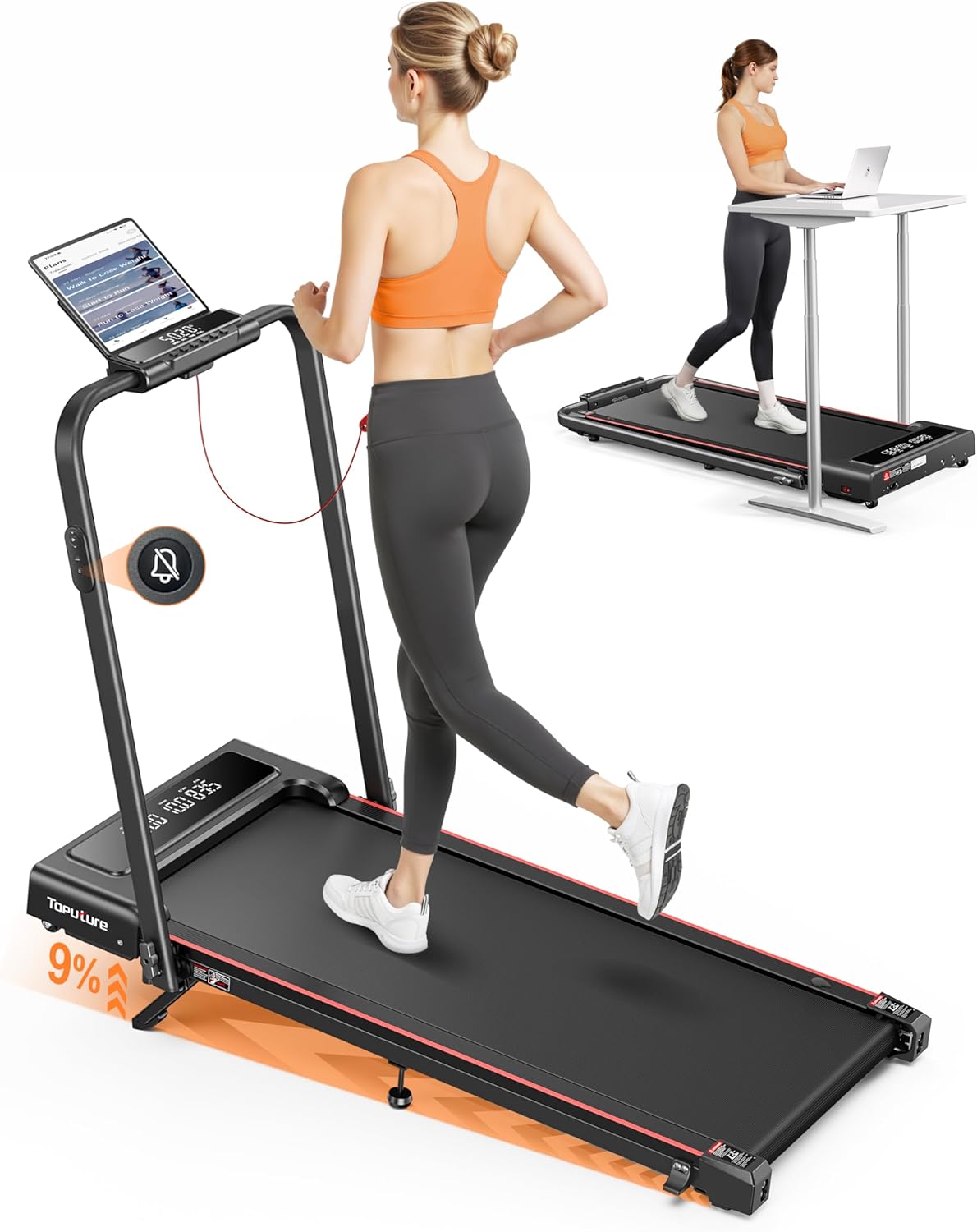
Image: The TOPUTURE 4-in-1 Foldable Walking Pad in its upright running configuration and folded flat for under-desk use, demonstrating its versatility.
പ്രധാനപ്പെട്ട സുരക്ഷാ നിർദ്ദേശങ്ങൾ
To reduce the risk of serious injury, read all instructions before using this product. The manufacturer is not responsible for personal injury or property damage sustained by or through the use of this product.
- വാക്കിംഗ് പാഡ് എപ്പോഴും പരന്നതും സ്ഥിരതയുള്ളതുമായ ഒരു പ്രതലത്തിൽ വയ്ക്കുക.
- പ്രവർത്തന സമയത്ത് ഉപകരണങ്ങളിൽ നിന്ന് കുട്ടികളെയും വളർത്തുമൃഗങ്ങളെയും അകറ്റി നിർത്തുക.
- Ensure adequate clearance around the walking pad (at least 2 feet on all sides).
- Do not exceed the maximum user weight capacity of 300 lbs (approximately 136 kg).
- ഉചിതമായ കായിക പാദരക്ഷകളും വസ്ത്രങ്ങളും ധരിക്കുക.
- നിങ്ങൾക്ക് ക്ഷീണം, തലകറക്കം, അല്ലെങ്കിൽ വേദന അനുഭവപ്പെടുകയാണെങ്കിൽ, വ്യായാമം ഉടൻ നിർത്തുക.
- Always unplug the walking pad from the power outlet when not in use, before cleaning, or performing maintenance.
- Use the emergency stop feature if necessary.
ഉൽപ്പന്നം കഴിഞ്ഞുview
The TOPUTURE TP4 is designed with user convenience and effective workouts in mind. Key features include:
- 9% Manual Incline & M Mode: Adjust the incline to simulate uphill running and burn more calories. M Mode allows setting goals based on time, calories, or distance.
- Silent Remote Control & Dual Display: Enjoy quiet operation with a noiseless remote. The dual-screen display shows real-time data like time, speed, distance, and calories.
- No Assembly & Space-Saving Design: Ready to use out of the box. Lightweight and portable with front wheels for easy mobility. Folds compactly for storage under beds or sofas.
- 2.5HP Powerful Silent Motor: Delivers speeds of 0.6-7.6 MPH with a 300 lbs load capacity.
- അഡ്വാൻസ്ഡ് ഷോക്ക് അബ്സോർപ്ഷൻ: Features a 5-layer anti-slip belt, 8 silicone shock absorbers, and 2 soft rubber pads for double shock absorption, protecting your knees.
- സ്മാർട്ട് ആപ്പ് കണക്റ്റിവിറ്റി: Connect to a compatible app (e.g., FitShow) to sync exercise data, access training plans, and track progress.
ഉൽപ്പന്ന മോഡുകൾ

Image: The walking pad supports both walking (0.6-5 MPH) and running (5-7.6 MPH) modes, adapting to various fitness needs.

Image: This diagram illustrates the four primary modes of operation: Running (3-7.6 MPH), Climbing (0.6-3 MPH), Walking (1.5-3 MPH), and Working (0.6-1.5 MPH), highlighting the treadmill's versatility.
Incline Feature

Image: The adjustable 0-9% manual incline feature allows for a more challenging workout, boosting calorie expenditure.
ഡിസ്പ്ലേയും നിയന്ത്രണവും

Image: The dual LED screen provides clear, real-time data, while the silent remote control offers convenient operation.
Motor and Noise Level

Image: The 2.5HP motor operates quietly (under 45dB), making it suitable for use in shared spaces without disturbance.
ആപ്പ് ഇൻ്റഗ്രേഷൻ

Image: Enhance your workout experience by connecting to a smart app for real-time data synchronization and personalized training plans.
Running Belt and Shock Absorption

Image: The multi-layer belt and advanced shock absorption system provide a comfortable and joint-friendly running surface.
പ്രാരംഭ സജ്ജീകരണം
The TOPUTURE TP4 is designed for installation-free setup, meaning it's ready to use almost immediately out of the box.
അൺബോക്സിംഗും പ്ലേസ്മെന്റും
- വാക്കിംഗ് പാഡ് അതിന്റെ പാക്കേജിംഗിൽ നിന്ന് ശ്രദ്ധാപൂർവ്വം നീക്കം ചെയ്യുക.
- Place the walking pad on a firm, level surface. Ensure there is sufficient space around the unit for safe operation and movement.
- Unfold the handle/handrail if you intend to use it in running mode.
- ഗ്രൗണ്ടഡ് ഇലക്ട്രിക്കൽ ഔട്ട്ലെറ്റിലേക്ക് പവർ കോർഡ് പ്ലഗ് ചെയ്യുക.
Folding and Unfolding for Storage
The compact design allows for easy storage.

Image: The treadmill easily folds flat to a compact size (50x23x4.5 inches) and features transport wheels for convenient storage under furniture or against a wall.
Adjusting the Manual Incline
The walking pad features a 9% manual incline for varied workouts.

Image: Follow these three steps to adjust the incline: 1. Unfold the footpad. 2. Insert the pin into the desired incline slot. 3. Adjust the middle footpad for stability.
പ്രവർത്തന നിർദ്ദേശങ്ങൾ
പവർ ഓൺ/ഓഫ്
- To power on, ensure the safety key is in place and press the power button on the console or remote.
- To power off, press the power button again or remove the safety key.
റിമോട്ട് കൺട്രോൾ ഉപയോഗിക്കുന്നു
The remote control allows for convenient adjustment of speed and mode without reaching the console.
- ആരംഭിക്കുക/നിർത്തുക: നിങ്ങളുടെ വ്യായാമം ആരംഭിക്കാനോ അവസാനിപ്പിക്കാനോ അമർത്തുക.
- വേഗത +/-: Adjust the walking/running speed.
- മോഡ്: Cycle through different workout modes (e.g., M Mode for time, distance, calorie goals).
- നിശബ്ദമാക്കുക: Press the mute button for quiet operation, especially useful for under-desk use.

Image: The remote control features a mute button, allowing for silent operation, perfect for office environments.
ഡിസ്പ്ലേ മനസ്സിലാക്കുന്നു
The dual LED display provides essential workout metrics:
- സമയം: നിങ്ങളുടെ വ്യായാമത്തിന്റെ ദൈർഘ്യം.
- വേഗത: നിലവിലെ വേഗത MPH-ൽ.
- ദൂരം: ആകെ സഞ്ചരിച്ച ദൂരം.
- കലോറികൾ: കണക്കാക്കിയ കലോറികൾ കത്തിച്ചു.
അപ്ലിക്കേഷൻ കണക്റ്റിവിറ്റി
For enhanced tracking and personalized workouts, connect your walking pad to a compatible fitness app (e.g., FitShow).
- Download the recommended app from your device's app store.
- നിങ്ങളുടെ മൊബൈൽ ഉപകരണത്തിൽ ബ്ലൂടൂത്ത് പ്രവർത്തനക്ഷമമാക്കുക.
- Open the app and follow the on-screen instructions to pair with your TOPUTURE TP4.
- Once connected, you can sync exercise data, access training plans, and participate in challenges.
പരിപാലനവും പരിചരണവും
പതിവായി പരിപാലിക്കുന്നത് നിങ്ങളുടെ വാക്കിംഗ് പാഡിന്റെ ദീർഘായുസ്സും മികച്ച പ്രകടനവും ഉറപ്പാക്കുന്നു.
ലൂബ്രിക്കേഷൻ
The running belt requires periodic lubrication to reduce friction and extend its lifespan. Use only silicone-based treadmill lubricant.

Image: The treadmill features a dedicated lubrication port for easy maintenance of the running belt.
- Unplug the walking pad from the power outlet.
- Locate the lubrication port (as shown in the image).
- Apply a small amount of lubricant into the port.
- Plug in the walking pad and run it at a low speed (e.g., 1 MPH) for 2-3 minutes to distribute the lubricant evenly.
- ഉപയോഗത്തിനനുസരിച്ച് ഓരോ 3-6 മാസത്തിലും ലൂബ്രിക്കേറ്റ് ചെയ്യുക.
ബെൽറ്റ് അഡ്ജസ്റ്റ്മെൻ്റ്
If the running belt feels loose or is slipping, it may need adjustment. Use the included tool kit to tighten the belt tension screws located at the rear of the walking pad.
- Turn the screws clockwise in small increments (quarter turns) until the belt feels appropriately tensioned.
- Ensure the belt remains centered. If it drifts to one side, adjust the screw on the opposite side.
വൃത്തിയാക്കൽ
- പരസ്യം ഉപയോഗിച്ച് വാക്കിംഗ് പാഡ് തുടയ്ക്കുകamp ഓരോ ഉപയോഗത്തിനു ശേഷവും വിയർപ്പും പൊടിയും നീക്കം ചെയ്യാൻ തുണി ഉപയോഗിക്കുക.
- ഉരച്ചിലുകളുള്ള ക്ലീനറുകളോ ലായകങ്ങളോ ഉപയോഗിക്കരുത്.
സംഭരണം
When not in use, fold the walking pad and store it in a dry, cool place away from direct sunlight and moisture.
പ്രശ്ന പരിഹാരത്തിന് സഹായിക്കുന്ന മാർഗധർശി
This section addresses common issues you might encounter with your TOPUTURE TP4 walking pad.
| പ്രശ്നം | സാധ്യമായ കാരണം | പരിഹാരം |
|---|---|---|
| വാക്കിംഗ് പാഡ് പവർ ഓൺ ചെയ്യുന്നില്ല. | Power cord not connected; Safety key not in place; Power switch off. | Ensure power cord is securely plugged in; Insert safety key fully; Turn on the main power switch. |
| Belt slips or hesitates during use. | ബെൽറ്റ് വളരെ അയഞ്ഞിരിക്കുന്നു; ലൂബ്രിക്കേഷൻ അപര്യാപ്തമാണ്. | Adjust belt tension (see Maintenance section); Lubricate the running belt. |
| Unusual noise from the motor area. | ലൂബ്രിക്കേഷന്റെ അഭാവം; അയഞ്ഞ ഘടകങ്ങൾ. | Lubricate the running belt; Check for any loose screws and tighten them. If noise persists, contact customer support. |
| Display not showing correct data. | Sensor issue; Loose connection. | Restart the walking pad; Check connections. If problem persists, contact customer support. |
ഉൽപ്പന്ന സവിശേഷതകൾ
| സ്പെസിഫിക്കേഷൻ | മൂല്യം |
|---|---|
| മോഡൽ നമ്പർ | TP4 |
| ഉൽപ്പന്ന അളവുകൾ (അൺഫോൾഡ്) | 126 x 12 x 62 സെ.മീ (50 x 23 x 42 ഇഞ്ച്) |
| മടക്കാവുന്ന വലുപ്പം | 50 x 23 x 4.5 ഇഞ്ച് |
| ഇനത്തിൻ്റെ ഭാരം | 25 കി.ഗ്രാം (55 പൗണ്ട്) |
| മെറ്റീരിയൽ | അലോയ് സ്റ്റീൽ |
| മോട്ടോർ കുതിരശക്തി | 2.5 എച്ച്.പി |
| വേഗത പരിധി | 0.6 - 7.6 മൈൽ / മണിക്കൂർ |
| പരമാവധി ചരിവ് ശതമാനംtage | 9% (Manual) |
| പരമാവധി ഉപയോക്തൃ ഭാരം ശേഷി | 300 പൗണ്ട് (ഏകദേശം 136 കിലോഗ്രാം) |
| ശബ്ദ നില | <45 ഡിബി |
| Display Metrics | Speed, Calories Burned, Time, Distance |
| പ്രത്യേക സവിശേഷതകൾ | Shock Absorbent, Lightweight, Manual Incline, Foldable, Compact Design |
| ഉൾപ്പെടുത്തിയ ഘടകങ്ങൾ | User Manual, Power Cord, Tool Kit |
വാറൻ്റിയും ഉപഭോക്തൃ പിന്തുണയും
TOPUTURE products are manufactured to high-quality standards and are backed by a manufacturer's warranty. Please refer to the warranty card included in your packaging for specific terms and conditions regarding coverage and duration.
For any questions, technical assistance, or warranty claims, please contact TOPUTURE customer support. Contact information can typically be found on the product packaging, the official TOPUTURE webസൈറ്റ്, അല്ലെങ്കിൽ വാറന്റി കാർഡ്.
Please have your model number (TP4) and purchase information ready when contacting support to ensure efficient service.