
ആമുഖം
This manual provides essential information for the safe and effective use of your Minolta MNB5Z 56MP Dual Lens Point & Shoot Digital Camera. Please read this manual thoroughly before using the camera and keep it for future reference. The Minolta MNB5Z is designed to capture high-quality photos at 56MP and record videos in 5K Ultra HD, featuring a 5x optical zoom and a user-friendly 2.8-inch IPS touchscreen.
സുരക്ഷാ വിവരങ്ങൾ
- Do not expose the camera to water or moisture. This camera is not water resistant.
- ക്യാമറ താഴെയിടുകയോ ശക്തമായ ആഘാതങ്ങൾക്ക് വിധേയമാക്കുകയോ ചെയ്യരുത്.
- Keep the camera away from direct sunlight, high temperatures, and dusty environments.
- നിർദ്ദിഷ്ട ബാറ്ററികളും അനുബന്ധ ഉപകരണങ്ങളും മാത്രം ഉപയോഗിക്കുക.
- ക്യാമറ വേർപെടുത്താനോ പരിഷ്കരിക്കാനോ ശ്രമിക്കരുത്. എല്ലാ സേവനങ്ങളും യോഗ്യതയുള്ള ഉദ്യോഗസ്ഥരെ ഏൽപ്പിക്കുക.
- കുട്ടികൾക്ക് ലഭ്യമാകാതെ സൂക്ഷിക്കുക.
പാക്കേജ് ഉള്ളടക്കം
നിങ്ങളുടെ പാക്കേജിൽ എല്ലാ ഇനങ്ങളും ഉണ്ടെന്ന് ഉറപ്പാക്കുക:
- Minolta MNB5Z 56MP Digital Camera
- യുഎസ്ബി ചാർജിംഗ് കേബിൾ
- റീചാർജ് ചെയ്യാവുന്ന ലിഥിയം-അയൺ ബാറ്ററി
- MicroSDHC Ultra 64GB Memory Card
- ഫ്ലെക്സിബിൾ വ്ലോഗിംഗ് ട്രൈപോഡ്
- മെമ്മറി കാർഡ് വാലറ്റ്
- USB Card Reader (SD/microSD)
- ക്യാമറ ബാഗ്
- ക്ലീനിംഗ് കിറ്റ്
- Corel Photo, Video, & Art Suite Deluxe Software (Download information may be included)
സജ്ജമാക്കുക
1. ബാറ്ററി ഇൻസ്റ്റാളേഷൻ
- ക്യാമറയുടെ അടിയിൽ ബാറ്ററി കമ്പാർട്ട്മെന്റ് കവർ കണ്ടെത്തുക.
- കമ്പാർട്ട്മെന്റ് തുറക്കാൻ കവർ ലാച്ച് സ്ലൈഡ് ചെയ്യുക.
- Insert the Lithium-Ion battery according to the polarity indicators (+/-).
- ബാറ്ററി കമ്പാർട്ട്മെന്റ് കവർ ശരിയായി ക്ലിക്കു ചെയ്യുന്നത് വരെ സുരക്ഷിതമായി അടയ്ക്കുക.
2. മെമ്മറി കാർഡ് ഇൻസ്റ്റാളേഷൻ
The Minolta MNB5Z supports microSD and microSDHC cards up to 256GB.
- Open the battery compartment cover. The microSD card slot is usually located near the battery.
- Insert the microSD card with the gold contacts facing down, gently pushing until it clicks into place.
- നീക്കം ചെയ്യാൻ, കാർഡ് വീണ്ടും ഉള്ളിലേക്ക് അമർത്തി അത് പുറത്തേക്ക് വരുന്നത് വരെ അമർത്തുക.
- ബാറ്ററി കമ്പാർട്ട്മെൻ്റ് കവർ അടയ്ക്കുക.
3 ബാറ്ററി ചാർജ് ചെയ്യുന്നു
- Connect the small end of the USB charging cable to the camera's USB port.
- USB കേബിളിന്റെ മറ്റേ അറ്റം ഒരു USB പവർ അഡാപ്റ്ററുമായി (ഉൾപ്പെടുത്തിയിട്ടില്ല) അല്ലെങ്കിൽ ഒരു കമ്പ്യൂട്ടറിന്റെ USB പോർട്ടുമായി ബന്ധിപ്പിക്കുക.
- The charging indicator light (CHG) will illuminate during charging and turn off when fully charged.
4. പ്രാരംഭ പവർ ഓൺ
- അമർത്തിപ്പിടിക്കുക ഓൺ/ഓഫ് ക്യാമറയുടെ മുകളിൽ സ്ഥിതിചെയ്യുന്ന ബട്ടൺ.
- The camera will power on, and the display screen will activate.
- പ്രാരംഭ സജ്ജീകരണത്തിനായി, തീയതിയും സമയവും സജ്ജീകരിക്കുന്നത് പോലുള്ള ഏതെങ്കിലും ഓൺ-സ്ക്രീൻ നിർദ്ദേശങ്ങൾ പാലിക്കുക.
ക്യാമറ പ്രവർത്തിപ്പിക്കുന്നത്
1. ക്യാമറ ലേഔട്ടും നിയന്ത്രണങ്ങളും
Familiarize yourself with the camera's buttons and touchscreen interface.

ചിത്രം: പിൻഭാഗം view of the Minolta MNB5Z camera, highlighting the touchscreen display and physical control buttons for navigation and function selection.
- ഓൺ/ഓഫ് ബട്ടൺ: ക്യാമറ ഓൺ അല്ലെങ്കിൽ ഓഫ് ആക്കുന്നു.
- ഷട്ടർ ബട്ടൺ: Press halfway to focus, fully to take a photo.
- സൂം ലിവർ: Controls the 5x optical zoom.
- മോഡ് ബട്ടൺ: Switches between different shooting modes (Photo, Video, Playback, etc.).
- Directional Pad (DISP/OK): മെനുകളിലൂടെ നാവിഗേറ്റ് ചെയ്ത് തിരഞ്ഞെടുപ്പുകൾ സ്ഥിരീകരിക്കുന്നു.
- പ്ലേബാക്ക് ബട്ടൺ: പ്ലേബാക്ക് മോഡിലേക്ക് പ്രവേശിക്കുന്നു view ഫോട്ടോകളും വീഡിയോകളും.
- മെനു ബട്ടൺ: ക്യാമറ ക്രമീകരണങ്ങളും ഓപ്ഷനുകളും ആക്സസ് ചെയ്യുന്നു.
- 2.8-inch IPS Touchscreen: For intuitive navigation and reviewഉള്ളടക്കം.
2. ഫോട്ടോ എടുക്കൽ
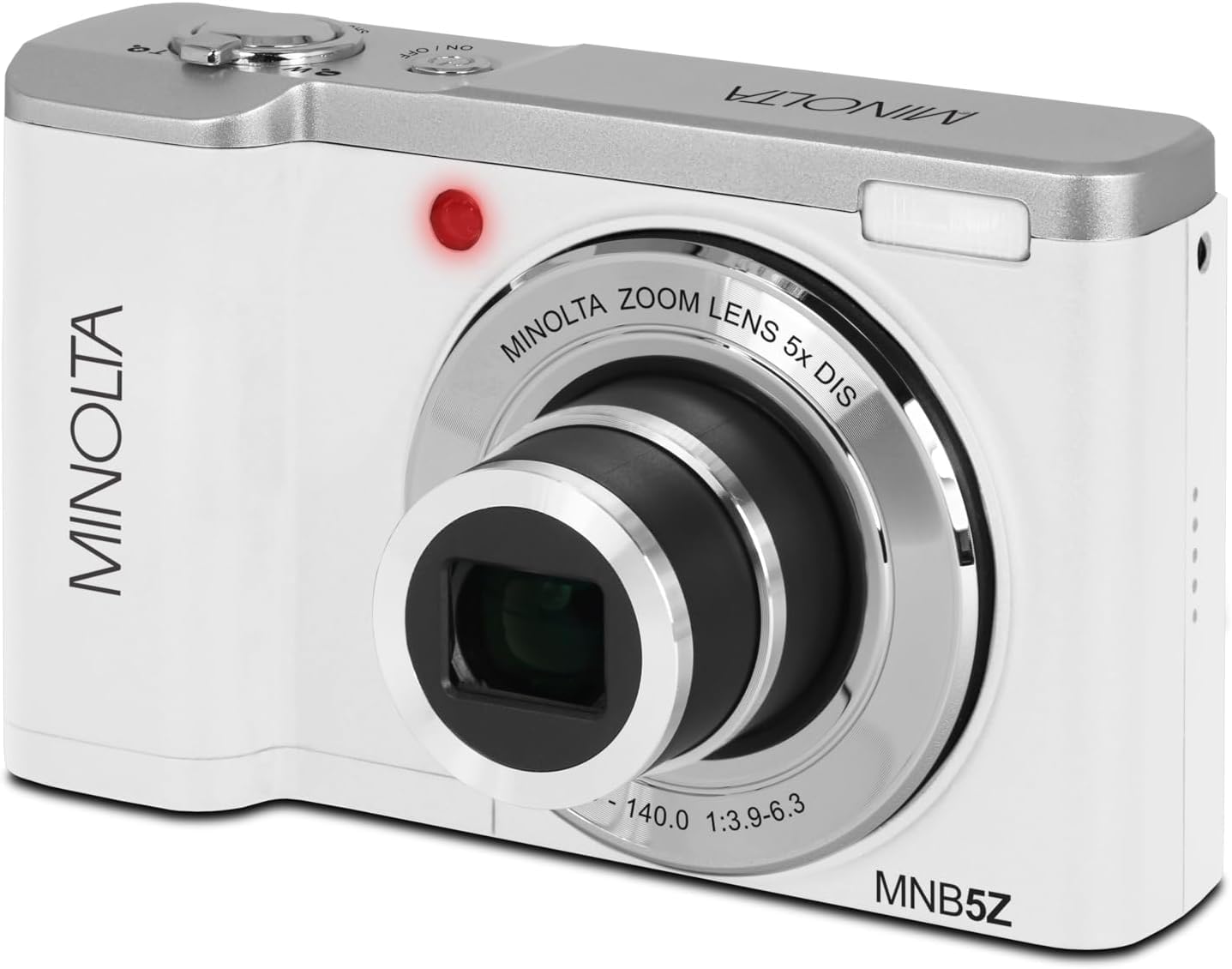
ചിത്രം: മുൻഭാഗം view of the Minolta MNB5Z camera, showing the lens extended for capturing images, with the Minolta branding visible.
- ക്യാമറ ഓണാക്കി അത് ഫോട്ടോ മോഡിലാണെന്ന് ഉറപ്പാക്കുക.
- Frame your shot using the 2.8-inch IPS touchscreen.
- Use the zoom lever to adjust the 5x optical zoom.
- Press the shutter button halfway down to allow the camera to focus. The focus indicator will confirm focus.
- Press the shutter button fully to capture the photo.
- ഫ്ലാഷ്: The built-in flash can be set to Auto, On/Fill, or Off via the menu.
- ഷൂട്ടിംഗ് മോഡുകൾ: Access various modes like Photo Burst, Time-Lapse, and Slow Motion via the Mode button or touchscreen menu.
3. വീഡിയോകൾ റെക്കോർഡുചെയ്യുന്നു
- Turn on the camera and switch to Video mode using the Mode button.
- Frame your subject on the touchscreen.
- Press the shutter button to start recording. A recording indicator will appear on the screen.
- റെക്കോർഡിംഗ് നിർത്താൻ ഷട്ടർ ബട്ടൺ വീണ്ടും അമർത്തുക.
- The camera records in 5K Ultra HD resolution and includes a built-in microphone for audio capture.
4. പ്ലേബാക്ക്
- Press the Playback button to enter playback mode.
- Use the directional pad or swipe on the touchscreen to browse through your photos and videos.
- ശരി ബട്ടൺ അമർത്തുക view a video or zoom into a photo.
- പ്ലേബാക്ക് മോഡിൽ നിന്ന് പുറത്തുകടക്കാൻ പ്ലേബാക്ക് ബട്ടൺ വീണ്ടും അമർത്തുക.
5. ക്യാമറ ക്രമീകരണങ്ങൾ
- Press the Menu button to access camera settings.
- Use the directional pad or touchscreen to navigate through options such as resolution, white balance, ISO, exposure compensation, and color filters.
- Select an option and press OK to confirm or adjust.
- മെനുവിൽ നിന്ന് പുറത്തുകടക്കാൻ മെനു ബട്ടൺ വീണ്ടും അമർത്തുക.
6. Connecting to a Computer (USB)
- ക്യാമറ ഓഫാണെന്ന് ഉറപ്പാക്കുക.
- നൽകിയിരിക്കുന്ന USB കേബിൾ ഉപയോഗിച്ച് നിങ്ങളുടെ കമ്പ്യൂട്ടറിലേക്ക് ക്യാമറ ബന്ധിപ്പിക്കുക.
- Turn on the camera. It should be recognized as a removable disk or media device.
- ഇപ്പോൾ നിങ്ങൾക്ക് നിങ്ങളുടെ കമ്പ്യൂട്ടറിലേക്ക് ഫോട്ടോകളും വീഡിയോകളും കൈമാറാൻ കഴിയും.
7. Wi-Fi കണക്റ്റിവിറ്റി
The Minolta MNB5Z features Wi-Fi connectivity for wireless transfer of images and remote control via a compatible smartphone application (if available). Refer to the camera's on-screen menu for Wi-Fi setup instructions and pairing with your device.
മെയിൻ്റനൻസ്
1. ക്യാമറ വൃത്തിയാക്കൽ
- ക്യാമറ ബോഡി വൃത്തിയാക്കാൻ മൃദുവായ, ലിന്റ് രഹിത തുണി ഉപയോഗിക്കുക.
- For the lens and screen, use a specialized lens cleaning cloth and solution. Avoid harsh chemicals.
- Gently blow away dust from the lens surface before wiping.
2. സംഭരണം

ചിത്രം: മുൻഭാഗം view of the Minolta MNB5Z camera with its lens retracted, demonstrating its compact form factor for easy storage in the included camera bag.
- When not in use, store the camera in the provided camera bag to protect it from dust and scratches.
- ക്യാമറ ദീർഘനേരം ഉപയോഗിച്ചില്ലെങ്കിൽ ബാറ്ററി നീക്കം ചെയ്യുക.
- Store in a cool, dry place, away from extreme temperatures and humidity.
ട്രബിൾഷൂട്ടിംഗ്
| പ്രശ്നം | പരിഹാരം |
|---|---|
| ക്യാമറ പവർ ഓൺ ചെയ്യുന്നില്ല. | Ensure the battery is correctly inserted and fully charged. Try charging the battery for at least 2 hours. |
| ഫോട്ടോകൾ/വീഡിയോകൾ എടുക്കാൻ കഴിയില്ല. | Check if the memory card is inserted correctly and has sufficient free space. Ensure the camera is in the correct mode (Photo/Video). |
| ചിത്രങ്ങൾ അവ്യക്തമാണ്. | Ensure the lens is clean. Press the shutter button halfway to allow the camera to focus before fully pressing. Use digital image stabilization in shaky conditions. |
| Flash is not working. | Check flash settings in the menu to ensure it is not set to 'Off'. |
| ക്യാമറ മരവിക്കുന്നു അല്ലെങ്കിൽ പ്രതികരിക്കുന്നില്ല. | Remove the battery, wait a few seconds, and reinsert it to reset the camera. |
സ്പെസിഫിക്കേഷനുകൾ
| ഫീച്ചർ | വിശദാംശങ്ങൾ |
|---|---|
| മോഡലിൻ്റെ പേര് | MNB5Z |
| ഫോട്ടോ റെസല്യൂഷൻ | 56 മെഗാപിക്സലുകൾ |
| വീഡിയോ റെസല്യൂഷൻ | 5K Ultra HD (30 FPS) |
| ഒപ്റ്റിക്കൽ സൂം | 5x |
| ഇമേജ് സ്റ്റെബിലൈസേഷൻ | ഡിജിറ്റൽ |
| സ്ക്രീൻ വലിപ്പം | 2.8 Inches IPS Touchscreen |
| മെമ്മറി കാർഡ് പിന്തുണ | microSD, microSDHC (up to 256GB) |
| കണക്റ്റിവിറ്റി | USB, Wi-Fi |
| ബാറ്ററി തരം | ലിഥിയം അയോൺ |
| ഫ്ലാഷ് | Built-In (Auto, On/Fill) |
| സെൻസർ തരം | CMOS |
| കുറഞ്ഞ ഷട്ടർ സ്പീഡ് | 1/4000 സെ |
| പിന്തുണച്ചു File ഫോർമാറ്റുകൾ | JPEG (ഫോട്ടോകൾ), MP4 (വീഡിയോകൾ) |
| ഇനത്തിൻ്റെ ഭാരം | 2.37 പൗണ്ട് |
വാറൻ്റിയും പിന്തുണയും
Minolta products are manufactured to the highest quality standards. For information regarding your product's warranty, please refer to the warranty card included in your package or visit the official Minolta support website. For technical assistance, troubleshooting, or service inquiries, please contact Minolta customer support.
ഓൺലൈൻ പിന്തുണ: Visit the official Minolta webപതിവുചോദ്യങ്ങൾ, ഡ്രൈവർ ഡൗൺലോഡുകൾ, ബന്ധപ്പെടാനുള്ള വിവരങ്ങൾ എന്നിവയ്ക്കുള്ള സൈറ്റ്.
കസ്റ്റമർ സർവീസ്: Refer to your product packaging or the Minolta webഉപഭോക്തൃ സേവന കോൺടാക്റ്റ് വിശദാംശങ്ങൾക്കായുള്ള സൈറ്റ്.