
CORBOBO SM850
SOLAKAKA SM850 വയർലെസ് ഗെയിമിംഗ് മൗസ് യൂസർ മാനുവൽ
മോഡൽ: SM850
1. ആമുഖം
Thank you for choosing the SOLAKAKA SM850 Wireless Gaming Mouse. This high-performance gaming mouse is designed for precision, speed, and comfort, featuring a lightweight build, tri-mode connectivity, and customizable buttons. This manual provides detailed instructions on setting up, operating, and maintaining your SM850 mouse to ensure optimal performance.

Image: The SOLAKAKA SM850 Wireless Gaming Mouse in white, showcasinഅതിന്റെ എർഗണോമിക് ഡിസൈനും ഉൾപ്പെടുത്തിയിരിക്കുന്ന യുഎസ്ബി റിസീവറും.
2. പാക്കേജ് ഉള്ളടക്കം
നിങ്ങളുടെ പാക്കേജിൽ എല്ലാ ഇനങ്ങളും ഉണ്ടെന്ന് ദയവായി പരിശോധിക്കുക:
- SOLAKAKA SM850 വയർലെസ് ഗെയിമിംഗ് മൗസ്
- USB-C ചാർജിംഗ് കേബിൾ
- USB 2.4G Wireless Receiver (stored in the mouse)
- ഉപയോക്തൃ മാനുവൽ (ഈ പ്രമാണം)
3. ഉൽപ്പന്നം കഴിഞ്ഞുview
Familiarize yourself with the various components and buttons of your SM850 mouse:
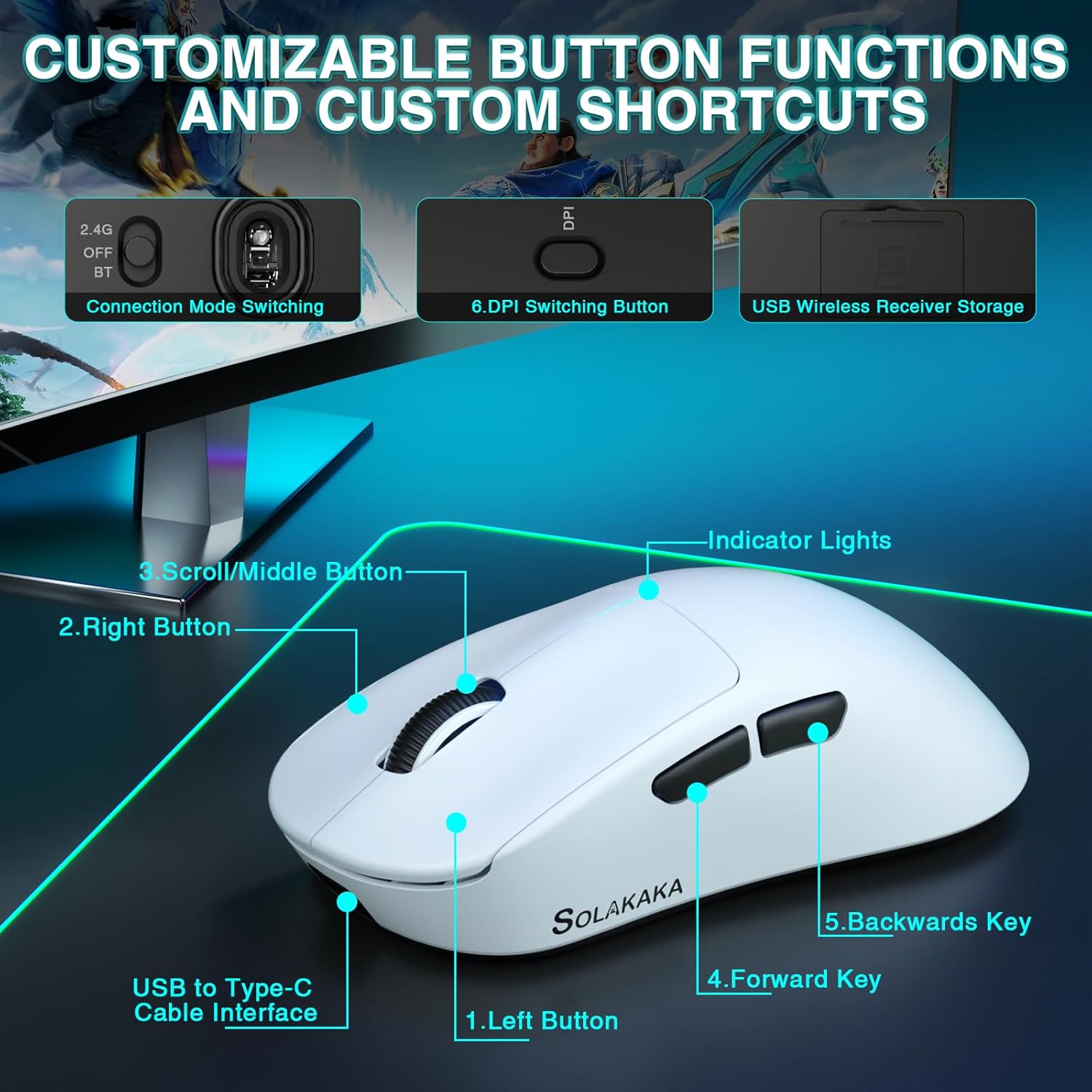
Image: Labeled diagram of the SM850 mouse, highlighting its buttons and features.
- ഇടത് ബട്ടൺ: സ്റ്റാൻഡേർഡ് ഇടത്-ക്ലിക്ക് പ്രവർത്തനം.
- വലത് ബട്ടൺ: സ്റ്റാൻഡേർഡ് റൈറ്റ്-ക്ലിക്ക് ഫംഗ്ഷൻ.
- Scroll/Middle Button: Scroll wheel for navigation and middle-click function.
- ഫോർവേഡ് കീ: മുന്നോട്ട് നാവിഗേറ്റ് ചെയ്യുന്നു web ബ്രൗസറുകൾ അല്ലെങ്കിൽ ആപ്ലിക്കേഷനുകൾ.
- പിന്നിലേക്ക് പോകാനുള്ള കീ: പിന്നിലേക്ക് നാവിഗേറ്റ് ചെയ്യുന്നു web ബ്രൗസറുകൾ അല്ലെങ്കിൽ ആപ്ലിക്കേഷനുകൾ.
- DPI Switching Button: പ്രീസെറ്റ് DPI ലെവലുകളിലൂടെ കടന്നുപോകുന്നു.
- Connection Mode Switching: Switch between 2.4G, OFF, and BT (Bluetooth) modes.
- USB Wireless Receiver Storage: Compartment for the 2.4G USB receiver.
- യുഎസ്ബി മുതൽ ടൈപ്പ്-സി കേബിൾ ഇന്റർഫേസ്: Port for wired connection and charging.
- ഇൻഡിക്കേറ്റർ ലൈറ്റുകൾ: Provide visual feedback for DPI, battery, and connection status.
4. Setup & Connectivity
The SM850 mouse offers three connectivity options: 2.4G wireless, Bluetooth 5.1, and USB-C wired.
4.1. 2.4G വയർലെസ് കണക്ഷൻ
- Locate the USB 2.4G wireless receiver stored in the compartment on the underside of the mouse.
- നിങ്ങളുടെ കമ്പ്യൂട്ടറിൽ ലഭ്യമായ USB പോർട്ടിലേക്ക് റിസീവർ പ്ലഗ് ചെയ്യുക.
- മൗസിന്റെ താഴെയുള്ള കണക്ഷൻ മോഡ് സ്വിച്ച് "2.4G" സ്ഥാനത്തേക്ക് സ്ലൈഡ് ചെയ്യുക.
- മൗസ് നിങ്ങളുടെ കമ്പ്യൂട്ടറിലേക്ക് യാന്ത്രികമായി ബന്ധിപ്പിക്കും.
4.2. ബ്ലൂടൂത്ത് 5.1 കണക്ഷൻ
- മൗസിന്റെ അടിയിലുള്ള കണക്ഷൻ മോഡ് സ്വിച്ച് "BT" സ്ഥാനത്തേക്ക് സ്ലൈഡ് ചെയ്യുക.
- The indicator light on the mouse will begin to flash, indicating it is in pairing mode.
- നിങ്ങളുടെ കമ്പ്യൂട്ടറിൽ, ബ്ലൂടൂത്ത് ക്രമീകരണങ്ങളിലേക്ക് നാവിഗേറ്റ് ചെയ്ത് പുതിയ ഉപകരണങ്ങൾക്കായി തിരയുക.
- ജോടിയാക്കാൻ ലഭ്യമായ ഉപകരണങ്ങളുടെ പട്ടികയിൽ നിന്ന് "SM850" തിരഞ്ഞെടുക്കുക.
- ജോടിയാക്കിക്കഴിഞ്ഞാൽ, ഇൻഡിക്കേറ്റർ ലൈറ്റ് സോളിഡ് ആകും.
4.3. യുഎസ്ബി-സി വയർഡ് കണക്ഷൻ
- Connect one end of the provided USB-C cable to the mouse's USB-C port.
- നിങ്ങളുടെ കമ്പ്യൂട്ടറിൽ ലഭ്യമായ USB പോർട്ടിലേക്ക് കേബിളിന്റെ മറ്റേ അറ്റം ബന്ധിപ്പിക്കുക.
- The mouse will function immediately in wired mode and will also begin charging.
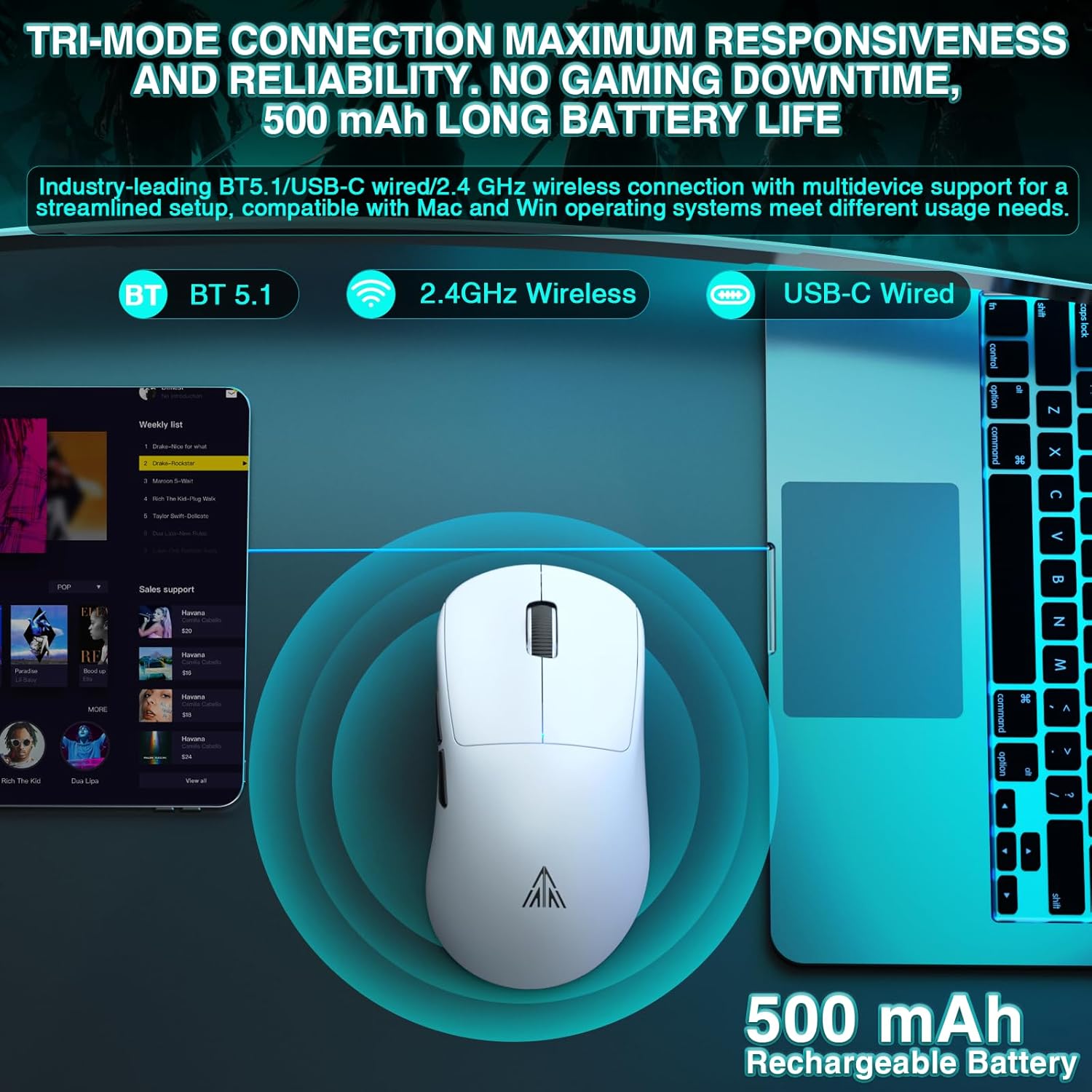
Image: Visual representation of the SM850 mouse utilizing its tri-mode connectivity options (Bluetooth, 2.4GHz Wireless, USB-C Wired).
5. ഓപ്പറേഷൻ
5.1. ഡിപിഐ ക്രമീകരണം
The SM850 mouse features a dedicated DPI switching button to cycle through 6 adjustable DPI levels: 1200, 1600, 2400, 3200, 6400, and 12000. Each level is indicated by a specific color on the mouse's indicator lights.
- 1200 DPI: (Color indication may vary, refer to software)
- 1600 DPI: (Color indication may vary, refer to software)
- 2400 DPI: (Color indication may vary, refer to software)
- 3200 DPI: (Color indication may vary, refer to software)
- 6400 DPI: (Color indication may vary, refer to software)
- 12000 DPI: (Color indication may vary, refer to software)
For advanced customization, the DPI can be adjusted up to 24000 DPI via the dedicated driver software.
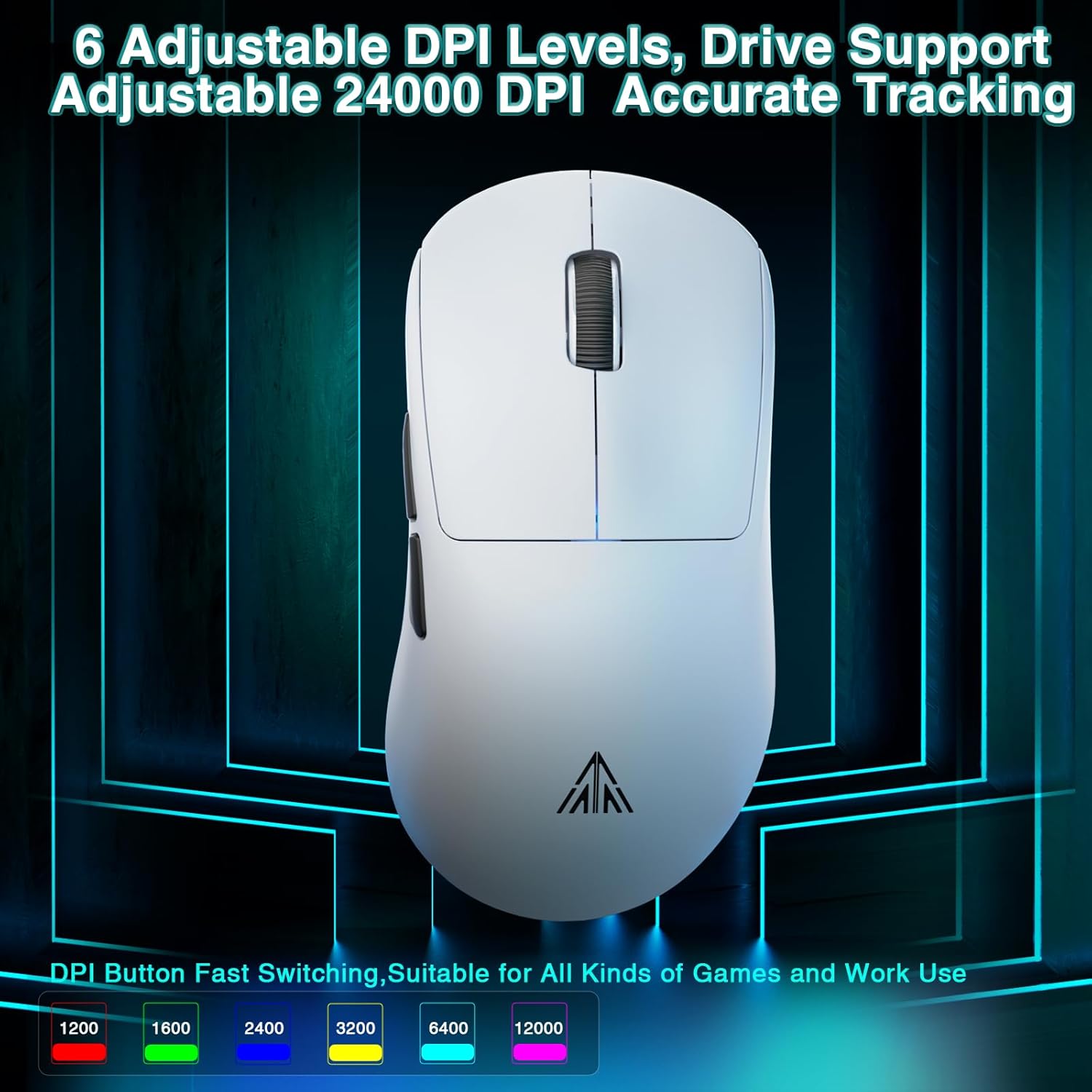
Image: Illustration of the SM850 mouse's adjustable DPI levels and accurate tracking capabilities.
5.2. Programmable Buttons & Software
The SM850 features 6 programmable buttons that can be customized to suit your gaming and office needs. Each button supports macro programming, allowing you to assign complex commands.
To access full customization options, including DPI adjustment, button remapping, and macro creation, download the official software.
- സോഫ്റ്റ്വെയർ ഡൗൺലോഡ് വിലാസം: bit.ly/m/corbobo
- Note: The software is only compatible with Windows operating systems.
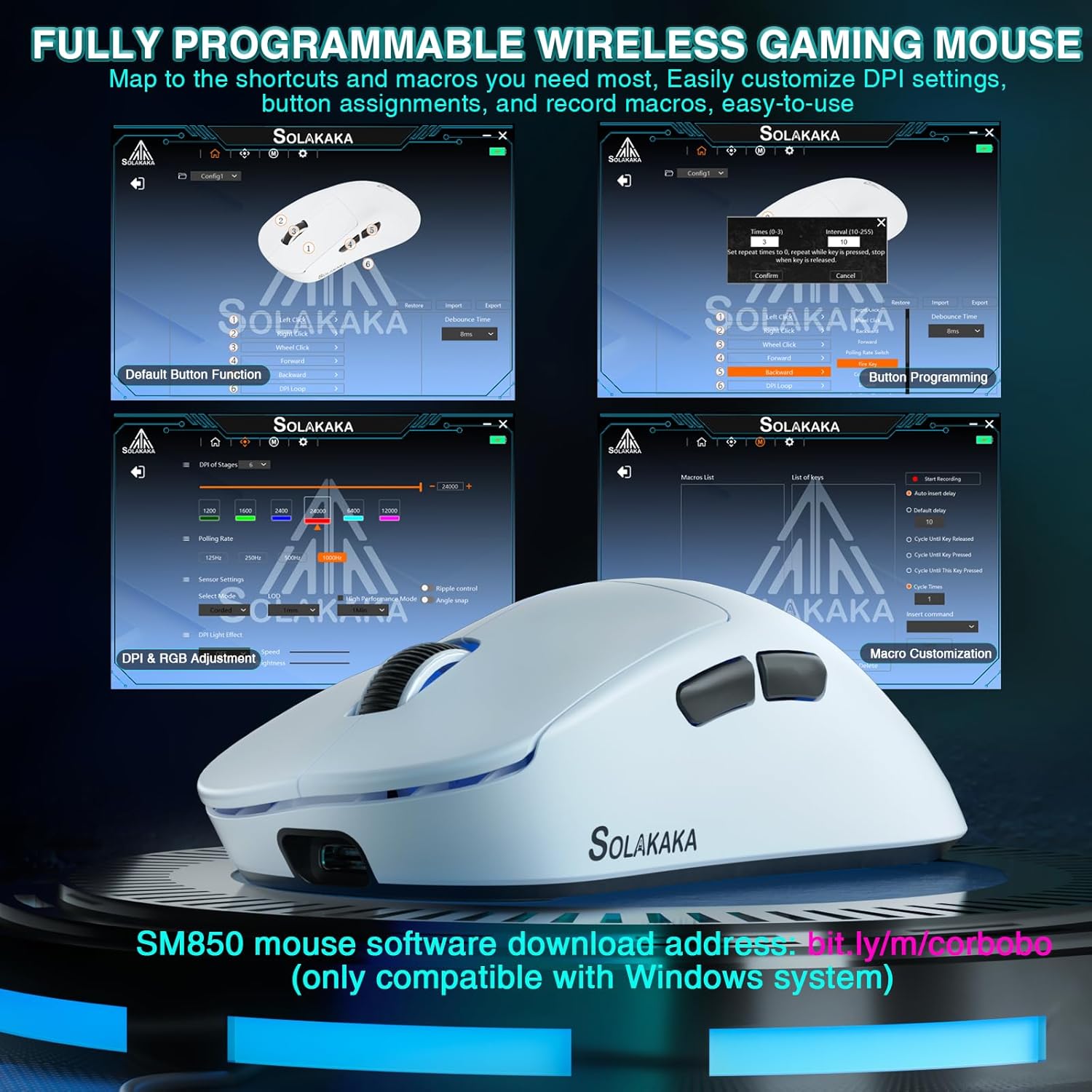
Image: Screenshots of the SM850 mouse's customization software interface, showing options for button programming, DPI adjustment, and macro creation.
6. ബാറ്ററിയും ചാർജിംഗും
The SM850 mouse is equipped with a built-in 500mAh high-efficiency battery, providing up to 250 hours of usage on a single charge.
- To charge the mouse, connect it to your computer using the provided USB-C cable.
- The mouse can be used in wired mode while charging, ensuring uninterrupted gaming or work.
- An indicator light on the mouse will show the charging status (e.g., blinking while charging, solid when fully charged).
7. പരിപാലനവും പരിചരണവും
To ensure the longevity and optimal performance of your SM850 mouse, follow these care guidelines:
- വൃത്തിയാക്കൽ: മൗസിന്റെ പ്രതലം തുടയ്ക്കാൻ മൃദുവായതും ഉണങ്ങിയതുമായ ഒരു തുണി ഉപയോഗിക്കുക. കഠിനമായ അഴുക്കിന്, അല്പം ഡി.amp cloth can be used, but ensure no liquid enters the mouse.
- സംരക്ഷണം: The mouse features anti-scratch, anti-dust, and water-resistant properties, designed to withstand sweat and minor liquid splashes. However, avoid submerging the mouse in water or exposing it to excessive moisture.
- സംഭരണം: ദീർഘനേരം ഉപയോഗിക്കാത്തപ്പോൾ, മൗസ് തണുത്തതും വരണ്ടതുമായ സ്ഥലത്ത് സൂക്ഷിക്കുക.
- തീവ്രമായ അവസ്ഥകൾ ഒഴിവാക്കുക: Do not expose the mouse to extreme temperatures, direct sunlight, or corrosive substances.
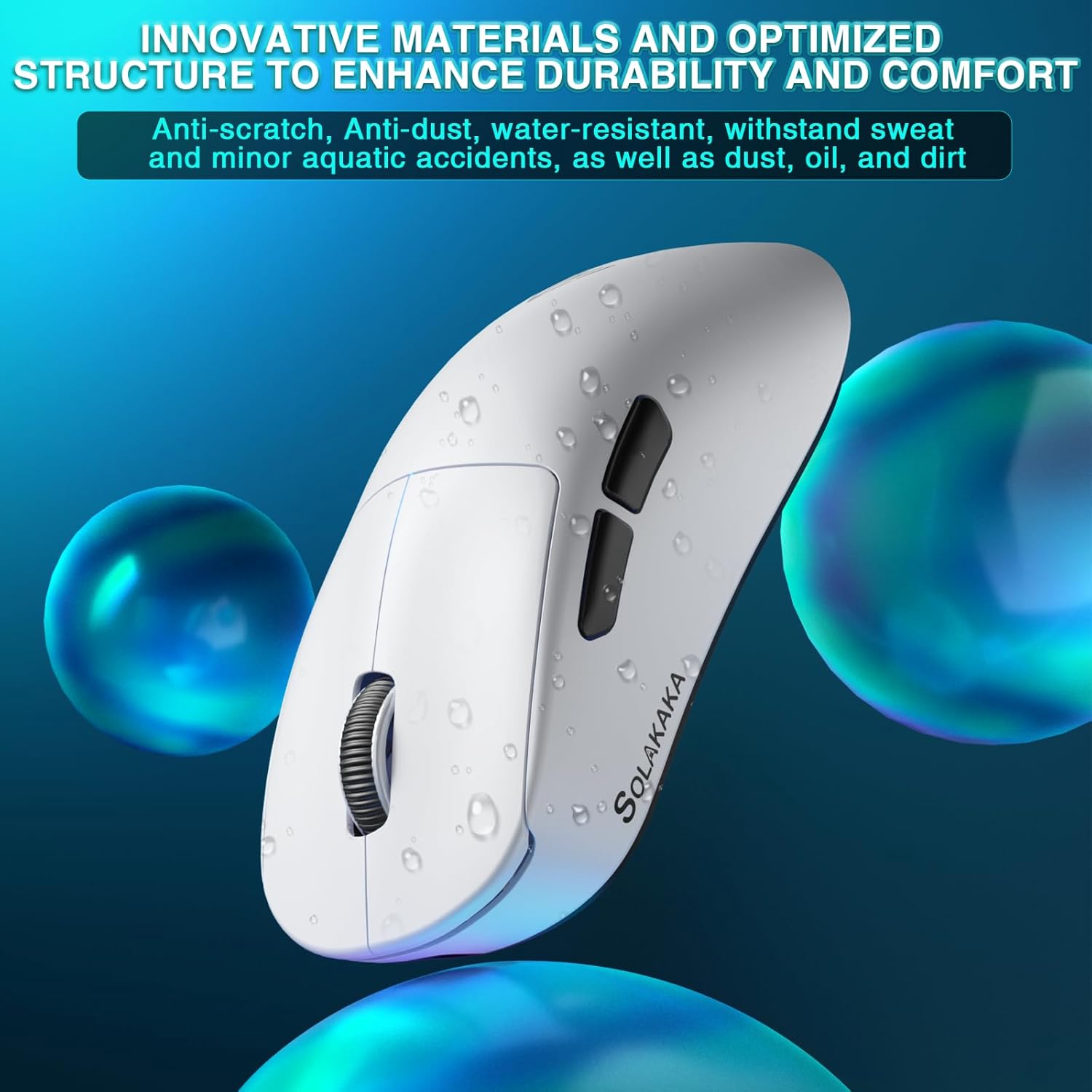
Image: The SM850 mouse with water droplets, illustrating its water-resistant and durable material properties.
8. പ്രശ്നപരിഹാരം
If you encounter issues with your SM850 mouse, please refer to the following common solutions:
| പ്രശ്നം | സാധ്യമായ പരിഹാരം |
|---|---|
| മൗസ് പ്രതികരിക്കുന്നില്ല (വയർലെസ്) |
|
| മന്ദത അല്ലെങ്കിൽ ക്രമരഹിതമായ ചലനം |
|
| ബട്ടണുകൾ പ്രവർത്തിക്കുന്നില്ല |
|
| ബാറ്ററി ചാർജ് ചെയ്യുന്നില്ല |
|
9 സ്പെസിഫിക്കേഷനുകൾ
| ഫീച്ചർ | വിശദാംശങ്ങൾ |
|---|---|
| മോഡൽ നമ്പർ | SM850 |
| കണക്റ്റിവിറ്റി ടെക്നോളജി | ബ്ലൂടൂത്ത് 5.1, 2.4G വയർലെസ്, യുഎസ്ബി-സി വയർഡ് |
| സെൻസർ | PAW3311 ഒപ്റ്റിക്കൽ സെൻസർ |
| ഡിപിഐ ലെവലുകൾ | 1200/1600/2400/3200/6400/12000 (Up to 24000 via driver) |
| ട്രാക്കിംഗ് സ്പീഡ് | 300 ഐ.പി.എസ് |
| ത്വരണം | 35G |
| പോളിംഗ് നിരക്ക് | 125Hz - 1000Hz |
| ബട്ടണുകൾ | 6 പ്രോഗ്രാം ചെയ്യാവുന്ന ബട്ടണുകൾ |
| ബാറ്ററി തരം | ബിൽറ്റ്-ഇൻ 500mAh റീചാർജ് ചെയ്യാവുന്ന ബാറ്ററി |
| ബാറ്ററി ലൈഫ് | 250 മണിക്കൂർ വരെ |
| ഭാരം | 55 ഗ്രാം (1.28 ഔൺസ്) |
| അളവുകൾ (L x W x H) | 4.72 x 3.07 x 0.04 ഇഞ്ച് |
| നിർമ്മാതാവ് | സൊലകക |
| മാതൃരാജ്യം | ചൈന |
10. വാറണ്ടിയും പിന്തുണയും
For warranty information and technical support, please refer to the warranty card included with your product or visit the official CORBOBO website. You may also contact CORBOBO customer service directly for assistance with product inquiries, troubleshooting, or replacement parts.
ബ്രാൻഡ്: കോർബോബോ
Webസൈറ്റ്: CORBOBO Amazon Store
Ask a question about this manual
Ask about setup, troubleshooting, compatibility, parts, safety, or missing instructions. Manuals+ will review the question and use this page’s manual context to help answer it.