
ആമുഖം
Welcome to the Samsung Galaxy S25 Ultra 5G user manual. This guide provides comprehensive instructions for setting up, operating, maintaining, and troubleshooting your new smartphone. The Galaxy S25 Ultra 5G is designed as an advanced AI companion, featuring multi-modality AI capabilities and robust hardware. It adapts to user patterns, anticipates needs, and connects seamlessly. Key features include Now Brief for personalized insights, an Ultra-strong titanium frame, Corning Gorilla Armor 2, and a powerful Snapdragon 8 Elite processor optimized for gaming.
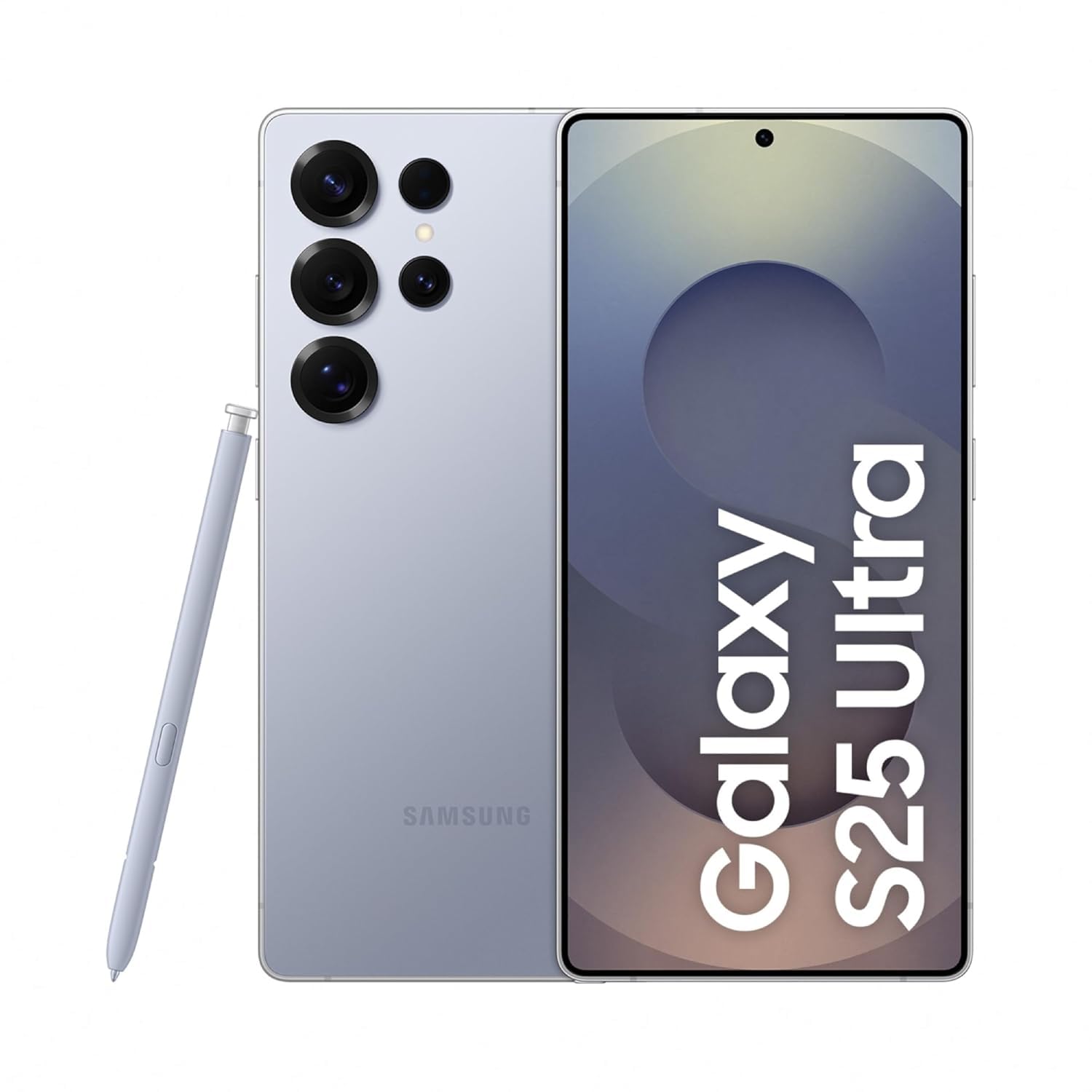
Image: Samsung Galaxy S25 Ultra 5G in Titanium Silverblue, showcasing the device's rear design and the accompanying S Pen.
സജ്ജീകരണ ഗൈഡ്
1. ബോക്സിൽ എന്താണുള്ളത്?
ആരംഭിക്കുന്നതിന് മുമ്പ്, എല്ലാ ഘടകങ്ങളും ഉണ്ടെന്ന് ഉറപ്പാക്കുക:
- Samsung Galaxy S25 Ultra 5G സ്മാർട്ട്ഫോൺ
- USB-C മുതൽ USB-C ഡാറ്റ കേബിൾ വരെ
- സിം എജക്ഷൻ പിൻ
- S Pen Stylus

Image: The contents of the product box, including the Galaxy S25 Ultra, USB-C charge cable, and SIM ejection pin.
2. സിം കാർഡ് ഇൻസ്റ്റാളേഷൻ
- നിങ്ങളുടെ ഉപകരണത്തിന്റെ വശത്ത് സിം കാർഡ് ട്രേ കണ്ടെത്തുക.
- Insert the SIM ejection pin into the small hole next to the tray and press firmly until the tray ejects.
- Place your Nano-SIM card(s) into the tray with the gold contacts facing down. The Galaxy S25 Ultra supports Dual SIM.
- ഉപകരണത്തിലേക്ക് ട്രേ ശ്രദ്ധാപൂർവ്വം വീണ്ടും ചേർക്കുക.
3. പ്രാരംഭ പവർ ഓണും സജ്ജീകരണവും
- സാംസങ് ലോഗോ ദൃശ്യമാകുന്നതുവരെ പവർ ബട്ടൺ അമർത്തിപ്പിടിക്കുക.
- നിങ്ങളുടെ ഭാഷ തിരഞ്ഞെടുക്കുന്നതിനും, ഒരു വൈഫൈ നെറ്റ്വർക്കിലേക്ക് കണക്റ്റുചെയ്യുന്നതിനും, നിബന്ധനകളും വ്യവസ്ഥകളും അംഗീകരിക്കുന്നതിനും ഓൺ-സ്ക്രീൻ നിർദ്ദേശങ്ങൾ പാലിക്കുക.
- നിങ്ങളുടെ Google അക്കൗണ്ട് ഉപയോഗിച്ച് സൈൻ ഇൻ ചെയ്യുക അല്ലെങ്കിൽ പുതിയൊരെണ്ണം സൃഷ്ടിക്കുക.
- ഒരു പഴയ ഉപകരണത്തിൽ നിന്ന് ഡാറ്റ കൈമാറുക (ഓപ്ഷണൽ).
- Set up biometric security (fingerprint recognition, face unlock) and a screen lock (PIN, pattern, password).
പ്രവർത്തന നിർദ്ദേശങ്ങൾ
1. അടിസ്ഥാന നാവിഗേഷൻ
- ഹോം സ്ക്രീൻ: വ്യത്യസ്ത പാനലുകൾ ആക്സസ് ചെയ്യാൻ ഇടത്തോട്ടോ വലത്തോട്ടോ സ്വൈപ്പ് ചെയ്യുക.
- ആപ്പ് ഡ്രോയർ: ഹോം സ്ക്രീനിൽ നിന്ന് മുകളിലേക്ക് സ്വൈപ്പ് ചെയ്യുക view ഇൻസ്റ്റാൾ ചെയ്ത എല്ലാ ആപ്ലിക്കേഷനുകളും.
- അറിയിപ്പ് പാനൽ: അറിയിപ്പുകളും ദ്രുത ക്രമീകരണങ്ങളും ആക്സസ് ചെയ്യാൻ സ്ക്രീനിന്റെ മുകളിൽ നിന്ന് താഴേക്ക് സ്വൈപ്പ് ചെയ്യുക.
- സമീപകാല ആപ്പുകൾ: Tap the Recent Apps button (usually a square icon) to switch between open applications.
2. Using the S Pen
The S Pen is integrated into the Galaxy S25 Ultra 5G, offering enhanced productivity and creativity:
- എസ് പെൻ പുറത്തെടുക്കൽ: Press the bottom of the S Pen to release it from its slot.
- എയർ കമാൻഡ്: Hover the S Pen over the screen and press its button to open the Air Command menu for quick access to S Pen features like Create Note, Smart Select, and Screen Write.
- എഴുത്തും വരയും: അനുയോജ്യമായ ആപ്ലിക്കേഷനുകളിൽ കൃത്യമായ ഇൻപുട്ടിനായി എസ് പെൻ നേരിട്ട് സ്ക്രീനിൽ ഉപയോഗിക്കുക.
3. ക്യാമറ സവിശേഷതകൾ
The Galaxy S25 Ultra 5G features an advanced AI ProVisual Engine with a versatile camera system:
- പിൻ ക്യാമറകൾ: 200MP Wide-angle, 50MP Ultra-wide, 10MP Telephoto (3x optical zoom), 50MP Periscope Telephoto (5x optical zoom).
- മുൻ ക്യാമറ: 12 എംപി.
- ഷൂട്ടിംഗ് മോഡുകൾ: Bixby Vision, Dual Recording, Food, Hyperlapse, Night, Panorama, Photo, Portrait, Portrait Video, Pro, Pro Video, Single Take, Slow Motion, Video.
- ഡിജിറ്റൽ സൂം: Up to 100x.

ചിത്രം: കഴിഞ്ഞുview of key features including the advanced AI ProVisual Engine camera system, powerful processor, and 5000mAh battery life.
4. AI സവിശേഷതകൾ
- ഇപ്പോൾ ചുരുക്കത്തിൽ: Provides personalized daily insights and summaries. Access by swiping right on your home screen or through the dedicated widget.
- Multi-modality AI: Enables seamless actions across various applications and offers real-time translation and generative photo editing.

Image: The 'Now Brief' feature displaying personalized briefings for morning, commute, and evening, providing daily insights and information.
5. ഗെയിമിംഗ്
The Snapdragon 8 Elite processor ensures hyper-realistic and ultra-smooth gameplay. Optimize your gaming experience through the Game Launcher app, which allows for performance adjustments and notification management during gameplay.
മെയിൻ്റനൻസ്
1. ബാറ്ററി പരിചരണം
- Avoid extreme temperatures to prolong battery life.
- Use the provided USB-C cable and a compatible fast charger for optimal charging.
- Enable power-saving modes when necessary to extend usage time.
2. നിങ്ങളുടെ ഉപകരണം വൃത്തിയാക്കൽ
- സ്ക്രീനും ബോഡിയും വൃത്തിയാക്കാൻ മൃദുവായ, ലിന്റ് രഹിത തുണി ഉപയോഗിക്കുക.
- കഠിനമായ രാസവസ്തുക്കളോ ഉരച്ചിലുകളോ ഉള്ള വസ്തുക്കളോ ഒഴിവാക്കുക.
- The device has a Water Resistant rating; however, avoid intentional submersion.
3. സോഫ്റ്റ്വെയർ അപ്ഡേറ്റുകൾ
മികച്ച പ്രകടനം, സുരക്ഷ, പുതിയ സവിശേഷതകളിലേക്കുള്ള ആക്സസ് എന്നിവ ഉറപ്പാക്കാൻ സോഫ്റ്റ്വെയർ അപ്ഡേറ്റുകൾ പതിവായി പരിശോധിച്ച് ഇൻസ്റ്റാൾ ചെയ്യുക. ഇതിലേക്ക് നാവിഗേറ്റ് ചെയ്യുക ക്രമീകരണങ്ങൾ > സോഫ്റ്റ്വെയർ അപ്ഡേറ്റ് > ഡൗൺലോഡ് ചെയ്ത് ഇൻസ്റ്റാൾ ചെയ്യുക.
ട്രബിൾഷൂട്ടിംഗ്
ഉപകരണം പവർ ചെയ്യുന്നില്ല
- ബാറ്ററി ചാർജ്ജ് ചെയ്തിട്ടുണ്ടെന്ന് ഉറപ്പാക്കുക. കുറഞ്ഞത് 10 മിനിറ്റെങ്കിലും ഉപകരണം ചാർജറുമായി ബന്ധിപ്പിക്കുക.
- Perform a forced restart by pressing and holding the Power button and Volume Down button simultaneously for about 7-10 seconds.
ആപ്പുകൾ ക്രാഷാകുന്നു അല്ലെങ്കിൽ മരവിക്കുന്നു
- ആപ്പ് അടച്ച് വീണ്ടും തുറക്കുക.
- ആപ്പിന്റെ കാഷെയും ഡാറ്റയും മായ്ക്കുക (ക്രമീകരണങ്ങൾ > ആപ്പുകൾ > [ആപ്പ് നാമം] > സംഭരണം > കാഷെ മായ്ക്കുക/ഡാറ്റ മായ്ക്കുക).
- ആപ്പ് അതിന്റെ ഏറ്റവും പുതിയ പതിപ്പിലേക്ക് അപ്ഡേറ്റ് ചെയ്തിട്ടുണ്ടെന്ന് ഉറപ്പാക്കുക.
Connectivity Issues (Wi-Fi/Bluetooth/5G)
- Toggle Wi-Fi, Bluetooth, or Mobile Data off and on.
- നിങ്ങളുടെ ഉപകരണം പുനരാരംഭിക്കുക.
- Reset network settings (Settings > General management > Reset > Reset network settings).
S Pen Not Responding
- Ensure the S Pen is properly seated in its slot and then re-eject it.
- Check S Pen settings (Settings > Advanced features > S Pen).
- നിങ്ങളുടെ ഉപകരണം പുനരാരംഭിക്കുക.
സാങ്കേതിക സവിശേഷതകൾ
| ഫീച്ചർ | സ്പെസിഫിക്കേഷൻ |
|---|---|
| ബ്രാൻഡ് | സാംസങ് |
| മോഡൽ | Galaxy S25 Ultra 5G |
| ഓപ്പറേറ്റിംഗ് സിസ്റ്റം | ആൻഡ്രോയിഡ് 15.0 |
| പ്രോസസ്സർ | Snapdragon 8 Elite (4.47 GHz) |
| റാം | 12 ജിബി |
| സംഭരണം | 256 ജിബി |
| പ്രദർശിപ്പിക്കുക | 6.9 Inches AMOLED, 3120 x 1440 Pixels, 120 Hz Refresh Rate, 500 PPI |
| പിൻ ക്യാമറ | 200MP Wide, 50MP Ultra-wide, 10MP Telephoto (3x), 50MP Periscope Telephoto (5x) |
| മുൻ ക്യാമറ | 12 എം.പി |
| ബാറ്ററി ശേഷി | 5000 മില്ലിamp Hours (Lithium-Ion) |
| കണക്റ്റിവിറ്റി | 5G, Bluetooth, NFC, USB Type C, Wi-Fi |
| സുരക്ഷ | വിരലടയാള തിരിച്ചറിയൽ |
| അളവുകൾ | 8 x 78 x 163 മില്ലിമീറ്റർ |
| ഭാരം | 218 ഗ്രാം |
| ജല പ്രതിരോധം | വെള്ളത്തെ പ്രതിരോധിക്കുന്ന |
വാറൻ്റി വിവരങ്ങൾ
The Samsung Galaxy S25 Ultra 5G comes with a 1 വർഷത്തെ നിർമ്മാതാവിൻ്റെ വാറൻ്റി for the device itself and 6 മാസ വാറൻ്റി for in-box accessories. Please retain your proof of purchase for warranty claims.
ഉപഭോക്തൃ പിന്തുണ
For further assistance, technical support, or warranty inquiries, please contact Samsung customer service:
- നിർമ്മാതാവ്: Samsung India Electronics Pvt ltd
- വിലാസം: 6th Floor, DLF Centre, Sansad Marg, New Delhi - 110001
- ഇമെയിൽ: support.india@samsung.com
You can also visit the official Samsung support webപതിവുചോദ്യങ്ങൾക്കും അധിക ഉറവിടങ്ങൾക്കുമുള്ള സൈറ്റ്.