1. ആമുഖം
Thank you for choosing the AIR3 Wireless TWS Earbuds. This manual provides essential information for setting up, operating, and maintaining your earbuds to ensure optimal performance and longevity. Please read this manual thoroughly before using the product.
എന്താണ് ഉൾപ്പെടുത്തിയിരിക്കുന്നത്:
- AIR3 Wireless Earbuds
- ചാർജിംഗ് കേസ്
- ഉപയോക്തൃ മാനുവൽ
2. ഉൽപ്പന്നം കഴിഞ്ഞുview
The AIR3 Wireless TWS Earbuds are designed to deliver an immersive audio experience with powerful bass and clear sound. The compact charging case features a digital display for convenient battery monitoring.

Figure 2.1: AIR3 Wireless Earbuds in their charging case, showing the digital battery display. The earbuds are white and fit snugly into the clear charging case.

Figure 2.2: The AIR3 Wireless Earbuds charging case in a closed position, showcasing its compact and sleek design. The case is clear with white internal components.
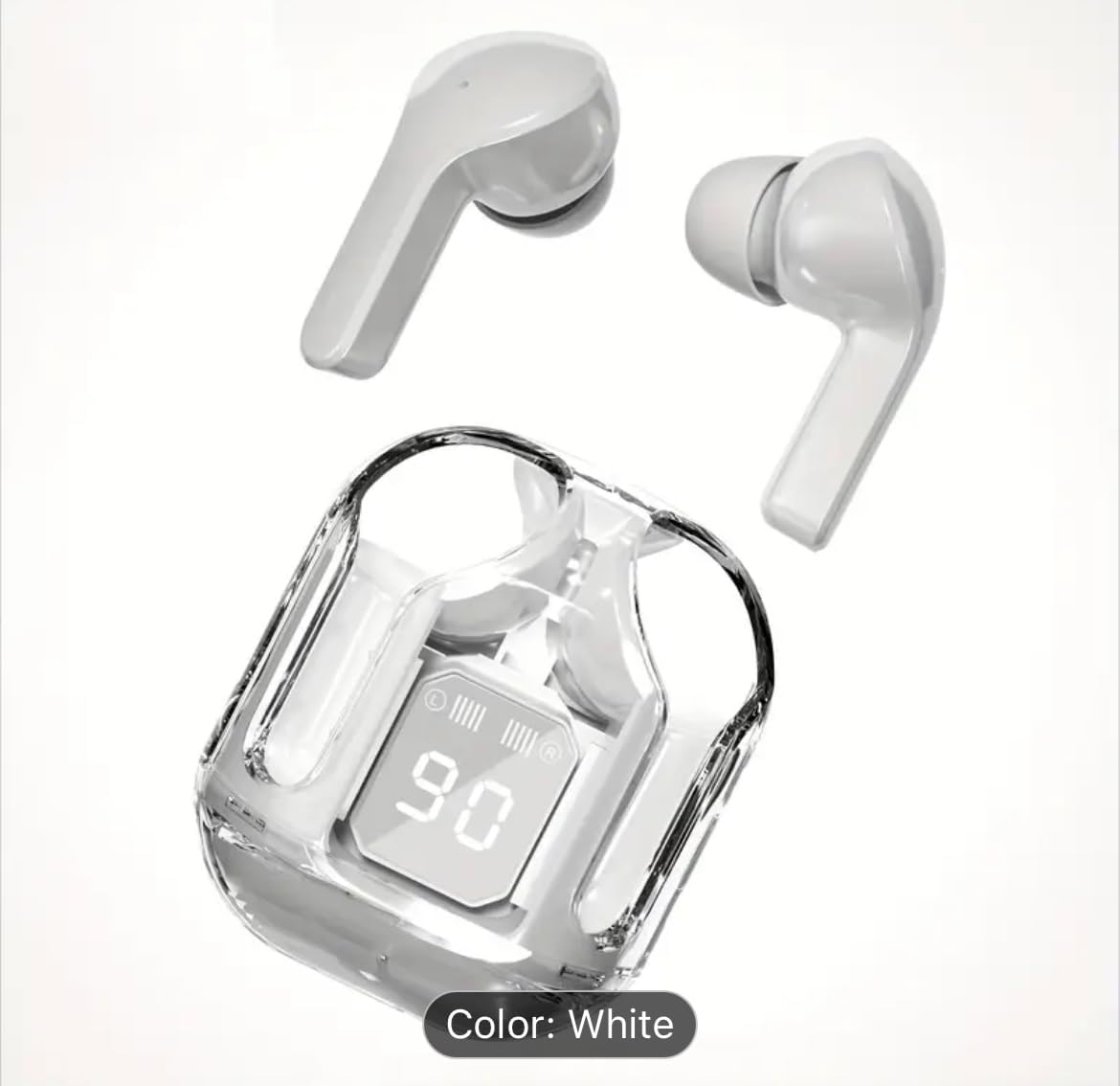
Figure 2.3: The AIR3 Wireless Earbuds displayed outside their open charging case. Both the left and right earbuds are visible, highlighting their ergonomic design.
പ്രധാന സവിശേഷതകൾ:
- പ്രീമിയം ശബ്ദം: Expertly tuned acoustics deliver immersive audio with powerful bass response as low as 16Hz, perfectly balanced with mids and trebles.
- വിപുലീകരിച്ച ബാറ്ററി: Up to 8 hours of continuous playback on a single charge, with total 35 hours including charging case.
- വയർലെസ് ഡിസൈൻ: Sleek and portable true wireless earbuds with convenient charging case featuring LED display.
- ഡീപ് ബാസ്: OrigX technology enhances low-frequency performance while maintaining audio clarity across all ranges.
- സ്മാർട്ട് ഡിസ്പ്ലേ: Digital LED screen shows precise battery level and charging status for both earbuds and case.
3. സജ്ജീകരണം
3.1 ഇയർബഡുകളും കേസും ചാർജ് ചെയ്യുന്നു
Before first use, fully charge the charging case and earbuds. The digital display on the case will indicate the battery level.
- ഇയർബഡുകൾ ചാർജിംഗ് കേസിൽ വയ്ക്കുക, അവ ശരിയായി ഇട്ടിട്ടുണ്ടെന്ന് ഉറപ്പാക്കുക.
- അനുയോജ്യമായ ഒരു ചാർജിംഗ് കേബിൾ ഉപയോഗിച്ച് ചാർജിംഗ് കേസ് ഒരു USB പവർ സ്രോതസ്സുമായി ബന്ധിപ്പിക്കുക.
- The digital display on the case will show the charging progress. Once fully charged, the display will indicate 100%.
A full charge for the earbuds provides up to 8 hours of playback, and the charging case provides multiple additional charges for a total of up to 35 hours of playtime.
3.2 ഒരു ഉപകരണവുമായി ജോടിയാക്കൽ
The earbuds use Bluetooth technology for wireless connection.
- പ്രാരംഭ ജോടിയാക്കൽ: Open the charging case. The earbuds will automatically enter pairing mode (indicated by flashing LED lights on the earbuds).
- നിങ്ങളുടെ ഉപകരണത്തിൽ (സ്മാർട്ട്ഫോൺ, ടാബ്ലെറ്റ്, കമ്പ്യൂട്ടർ), ബ്ലൂടൂത്ത് ക്രമീകരണങ്ങളിലേക്ക് പോയി ബ്ലൂടൂത്ത് പ്രവർത്തനക്ഷമമാക്കിയിട്ടുണ്ടെന്ന് ഉറപ്പാക്കുക.
- ഇതിനായി തിരയുക available devices. Select "AIR3" from the list.
- Once connected, the earbud LEDs will stop flashing, and your device will confirm the connection.
- വീണ്ടും ജോടിയാക്കൽ: പ്രാരംഭ ജോടിയാക്കലിന് ശേഷം, കേസിൽ നിന്ന് നീക്കം ചെയ്യുമ്പോൾ ഇയർബഡുകൾ അവസാന ജോടിയാക്കിയ ഉപകരണത്തിലേക്ക് യാന്ത്രികമായി കണക്റ്റുചെയ്യും, ഉപകരണത്തിൽ ബ്ലൂടൂത്ത് പ്രവർത്തനക്ഷമമാക്കിയിട്ടുണ്ടെങ്കിൽ.
4. പ്രവർത്തന നിർദ്ദേശങ്ങൾ
The AIR3 earbuds feature touch controls for easy management of audio playback and calls.
4.1 പവർ ഓൺ/ഓഫ്
- പവർ ഓൺ: ചാർജിംഗ് കേസ് തുറക്കുക, ഇയർബഡുകൾ സ്വയമേവ പവർ ഓൺ ആകും. പകരമായി, രണ്ട് ഇയർബഡുകളിലെയും ടച്ച് ഏരിയ 3 സെക്കൻഡ് അമർത്തിപ്പിടിക്കുക.
- പവർ ഓഫ്: Place the earbuds back into the charging case and close the lid. They will automatically power off and begin charging. Alternatively, press and hold the touch area on both earbuds for 5 seconds.
4.2 ടച്ച് നിയന്ത്രണങ്ങൾ
| ഫംഗ്ഷൻ | ആക്ഷൻ |
|---|---|
| പ്ലേ/താൽക്കാലികമായി നിർത്തുക | ഇയർബഡുകളിൽ ഏതെങ്കിലുമൊന്നിൽ ഒറ്റ ടാപ്പ് ചെയ്യുക. |
| അടുത്ത ട്രാക്ക് | വലതുവശത്തെ ഇയർബഡിൽ രണ്ടുതവണ ടാപ്പ് ചെയ്യുക. |
| മുമ്പത്തെ ട്രാക്ക് | ഇടതുവശത്തെ ഇയർബഡിൽ രണ്ടുതവണ ടാപ്പ് ചെയ്യുക. |
| വോളിയം കൂട്ടുക | വലതുവശത്തെ ഇയർബഡിൽ മൂന്ന് തവണ ടാപ്പ് ചെയ്യുക. |
| വോളിയം ഡൗൺ | ഇടതുവശത്തെ ഇയർബഡിൽ മൂന്ന് തവണ ടാപ്പ് ചെയ്യുക. |
| ഉത്തരം / കോൾ അവസാനിപ്പിക്കുക | ഇൻകമിംഗ് കോൾ വരുമ്പോൾ ഏത് ഇയർബഡിലും ഒറ്റ ടാപ്പ് ചെയ്യുക. |
| കോൾ നിരസിക്കുക | ഇൻകമിംഗ് കോൾ വരുമ്പോൾ, ഇയർബഡുകളിൽ ഏതെങ്കിലുമൊന്ന് 2 സെക്കൻഡ് അമർത്തിപ്പിടിക്കുക. |
| വോയ്സ് അസിസ്റ്റൻ്റ് സജീവമാക്കുക | (കോൾ ചെയ്യാത്തപ്പോൾ) ഇയർബഡുകളിൽ ഏതെങ്കിലുമൊന്ന് 3 സെക്കൻഡ് അമർത്തിപ്പിടിക്കുക. |
4.3 സിംഗിൾ ഇയർബഡ് മോഡ്
You can use either the left or right earbud independently. Simply take one earbud out of the charging case, and it will automatically connect to your device. The other earbud can remain in the case or be powered off.
5. പരിപാലനം
5.1 വൃത്തിയാക്കൽ
- ഇയർബഡുകളും ചാർജിംഗ് കെയ്സും വൃത്തിയാക്കാൻ മൃദുവായതും ഉണങ്ങിയതും ലിന്റ് രഹിതവുമായ തുണി ഉപയോഗിക്കുക.
- അബ്രാസീവ് ക്ലീനറുകൾ, ആൽക്കഹോൾ, കെമിക്കൽ ലായകങ്ങൾ എന്നിവ ഉപയോഗിക്കരുത്.
- ശരിയായ ചാർജിംഗ് ഉറപ്പാക്കാൻ ഇയർബഡുകളിലെയും കേസിലെയും ചാർജിംഗ് കോൺടാക്റ്റുകൾ പതിവായി വൃത്തിയാക്കുക.
5.2 സംഭരണം
- ഉപയോഗത്തിലില്ലാത്തപ്പോൾ, ഇയർബഡുകൾ സംരക്ഷിക്കുന്നതിനും ചാർജ്ജ് ചെയ്ത നിലയിൽ നിലനിർത്തുന്നതിനും അവ ചാർജിംഗ് കേസിൽ സൂക്ഷിക്കുക.
- ഉൽപ്പന്നം തണുത്തതും വരണ്ടതുമായ സ്ഥലത്ത് സൂക്ഷിക്കുക, തീവ്രമായ താപനിലയിൽ നിന്നും നേരിട്ടുള്ള സൂര്യപ്രകാശത്തിൽ നിന്നും അകറ്റി നിർത്തുക.
6. പ്രശ്നപരിഹാരം
If you encounter issues with your AIR3 Wireless TWS Earbuds, refer to the following common problems and solutions:
- ഉപകരണവുമായി ഇയർബഡുകൾ ജോടിയാക്കുന്നില്ല:
- നിങ്ങളുടെ ഉപകരണത്തിൽ ബ്ലൂടൂത്ത് പ്രവർത്തനക്ഷമമാക്കിയിട്ടുണ്ടെന്ന് ഉറപ്പാക്കുക.
- ഇയർബഡുകൾ ചാർജ് ചെയ്തിട്ടുണ്ടെന്നും ചാർജിംഗ് കെയ്സിന് പുറത്താണെന്നും ഉറപ്പാക്കുക.
- നിങ്ങളുടെ ഉപകരണത്തിൽ Bluetooth ഓഫാക്കുക, തുടർന്ന് അത് വീണ്ടും ഓണാക്കുക.
- Forget "AIR3" from your device's Bluetooth list and try pairing again.
- നിങ്ങളുടെ ഉപകരണം പുനരാരംഭിക്കുക.
- ഒരു ഇയർബഡ് മാത്രമേ പ്രവർത്തിക്കുന്നുള്ളൂ:
- Place both earbuds back into the charging case, close the lid, wait a few seconds, then open the lid and take them out together.
- രണ്ട് ഇയർബഡുകളും ചാർജ്ജ് ചെയ്തിട്ടുണ്ടെന്ന് ഉറപ്പാക്കുക.
- Try resetting the earbuds (e.g., by placing them in the case and holding the touch area for 10 seconds, if applicable).
- കുറഞ്ഞ ശബ്ദം അല്ലെങ്കിൽ മോശം ശബ്ദ നിലവാരം:
- നിങ്ങളുടെ ഉപകരണത്തിലും ഇയർബഡുകളിലും വോളിയം ക്രമീകരിക്കുക.
- ഇയർബഡുകൾ വൃത്തിയുള്ളതും അവശിഷ്ടങ്ങൾ ഇല്ലാത്തതുമാണെന്ന് ഉറപ്പാക്കുക.
- മറ്റ് വയർലെസ് ഉപകരണങ്ങളിൽ നിന്നുള്ള ഇടപെടൽ പരിശോധിക്കുക.
- ഇയർബഡുകൾ നിങ്ങളുടെ ചെവിയിൽ ശരിയായി ഘടിപ്പിച്ചിട്ടുണ്ടെന്ന് ഉറപ്പാക്കുക.
- ചാർജിംഗ് കേസ് ചാർജുചെയ്യുന്നില്ല:
- ചാർജിംഗ് കേബിൾ കേസിലേക്കും പവർ സ്രോതസ്സിലേക്കും സുരക്ഷിതമായി ബന്ധിപ്പിച്ചിട്ടുണ്ടെന്ന് ഉറപ്പാക്കുക.
- Try a different charging cable and/or power adapter.
- കേസിലെ ചാർജിംഗ് പോർട്ട് വൃത്തിയാക്കുക.
7 സ്പെസിഫിക്കേഷനുകൾ
| ഫീച്ചർ | വിശദാംശങ്ങൾ |
|---|---|
| മോഡലിൻ്റെ പേര് | AIR3 |
| ഇനം മോഡൽ നമ്പർ | 2411 |
| കണക്റ്റിവിറ്റി ടെക്നോളജി | വയർലെസ്, ബ്ലൂടൂത്ത് |
| വയർലെസ് കമ്മ്യൂണിക്കേഷൻ ടെക്നോളജി | ബ്ലൂടൂത്ത് |
| ഫ്രീക്വൻസി പ്രതികരണം | 16 Hz |
| ശബ്ദ നിയന്ത്രണം | ഒന്നുമില്ല |
| Earbud Playback Time (Single Charge) | 8 മണിക്കൂർ വരെ |
| ആകെ പ്ലേടൈം (ചാർജിംഗ് കേസിനൊപ്പം) | 35 മണിക്കൂർ വരെ |
| ചാർജിംഗ് സമയം | 8 മണിക്കൂർ |
| മെറ്റീരിയൽ | പ്ലാസ്റ്റിക് |
| നിയന്ത്രണ തരം | ടച്ച് നിയന്ത്രണം |
| ജല പ്രതിരോധ നില | വെള്ളത്തെ പ്രതിരോധിക്കുന്ന |
| ഓഡിയോ ഡ്രൈവർ തരം | ഡൈനാമിക് ഡ്രൈവർ |
| ഇയർപീസ് ആകൃതി | Half In-ear |
| നിറം | വെള്ള |
| ഇനത്തിൻ്റെ ഭാരം | 1.5 ഔൺസ് |
| നിർമ്മാതാവ് | Banzi Trading |
8 സുരക്ഷാ വിവരങ്ങൾ
നിങ്ങളുടെ ഉപകരണത്തിന് കേടുപാടുകൾ സംഭവിക്കാതിരിക്കാനോ നിങ്ങൾക്ക് തന്നെ പരിക്കേൽക്കാതിരിക്കാനോ ഈ സുരക്ഷാ മാർഗ്ഗനിർദ്ദേശങ്ങൾ വായിച്ച് പാലിക്കുക:
- ഉൽപ്പന്നം ഡിസ്അസംബ്ലിംഗ് ചെയ്യരുത്, നന്നാക്കരുത് അല്ലെങ്കിൽ പരിഷ്ക്കരിക്കുക.
- Keep the product away from extreme temperatures, humidity, and liquids.
- ഉൽപ്പന്നം ശക്തമായ ആഘാതങ്ങൾക്ക് വിധേയമാക്കുകയോ ഉപേക്ഷിക്കുകയോ ചെയ്യരുത്.
- Do not expose the product to fire or dispose of it in fire, as batteries may explode.
- അനുയോജ്യമായ ചാർജിംഗ് കേബിളുകളും അഡാപ്റ്ററുകളും മാത്രം ഉപയോഗിക്കുക.
- ഉയർന്ന ശബ്ദത്തിൽ ദീർഘനേരം എക്സ്പോഷർ ചെയ്യുന്നത് കേൾവിക്ക് കേടുപാടുകൾ വരുത്തിയേക്കാം. സുരക്ഷിതമായ തലത്തിലേക്ക് ശബ്ദം ക്രമീകരിക്കുക.
- കുട്ടികൾക്കും വളർത്തുമൃഗങ്ങൾക്കും ലഭ്യമാകാതെ സൂക്ഷിക്കുക.
9. വാറൻ്റിയും പിന്തുണയും
This product is covered by a standard manufacturer's warranty. For specific warranty terms and conditions, please refer to the documentation provided at the time of purchase or contact the seller directly.
For technical support or customer service inquiries, please contact your retailer or the manufacturer using the contact information provided with your purchase.


