
1. ആമുഖം
The Yanmai X1R USB Gaming Microphone is a high-sensitivity condenser microphone designed for clear audio capture in gaming, e-sports, and other applications. It features RGB lighting, a stable tripod, and intelligent noise reduction for an enhanced audio experience. This manual provides instructions for setup, operation, and maintenance of your microphone.
2. പാക്കേജ് ഉള്ളടക്കം
പാക്കേജിൽ ഇനിപ്പറയുന്ന ഇനങ്ങൾ ഉണ്ടോ എന്ന് പരിശോധിക്കുക:
- 1 x Yanmai X1R USB Gaming Microphone
- 1 x Metal Anti-slip Tripod with Gooseneck Pop Filter
- 1 x USB-A to USB-C Cable (1.8 meters)
- 1 x USB-C അഡാപ്റ്റർ
- 1 x ഇംഗ്ലീഷ് ഉപയോക്തൃ മാനുവൽ
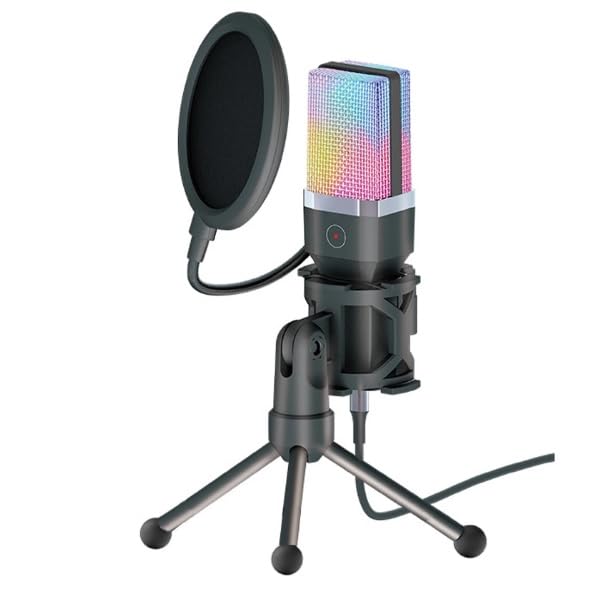
Image: The Yanmai X1R microphone, pop filter, tripod, USB cable, and USB-C adapter.
3. സജ്ജീകരണ നിർദ്ദേശങ്ങൾ
Assemble the Tripod and Microphone:
Unfold the metal anti-slip tripod and place it on a stable surface. Attach the microphone to the tripod mount. Secure the gooseneck pop filter to the tripod or microphone stand, positioning it approximately 2-3 inches in front of the microphone capsule.

Image: The Yanmai X1R microphone mounted on its tripod with the pop filter attached.
നിങ്ങളുടെ ഉപകരണത്തിലേക്ക് കണക്റ്റുചെയ്യുക:
Connect the provided USB-A to USB-C cable to the microphone. Then, plug the USB-A end into an available USB port on your PC, laptop, or game console. If your device only has USB-C ports, use the included USB-C adapter.

Image: The Yanmai X1R microphone connected to a laptop, showing the USB-A and USB-C connection options.
ഡ്രൈവർ ഇൻസ്റ്റലേഷൻ (പ്ലഗ് & പ്ലേ):
The Yanmai X1R is a plug-and-play device. Your operating system (Windows, macOS, PlayStation, etc.) should automatically detect and install the necessary drivers. No manual driver installation is typically required.
Select as Default Audio Input:
After connecting, navigate to your device's sound settings. Select the "Yanmai X1R" or similar name as your default recording (input) device. Adjust the input volume as needed.
4. പ്രവർത്തന നിർദ്ദേശങ്ങൾ
4.1 Power On/Off and RGB Lighting
The microphone powers on automatically when connected to a USB port. The RGB lighting will illuminate, cycling through 7 breathing colors. There is no separate power button.
4.2 നിശബ്ദ പ്രവർത്തനം
The microphone features a one-touch mute button located on the front of the microphone body. Tap this button to instantly mute or unmute the microphone. The indicator light will change to show the mute status (e.g., red for muted).

Image: A finger pressing the one-touch mute button on the Yanmai X1R microphone.
4.3 Optimal Microphone Placement
For best audio quality, position the microphone directly in front of you, approximately 6-12 inches (15-30 cm) from your mouth. Ensure the pop filter is between your mouth and the microphone to reduce plosive sounds (P's and B's).

Image: The Yanmai X1R microphone set up on a desk, being used by a person playing a guitar.
4.4 ശബ്ദം കുറയ്ക്കൽ
The Yanmai X1R features intelligent noise reduction technology. This helps to minimize background noise, focusing on your voice. No specific user action is required to activate this feature as it operates automatically.

Image: A visual representation of how the microphone's noise reduction feature processes audio, showing "before" and "after" sound wave patterns.
5. പരിപാലനം
- വൃത്തിയാക്കൽ: Use a soft, dry cloth to wipe the microphone body and tripod. Do not use liquid cleaners or abrasive materials.
- പോപ്പ് ഫിൽട്ടർ: പരസ്യം ഉപയോഗിച്ച് പോപ്പ് ഫിൽട്ടർ സൌമ്യമായി വൃത്തിയാക്കാം.amp ആവശ്യമെങ്കിൽ തുണി ഉപയോഗിക്കുക. വീണ്ടും ഘടിപ്പിക്കുന്നതിന് മുമ്പ് പൂർണ്ണമായും ഉണങ്ങിയെന്ന് ഉറപ്പാക്കുക.
- സംഭരണം: ഉപയോഗത്തിലില്ലാത്തപ്പോൾ, ഉയർന്ന താപനിലയിൽ നിന്നും നേരിട്ടുള്ള സൂര്യപ്രകാശത്തിൽ നിന്നും മാറി വൃത്തിയുള്ളതും വരണ്ടതുമായ സ്ഥലത്ത് മൈക്രോഫോൺ സൂക്ഷിക്കുക.
- കൈകാര്യം ചെയ്യൽ: മൈക്രോഫോൺ താഴെയിടുകയോ ശക്തമായ ആഘാതങ്ങൾക്ക് വിധേയമാക്കുകയോ ചെയ്യുന്നത് ഒഴിവാക്കുക, കാരണം ഇത് ആന്തരിക ഘടകങ്ങളെ തകരാറിലാക്കും.
6. പ്രശ്നപരിഹാരം
| പ്രശ്നം | പരിഹാരം |
|---|---|
| Microphone not detected by device. |
|
| ശബ്ദമില്ല അല്ലെങ്കിൽ കുറഞ്ഞ ശബ്ദമില്ല. |
|
| Background noise is present. |
|
| RGB ലൈറ്റിംഗ് പ്രവർത്തിക്കുന്നില്ല. |
|
7 സ്പെസിഫിക്കേഷനുകൾ
| ഫീച്ചർ | വിശദാംശങ്ങൾ |
|---|---|
| ബ്രാൻഡ് | Yanmai |
| മോഡൽ | X1R |
| കണക്റ്റിവിറ്റി | Wired USB (USB-A / USB-C) |
| മൈക്രോഫോൺ തരം | കണ്ടൻസർ |
| പോളാർ പാറ്റേൺ | ഏകദിശ |
| RGB ലൈറ്റിംഗ് | 7-color breathing light |
| സംവേദനക്ഷമത | -38 ± 3 ഡി.ബി |
| ഫ്രീക്വൻസി പ്രതികരണം | 20Hz - 20KHz |
| Sampലിംഗ് നിരക്ക് | 44.1/48 കിലോ ഹെർട്സ് |
| ബിറ്റ് നിരക്ക് | 16-ബിറ്റ് |
| പ്രതിരോധം | ≤2.2 KΩ |
| വൈദ്യുതി വിതരണം | USB 5V |
| കേബിൾ നീളം | 1.8 മീറ്റർ |
| പ്രത്യേക സവിശേഷതകൾ | One-touch mute, Intelligent Noise Reduction |
| അനുയോജ്യമായ ഉപകരണങ്ങൾ | PC, Laptop, Game Consoles |
| നിറം | കറുപ്പ് |
| ഇനത്തിൻ്റെ ഭാരം | 598 ഗ്രാം |

Image: Technical drawing illustrating the dimensions of the Yanmai X1R microphone, pop filter, tripod, and cable.
8. വാറണ്ടിയും പിന്തുണയും
8.1 വാറൻ്റി വിവരങ്ങൾ
The Yanmai X1R USB Gaming Microphone comes with a ഒരു വർഷത്തെ വാറൻ്റി വാങ്ങിയ തീയതി മുതൽ. സാധാരണ ഉപയോഗത്തിലുള്ള നിർമ്മാണ വൈകല്യങ്ങളും തകരാറുകളും ഈ വാറന്റി ഉൾക്കൊള്ളുന്നു. ദുരുപയോഗം, അപകടങ്ങൾ, അനധികൃത പരിഷ്കാരങ്ങൾ അല്ലെങ്കിൽ അനുചിതമായ ഇൻസ്റ്റാളേഷൻ എന്നിവ മൂലമുണ്ടാകുന്ന നാശനഷ്ടങ്ങൾക്ക് ഇത് പരിരക്ഷ നൽകുന്നില്ല.
വാറൻ്റി ക്ലെയിമുകൾക്കായി നിങ്ങളുടെ വാങ്ങിയതിൻ്റെ തെളിവ് സൂക്ഷിക്കുക.
8.2 ഉപഭോക്തൃ പിന്തുണ
For technical assistance, troubleshooting, or warranty inquiries, please contact your retailer or the manufacturer's customer support. Refer to the contact information provided with your purchase documentation.