
Toputure TP4
Toputure TP4 Foldable Electric Treadmill User Manual
Model: TP4 | Brand: Toputure
1. ആമുഖം
Thank you for choosing the Toputure TP4 Foldable Electric Treadmill. This versatile 4-in-1 treadmill is designed to provide an effective and convenient workout experience in the comfort of your home or office. With its compact design, manual incline, app connectivity, and quiet operation, the TP4 is an ideal solution for maintaining an active lifestyle. Please read this manual thoroughly before use to ensure proper operation, maintenance, and safety.
2. പ്രധാന സുരക്ഷാ നിർദ്ദേശങ്ങൾ
To reduce the risk of serious injury, read all instructions before using this treadmill. Keep this manual for future reference.
- ട്രെഡ്മിൽ എപ്പോഴും പരന്നതും സ്ഥിരതയുള്ളതുമായ ഒരു പ്രതലത്തിൽ വയ്ക്കുക.
- ഓപ്പറേഷൻ സമയത്ത് ട്രെഡ്മില്ലിൽ നിന്ന് കുട്ടികളെയും വളർത്തുമൃഗങ്ങളെയും അകറ്റി നിർത്തുക.
- ട്രെഡ്മില്ലിന് ചുറ്റും മതിയായ വ്യക്തമായ ഇടം (കുറഞ്ഞത് 2 മീറ്റർ പിന്നിലും ഓരോ വശത്തും 0.6 മീറ്ററും) ഉറപ്പാക്കുക.
- ട്രെഡ്മില്ലിൽ കേടുപാടുകളുണ്ടെങ്കിൽ, അല്ലെങ്കിൽ അത് ശരിയായി പ്രവർത്തിക്കുന്നില്ലെങ്കിൽ, അത് പ്രവർത്തിപ്പിക്കരുത്.
- ഉചിതമായ കായിക പാദരക്ഷകളും വസ്ത്രങ്ങളും ധരിക്കുക.
- ഏതെങ്കിലും വ്യായാമ പരിപാടി ആരംഭിക്കുന്നതിന് മുമ്പ് ഒരു ഡോക്ടറെ സമീപിക്കുക.
- ട്രെഡ്മിൽ പുറത്ത് അല്ലെങ്കിൽ ഇരുവശത്തും ഉപയോഗിക്കരുത്.amp പ്രദേശങ്ങൾ.
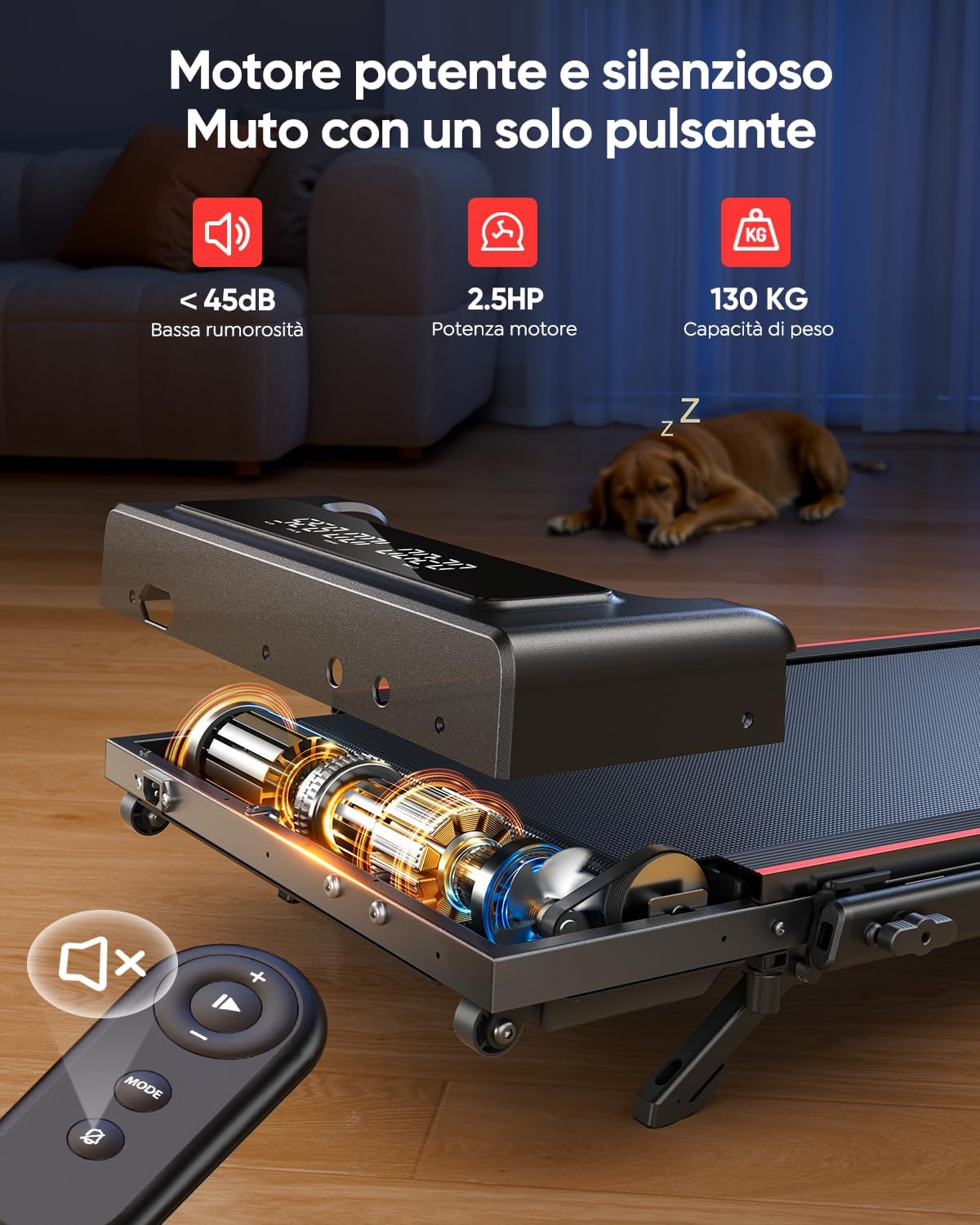
- The maximum user weight capacity for this treadmill is 130 kg.
- Always hold the handrails when starting or stopping the treadmill.
- In case of emergency, pull the safety key to immediately stop the treadmill.

The treadmill features a multi-layer shock absorption system designed to protect your knees and joints during exercise.
3. പാക്കേജ് ഉള്ളടക്കം
താഴെ പറയുന്ന ഇനങ്ങൾക്കായി ബോക്സ് ചെക്ക് ചെയ്യുക:
- Toputure TP4 Foldable Electric Treadmill (Main Unit)
- റിമോട്ട് കൺട്രോൾ
- പവർ കോർഡ്
- Tool Kit (for minor adjustments)
- ഉപയോക്തൃ മാനുവൽ (ഈ പ്രമാണം)
4. സജ്ജീകരണ ഗൈഡ്
4.1 ട്രെഡ്മിൽ തുറക്കൽ
The Toputure TP4 treadmill comes pre-assembled and requires no complex installation. Simply remove it from the packaging and unfold it for use.
- Carefully lift the treadmill out of its packaging.
- Place the treadmill on a flat, level surface.
- If using the handrail, lift it into the upright position and secure it with the locking mechanisms.

The Toputure TP4 treadmill can be used with the handrail up for running or folded down for under-desk walking.

The treadmill features a space-saving foldable design and integrated transport wheels for easy movement and storage.
4.2 Adjusting Manual Incline
The treadmill offers a manual incline adjustment up to 9% to increase workout intensity.
- Locate the adjustable feet/supports at the rear of the treadmill.
- Lift the rear of the treadmill slightly.
- Extend the incline supports to the desired position. The treadmill has a fixed 9% incline option.
- Ensure the supports are securely locked in place before use.

Follow these three steps to adjust the manual incline: 1. Open the footrests, 2. Insert the pin, 3. Adjust the central footrest.

Utilizing the 9% manual incline can significantly increase calorie expenditure during your workout.
5. പ്രവർത്തന നിർദ്ദേശങ്ങൾ
5.1 പവർ ഓൺ/ഓഫ്
Connect the power cord to a grounded electrical outlet and then to the treadmill. Press the power button on the treadmill to turn it on. To turn off, press the power button again or disconnect from the power source.
5.2 വേഗത നിയന്ത്രണം
The treadmill offers a speed range of 1-12 km/h. You can adjust the speed using the remote control or the buttons on the treadmill's display panel.
- റിമോട്ട് കൺട്രോൾ: Use the '+' and '-' buttons to increase or decrease speed. The remote also features a mute button for quiet operation.
- പ്രദർശന പാനൽ: Use the speed control buttons on the main display for quick adjustments.
5.3 Understanding the Dual Display
The treadmill features a dual LED display that provides real-time workout data at a glance.
- സമയം: നിങ്ങളുടെ വ്യായാമത്തിന്റെ ദൈർഘ്യം പ്രദർശിപ്പിക്കുന്നു.
- വേഗത: Shows your current speed in km/h.
- ദൂരം: Tracks the total distance covered during your session.
- കലോറികൾ: നിങ്ങളുടെ വ്യായാമ വേളയിൽ കത്തിച്ച കലോറികളുടെ എണ്ണം കണക്കാക്കുന്നു.

The dual LED display provides clear visualization of your workout data, while the silent remote control allows for convenient adjustments.
5.4 ആപ്പ് കണക്റ്റിവിറ്റി
Enhance your workout experience by connecting your treadmill to the dedicated smart app via Bluetooth.
- Download the compatible fitness app (refer to the product packaging or quick start guide for app name).
- നിങ്ങളുടെ സ്മാർട്ട്ഫോണിലോ ടാബ്ലെറ്റിലോ ബ്ലൂടൂത്ത് പ്രവർത്തനക്ഷമമാക്കുക.
- Open the app and follow the on-screen instructions to pair with your TP4 treadmill.
- Once connected, you can synchronize real-time workout data, access personalized programs, monitor progress, and participate in challenges.
Connect to the smart app to track your progress, access personalized programs, and make your workouts more engaging.
5.5 ഓപ്പറേറ്റിംഗ് മോഡുകൾ
The TP4 treadmill supports various modes to suit your fitness needs:
- Walking Mode (1-8 km/h): Ideal for casual walks or under-desk use.
- Running Mode (8-12 km/h): For more intense cardio workouts.
- Climbing Mode (1-5 km/h with incline): Simulates uphill walking/running for increased calorie burn.
- Working Mode (1-2 km/h under desk): Perfect for staying active while working.

The 4-in-1 walking pad offers versatile modes for running, climbing, walking, and working, adapting to various fitness routines.
6. പരിപാലനം
പതിവ് അറ്റകുറ്റപ്പണികൾ നിങ്ങളുടെ ട്രെഡ്മില്ലിന്റെ ദീർഘായുസ്സും മികച്ച പ്രകടനവും ഉറപ്പാക്കുന്നു.
6.1 ലൂബ്രിക്കേഷൻ
The running belt requires periodic lubrication to reduce friction and extend its lifespan. Use only silicone-based treadmill lubricant.
- ട്രെഡ്മിൽ ഓഫ് ചെയ്ത് അൺപ്ലഗ് ചെയ്യുക.
- Lift the edge of the running belt on one side.
- Apply a small amount of lubricant (approx. 5ml or one teaspoon) in a Z-pattern under the belt, about 10-15 cm from the front.
- മറുവശത്ത് ആവർത്തിക്കുക.
- Plug in the treadmill and run it at a low speed (e.g., 3 km/h) for 5 minutes to distribute the lubricant.
- ഉപയോഗത്തിനനുസരിച്ച് ഓരോ 3-6 മാസത്തിലും ലൂബ്രിക്കേറ്റ് ചെയ്യുക.

Ensure regular lubrication through the designated port and adjust the belt as needed for optimal performance.
6.2 വൃത്തിയാക്കൽ
പരസ്യം ഉപയോഗിച്ച് ട്രെഡ്മില്ലിൽ വൃത്തിയാക്കുകamp ഓരോ ഉപയോഗത്തിനു ശേഷവും വിയർപ്പും പൊടിയും നീക്കം ചെയ്യാൻ തുണി ഉപയോഗിക്കുക. അബ്രസീവ് ക്ലീനറുകളോ ലായകങ്ങളോ ഉപയോഗിക്കരുത്.
6.3 ബെൽറ്റ് ക്രമീകരണം
If the running belt slips or drifts to one side, it may need adjustment. Use the included tool kit to turn the rear roller adjustment bolts in small increments (quarter turns) until the belt is centered and taut.
7. ട്രബിൾഷൂട്ടിംഗ് ഗൈഡ്
പൊതുവായ പ്രശ്നങ്ങളും അവയുടെ പരിഹാരങ്ങളും അറിയാൻ ഈ പട്ടിക കാണുക.
| പ്രശ്നം | സാധ്യമായ കാരണം | പരിഹാരം |
|---|---|---|
| ട്രെഡ്മിൽ പവർ ഓൺ ആകുന്നില്ല. | Power cord not connected; Power switch off; Circuit breaker tripped. | Ensure power cord is securely plugged in; Turn power switch on; Reset circuit breaker. |
| റണ്ണിംഗ് ബെൽറ്റ് സ്ലിപ്പുകൾ. | ബെൽറ്റ് വളരെ അയഞ്ഞിരിക്കുന്നു; ലൂബ്രിക്കേഷൻ അപര്യാപ്തമാണ്. | Adjust belt tension (see 6.3); Lubricate belt (see 6.1). |
| റണ്ണിംഗ് ബെൽറ്റ് ഒരു വശത്തേക്ക് നീങ്ങുന്നു. | ബെൽറ്റ് മധ്യത്തിലല്ല. | Adjust belt alignment (see 6.3). |
| പ്രവർത്തന സമയത്ത് അസാധാരണമായ ശബ്ദം. | Loose parts; Lack of lubrication; Motor issue. | Check for loose bolts and tighten; Lubricate belt; If noise persists, contact customer support. |
| റിമോട്ട് കൺട്രോൾ പ്രവർത്തിക്കുന്നില്ല. | Batteries dead; Remote not paired. | Replace batteries; Refer to pairing instructions in the quick start guide. |
8. ഉൽപ്പന്ന സവിശേഷതകൾ
| ഫീച്ചർ | സ്പെസിഫിക്കേഷൻ |
|---|---|
| മോഡൽ നമ്പർ | TP4 |
| ബ്രാൻഡ് | ടോപ്യൂട്ടർ |
| ഉൽപ്പന്ന അളവുകൾ (അൺഫോൾഡ്) | 127 x 58 x 107 സെ.മീ |
| ഉൽപ്പന്ന അളവുകൾ (മടക്കിയത്) | 127 x 58 x 11.5 സെ.മീ |
| ഇനത്തിൻ്റെ ഭാരം | 21.1 കി.ഗ്രാം |
| പരമാവധി ഭാരം ശേഷി | 130 കി.ഗ്രാം |
| മോട്ടോർ കുതിരശക്തി | 2.5 എച്ച്.പി |
| വേഗത പരിധി | മണിക്കൂറിൽ 1-12 കി.മീ |
| ഇൻക്ലൈൻ തരം | Manual (up to 9%) |
| ഡിസ്പ്ലേ തരം | ഡ്യുവൽ എൽഇഡി |
| കണക്റ്റിവിറ്റി | Bluetooth (App Compatible) |
| ഫ്രെയിം മെറ്റീരിയൽ | Carbon Steel / Alloy Steel |
| പ്രത്യേക സവിശേഷതകൾ | Shock Absorption, Compact Design, Foldable, Portable, Quiet Operation |
9. വാറണ്ടിയും ഉപഭോക്തൃ പിന്തുണയും
Your Toputure TP4 Treadmill comes with a standard manufacturer's warranty. Please refer to the warranty card included in your package for specific terms and conditions. For any product inquiries, technical support, or warranty claims, please contact Toputure customer service through the retailer's platform or the contact information provided on the official Toputure webസൈറ്റ്.
Ask a question about this manual
Ask about setup, troubleshooting, compatibility, parts, safety, or missing instructions. Manuals+ will review the question and use this page’s manual context to help answer it.