
ആമുഖം
This manual provides comprehensive instructions for the installation, operation, and maintenance of your FURITEK Unity PRO 3500kv 2-in-1 Micro FOC Brushless System. This system integrates an inrunner motor with an Electronic Speed Controller (ESC), designed for 1/18 and 1/24 scale RC crawlers and cars, including the TRX4M.
Please read this manual thoroughly before using the product to ensure proper function and longevity.
സുരക്ഷാ വിവരങ്ങൾ
പ്രധാന സുരക്ഷാ മുൻകരുതലുകൾ:
- This product is not intended for use by children. Adult supervision is required for operation by individuals under 18 years of age.
- Always disconnect the battery from the system when not in use to prevent accidental operation and potential damage.
- ഷോർട്ട് സർക്യൂട്ടുകൾ ഒഴിവാക്കാൻ എല്ലാ കണക്ഷനുകളും സുരക്ഷിതമാണെന്നും ശരിയായി ഇൻസുലേറ്റ് ചെയ്തിട്ടുണ്ടെന്നും ഉറപ്പാക്കുക.
- Operate your RC vehicle in a safe environment, away from people, pets, and obstacles.
- Do not modify the system components. Unauthorized modifications can lead to malfunction and void the warranty.
- Keep the system away from extreme temperatures and direct sunlight.
ഉൽപ്പന്ന സവിശേഷതകൾ
The FURITEK Unity PRO system incorporates several advanced features:
- Waterproof and Dustproof Design: The enclosing case protects internal components from environmental elements.
- FOC Technology: Field-Orientated Control for smooth throttle response and efficient power delivery.
- Integrated 5A BEC: Built-in Battery Eliminator Circuit with adjustable voltage settings (5.5V, 7.4V, 8.4V) to power high-torque servos.
- Separate Power Switch: Allows convenient system activation and deactivation.
- മൊബൈൽ ആപ്പ് ഇന്റഗ്രേഷൻ: Compatibility with the Furicar app (Android/iOS) for real-time telemetry, tuning, and programming (repeater module may be required).
- Lifetime Firmware Updates: Ensures access to the latest features and performance enhancements.
സജ്ജീകരണവും ഇൻസ്റ്റാളേഷനും
Follow these steps for proper installation of the Unity PRO system into your RC vehicle:
- ഘടകങ്ങൾ അൺപാക്ക് ചെയ്യുക: Carefully remove all components from the packaging. Verify that you have the Unity PRO motor with integrated ESC, the separate power switch, and any included accessories like the pinion gear.

Image 1: The FURITEK Unity PRO 3500kv 2-in-1 Micro FOC Brushless System components, including the motor with integrated ESC, power switch, and wiring.
- Mount the Motor/ESC Unit: Securely mount the Unity PRO motor/ESC unit into your RC chassis. Ensure it is positioned to allow for proper gear mesh and airflow.
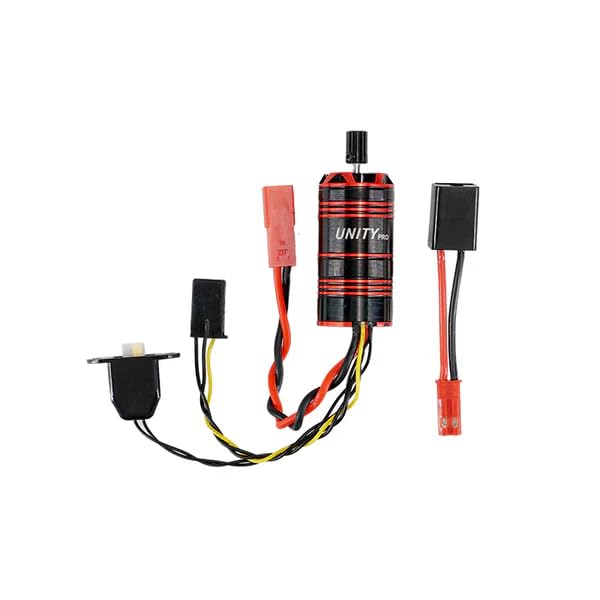
Image 2: The FURITEK Unity PRO system installed within an RC crawler chassis, showing its compact integration.
- Install Pinion Gear: Attach the appropriate pinion gear to the motor shaft. Ensure the gear mesh with the spur gear is correct to prevent premature wear and damage.
- റിസീവറുമായി ബന്ധിപ്പിക്കുക: Plug the signal wire from the Unity PRO ESC into the throttle channel of your RC receiver.
- Connect Power Switch: Connect the separate power switch to the designated port on the ESC. Position the switch in an easily accessible location on your vehicle.
- ബാറ്ററി ബന്ധിപ്പിക്കുക: Connect your battery to the power input leads of the ESC. Ensure correct polarity. The system supports various battery types; refer to specifications for voltagഇ പരിധികൾ.
- ബിഇസി വോളിയംtagഇ ക്രമീകരണം: The integrated 5A BEC can be configured for 5.5V, 7.4V, or 8.4V output. Adjust this setting via the Furicar mobile app to match the voltage requirements of your servos and other accessories.
പ്രവർത്തന നിർദ്ദേശങ്ങൾ
Once installed, follow these steps to operate your Unity PRO system:
- പവർ ഓൺ: Ensure your transmitter is turned on first. Then, activate the separate power switch on your RC vehicle to power on the Unity PRO system.
- കാലിബ്രേഷൻ: Perform throttle calibration according to your transmitter's instructions and the ESC's manual (if specific steps are required beyond standard setup). This ensures proper synchronization between your transmitter and the ESC.
- പ്രാരംഭ ഓട്ടം: Begin with slow, controlled movements to verify all functions are operating correctly. The FOC technology provides smooth, precise throttle control.
- Mobile App Tuning: For advanced tuning and real-time telemetry, download the Furicar app from your device's app store. Connect to the Unity PRO system (a repeater module may be necessary for some features) to adjust parameters such as throttle curves, drag brake, and more.
- ഡൗൺലോഡ് ചെയ്യുക Furicar App for Android or search for "Furicar" on the iOS App Store.
- Follow the in-app instructions for connecting to your device.
- പവർ ഓഫ്: Always turn off the RC vehicle's power switch first, then turn off your transmitter.
മെയിൻ്റനൻസ്
Regular maintenance ensures optimal performance and extends the lifespan of your Unity PRO system:
- വൃത്തിയാക്കൽ: Despite its waterproof and dustproof design, periodically clean the exterior of the motor and ESC to remove accumulated dirt and debris. Use a soft brush or compressed air. Avoid using harsh chemicals.
- പരിശോധനകൾ: Regularly inspect all wiring and connectors for signs of wear, damage, or loose connections. Ensure the motor is securely mounted.
- ഫേംവെയർ അപ്ഡേറ്റുകൾ: അഡ്വാൻ എടുക്കുകtage of the free lifetime firmware updates. Check the Furitek website or the Furicar app periodically for new firmware releases. Updating firmware can improve performance, add features, and resolve issues.
- സംഭരണം: When not in use for extended periods, store the system in a cool, dry place, disconnected from the battery.
ട്രബിൾഷൂട്ടിംഗ്
If you encounter issues with your Unity PRO system, consider the following:
- ശക്തിയില്ല:
- ബാറ്ററി കണക്ഷനും ചാർജ് ലെവലും പരിശോധിക്കുക.
- Ensure the power switch is fully engaged.
- എല്ലാ വയറിംഗ് കണക്ഷനുകളും സുരക്ഷിതമാണെന്ന് ഉറപ്പാക്കുക.
- Motor Not Responding/Erratic Behavior:
- Re-calibrate the ESC with your transmitter.
- Check the signal wire connection to the receiver.
- Ensure the motor shaft is not obstructed and the pinion gear is free.
- Inspect for any physical damage to the motor or ESC.
- അമിത ചൂടാക്കൽ:
- Verify proper gear mesh.
- Ensure adequate airflow around the motor/ESC unit.
- Check for excessive load on the motor (e.g., binding drivetrain).
- ആപ്പ് കണക്റ്റിവിറ്റി പ്രശ്നങ്ങൾ:
- നിങ്ങളുടെ മൊബൈൽ ഉപകരണത്തിൽ ബ്ലൂടൂത്ത് പ്രവർത്തനക്ഷമമാക്കിയിട്ടുണ്ടെന്ന് ഉറപ്പാക്കുക.
- Verify the repeater module (if used) is correctly connected and powered.
- Restart the app and the Unity PRO system.
If problems persist, contact Furitek customer support for further assistance.
സ്പെസിഫിക്കേഷനുകൾ
| ഫീച്ചർ | വിശദാംശങ്ങൾ |
|---|---|
| മോഡൽ നമ്പർ | FUR-2575 |
| മോട്ടോർ തരം | ബ്രഷ്ലെസ് ഇൻറണ്ണർ |
| കെവി റേറ്റിംഗ് | 3500കെ.വി |
| ESC തരം | Integrated FOC (Field-Orientated Control) |
| BEC ഔട്ട്പുട്ട് | 5A (Adjustable: 5.5V, 7.4V, 8.4V) |
| വെള്ളം/പൊടി സംരക്ഷണം | Completely Waterproof and Dustproof |
| മൊബൈൽ ആപ്പ് പിന്തുണ | Furicar App (Android/iOS) for tuning and telemetry |
| ശുപാർശ ചെയ്യുന്ന പ്രായം | 12 months and up (Adult supervision recommended for operation) |
| ഉൽപ്പന്ന അളവുകൾ | 5 x 5 x 5 ഇഞ്ച്; 1.6 ഔൺസ് |
വാറൻ്റിയും പിന്തുണയും
ഫേംവെയർ അപ്ഡേറ്റുകൾ: The FURITEK Unity PRO system includes free lifetime firmware updates. This ensures your system benefits from the latest features and performance improvements throughout its lifespan.
ഉൽപ്പന്ന വാറൻ്റി: For specific warranty terms and conditions, please refer to the official Furitek webനിങ്ങളുടെ വാങ്ങൽ കേന്ദ്രത്തിന്റെ സൈറ്റിൽ ബന്ധപ്പെടുക അല്ലെങ്കിൽ ബന്ധപ്പെടുക. ഏതെങ്കിലും വാറന്റി ക്ലെയിമുകൾക്കായി നിങ്ങളുടെ വാങ്ങലിന്റെ തെളിവ് സൂക്ഷിക്കുക.
ഉപഭോക്തൃ പിന്തുണ: If you require technical assistance, have questions about your product, or need to report an issue, please visit the official Furitek Store on Amazon അല്ലെങ്കിൽ നിർമ്മാതാവിന്റെ website (Furitek - HELIDIRECT) for contact information.