
YL80C
Ebike LCD Display Screen Meter YL80C User Manual
മോഡൽ: YL80C
1. ആമുഖം
This manual provides comprehensive instructions for the installation, operation, and maintenance of your YL80C Ebike LCD Display Screen Meter. The YL80C is a color LCD display designed to enhance your electric bicycle riding experience by providing essential information and control functions. It features a 5-pin waterproof connector and is compatible with 36V, 48V, and 52V power supplies.
Key functions include battery level display, motor power indication, power gear adjustment, speed display (real-time, maximum, average), mileage display (single trip, total), headlight control, and personalized parameter settings such as wheel diameter and speed limit.
2 സുരക്ഷാ വിവരങ്ങൾ
Please read all safety warnings and instructions carefully before installation and operation to prevent injury or damage to the device. Keep this manual for future reference.
- വാട്ടർപ്രൂഫ് കണക്റ്റർ: Ensure the 5-pin waterproof connector is securely and correctly connected to prevent short circuits or water damage.
- വൈദ്യുതി വിതരണം: Only connect the display to compatible 36V, 48V, or 52V ebike power systems. Using an incorrect voltage യൂണിറ്റിന് കേടുപാടുകൾ വരുത്തിയേക്കാം.
- ഇൻസ്റ്റലേഷൻ: Professional installation is recommended. Ensure the display is securely mounted to the handlebar to prevent detachment during riding.
- Operation While Riding: Avoid making complex adjustments or settings changes while riding. Pull over to a safe location before interacting with the display's settings.
- വൃത്തിയാക്കൽ: Do not use abrasive cleaners or solvents. Refer to the Maintenance section for proper cleaning procedures.
- താപനില: Do not expose the display to extreme temperatures outside its operating range.
3. ഉൽപ്പന്നം കഴിഞ്ഞുview
The YL80C display features a robust design with an ABS housing, tempered glass screen, and nylon base, built to withstand various terrains and weather conditions.
3.1 ഘടകങ്ങൾ
- YL80C LCD Display Unit
- Control Panel (K5 or K6 button type)
- 5-pin Waterproof Connector Cable
- Flexible Mounting Bracket (for 22.2mm, 25.4mm, and 31.8mm handlebars)
3.2 ഡിസ്പ്ലേ സവിശേഷതകൾ
- കളർ എൽസിഡി സ്ക്രീൻ
- ബാറ്ററി ലെവൽ ഇൻഡിക്കേറ്റർ
- മോട്ടോർ പവർ സൂചന
- Power Assist Level Adjustment and Display
- Speed Display (Real-time, Max, Average)
- Mileage Display (Single Trip, Total Odometer)
- Headlight Control and Indicator
- Personalized Parameter Settings (e.g., wheel diameter, speed limit)
- Bluetooth Connection Indication (Customized)
- USB Interface (Customized)
- Factory Default Parameter Restoration Function
3.3 ഉൽപ്പന്നം Views

ചിത്രം 3.3.1: മുൻഭാഗം view of the YL80C Display and Control Panel.

Figure 3.3.2: YL80C Display with K6 Button Control Panel.

Figure 3.3.3: Detail of the 5-pin Waterproof Connector.
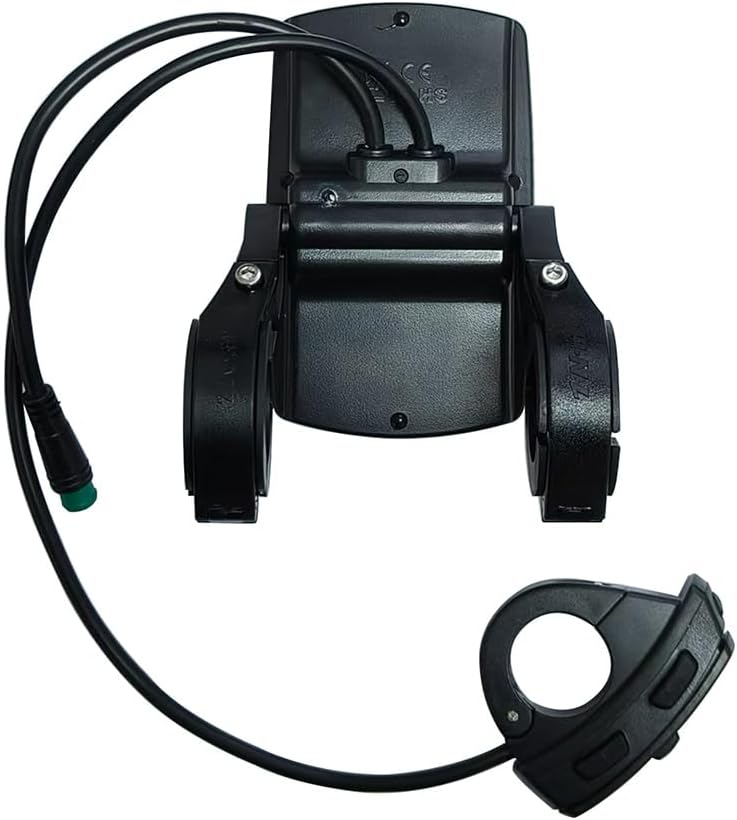
ചിത്രം 3.3.4: പിൻഭാഗം View and Mounting Bracket.
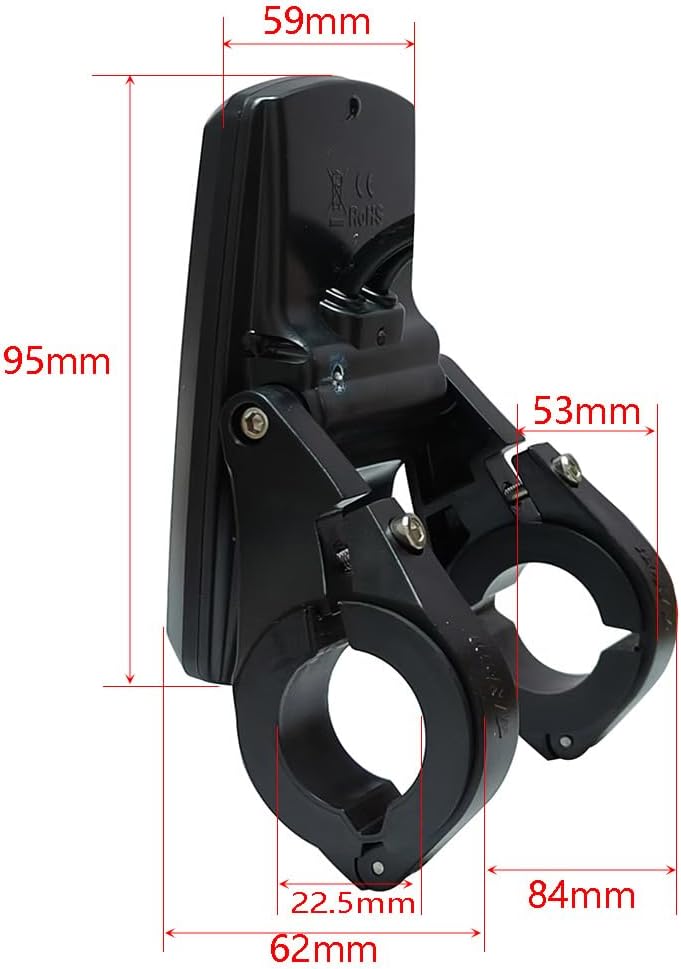
Figure 3.3.5: YL80C Display Dimensions.
4. സജ്ജീകരണവും ഇൻസ്റ്റാളേഷനും
Before installation, ensure your ebike's power is off. It is crucial to verify the communication protocol compatibility of your ebike system with the YL80C display. Contact customer service with your old display's serial number for verification if unsure.
4.1 ഡിസ്പ്ലേ മൌണ്ട് ചെയ്യൽ
- Select an appropriate position on your ebike handlebar. The flexible mounting bracket supports handlebar sizes of 22.2mm, 25.4mm, and 31.8mm.
- Loosen the screws on the mounting bracket.
- Place the bracket around the handlebar and tighten the screws securely, ensuring the display is stable and does not rotate freely.
- Adjust the display angle for optimal visibility.
4.2 കേബിളുകൾ ബന്ധിപ്പിക്കുന്നു
- Locate the corresponding 5-pin male waterproof connector on your ebike's wiring harness.
- Align the pins of the YL80C display's 5-pin female connector with the male connector on your ebike.
- Gently push the connectors together until they click into place, ensuring a firm and waterproof seal.
- Route the cables neatly and secure them with cable ties to prevent snagging or damage during riding.
പ്രധാന കുറിപ്പ്: The YL80C LCD monitor has a variety of communication protocols. To ensure plug-and-play compatibility, please contact customer service after purchase and provide the serial number on the back of your old display. This will help ensure you receive the correct version for your ebike.
5. പ്രവർത്തന നിർദ്ദേശങ്ങൾ
The YL80C display provides intuitive control over your ebike's functions. The control panel typically consists of power, mode, and up/down buttons.
5.1 പവർ ഓൺ/ഓഫ്
- പവർ ഓണാക്കാൻ: Press and hold the Power button (usually the middle button) for a few seconds until the display illuminates.
- പവർ ഓഫ് ചെയ്യാൻ: Press and hold the Power button again for a few seconds until the display turns off.
5.2 അടിസ്ഥാന ഡിസ്പ്ലേ ഫംഗ്ഷനുകൾ
- സ്പീഡ് ഡിസ്പ്ലേ: Shows real-time speed, maximum speed, and average speed. Use the Mode button to cycle through these views.
- മൈലേജ് ഡിസ്പ്ലേ: Displays single trip mileage and total odometer. Cycle using the Mode button.
- ബാറ്ററി നില: ശേഷിക്കുന്ന ബാറ്ററി ചാർജ് സൂചിപ്പിക്കുന്നു.
- മോട്ടോർ പവർ: Shows the current power output of the motor.
- പവർ അസിസ്റ്റ് ലെവൽ: Adjust the level of motor assistance using the Up (+) and Down (-) buttons. Higher numbers indicate more assistance.
5.3 ഹെഡ്ലൈറ്റ് നിയന്ത്രണം
To turn the ebike's headlights on or off, typically press and hold the Up (+) button for a few seconds. A headlight icon will appear or disappear on the display.
5.4 പാരാമീറ്റർ ക്രമീകരണങ്ങൾ
The YL80C allows for personalized parameter settings. Accessing these settings usually involves a specific button combination (e.g., holding both Up and Down buttons simultaneously for a few seconds while powered on). Consult your ebike's specific controller manual or contact customer service for detailed instructions on accessing and modifying these parameters.
- വീൽ വ്യാസം Essential for accurate speed and mileage readings. Set this according to your ebike's wheel size.
- നിശ്ചയിക്കപ്പെട്ട പരമാവധി വേഗത: Adjust the maximum assisted speed. Adhere to local regulations regarding ebike speed limits.
- ബാറ്ററി വോളിയംtage: ശരിയായ വോളിയം സ്ഥിരീകരിക്കുകtage setting (36V, 48V, 52V) for your ebike.
- ഫാക്ടറി സ്ഥിരസ്ഥിതികൾ പുന ore സ്ഥാപിക്കുക: An option to reset all parameters to their original factory settings.
കുറിപ്പ്: Customized features like Bluetooth connectivity and USB charging ports may require specific activation or configuration steps not covered in this general manual. Refer to additional documentation or contact customer support for these features.
6. പരിപാലനം
ശരിയായ അറ്റകുറ്റപ്പണി നിങ്ങളുടെ YL80C ഡിസ്പ്ലേയുടെ ദീർഘായുസ്സും മികച്ച പ്രകടനവും ഉറപ്പാക്കുന്നു.
- വൃത്തിയാക്കൽ: ഡിസ്പ്ലേ സ്ക്രീനും ഹൗസിംഗും ഒരു സോഫ്റ്റ്, ഡി ക്ലീനർ ഉപയോഗിച്ച് തുടയ്ക്കുക.amp cloth. Do not use harsh chemicals, abrasive cleaners, or solvents, as these can damage the screen or housing.
- വാട്ടർ എക്സ്പോഷർ: While the display is waterproof, avoid submerging it. Ensure the connector is always securely sealed.
- സംഭരണം: When not in use for extended periods, store the ebike and display in a cool, dry place, away from direct sunlight and extreme temperatures.
- കേബിൾ പരിശോധന: Periodically check the connecting cable and connector for any signs of wear, fraying, or damage. Replace if necessary.
- മൗണ്ടിംഗ് സെക്യൂരിറ്റി: Regularly check that the display is securely mounted to the handlebar and that all screws are tight.
7. പ്രശ്നപരിഹാരം
If you encounter issues with your YL80C display, refer to the following common problems and solutions:
| പ്രശ്നം | സാധ്യമായ കാരണം | പരിഹാരം |
|---|---|---|
| Display does not power on. |
|
|
| Incorrect speed or mileage readings. |
|
|
| Display shows error codes. |
|
|
| ബട്ടണുകൾ പ്രതികരിക്കുന്നില്ല. |
|
|
ഇവിടെ പട്ടികപ്പെടുത്തിയിട്ടില്ലാത്ത പ്രശ്നങ്ങൾക്കോ പരിഹാരങ്ങൾ പ്രശ്നം പരിഹരിക്കുന്നില്ലെങ്കിൽ, ദയവായി ഉപഭോക്തൃ പിന്തുണയുമായി ബന്ധപ്പെടുക.
8 സ്പെസിഫിക്കേഷനുകൾ
| ഫീച്ചർ | സ്പെസിഫിക്കേഷൻ |
|---|---|
| മോഡലിൻ്റെ പേര് | YL80C |
| ഡിസ്പ്ലേ തരം | കളർ എൽസിഡി |
| സ്ക്രീൻ വലിപ്പം | 9.5 സെൻ്റീമീറ്റർ |
| കണക്റ്റിവിറ്റി | Wired (5-pin waterproof connector) |
| അനുയോജ്യമായ വോളിയംtage | 36 വി, 48 വി, 52 വി |
| മെറ്റീരിയൽ | ABS Housing, Tempered Glass Screen, Nylon Base |
| നിറം | കറുപ്പ് |
| ഇനത്തിൻ്റെ ഭാരം | 137 ഗ്രാം |
| അളവുകൾ (L x W x H) | 62mm x 59mm x 95mm (approx. 4.72 x 3.94 x 3.54 inches package dimensions) |
| മൗണ്ടിംഗ് തരം | Handlebar Mount (22.2mm, 25.4mm, 31.8mm compatible) |
| ഹ്യൂമൻ ഇന്റർഫേസ് ഇൻപുട്ട് | Buttons (K5/K6 types) |
| ഉൾപ്പെടുത്തിയ ഘടകങ്ങൾ | Display, Mounting Bracket |
9. വാറൻ്റിയും പിന്തുണയും
9.1 വാറൻ്റി വിവരങ്ങൾ
This YL80C Ebike LCD Display comes with a 1 വർഷത്തെ നിർമ്മാതാവിൻ്റെ വാറൻ്റി from the date of purchase. This warranty covers defects in materials and workmanship under normal use. It does not cover damage resulting from misuse, accidents, unauthorized modifications, or improper installation.
വാറൻ്റി ക്ലെയിമുകൾക്കായി നിങ്ങളുടെ വാങ്ങിയതിൻ്റെ തെളിവ് സൂക്ഷിക്കുക.
9.2 ഉപഭോക്തൃ പിന്തുണ
For technical assistance, troubleshooting, warranty claims, or inquiries regarding communication protocol compatibility, please contact our online customer service. When contacting support, please be prepared to provide:
- Your purchase details.
- The serial number located on the back of your YL80C display.
- A clear description of the issue or question.
We will endeavor to respond to your inquiries promptly.
Ask a question about this manual
Ask about setup, troubleshooting, compatibility, parts, safety, or missing instructions. Manuals+ will review the question and use this page’s manual context to help answer it.