ആമുഖം
The See and Say Blue-Bot is a programmable floor robot designed to introduce control and programming concepts in an engaging and interactive manner. This manual provides detailed instructions for setting up, operating, and maintaining your Blue-Bot, along with its accompanying TacTile Code Reader and TacTile Standard Extension Pack. It is an ideal tool for fostering computational thinking and problem-solving skills in educational environments.
The Blue-Bot can communicate with other Blue-Bots and Bee-Bots, promoting teamwork. Its transparent design allows users to observe the internal mechanisms, sparking curiosity about technology. The robot aligns with Key Stages 1 and 2 Computing curriculum, supporting learning in programming, debugging, and algorithm understanding.
ഉൽപ്പന്ന ഘടകങ്ങൾ
Your Blue-Bot package includes the following components:
- 6x Blue-Bot Programmable Rechargeable Robot (See & Say Version)
- 1x TacTile Code Reader with 25x Blue-Bot Tiles
- 1x TacTile Standard Extension Pack (25 pieces)

ചിത്രം 1: ഓവർview of the Blue-Bot kit components, including multiple robots, the TacTile Code Reader, and various programming tiles.
സജ്ജീകരണ ഗൈഡ്
1. Blue-Bot Robot Setup
- ചാർജിംഗ്: Before first use, fully charge your Blue-Bot using the provided USB cable. Connect the cable to the charging port on the robot and a compatible USB power source. The charging indicator light will show the charging status.
- പവർ ഓൺ: Locate the power switch on the underside of the Blue-Bot and slide it to the 'ON' position. The robot will emit a sound and its eyes will light up, indicating it is ready for use.

ചിത്രം 2: വിശദമായ ഒരു view of the Blue-Bot robot, highlighting its transparent design and control interface.
2. TacTile Code Reader Setup
- ചാർജിംഗ്: The TacTile Code Reader is rechargeable. Connect it to a USB power source using its charging cable.
- പവർ ഓൺ: Turn on the TacTile Code Reader.
- Connecting to Blue-Bot: Ensure your Blue-Bot is powered on. On the TacTile Code Reader, press the "Connect" button. Wait for the blue light on the reader to illuminate, indicating a successful connection with the Blue-Bot. You can connect up to three readers for longer programs.
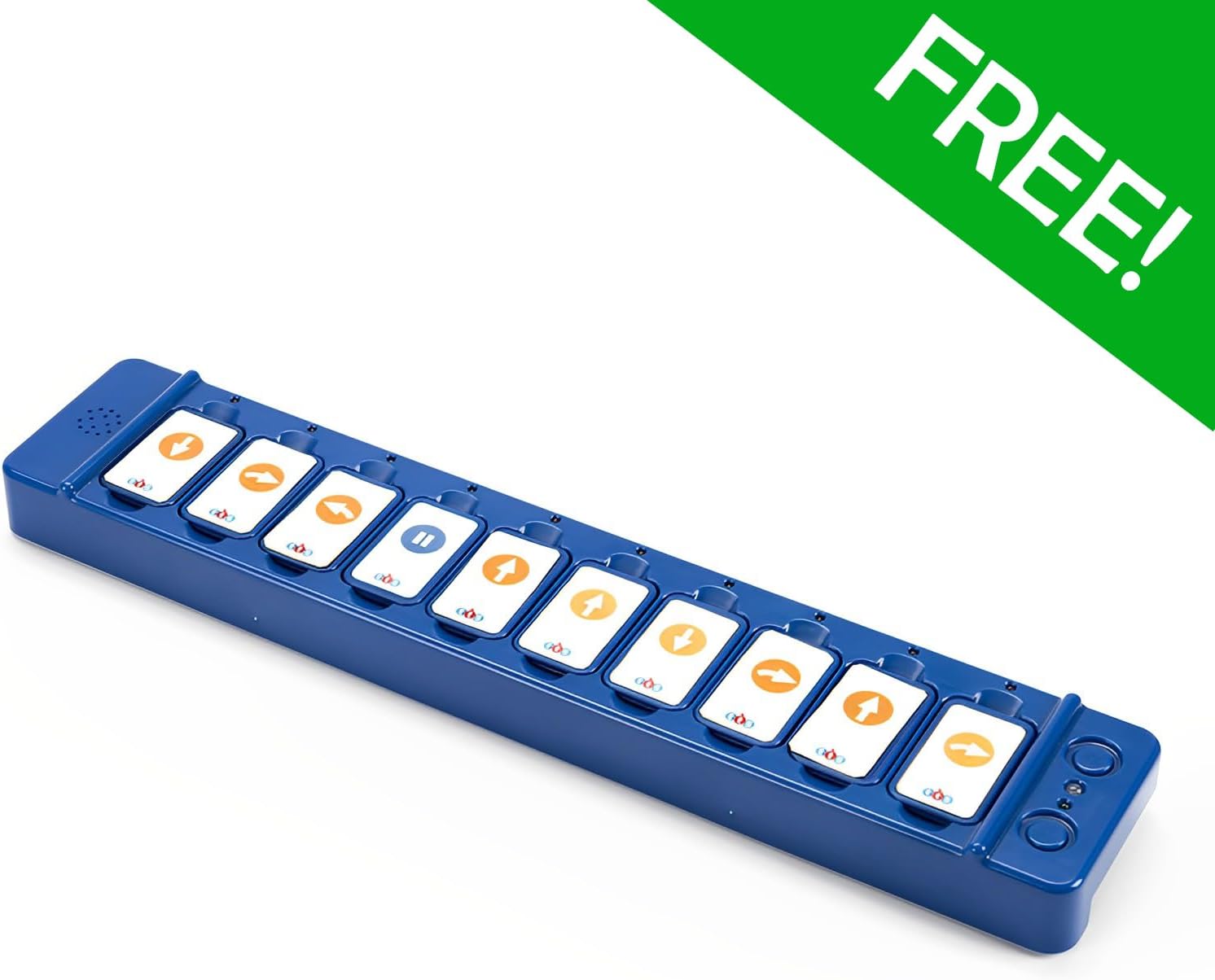
Figure 3: The TacTile Code Reader, ready for programming with inserted tiles.
പ്രവർത്തന നിർദ്ദേശങ്ങൾ
1. Basic Blue-Bot Operation (On-Board Buttons)
The Blue-Bot can be programmed directly using the buttons on its back:
- മുന്നോട്ടും പിന്നോട്ടുമുള്ള അമ്പടയാളങ്ങൾ: Move the Blue-Bot one step forward or backward.
- ഇടത്/വലത് അമ്പടയാളങ്ങൾ: Rotate the Blue-Bot 90 degrees left or right.
- Pause Button (||): Inserts a pause in the program.
- Clear (X) Button: Clears the current program sequence.
- Go Button: Executes the programmed sequence.

Figure 4: Blue-Bot's control panel with directional and action buttons.
2. Programming with the TacTile Code Reader
The TacTile Code Reader offers an alternative and intuitive method for programming your Blue-Bot:
- Arrange Tiles: Select the desired TacTile programming cards (e.g., forward, turn, pause) and arrange them in the slots of the TacTile Code Reader in the sequence you want the Blue-Bot to follow.
- Execute Program: Once the tiles are arranged, press the "Go" button on the TacTile Code Reader. The Blue-Bot will then execute the program precisely as instructed by the tiles.
- Modify Program: If a mistake is made or you wish to change the program, simply rearrange or swap the tiles in the reader and press "Go" again.

Figure 5: Demonstrating the placement of a programming tile into the TacTile Code Reader.

Figure 6: A child engaging with the Blue-Bot and TacTile Code Reader for interactive learning.
3. Using the TacTile Extension Pack
The Extension Pack adds advanced functionality to your programming:
- 45-Degree Turn Tiles: Introduce more precise directional control.
- Repeat Loop Tiles (e.g., x2, x3): Simplify complex algorithms by repeating a sequence of commands multiple times.
- Integrate these tiles into your TacTile Code Reader sequences to explore more complex programming concepts and spatial awareness.
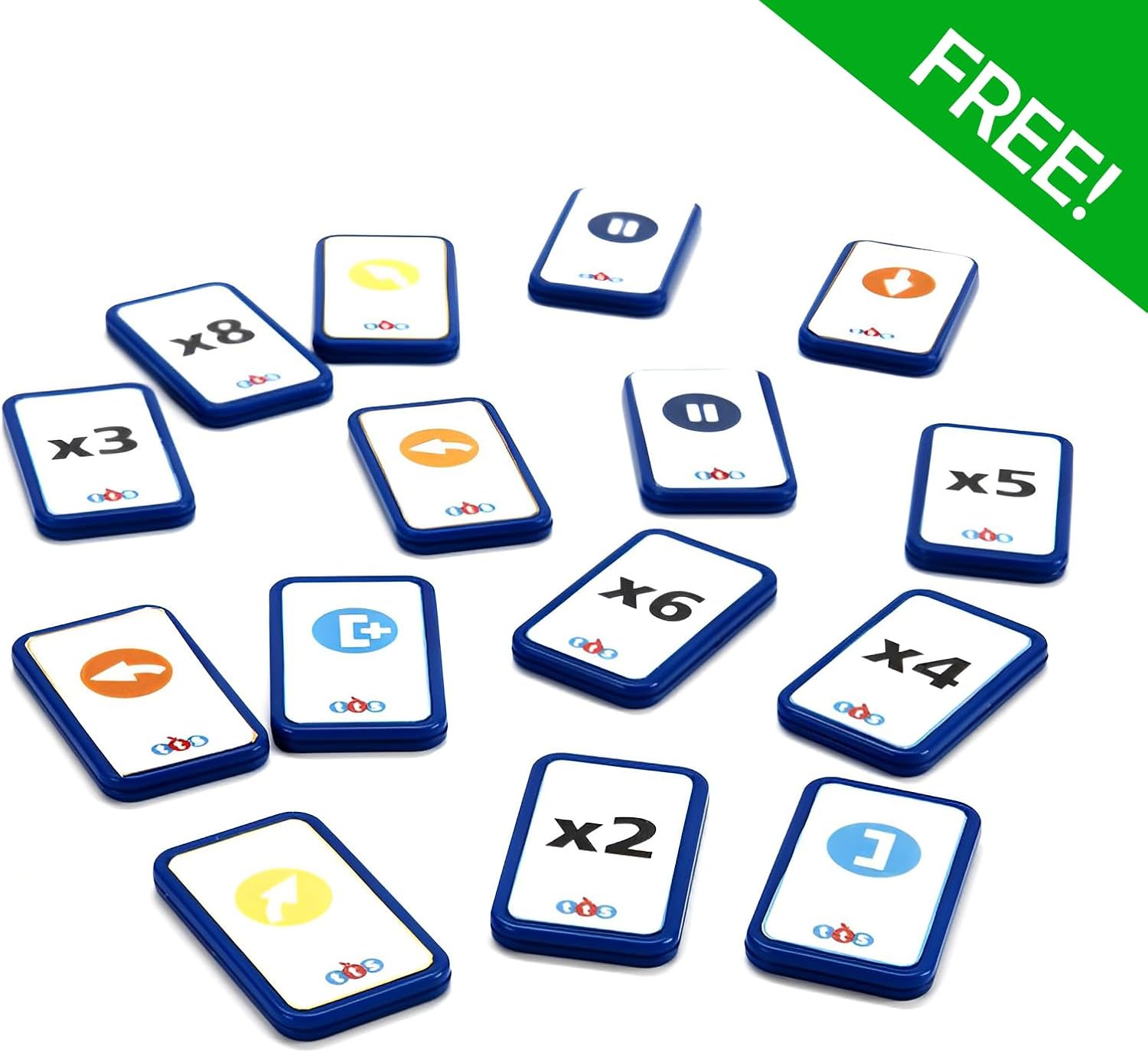
Figure 7: TacTile Extension Pack tiles, offering advanced programming commands.

ചിത്രം 8: വിശദമായി view of individual TacTile Extension Pack cards.
4. Bluetooth Connectivity (Tablet Integration)
The Blue-Bot features Bluetooth functionality for enhanced programming experiences:
- Download the official Blue-Bot app on your compatible tablet device.
- നിങ്ങളുടെ ടാബ്ലെറ്റിൽ ബ്ലൂടൂത്ത് പ്രവർത്തനക്ഷമമാക്കിയിട്ടുണ്ടെന്ന് ഉറപ്പാക്കുക.
- Open the Blue-Bot app and follow the on-screen instructions to connect to your Blue-Bot. This allows for secure and innovative programming without personal data collection.

Figure 9: Programming the Blue-Bot via a tablet application.
മെയിൻ്റനൻസ്
- വൃത്തിയാക്കൽ: Wipe the Blue-Bot and TacTile components with a soft, dry cloth. Avoid using abrasive cleaners or solvents.
- സംഭരണം: Store the Blue-Bot and its accessories in a cool, dry place away from direct sunlight and extreme temperatures.
- ബാറ്ററി കെയർ: For optimal battery life, avoid fully discharging the Blue-Bot and TacTile Code Reader frequently. Recharge them regularly.
ട്രബിൾഷൂട്ടിംഗ്
| പ്രശ്നം | സാധ്യമായ കാരണം | പരിഹാരം |
|---|---|---|
| Blue-Bot does not move. | Low battery; Not powered on; Incorrect program. | Charge the Blue-Bot; Ensure power switch is ON; Clear and re-enter the program. |
| TacTile Code Reader not connecting. | Blue-Bot not on; Reader not charged; Connection issue. | Ensure Blue-Bot is ON; Charge the reader; Press "Connect" button again. |
| Blue-Bot not responding to app. | Bluetooth off; App not connected; Blue-Bot out of range. | Enable Bluetooth on tablet; Reconnect in app; Move Blue-Bot closer to tablet. |
| Program not executing as expected. | Incorrect tile sequence; Tiles not fully inserted. | Review and correct tile arrangement; Ensure tiles are firmly in slots. |
സ്പെസിഫിക്കേഷനുകൾ
| ഫീച്ചർ | വിശദാംശങ്ങൾ |
|---|---|
| മോഡൽ നമ്പർ | B0DTJ5B5WN |
| ബ്രാൻഡ് | ജനറിക് |
| നിർമ്മാതാവ് | Terrific Teaching Solutions |
| ശുപാർശ ചെയ്യുന്ന പ്രായം | 15 വർഷവും അതിൽ കൂടുതലും |
| മെമ്മറി കപ്പാസിറ്റി | Up to 200 steps (Blue-Bot) |
| കണക്റ്റിവിറ്റി | Bluetooth (for tablet integration) |
| പവർ ഉറവിടം | Rechargeable battery (Blue-Bot, TacTile Reader) |
വാറൻ്റിയും പിന്തുണയും
വാറന്റി വിവരങ്ങൾക്കും സാങ്കേതിക പിന്തുണയ്ക്കും, ദയവായി നിർമ്മാതാവിന്റെ ഉദ്യോഗസ്ഥനെ കാണുക. webസൈറ്റിൽ ബന്ധപ്പെടുകയോ അവരുടെ ഉപഭോക്തൃ സേവന വിഭാഗവുമായി ബന്ധപ്പെടുകയോ ചെയ്യുക. ഏതെങ്കിലും വാറന്റി ക്ലെയിമുകൾക്കായി നിങ്ങളുടെ വാങ്ങലിന്റെ തെളിവ് സൂക്ഷിക്കുക.
Manufacturer: Terrific Teaching Solutions