
1. ആമുഖം
This manual provides essential information for the proper use and maintenance of your replacement remote control for Keeson adjustable bed bases. This remote is specifically designed to be compatible with Keeson CU380 adjustable bed bases and control boxes with model number CU358-2. Please read this manual carefully before attempting to use or pair the remote control.
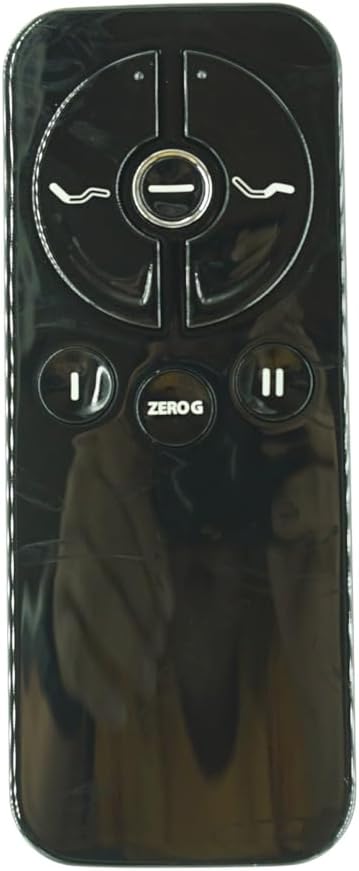
ചിത്രം 1.1: ഫ്രണ്ട് view of the Replacement Remote Control. This sleek black remote features intuitive buttons for adjusting your bed's position.
പ്രധാന അനുയോജ്യതാ കുറിപ്പ്: This remote control is not universal. It is crucial to verify that your existing control box is model CU358-2 and that your old remote is identical to this replacement. If you are unsure, please provide detailed information about your bed, control box, old remote control, and any existing manual to the seller for verification before purchase.
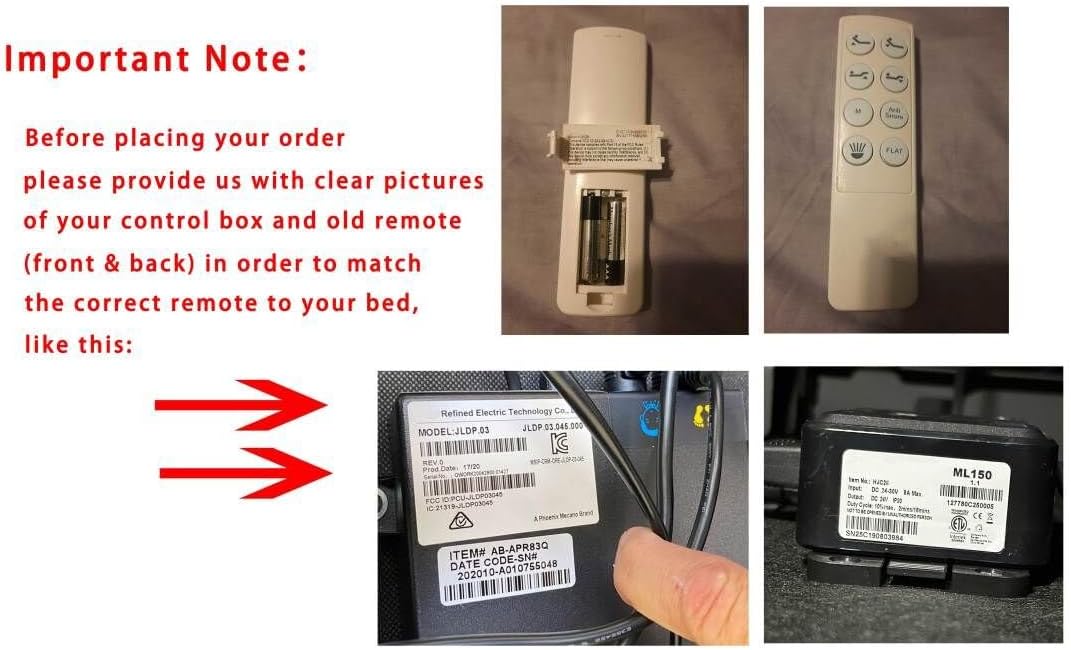
ചിത്രം 1.2: Visual guide emphasizing the importance of checking your control box and old remote for compatibility. This image displays examples of what to look for on your existing equipment.
2. സജ്ജീകരണം
2.1 ബാറ്ററി ഇൻസ്റ്റാളേഷൻ
The remote control requires 2 AAA batteries (not included). Ensure correct polarity when inserting the batteries.
- റിമോട്ട് കൺട്രോളിന്റെ പിൻഭാഗത്തുള്ള ബാറ്ററി കവർ നീക്കം ചെയ്യുക.
- Insert 2 AAA batteries, matching the (+) and (-) terminals as indicated inside the compartment.
- ബാറ്ററി കവർ സുരക്ഷിതമായി മാറ്റിസ്ഥാപിക്കുക.

ചിത്രം 2.1: View of the remote control with the battery cover removed, illustrating the battery placement area.

ചിത്രം 2.2: പിൻഭാഗം view of the remote control, highlighting the location of the 'Pair' button, which is essential for linking the remote to the bed base.
2.2 റിമോട്ട് കൺട്രോൾ ജോടിയാക്കുന്നു
The remote control must be paired with your adjustable bed base's control box to function. Follow these steps carefully:

ചിത്രം 2.3: Step-by-step visual guide for pairing the remote control with the adjustable bed base.
- ഘട്ടം 1: Unplug the power cord of your adjustable bed base from the wall outlet. Wait approximately 5 seconds, then plug it back into the outlet. You must perform Step 2 within 10 seconds of plugging the power cord back in.
- ഘട്ടം 2: റിമോട്ട് കൺട്രോളിന്റെ പിൻഭാഗത്ത്, അമർത്തിപ്പിടിക്കുക ജോടിയാക്കുക button. The PAIR button will illuminate blue and begin flashing. Continue holding the button until it stops flashing and the LED light on the control box goes out. Release the PAIR button.
- ഘട്ടം 3: The remote is now paired to the adjustable base. Test all remote functions to ensure proper operation. If the remote buttons do not impact the adjustable base movements, repeat the pairing process from Step 1.
Alternative Pairing Method (In case of trouble):

ചിത്രം 2.4: Detailed instructions for an alternative pairing method, including interaction with the control box's reset button.
- Ensure the distance between the remote and control box for pairing is less than 2 meters.
- റിമോട്ടിൽ നിന്ന് ബാറ്ററി കവർ നീക്കം ചെയ്യുക.
- Insert/check existing 3x AAA batteries.
- ഒരു കൂർത്ത വസ്തു ഉപയോഗിച്ച് കൺട്രോൾ ബോക്സിലെ റീസെറ്റ് ബട്ടൺ രണ്ടുതവണ അമർത്തുക. അതിനോട് ചേർന്നുള്ള പച്ച ജോടിയാക്കൽ LED പ്രകാശിക്കും.
- You now have 10 seconds to pair the remote and receiver. On the back of the remote, there is a silicone push button positioned above the batteries (labeled 13 in some diagrams). A blue LED starts blinking as the button is pressed. Keep it pressed until the blue LED is lit continuously, then pairing is completed, and the blue LED light fades away.
3. പ്രവർത്തന നിർദ്ദേശങ്ങൾ
Once paired, your remote control allows you to adjust the position of your adjustable bed base. The buttons are designed for intuitive control of head and foot articulation, as well as pre-set positions.

ചിത്രം 3.1: കോണാകൃതിയിലുള്ളത് view of the remote control, providing a clear perspective of the button layout for easy identification and use.
- Head Up/Down Buttons: Control the elevation and lowering of the head section of the bed.
- Foot Up/Down Buttons: Control the elevation and lowering of the foot section of the bed.
- ZERO G Button: Activates the pre-programmed Zero Gravity position, which elevates the head and foot to a position that may relieve pressure on the back.
- Other Function Buttons: (Refer to your original bed base manual for specific functions if these are memory presets or other controls.)
4. പരിപാലനം
നിങ്ങളുടെ റിമോട്ട് കൺട്രോളിന്റെ ദീർഘായുസ്സും ശരിയായ പ്രവർത്തനവും ഉറപ്പാക്കാൻ, ഈ ലളിതമായ അറ്റകുറ്റപ്പണി മാർഗ്ഗനിർദ്ദേശങ്ങൾ പാലിക്കുക:
- വൃത്തിയാക്കൽ: Wipe the remote control with a soft, dry cloth. Do not use abrasive cleaners, solvents, or harsh chemicals, as these can damage the surface and internal components.
- ബാറ്ററി മാറ്റിസ്ഥാപിക്കൽ: റിമോട്ടിന്റെ പ്രതികരണം മന്ദഗതിയിലാകുമ്പോഴോ അല്ലെങ്കിൽ ഇൻഡിക്കേറ്റർ ലൈറ്റ് (ഉണ്ടെങ്കിൽ) ബാറ്ററി കുറവാണെന്ന് സൂചന നൽകുമ്പോഴോ ബാറ്ററികൾ മാറ്റിസ്ഥാപിക്കുക. എല്ലായ്പ്പോഴും ഒരേ സമയം രണ്ട് ബാറ്ററികളും ഒരേ തരത്തിലുള്ള (AAA) പുതിയവ ഉപയോഗിച്ച് മാറ്റിസ്ഥാപിക്കുക.
- സംഭരണം: Store the remote control in a dry place, away from direct sunlight, extreme temperatures, and high humidity.
- തുള്ളികൾ ഒഴിവാക്കുക: തുള്ളികൾ ആന്തരിക സർക്യൂട്ടറിക്ക് കേടുവരുത്തുമെന്നതിനാൽ, ശാരീരിക ആഘാതത്തിൽ നിന്ന് റിമോട്ടിനെ സംരക്ഷിക്കുക.
5. പ്രശ്നപരിഹാരം
നിങ്ങളുടെ റിമോട്ട് കൺട്രോളിൽ പ്രശ്നങ്ങൾ അനുഭവപ്പെടുകയാണെങ്കിൽ, ഇനിപ്പറയുന്ന പൊതുവായ ട്രബിൾഷൂട്ടിംഗ് ഘട്ടങ്ങൾ പരിശോധിക്കുക:
- റിമോട്ട് പ്രതികരിക്കുന്നില്ല:
- Check if the batteries are inserted correctly and are not depleted. Replace them if necessary.
- Ensure the bed base is plugged into a working power outlet.
- വിഭാഗം 2.2-ൽ വിവരിച്ചിരിക്കുന്നതുപോലെ ജോടിയാക്കൽ പ്രക്രിയ വീണ്ടും ശ്രമിക്കുക.
- ഇടയ്ക്കിടെയുള്ള പ്രവർത്തനം:
- Ensure there are no obstructions between the remote and the bed base's control box.
- Move closer to the bed base during operation.
- Check for potential interference from other electronic devices.
- അനുയോജ്യത പ്രശ്നങ്ങൾ:
- Double-check that your bed base's control box model is CU358-2. This remote is not universally compatible.
- Verify that your old remote control was identical to this replacement.
- If you are still unsure about compatibility, contact the seller with photos of your control box and old remote for assistance.
6 സ്പെസിഫിക്കേഷനുകൾ
| ഫീച്ചർ | വിശദാംശങ്ങൾ |
|---|---|
| ബ്രാൻഡ് | ജനറിക് |
| അനുയോജ്യമായ ഉപകരണങ്ങൾ | Adjustable bed base (Keeson CU380 / CU358-2 control box) |
| ബാറ്ററികൾ ആവശ്യമാണ് | 2 x AAA (ഉൾപ്പെടുത്തിയിട്ടില്ല) |
| നിറം | കറുപ്പ് |
| പിന്തുണയ്ക്കുന്ന ഉപകരണങ്ങളുടെ പരമാവധി എണ്ണം | 1 |
| പ്രത്യേക ഫീച്ചർ | Not Universal remote |
7. വാറൻ്റിയും പിന്തുണയും
For specific warranty information, please refer to the terms provided at the time of purchase or contact the seller directly. As this is a replacement part, warranty coverage may vary.
If you require further assistance or have questions not covered in this manual, please contact the seller or your adjustable bed base manufacturer's customer support. Providing your product's ASIN (B0DTPZCY41) and detailed descriptions of your issue will help expedite support.