
1. ഉൽപ്പന്നം കഴിഞ്ഞുview
The AYANEO Pocket S is an Android-based portable gaming handheld designed for a premium gaming experience. It integrates a powerful Snapdragon G3x Gen 2 Gaming Platform, a high-resolution touch display, and ergonomic controls within a compact form factor. This device is engineered to deliver robust performance for a wide range of gaming applications, from classic titles to modern Android games.

Image 1.1: AYANEO Pocket S device in use.
2 പ്രധാന സവിശേഷതകൾ
- ശക്തമായ പ്രകടനം: Equipped with the Snapdragon G3x Gen 2 Gaming Platform, featuring an 8-core Kyro CPU and Adreno A32 GPU at 1.2GHz, ensuring high performance and efficiency with a 15W TDP.
- അതിശയിപ്പിക്കുന്ന ദൃശ്യങ്ങൾ: Features a 6-inch 1440P IPS touch Bezel-less mirror screen for vivid colors and sharp details.
- Ample Memory and Storage: Includes 12GB of LPDDR5x RAM for smooth multitasking and 128GB UFS storage for extensive game libraries.
- എർഗണോമിക് നിയന്ത്രണങ്ങൾ: Incorporates RGB hall sensor joysticks, linear hall triggers, and conduction rubber buttons for precise and comfortable gaming.
- വിപുലമായ കണക്റ്റിവിറ്റി: Runs on a custom Android OS, supporting Wi-Fi 7 and Bluetooth 5.3 for robust multiplayer and network capabilities.
- സംയോജിത സോഫ്റ്റ്വെയർ: Comes with AYA SPACE, a dedicated software suite for game browsing and system management.

ചിത്രം 2.1: കഴിഞ്ഞുview of key features and components.
3. ഉപകരണ ലേഔട്ടും നിയന്ത്രണങ്ങളും
The AYANEO Pocket S is designed with intuitive controls for an optimal gaming experience. Familiarize yourself with the layout:
- ഡിസ്പ്ലേ: 6-inch 1440P IPS touch screen.
- ജോയ്സ്റ്റിക്കുകൾ: Dual RGB Hall sensor joysticks for precise analog input.
- ഡി-പാഡ്: Crystal-textured D-pad for directional input.
- ഫേസ് ബട്ടണുകൾ: ABXY buttons, typically located on the right side.
- ഷോൾഡർ ബട്ടണുകൾ/ട്രിഗറുകൾ: Linear Hall triggers and shoulder buttons for additional input.
- System Buttons: Buttons for menu, home, and other system functions.
- തുറമുഖങ്ങൾ: ചാർജിംഗിനും ഡാറ്റ കൈമാറ്റത്തിനുമായി യുഎസ്ബി ടൈപ്പ്-സി പോർട്ട്.

ചിത്രം 3.1: വിശദമായത് view of the device's design and control elements.
4. സജ്ജീകരണ ഗൈഡ്
4.1. പ്രാരംഭ പവർ ഓൺ
- ഉപകരണം ചാർജ് ചെയ്യുക: Before first use, ensure the device is fully charged. Connect the provided USB Type-C cable to the device and a compatible power adapter.
- പവർ ഓൺ: Press and hold the power button (usually located on the top or side) for a few seconds until the screen illuminates.
- പ്രാരംഭ കോൺഫിഗറേഷൻ: Follow the on-screen prompts to select your language, region, and agree to the terms of service.
4.2 ഉപകരണം ചാർജ് ചെയ്യുന്നു
To charge your AYANEO Pocket S:
- ഉപകരണത്തിൽ യുഎസ്ബി ടൈപ്പ്-സി പോർട്ട് കണ്ടെത്തുക.
- Connect one end of the USB Type-C cable to the device and the other end to a power adapter (not always included) or a powered USB port.
- The charging indicator light (if present) will show the charging status. A full charge typically takes several hours.
4.3. നെറ്റ്വർക്ക് കണക്ഷൻ (വൈ-ഫൈ)
ഒരു Wi-Fi നെറ്റ്വർക്കിലേക്ക് കണക്റ്റുചെയ്യാൻ:
- ഹോം സ്ക്രീനിൽ നിന്ന്, ഇതിലേക്ക് നാവിഗേറ്റ് ചെയ്യുക ക്രമീകരണങ്ങൾ.
- തിരഞ്ഞെടുക്കുക നെറ്റ്വർക്കും ഇൻ്റർനെറ്റും, പിന്നെ വൈഫൈ.
- വൈഫൈ ടോഗിൾ ചെയ്യുക On. The device will scan for available networks.
- ലിസ്റ്റിൽ നിന്ന് നിങ്ങൾക്ക് ആവശ്യമുള്ള നെറ്റ്വർക്ക് തിരഞ്ഞെടുക്കുക.
- ആവശ്യപ്പെടുകയാണെങ്കിൽ നെറ്റ്വർക്ക് പാസ്വേഡ് നൽകുക, തുടർന്ന് ടാപ്പുചെയ്യുക ബന്ധിപ്പിക്കുക.
5. പ്രവർത്തന നിർദ്ദേശങ്ങൾ
5.1. നാവിഗേഷൻ
- ടച്ച് സ്ക്രീൻ: Use your finger to tap, swipe, and pinch on the display for navigation.
- Joysticks/D-Pad: Use the physical controls to navigate menus and select options within games or the operating system.
- System Buttons: Utilize the dedicated buttons for functions like Home, Back, and Menu as per Android standards.
5.2. ഗെയിമിംഗ്
- ലോഞ്ച് ഗെയിമുകൾ: Games can be launched directly from the Android home screen or through the AYA SPACE application.
- Controller Mapping: For some games, you may need to configure controller mapping within the game settings or using AYA SPACE's button mapping feature.
- പ്രകടന മോഡുകൾ: The device may offer different performance modes (e.g., balanced, performance) accessible via system settings or AYA SPACE to optimize battery life or gaming fluidity.
5.3. AYA SPACE Application
AYA SPACE is a custom software suite designed to enhance your gaming experience. It provides features such as:
- Game library management and browsing.
- System performance monitoring and adjustment.
- Button remapping for various games.
- Quick access to system settings.
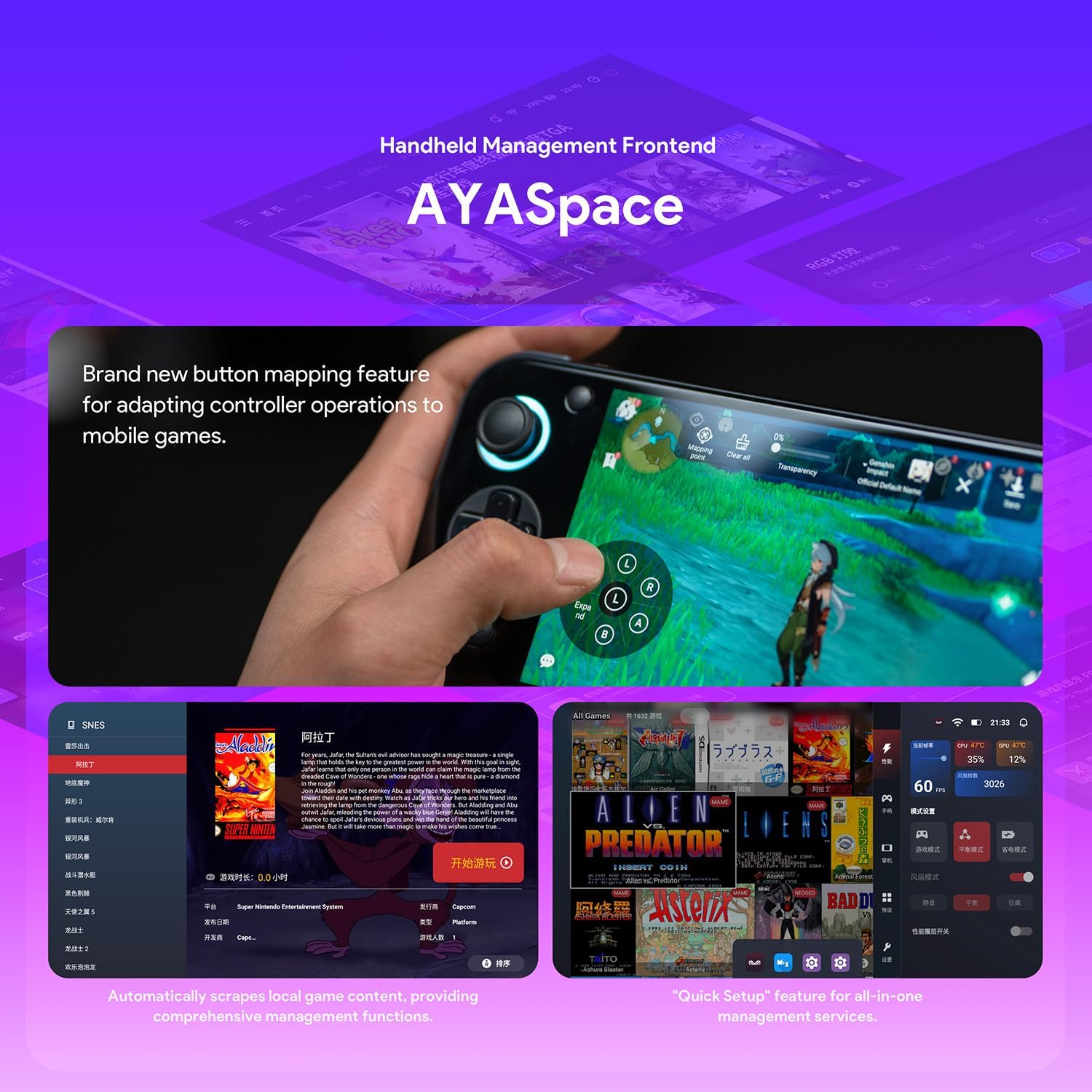
Image 5.1: AYA SPACE handheld management frontend.
6. പരിപാലനം
- വൃത്തിയാക്കൽ: Use a soft, dry, lint-free cloth to clean the screen and exterior. Avoid abrasive materials or harsh chemicals. For stubborn smudges, a slightly damp cloth with water can be used, ensuring no moisture enters ports.
- സോഫ്റ്റ്വെയർ അപ്ഡേറ്റുകൾ: Regularly check for system and AYA SPACE software updates to ensure optimal performance, security, and access to new features. Updates can typically be found in the device's Settings menu or within AYA SPACE.
- സംഭരണം: നേരിട്ടുള്ള സൂര്യപ്രകാശത്തിൽ നിന്നും കടുത്ത താപനിലയിൽ നിന്നും മാറി തണുത്തതും വരണ്ടതുമായ സ്ഥലത്ത് ഉപകരണം സൂക്ഷിക്കുക.
- ബാറ്ററി കെയർ: To prolong battery life, avoid fully discharging the device frequently. If storing for extended periods, charge the battery to approximately 50%.
7. പ്രശ്നപരിഹാരം
പൊതുവായ പ്രശ്നങ്ങളും അവയുടെ പരിഹാരങ്ങളും അറിയാൻ താഴെയുള്ള പട്ടിക കാണുക:
| ഇഷ്യൂ | സാധ്യമായ കാരണം | പരിഹാരം |
|---|---|---|
| ഉപകരണം പവർ ഓണാക്കുന്നില്ല. | ബാറ്ററി കുറവാണ്; ഉപകരണം ഫ്രീസുചെയ്തു. | Charge the device for at least 30 minutes. Perform a hard reset by holding the power button for 10-15 seconds. |
| വൈഫൈ കണക്ഷൻ പ്രശ്നങ്ങൾ. | തെറ്റായ പാസ്വേഡ്; പരിധിക്ക് പുറത്താണ്; റൂട്ടർ പ്രശ്നം. | Verify Wi-Fi password. Move closer to the router. Restart the device and the Wi-Fi router. |
| Games are lagging or performing poorly. | Background apps; low system resources; outdated software. | Close unnecessary background applications. Check for system and game updates. Adjust performance settings in AYA SPACE. |
| ടച്ച്സ്ക്രീൻ പ്രതികരിക്കുന്നില്ല. | സോഫ്റ്റ്വെയർ തകരാർ; സ്ക്രീൻ പ്രൊട്ടക്ടറിന്റെ ഇടപെടൽ. | Restart the device. Ensure the screen is clean. If a screen protector is installed, check for proper application. |
8 സ്പെസിഫിക്കേഷനുകൾ
Detailed technical specifications for the AYANEO Pocket S:
| ഫീച്ചർ | വിശദാംശങ്ങൾ |
|---|---|
| പ്രോസസ്സർ | Snapdragon G3x Gen 2 Gaming Platform (8-core Kyro CPU, Adreno A32 GPU @ 1.2GHz) |
| പ്രദർശിപ്പിക്കുക | 6-inch 1440P IPS Touch Bezel-less Mirror Screen |
| റാം | 12GB LPDDR5X |
| സംഭരണം | 128GB UFS |
| ഓപ്പറേറ്റിംഗ് സിസ്റ്റം | Custom Android OS |
| കണക്റ്റിവിറ്റി | വൈ-ഫൈ 7, ബ്ലൂടൂത്ത് 5.3 |
| നിയന്ത്രണങ്ങൾ | RGB Hall Sensor Joysticks, Linear Hall Triggers, Conduction Rubber Buttons |
| ബാറ്ററി ലൈഫ് (ശരാശരി) | 5 മണിക്കൂർ |
| അളവുകൾ | 3.35 x 8.42 x 0.55 ഇഞ്ച് |
| ഭാരം | 350 ഗ്രാം |
| ഹാർഡ്വെയർ ഇന്റർഫേസ് | യുഎസ്ബി ടൈപ്പ് സി |
| മെറ്റീരിയൽ തരം | പ്ലാസ്റ്റിക് |

Image 8.1: Snapdragon G3x Gen 2 Gaming Platform details.
9. വാറൻ്റിയും പിന്തുണയും
For warranty information and technical support, please refer to the official AYANEO webസൈറ്റിൽ ബന്ധപ്പെടുക അല്ലെങ്കിൽ അവരുടെ ഉപഭോക്തൃ സേവനവുമായി ബന്ധപ്പെടുക. വാറന്റി ക്ലെയിമുകൾക്കായി നിങ്ങളുടെ വാങ്ങിയതിന്റെ തെളിവ് സൂക്ഷിക്കുക.
Official AYANEO Store: AYANEO Amazon Store