
1. ആമുഖം
വാങ്ങിയതിന് നന്ദി.asing the Trevi RA 7F50 BT Portable Multiband Radio. This device offers versatile audio entertainment with FM, AM, and SW radio bands, wireless connectivity, and MP3 playback via USB and Micro SD. Its integrated solar panel and USB Type-C charging port ensure power availability wherever you go. Please read this manual carefully to ensure proper use and maintenance of your radio.
2 സുരക്ഷാ വിവരങ്ങൾ
- മഴ, ഈർപ്പം, അല്ലെങ്കിൽ തീവ്രമായ താപനില എന്നിവയിൽ ഉപകരണം തുറന്നുകാട്ടരുത്.
- റേഡിയോ താഴെയിടുകയോ ശക്തമായ ആഘാതങ്ങൾക്ക് വിധേയമാക്കുകയോ ചെയ്യുന്നത് ഒഴിവാക്കുക.
- Do not disassemble the unit. Repairs should only be performed by qualified personnel.
- കുട്ടികൾക്ക് ലഭ്യമാകാതെ സൂക്ഷിക്കുക.
- ചാർജ് ചെയ്യുമ്പോൾ ശരിയായ വായുസഞ്ചാരം ഉറപ്പാക്കുക.
- Use only the provided USB Type-C cable for charging or a certified equivalent.
3. ഉൽപ്പന്നം കഴിഞ്ഞുview
Familiarize yourself with the components and controls of your Trevi RA 7F50 BT radio.
ഫ്രണ്ട് View
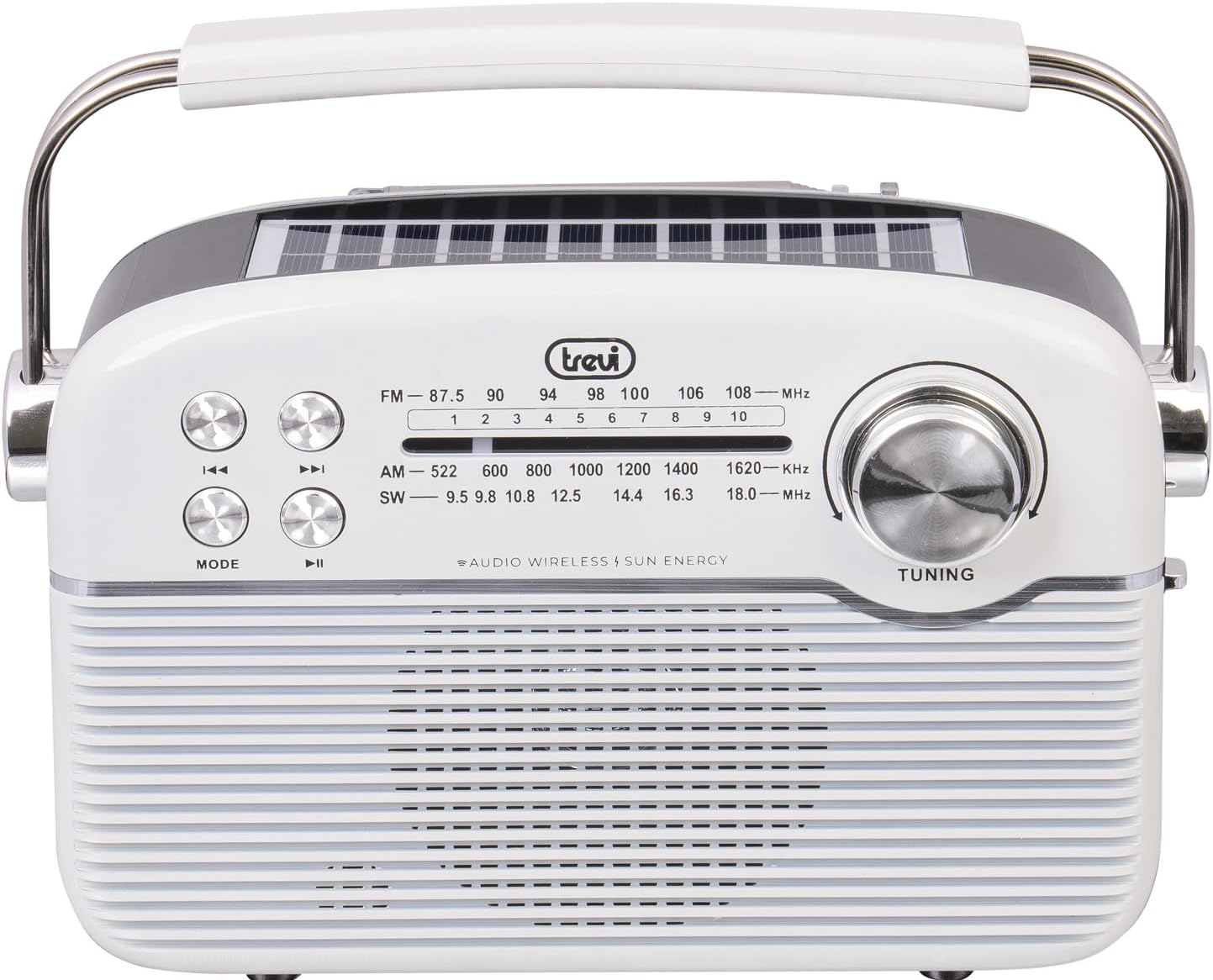
ചിത്രം: മുൻഭാഗം view of the Trevi RA 7F50 BT radio. Visible elements include the main speaker grille, frequency display for FM, AM, and SW bands, control buttons for playback and mode selection, and a large tuning dial on the right side. The Trevi logo is centered above the frequency display.
മുകളിലും വശവും View

Image: Top and side view of the Trevi RA 7F50 BT radio. This perspective clearly shows the integrated solar panel on the top surface, designed for charging. The sturdy carrying handle is also prominent, extending across the top of the unit. The side view reveals the rounded edges and overall compact design.
പിൻഭാഗം View

ചിത്രം: പിൻഭാഗം view of the Trevi RA 7F50 BT radio. The telescopic antenna is visible at the top. Below it, the various input ports are shown, including a USB port for flash drives, a Micro SD card slot for memory cards, and a USB Type-C port for charging the internal battery. The back panel also features a textured design.
നിയന്ത്രണങ്ങളും തുറമുഖങ്ങളും:
- ട്യൂണിംഗ് ഡയൽ: റേഡിയോ ഫ്രീക്വൻസികൾ തിരഞ്ഞെടുക്കുന്നതിന്.
- മോഡ് ബട്ടൺ: Switches between radio (FM/AM/SW), Wireless, and MP3 (USB/Micro SD) modes.
- പ്ലേ/താൽക്കാലികമായി നിർത്തുക ബട്ടൺ: Controls playback in MP3 and Wireless modes.
- മുമ്പത്തെ/അടുത്ത ട്രാക്ക് ബട്ടണുകൾ: Navigates tracks in MP3 and Wireless modes, or fine-tunes radio frequency.
- വോളിയം നിയന്ത്രണം: ഓഡിയോ ഔട്ട്പുട്ട് ലെവൽ ക്രമീകരിക്കുന്നു.
- USB പോർട്ട്: യുഎസ്ബി ഫ്ലാഷ് ഡ്രൈവുകൾ ബന്ധിപ്പിക്കുന്നതിന്.
- മൈക്രോ എസ്ഡി കാർഡ് സ്ലോട്ട്: For inserting Micro SD memory cards.
- യുഎസ്ബി ടൈപ്പ്-സി പോർട്ട്: ആന്തരിക ബാറ്ററി ചാർജ് ചെയ്യുന്നതിന്.
- ടെലിസ്കോപ്പിക് ആന്റിന: മെച്ചപ്പെട്ട റേഡിയോ സ്വീകരണത്തിനായി.
- സോളാർ പാനൽ: Integrated on top for solar charging.
4. സജ്ജീകരണം
4.1 ബാറ്ററി ചാർജ് ചെയ്യുന്നു
The Trevi RA 7F50 BT radio is equipped with a rechargeable lithium battery (1500 mAh) and offers two charging methods:
- യുഎസ്ബി ടൈപ്പ്-സി ചാർജിംഗ്: Connect the provided USB Type-C cable to the radio's charging port and the other end to a standard USB power adapter (not included) or a computer's USB port. The charging indicator light will illuminate.
- സോളാർ ചാർജിംഗ്: Place the radio with its solar panel facing direct sunlight. The integrated 80 mA solar panel will slowly recharge the battery. This method is ideal for maintaining charge or for emergency power in outdoor environments.
ആദ്യ ഉപയോഗത്തിന് മുമ്പ് ബാറ്ററി പൂർണ്ണമായി ചാർജ് ചെയ്യാൻ ശുപാർശ ചെയ്യുന്നു.
4.2 പ്രാരംഭ പവർ ഓൺ
Locate the Power On/Off switch, usually on the side or back of the unit. Slide it to the "ON" position. The radio will power on, and the display (if available) will light up.
5. പ്രവർത്തന നിർദ്ദേശങ്ങൾ
5.1 റേഡിയോ ഓപ്പറേഷൻ (FM/AM/SW)
- റേഡിയോ മോഡ് തിരഞ്ഞെടുക്കുക: അമർത്തുക മോഡ് button repeatedly until you reach the desired radio band (FM, AM, or SW).
- ആന്റിന വിപുലീകരിക്കുക: For optimal FM and SW reception, fully extend the telescopic antenna. For AM, the internal ferrite antenna is typically sufficient.
- ഒരു സ്റ്റേഷനിലേക്ക് ട്യൂൺ ചെയ്യുക: തിരിക്കുക ട്യൂണിംഗ് dial to scan for stations. The frequency display will show the current frequency.
- വോളിയം ക്രമീകരിക്കുക: Use the volume control knob to set the desired listening level.
5.2 വയർലെസ് കണക്റ്റിവിറ്റി (ബ്ലൂടൂത്ത്)
- Enter Wireless Mode: അമർത്തുക മോഡ് button repeatedly until "BT" or "Wireless" appears on the display (if applicable), or you hear an audible prompt indicating Bluetooth pairing mode.
- ഉപകരണവുമായി ജോടിയാക്കുക: On your smartphone, tablet, or other Bluetooth-enabled device, go to the Bluetooth settings and search for available devices. Select "Trevi RA 7F50 BT" from the list.
- സ്ഥിരീകരണം: Once paired, the radio will indicate a successful connection (e.g., an audible tone or stable indicator light).
- ഓഡിയോ പ്ലേ ചെയ്യുക: You can now play audio from your connected device through the radio's speaker. Use the radio's playback controls (Play/Pause, Previous/Next) or your device's controls.
5.3 MP3 Playback (USB/Micro SD)
- മീഡിയ ചേർക്കുക: Insert a USB flash drive into the USB port or a Micro SD card into the Micro SD slot. Ensure the media contains MP3 audio files.
- Enter MP3 Mode: അമർത്തുക മോഡ് button repeatedly until the radio automatically switches to MP3 playback mode, or you hear an audible prompt.
- പ്ലേബാക്ക് നിയന്ത്രണങ്ങൾ: ഉപയോഗിക്കുക പ്ലേ/താൽക്കാലികമായി നിർത്തുക button to start or pause playback. Use the മുമ്പത്തെ/അടുത്ത ട്രാക്ക് ട്രാക്കുകൾക്കിടയിൽ ഒഴിവാക്കാനുള്ള ബട്ടണുകൾ.
6. പരിപാലനം
- വൃത്തിയാക്കൽ: മൃദുവായതും ഉണങ്ങിയതുമായ തുണി ഉപയോഗിച്ച് റേഡിയോ തുടയ്ക്കുക. അബ്രാസീവ് ക്ലീനറുകളോ ലായകങ്ങളോ ഉപയോഗിക്കരുത്.
- ബാറ്ററി കെയർ: To prolong battery life, avoid fully discharging the battery frequently. Recharge regularly, especially if the unit will be stored for an extended period.
- സംഭരണം: നേരിട്ടുള്ള സൂര്യപ്രകാശത്തിൽ നിന്നും കടുത്ത താപനിലയിൽ നിന്നും അകലെ തണുത്തതും വരണ്ടതുമായ സ്ഥലത്ത് റേഡിയോ സൂക്ഷിക്കുക.
7. പ്രശ്നപരിഹാരം
| പ്രശ്നം | സാധ്യമായ കാരണം | പരിഹാരം |
|---|---|---|
| ശക്തിയില്ല | Battery discharged; Power switch off. | Charge the battery via USB-C or solar panel; Ensure power switch is ON. |
| മോശം റേഡിയോ സ്വീകരണം | ആന്റിന നീട്ടിയിട്ടില്ല; ദുർബലമായ സിഗ്നൽ; ഇടപെടൽ. | Fully extend the telescopic antenna; Reposition the radio; Try tuning to a stronger station. |
| Cannot connect via Wireless (Bluetooth) | Radio not in Wireless mode; Device not discoverable; Already connected to another device. | Press MODE to enter Wireless mode; Ensure your device's Bluetooth is on and discoverable; Disconnect from other devices. |
| MP3 fileകളിക്കുന്നില്ല | തെറ്റാണ് file format; USB/Micro SD not inserted correctly; Corrupted media. | ഉറപ്പാക്കുക files are MP3 format; Reinsert USB/Micro SD; Try different media. |
8 സ്പെസിഫിക്കേഷനുകൾ
- മോഡൽ: ആർഎ 7എഫ്50 ബിടി
- റേഡിയോ ബാൻഡുകൾ: എഫ്എം, എഎം, സൗത്ത് വെയിൽസ്
- കണക്റ്റിവിറ്റി: Wireless (Bluetooth), USB, Micro SD
- ഊർജ്ജ സ്രോതസ്സ്: Rechargeable Lithium Battery (1500 mAh), Solar Panel (80 mA max), USB Type-C
- ഇൻപുട്ട് വോളിയംtage: 3.7V DC
- അളവുകൾ: 25L x 11W x 20H സെ.മീ (ഏകദേശം)
- ഭാരം: 0.98 കി.ഗ്രാം (ഏകദേശം)
- ഉൾപ്പെടുത്തിയ ഘടകങ്ങൾ: USB / Type-C charging cable, User Manual
9. ബോക്സിൽ എന്താണുള്ളത്?
- Trevi RA 7F50 BT Portable Multiband Radio
- USB / Type-C Charging Cable
- ഉപയോക്തൃ മാനുവൽ
10. വാറൻ്റിയും പിന്തുണയും
This product is covered by a standard manufacturer's warranty. For detailed warranty information, technical support, or service inquiries, please refer to the warranty card included with your product or visit the official Trevi webസൈറ്റ്. വാറന്റി ക്ലെയിമുകൾക്കായി നിങ്ങളുടെ വാങ്ങലിന്റെ തെളിവ് സൂക്ഷിക്കുക.