
1. ഉൽപ്പന്നം കഴിഞ്ഞുview
The Hello 3 Pro Plus Smartwatch is a versatile and stylish wearable device designed to enhance your daily life and fitness journey. Featuring a vibrant AMOLED display and a durable aluminum alloy casing, it offers a comprehensive suite of features including advanced health monitoring, extensive sports tracking, and smart connectivity options.
This smartwatch is built for both performance and convenience, providing seamless integration with your smartphone and a long-lasting battery to keep up with your active lifestyle.

Figure 1.1: Contents of the Hello 3 Pro Plus Smartwatch package, including the smartwatch unit, charging cable, and additional strap.
2 സ്പെസിഫിക്കേഷനുകൾ
| ഫീച്ചർ | വിശദാംശങ്ങൾ |
|---|---|
| സ്ക്രീൻ മെറ്റീരിയൽ | അമോലെഡ് |
| സ്ക്രീൻ റെസല്യൂഷൻ | 320 x 385 |
| സ്ക്രീൻ പുതുക്കൽ നിരക്ക് | 60Hz |
| സിപിയു | JL7012 Dual-core |
| ബാറ്ററി ശേഷി | 400mAh Lithium-ion Polymer |
| റാം | 128എംബി |
| ROM | 4 ജിബി |
| Casing മെറ്റീരിയൽ | 45mm 1:1 Aluminum Alloy with strap lock button |
| ചാർജിംഗ് രീതി | വയർലെസ് മാഗ്നറ്റിക് ചാർജിംഗ് |
| അനുയോജ്യത | Android 5.0+, iOS 8.0+ |
| ബ്ലൂടൂത്ത് പതിപ്പ് | 5.0 |
| ജല പ്രതിരോധം | IP68 റേറ്റിംഗ് |
| പ്രത്യേക സവിശേഷതകൾ | NFC Access Control, Always-On Display (low brightness), Compass Function, Voice Assistant, Local Music/Picture Storage, Voice Recording, 173 Sports Modes |
3. സജ്ജീകരണ ഗൈഡ്
3.1 പ്രാരംഭ ചാർജിംഗ്
Before first use, fully charge your Hello 3 Pro Plus Smartwatch. Place the watch on the wireless magnetic charger, ensuring the charging contacts align. The screen will indicate charging status.
3.2 ആപ്പ് ഇൻസ്റ്റാളേഷനും ജോടിയാക്കലും
- Scan the QR code provided in the watch's packaging or on the watch screen to download the companion mobile application. Alternatively, search for the app name (if provided) in your device's app store.
- Install the application on your Android (5.0+) or iOS (8.0+) smartphone.
- ആപ്ലിക്കേഷൻ തുറന്ന് സ്ക്രീനിലെ നിർദ്ദേശങ്ങൾ പാലിച്ച് ഒരു അക്കൗണ്ട് സൃഷ്ടിക്കുക അല്ലെങ്കിൽ ലോഗിൻ ചെയ്യുക.
- നിങ്ങളുടെ സ്മാർട്ട്ഫോണിൽ ബ്ലൂടൂത്ത് പ്രവർത്തനക്ഷമമാക്കുക.
- Within the app, navigate to the device pairing section and select your Hello 3 Pro Plus Smartwatch from the list of available devices.
- നിങ്ങളുടെ സ്മാർട്ട്ഫോണിലും സ്മാർട്ട് വാച്ചിലും പെയറിംഗ് അഭ്യർത്ഥന സ്ഥിരീകരിക്കുക.
Once paired, the watch will synchronize data with your phone, including time, date, and notifications.

Figure 3.1: The Hello 3 Pro Plus Smartwatch displaying its main interface with various application icons.
4. പ്രവർത്തന നിർദ്ദേശങ്ങൾ
4.1 അടിസ്ഥാന നാവിഗേഷൻ
- ടച്ച് സ്ക്രീൻ: മെനുകളിലൂടെയും സ്ക്രീനുകളിലൂടെയും നാവിഗേറ്റ് ചെയ്യാൻ ഇടത്തേക്ക്/വലത്തേക്ക്, മുകളിലേക്കും താഴേക്കും സ്വൈപ്പ് ചെയ്യുക. ഇനങ്ങൾ തിരഞ്ഞെടുക്കാൻ ടാപ്പ് ചെയ്യുക.
- സൈഡ് ബട്ടൺ/കിരീടം: Press to return to the home screen or wake the device. Rotate (if applicable) to scroll through lists or zoom.
- Strap Lock Button: Used for securing or releasing the watch strap.
4.2 പ്രധാന സവിശേഷതകൾ
- ആരോഗ്യ നിരീക്ഷണം: Access Heart Rate, Blood Oxygen, and Sleep Monitoring from the main menu. Ensure the watch is worn snugly for accurate readings.
- സ്പോർട്സ് മോഡുകൾ: Select from 173 sports modes to track your activities. The watch records data such as steps, distance, calories, and heart rate during workouts.
- ബ്ലൂടൂത്ത് കോളുകൾ: Once paired, you can make and receive calls directly from your watch. Access your 500-contact phonebook.
- അറിയിപ്പുകൾ: Receive alerts for calls, messages, and app notifications. A red dot indicator may appear for unread messages.
- എൻഎഫ്സി ആക്സസ് നിയന്ത്രണം: Utilize NFC for compatible access control systems. Refer to specific NFC setup instructions within the app.
- എപ്പോഴും പ്രദർശനത്തിൽ: Enable this feature in settings for the screen to remain on at low brightness.
- വോയ്സ് അസിസ്റ്റന്റ്: Activate the voice assistant for hands-free control and information retrieval.
- Local Music/Picture: Store music and pictures directly on the watch's 4GB ROM. Connect Bluetooth earphones for audio playback.
- ഓർമ്മപ്പെടുത്തലുകൾ: Set drinking water and sedentary reminders to maintain healthy habits.
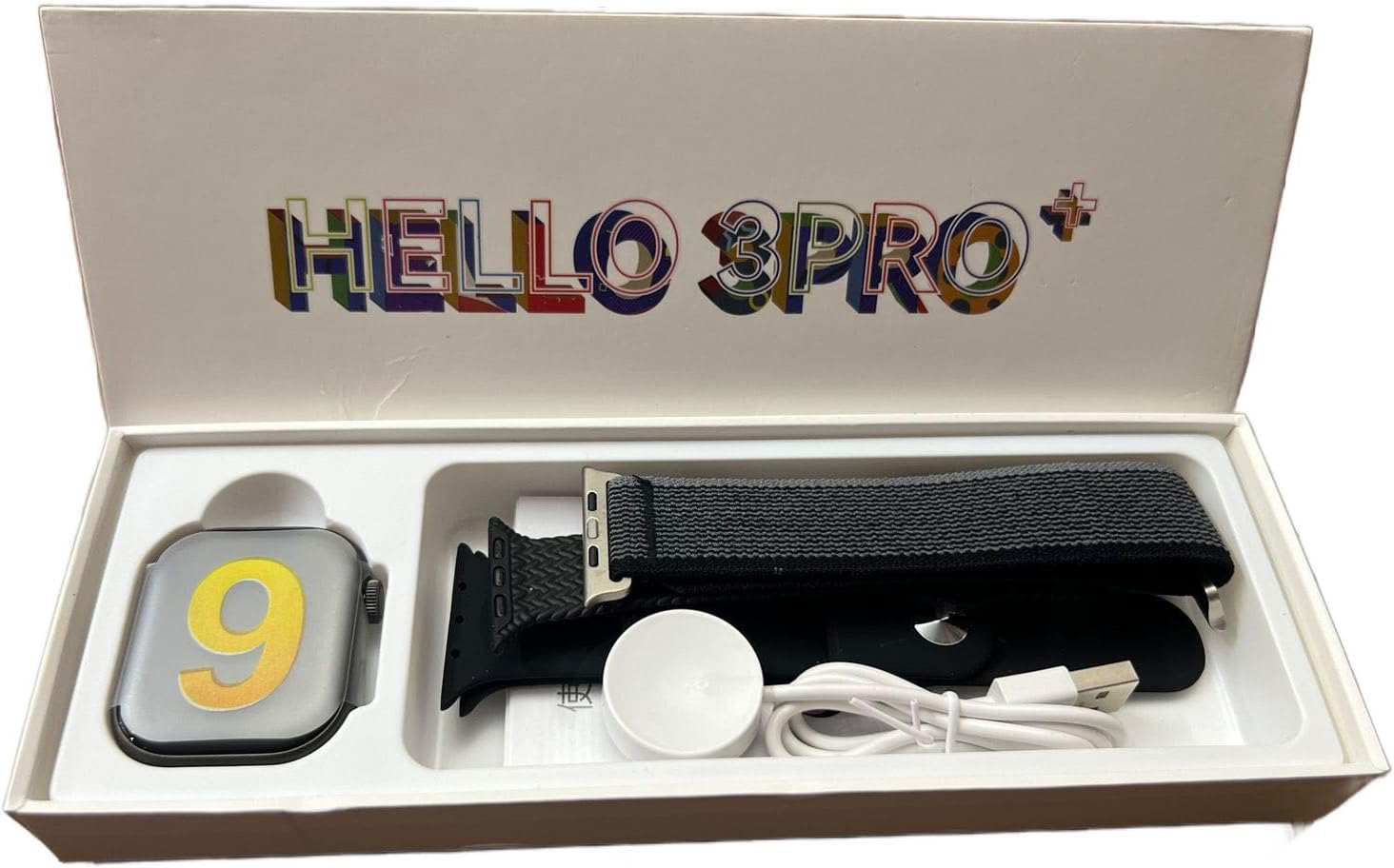
Figure 4.1: The Hello 3 Pro Plus Smartwatch in use, showcasing its vibrant display and user interface.
5. പരിപാലനവും പരിചരണവും
5.1 വൃത്തിയാക്കൽ
- മൃദുവായ, ലിന്റ് രഹിത തുണി ഉപയോഗിച്ച് വാച്ച് സ്ക്രീനും ബോഡിയും തുടയ്ക്കുക.
- കഠിനമായ പാടുകൾക്ക്, ചെറുതായി dampതുണിയിൽ വെള്ളം ഒഴിക്കുക. കഠിനമായ രാസവസ്തുക്കളോ ഉരച്ചിലുകളോ ഉള്ള വസ്തുക്കൾ ഉപയോഗിക്കുന്നത് ഒഴിവാക്കുക.
- Clean the charging contacts periodically to ensure efficient charging.
5.2 ജല പ്രതിരോധം (IP68)
The Hello 3 Pro Plus Smartwatch has an IP68 water resistance rating, meaning it is protected against dust ingress and can withstand immersion in water up to 1.5 meters for 30 minutes. While it is suitable for daily use and light water exposure (e.g., hand washing, rain), it is not recommended for swimming, diving, or high-pressure water activities.
5.3 ബാറ്ററി കെയർ
- ബാറ്ററി ഇടയ്ക്കിടെ പൂർണ്ണമായും ഡിസ്ചാർജ് ചെയ്യുന്നത് ഒഴിവാക്കുക.
- Charge the watch using only the provided magnetic charger.
- ദീർഘനേരം ഉപയോഗിക്കാത്തപ്പോൾ വാച്ച് തണുത്തതും വരണ്ടതുമായ സ്ഥലത്ത് സൂക്ഷിക്കുക.
6. പ്രശ്നപരിഹാരം
| പ്രശ്നം | സാധ്യമായ പരിഹാരം |
|---|---|
| വാച്ച് ഓണാകുന്നില്ല. | Ensure the watch is fully charged. Press and hold the side button for several seconds. |
| സ്മാർട്ട്ഫോണുമായി ജോടിയാക്കാൻ കഴിയില്ല | Ensure Bluetooth is enabled on both devices. Restart both the watch and phone. Clear previous pairings and try again. Ensure the app is updated. |
| കൃത്യമല്ലാത്ത ആരോഗ്യ വായനകൾ | Ensure the watch is worn snugly on your wrist, not too tight or too loose. Clean the sensor on the back of the watch. Avoid excessive movement during readings. |
| അറിയിപ്പുകൾ ലഭിച്ചിട്ടില്ല | Check app notification permissions on your phone. Ensure the watch is connected via Bluetooth. Verify notification settings within the smartwatch app. |
| ചെറിയ ബാറ്ററി ലൈഫ് | Reduce screen brightness. Disable unnecessary features like always-on display or frequent heart rate monitoring. Ensure background app usage is optimized. |
ഇവിടെ പട്ടികപ്പെടുത്തിയിട്ടില്ലാത്ത പ്രശ്നങ്ങൾ നേരിടുന്നുണ്ടെങ്കിലോ നിർദ്ദേശിച്ച പരിഹാരങ്ങൾ പ്രശ്നം പരിഹരിക്കുന്നില്ലെങ്കിലോ, ദയവായി ഉപഭോക്തൃ പിന്തുണയുമായി ബന്ധപ്പെടുക.
7. വാറൻ്റിയും പിന്തുണയും
This product comes with a standard manufacturer's warranty. For detailed warranty terms and conditions, please refer to the warranty card included in your product packaging or visit the official Generic webസൈറ്റ്.
For technical support, troubleshooting assistance, or service inquiries, please contact Generic customer support through the contact information provided on their official webസൈറ്റിലോ ഉൽപ്പന്നത്തിന്റെ സഹ ആപ്ലിക്കേഷനിലോ.