
ആമുഖം
This manual provides detailed instructions for the Rapoo VH650 Virtual 7.1 Channel RGB Gaming Headset. Please read this guide carefully to ensure proper setup, operation, and maintenance of your headset. This will help you maximize your gaming audio experience and prolong the life of your device.
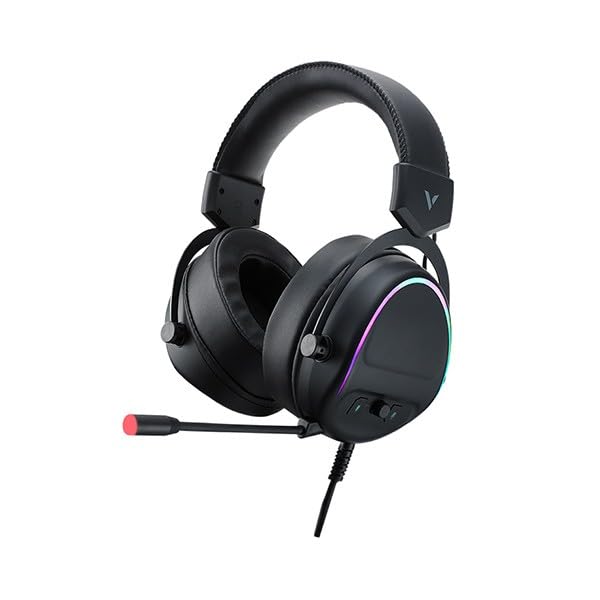
Figure 1: Rapoo VH650 Gaming Headset
ഫീച്ചറുകൾ
The Rapoo VH650 Gaming Headset is designed to deliver an immersive audio experience with its advanced features:
- Virtual 7.1 Channel Surround Sound: Experience precise positional audio, crucial for competitive gaming, allowing you to hear every detail from all directions.
- Brilliant RGB LED Backlight: Dynamic RGB lighting on the earcups enhances your gaming setup with vibrant colors and a modern aesthetic.
- Omnidirectional Noise-Canceling Microphone: The 360° adjustable microphone effectively reduces ambient noise, ensuring clear and precise communication with your teammates.
- High-Quality 50mm Sound Drivers: Equipped with powerful 50mm dynamic drivers, the headset delivers rich audio with deep bass and clear highs, optimized for gaming sound effects and music.
- Adjustable Metal Headband: The retractable single-head metal beam design ensures durability and a comfortable fit for various head sizes.
- Multi-function Ear Controls: Convenient controls located on the earcup allow for quick adjustments to volume and microphone settings.
- Over-Ear Design with Thick Ear Covers: Provides comfort during long gaming sessions and helps isolate external noise.

Figure 2: Virtual 7.1 Surround Sound for enhanced audio positioning.

Figure 3: RGB lighting on the earcups adds a vibrant gaming atmosphere.

Figure 4: The adjustable noise-canceling microphone ensures clear voice chat.

Figure 5: 50mm drivers provide powerful and clear audio.
സജ്ജീകരണ നിർദ്ദേശങ്ങൾ
- ഹെഡ്സെറ്റ് ബന്ധിപ്പിക്കുക: Plug the USB connector of the Rapoo VH650 headset into an available USB port on your computer or game console.
- Driver Installation (for PC):
- For Windows PCs, the operating system will typically install the necessary drivers automatically.
- To enable and customize the Virtual 7.1 Surround Sound and RGB lighting, download the dedicated Rapoo VH650 software from the official Rapoo webസൈറ്റ്.
- സോഫ്റ്റ്വെയർ ഇൻസ്റ്റാളേഷൻ പൂർത്തിയാക്കാൻ സ്ക്രീനിലെ നിർദ്ദേശങ്ങൾ പാലിക്കുക.
- ഓഡിയോ കോൺഫിഗറേഷൻ:
- വിൻഡോസ്: Go to 'Sound Settings' (right-click the speaker icon in the taskbar). Ensure 'Rapoo VH650' is selected as the default playback and recording device.
- ഗെയിം കൺസോളുകൾ: Navigate to the audio settings within your console's system menu and select the Rapoo VH650 as the audio output and input device.
- ഫിറ്റ് ക്രമീകരിക്കുക: Adjust the metal headband to ensure a comfortable and secure fit over your ears. Position the microphone appropriately for clear voice capture.
പ്രവർത്തന നിർദ്ദേശങ്ങൾ
- വോളിയം നിയന്ത്രണം: Use the volume wheel or buttons located on the left earcup to adjust the audio output level.
- മൈക്രോഫോൺ നിശബ്ദമാക്കുക/അൺമ്യൂട്ടുചെയ്യുക: A dedicated button on the earcup or inline control allows you to quickly mute or unmute the microphone. An LED indicator may show the microphone status.
- RGB ലൈറ്റിംഗ് നിയന്ത്രണം: If installed, use the Rapoo software on your PC to customize RGB lighting effects, colors, and patterns. Some headsets may have a physical button for cycling through preset lighting modes.
- Virtual 7.1 Surround Sound Activation: Activate and configure the Virtual 7.1 Surround Sound feature through the Rapoo software. This software allows for fine-tuning of audio profiles and positional sound.
മെയിൻ്റനൻസ്
- വൃത്തിയാക്കൽ: ഇയർകപ്പുകളും ഹെഡ്ബാൻഡും തുടയ്ക്കാൻ മൃദുവായതും ഉണങ്ങിയതുമായ തുണി ഉപയോഗിക്കുക. കഠിനമായ അഴുക്കിന്, അൽപ്പം ഡി.amp തുണി ഉപയോഗിക്കാം, പക്ഷേ സ്പീക്കർ ഗ്രില്ലുകളിലോ മൈക്രോഫോണിലോ ഈർപ്പം കയറുന്നില്ലെന്ന് ഉറപ്പാക്കുക. കഠിനമായ രാസവസ്തുക്കളോ അബ്രാസീവ് ക്ലീനറുകളോ ഉപയോഗിക്കരുത്.
- സംഭരണം: When not in use, store the headset in a clean, dry place away from direct sunlight and extreme temperatures. Avoid wrapping the cable tightly to prevent damage.
- കേബിൾ കെയർ: Handle the USB cable gently. Avoid pulling on the cable to disconnect the headset; always grasp the plug.
ട്രബിൾഷൂട്ടിംഗ്
- ഹെഡ്സെറ്റിൽ നിന്ന് ശബ്ദമില്ല:
- Ensure the USB cable is securely connected to your device.
- Check the headset's volume control and ensure it is not at minimum or muted.
- Verify that the Rapoo VH650 is selected as the default audio output device in your computer's or console's sound settings.
- ഒരു ഉപകരണ-നിർദ്ദിഷ്ട പ്രശ്നം ഒഴിവാക്കാൻ മറ്റൊരു ഉപകരണത്തിൽ ഹെഡ്സെറ്റ് പരിശോധിക്കുക.
- മൈക്രോഫോൺ പ്രവർത്തിക്കുന്നില്ല:
- Ensure the microphone is not muted via the headset's control or software.
- Check that the Rapoo VH650 is selected as the default recording device in your sound settings.
- Adjust microphone levels in your device's sound settings.
- Ensure the microphone boom is properly positioned near your mouth.
- RGB ലൈറ്റിംഗ് പ്രവർത്തിക്കുന്നില്ല:
- Ensure the headset is properly connected via USB.
- If using PC software, verify that the lighting effects are enabled and configured correctly.
- Check for any physical lighting control buttons on the headset.
സ്പെസിഫിക്കേഷനുകൾ
| ഫീച്ചർ | സ്പെസിഫിക്കേഷൻ |
|---|---|
| ബ്രാൻഡ് | റാപൂ |
| മോഡൽ | VH650 |
| നിറം | കറുപ്പ് |
| കണക്റ്റിവിറ്റി ടെക്നോളജി | Wired (USB for 7.1 Virtual Surround Sound) |
| ഓഡിയോ ഡ്രൈവർ തരം | ഡൈനാമിക് ഡ്രൈവർ |
| ഡ്രൈവർ വ്യാസം | 50 മി.മീ |
| ഹെഡ്ഫോണുകൾ ഫോം ഫാക്ടർ | ചെവിക്ക് മുകളിൽ |
| ചെവി പ്ലേസ്മെൻ്റ് | ചെവിക്ക് മുകളിൽ |
| പ്രതിരോധം | 3 ഓം |
| ശബ്ദ നിയന്ത്രണം | None (Microphone features noise-canceling) |
| മൈക്രോഫോൺ | Omnidirectional, Noise-Canceling, Rotary |
| പ്രത്യേക സവിശേഷതകൾ | Virtual 7.1 Channel Sound, RGB Backlight, Gaming-specific sound engine |
| അനുയോജ്യമായ ഉപകരണങ്ങൾ | Desktop Computers, Laptops, Mobile Phones (with adapter, not included), Game Consoles |
| ഉൽപ്പന്നത്തിൻ്റെ പ്രത്യേക ഉപയോഗങ്ങൾ | ഗെയിമിംഗ് |
| ഇനത്തിൻ്റെ ഭാരം | 150 ഗ്രാം |
| ഉൾപ്പെടുത്തിയ ഘടകങ്ങൾ | ഉപയോക്തൃ മാനുവൽ |
| നിർമ്മാണ രാജ്യം | ചൈന |
വാറൻ്റിയും പിന്തുണയും
The Rapoo VH650 Gaming Headset comes with a രണ്ട് വർഷത്തെ വാറൻ്റി വാങ്ങിയ തീയതി മുതൽ, നിർമ്മാണ വൈകല്യങ്ങൾ ഉൾക്കൊള്ളുന്നു. വാറന്റി ക്ലെയിമുകൾക്കായി നിങ്ങളുടെ വാങ്ങിയതിന്റെ തെളിവ് സൂക്ഷിക്കുക.
For technical support, troubleshooting assistance, or warranty inquiries, please visit the official Rapoo website or contact their customer service department. You can usually find contact information, FAQs, and driver downloads on the support section of their webസൈറ്റ്.
ഓൺലൈൻ ഉറവിടങ്ങൾ:
- Official Rapoo Website (for drivers and support)
- Product registration (if available)