
1. ആമുഖം
Thank you for choosing the Strong SM-RAZOR-ART1-M Razor Series Single-Arm Articulating Mount. This mount is designed to securely hold 22-50 inch displays, offering a low-profile solution that sits just 1.75 inches off the wall. Its robust steel construction supports up to 50 lbs, and the articulating arm allows for extensive swivel and extension, providing optimal viewing angles. This manual provides essential information for safe installation, operation, and maintenance of your new mount.
2 സുരക്ഷാ വിവരങ്ങൾ
Please read all instructions carefully before installation and use. Improper installation or use can cause property damage, serious injury, or death. If you do not understand these instructions, or have doubts about the safety of the installation, please contact a qualified installer.
- മൗണ്ടിംഗ് ഉപരിതലത്തിന് മൗണ്ടിന്റെയും ഡിസ്പ്ലേയുടെയും സംയുക്ത ഭാരം സുരക്ഷിതമായി താങ്ങാൻ കഴിയുമെന്ന് ഉറപ്പാക്കുക.
- പരമാവധി ഭാര ശേഷി 50 പൗണ്ട് (22.7 കിലോഗ്രാം) കവിയരുത്.
- This mount is designed for installation on a single wood stud. Do not install on drywall alone.
- നിർമ്മാതാവ് നൽകുന്നതോ വ്യക്തമാക്കിയതോ ആയ ഹാർഡ്വെയർ മാത്രം ഉപയോഗിക്കുക.
- ഇൻസ്റ്റാളേഷൻ സമയത്ത് കുട്ടികളെയും വളർത്തുമൃഗങ്ങളെയും അകറ്റി നിർത്തുക.
- എല്ലാ സ്ക്രൂകളും കണക്ഷനുകളും സുരക്ഷിതമായി നിലനിൽക്കുന്നുണ്ടെന്ന് ഉറപ്പാക്കാൻ ഇടയ്ക്കിടെ പരിശോധിക്കുക.
3. പാക്കേജ് ഉള്ളടക്കം
Verify that all components are present and undamaged before beginning installation. If any parts are missing or damaged, do not attempt to install. Contact your retailer for assistance.
- Articulating Wall Mount Assembly (3-piece construction)
- TV Attachment Hardware Kit (various screws, washers, spacers)
- Wall Mounting Hardware Kit (lag bolts, concrete anchors if applicable)
- നിർദ്ദേശ മാനുവൽ (ഈ പ്രമാണം)
4. സജ്ജീകരണവും ഇൻസ്റ്റാളേഷനും
This mount features an easy one-person installation process due to its three-piece construction. Ensure you have the necessary tools (e.g., stud finder, drill, level, screwdriver, socket wrench) before starting.
- മതിൽ തയ്യാറാക്കുക: Locate a suitable wood stud using a stud finder. Mark the desired height for the top of your display. Ensure the location allows for full articulation without obstruction.
- വാൾ പ്ലേറ്റ് ഘടിപ്പിക്കുക: Position the wall plate section of the mount against the stud at your marked height. Use a level to ensure it is perfectly horizontal. Mark the pilot hole locations. Drill pilot holes into the center of the stud. Secure the wall plate using the provided lag bolts.
- Assemble Arm Sections: Connect the articulating arm sections to the wall plate and to the display plate. The three-piece design simplifies handling and attachment.
- ടിവി ബ്രാക്കറ്റുകൾ ഘടിപ്പിക്കുക: Carefully lay your display face down on a soft, clean surface. Attach the VESA compatible brackets to the back of your display using the appropriate screws, washers, and spacers from the TV attachment hardware kit. Ensure the screws are tightened securely but do not overtighten. This mount supports VESA patterns up to 200x200.
- മൗണ്ട് ഡിസ്പ്ലേ: With assistance if needed, carefully lift the display and hook the attached brackets onto the display plate of the wall mount. Secure the display to the mount according to the specific locking mechanism.
- ക്രമീകരിച്ച് നില: Utilize the post-installation height leveling (+/- 3/8") and tilt adjustments (-11°/+5°) to fine-tune the display's position.

Figure 4.1: The Strong Razor Series mount shown in its compact, folded state, sitting close to the wall. This view highlights the robust construction and the mechanism that allows it to sit just 1.75 inches off the wall.
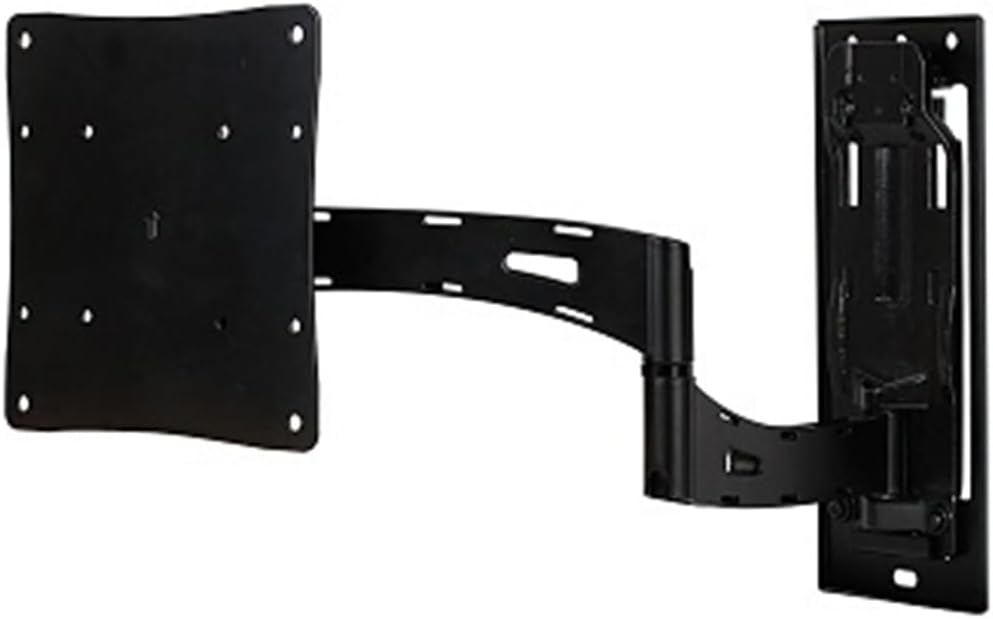
Figure 4.2: The Strong Razor Series mount fully extended, demonstrating its articulating capabilities. This image shows the single arm design and the VESA plate ready for display attachment.

Figure 4.3: The Strong Razor Series mount extended, with a measurement indicating its maximum extension of 22.21 inches from the wall. This illustrates the significant reach for optimal viewകോണുകൾ.
5. മൗണ്ട് പ്രവർത്തിപ്പിക്കൽ
Once installed, your Strong Razor Series mount offers flexible viewing ഓപ്ഷനുകൾ:
- സ്വിവൽ: The mount allows for swiveling up to 180 degrees (depending on display size and wall clearance) to achieve the perfect viewing angle from various positions in the room. Gently push or pull the display to adjust its horizontal angle.
- ടിൽറ്റ്: Adjust the vertical tilt of your display between -11 degrees (downward) and +5 degrees (upward) to reduce glare or optimize viewing comfort. This adjustment is typically made using knobs or levers on the mount.
- വിപുലീകരണം: The mount can extend out over 22 inches from the wall, bringing your display closer for an immersive experience or to clear obstacles.
- Integrated Wire Management: Utilize the built-in wire management channels or clips on the mount arms to route and conceal cables for a clean and organized appearance.
6. പരിപാലനം
പതിവ് അറ്റകുറ്റപ്പണികൾ നിങ്ങളുടെ മൌണ്ടിന്റെ ദീർഘായുസ്സും സുരക്ഷിതമായ പ്രവർത്തനവും ഉറപ്പാക്കുന്നു:
- വൃത്തിയാക്കൽ: മൃദുവായതും ഉണങ്ങിയതുമായ തുണി ഉപയോഗിച്ച് മൗണ്ട് തുടയ്ക്കുക. അബ്രാസീവ് ക്ലീനറുകളോ ലായകങ്ങളോ ഉപയോഗിക്കരുത്.
- പരിശോധന: Periodically (e.g., every 6 months) inspect all mounting hardware and connections. Ensure all screws, bolts, and nuts are tight. If any components appear loose or damaged, tighten them or contact support.
- ലൂബ്രിക്കേഷൻ: The articulating joints are designed for smooth movement. If movement becomes stiff over time, a small amount of silicone-based lubricant can be applied to the pivot points, avoiding contact with painted surfaces.
7. പ്രശ്നപരിഹാരം
If you encounter issues with your mount, refer to the following common problems and solutions:
- Display is not level after installation:
പരിഹാരം: Use the post-installation leveling adjustment feature. Refer to the installation section for details on how to adjust the height +/- 3/8".
- Mount feels loose or wobbly:
പരിഹാരം: Immediately remove the display. Re-check all wall mounting bolts and TV attachment screws for tightness. Ensure the wall plate is securely fastened to a solid wood stud. If the issue persists, consult a professional installer.
- Difficulty swiveling or extending the mount:
പരിഹാരം: Ensure no cables are snagged or obstructing movement. Check for any physical obstructions around the mount or display. If the joints are stiff, a small amount of silicone lubricant may be applied as per the Maintenance section.
- Display does not fit the mount:
പരിഹാരം: Verify your display's VESA pattern is compatible (up to 200x200) and its weight does not exceed 50 lbs. Ensure the display size is within the 22-50 inch range. Refer to your display's manual for its specifications.
8 സ്പെസിഫിക്കേഷനുകൾ
| മോഡൽ നമ്പർ | SM-RAZOR-ART1-M |
| ബ്രാൻഡ് | Generic (Manufactured by Strong) |
| Compatible Display Sizes | 22 - 50 ഇഞ്ച് |
| പരമാവധി ലോഡ് കപ്പാസിറ്റി | 50 പൗണ്ട് (22.7 കി.ഗ്രാം) |
| VESA അനുയോജ്യത | 100x100, 100x200, 200x100, 200x200 |
| വാൾ പ്രോfile (Retracted) | 1.75 ഇഞ്ച് (4.45 സെ.മീ) |
| പരമാവധി വിപുലീകരണം | 22 ഇഞ്ചിൽ കൂടുതൽ (55.88 സെ.മീ) |
| സ്വിവൽ റേഞ്ച് | 180 ഡിഗ്രി വരെ |
| ടിൽറ്റ് റേഞ്ച് | -11 degrees to +5 degrees |
| പോസ്റ്റ്-ഇൻസ്റ്റലേഷൻ ലെവലിംഗ് | +/- 3/8 inches |
| മെറ്റീരിയൽ | അലോയ് സ്റ്റീൽ |
| മൗണ്ടിംഗ് തരം | Single Wood Stud Wall Mount |
| ഇനത്തിൻ്റെ ഭാരം | 30 പൗണ്ട് (13.6 കി.ഗ്രാം) |
| മാതൃരാജ്യം | യുഎസ്എ |
9. വാറൻ്റിയും പിന്തുണയും
For warranty information or technical support, please refer to the documentation included with your purchase or contact the retailer or manufacturer directly. Keep your proof of purchase for any warranty claims.
Manufacturer: Strong
കൂടുതൽ സഹായത്തിന്, ദയവായി ഉദ്യോഗസ്ഥനെ സന്ദർശിക്കുക website of the manufacturer or contact their customer service department.