
QZ2131-840
QZ2131-840 700 Series Z-Wave Plus Outlet Plugin-in Module User Manual
Model: QZ2131-840
ആമുഖം
The Qolsys QZ2131-840 700 Series Z-Wave Plus Outlet Plugin-In Module is designed to provide advanced control over your electrical devices. This module integrates with Z-Wave compatible hubs and smartphone applications, enabling remote management of plugged-in appliances, lighting, and other electronics. It offers a convenient solution for automating and optimizing power usage within a smart home environment.
ഉൽപ്പന്നം കഴിഞ്ഞുview
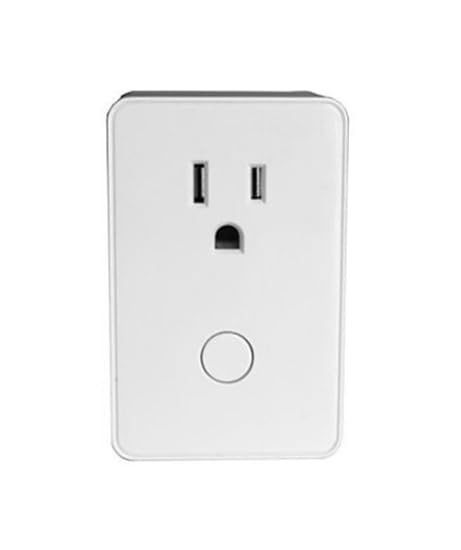
ചിത്രം 1: മുൻഭാഗം view of the QZ2131-840 Z-Wave Plus Outlet Plugin-in Module. The module is white, rectangular, and features two standard three-prong electrical outlets on the upper half and a circular control button on the lower half. This design allows for easy integration into existing wall outlets while providing smart control capabilities.
The QZ2131-840 module is a compact, plug-in device that converts any standard electrical outlet into a smart, controllable outlet. It utilizes Z-Wave Plus technology for reliable communication within your smart home network. The module features a simple design for easy installation and operation.
സജ്ജമാക്കുക
- മൊഡ്യൂൾ അൺപാക്ക് ചെയ്യുക: Carefully remove the QZ2131-840 module from its packaging.
- ഒരു ലൊക്കേഷൻ തിരഞ്ഞെടുക്കുക: Select a standard electrical outlet where you wish to control a device. Ensure the outlet is easily accessible.
- Plug In the Module: Insert the QZ2131-840 module directly into the chosen wall outlet.
- നിങ്ങളുടെ ഉപകരണം ബന്ധിപ്പിക്കുക: Plug the appliance or device you wish to control into the outlet on the front of the QZ2131-840 module.
- Pair with Z-Wave Hub:
- Put your Z-Wave compatible hub into inclusion/pairing mode. Refer to your hub's instruction manual for specific steps.
- Press the circular button on the front of the QZ2131-840 module once. The LED indicator on the module will flash to indicate pairing mode.
- Once successfully paired, the LED indicator will stop flashing and remain solid, or turn off, depending on the module's status.
- ടെസ്റ്റ് പ്രവർത്തനം: Use your Z-Wave hub or smartphone app to turn the connected device on and off to confirm successful setup.
പ്രവർത്തന നിർദ്ദേശങ്ങൾ
The QZ2131-840 module offers both manual and remote control options for connected devices.
മാനുവൽ നിയന്ത്രണം
- ടോഗിൾ ഓൺ / ഓഫ് ചെയ്യുക: Press the circular button on the front of the module once to manually toggle the power to the connected device. Each press will switch the state (on to off, or off to on).
Remote Control via Z-Wave Hub
- സ്മാർട്ട്ഫോൺ ആപ്പ്: Use the dedicated smartphone application associated with your Z-Wave hub to remotely turn the module on or off.
- ഓട്ടോമേഷനും ഷെഡ്യൂളിംഗും: Configure schedules, scenes, and automation rules through your Z-Wave hub to automatically control the connected device based on time, events, or other smart home triggers. This feature helps in energy management.
- ശബ്ദ നിയന്ത്രണം: If your Z-Wave hub supports integration with voice assistants (e.g., Amazon Alexa, Google Assistant), you can control the module using voice commands.
മെയിൻ്റനൻസ്
The QZ2131-840 module requires minimal maintenance to ensure optimal performance.
- വൃത്തിയാക്കൽ: Disconnect the module from the power outlet before cleaning. Use a soft, dry cloth to wipe the exterior. Do not use liquid cleaners or abrasive materials.
- ഫേംവെയർ അപ്ഡേറ്റുകൾ: Periodically check your Z-Wave hub's application for any available firmware updates for the QZ2131-840 module. Follow the hub's instructions for applying updates.
- പരിസ്ഥിതി വ്യവസ്ഥകൾ: Ensure the module is used within its specified operating temperature and humidity ranges. Avoid exposing it to extreme temperatures, direct sunlight, or moisture.
ട്രബിൾഷൂട്ടിംഗ്
| പ്രശ്നം | സാധ്യമായ കാരണം | പരിഹാരം |
|---|---|---|
| Module not responding to Z-Wave commands. | Module is out of range of the Z-Wave hub, or not properly paired. |
|
| ബന്ധിപ്പിച്ച ഉപകരണം ഓൺ/ഓഫ് ആകുന്നില്ല. | Device is not properly plugged in, or the device itself is faulty. |
|
| Module LED indicator is not lit. | മൊഡ്യൂളിന് വൈദ്യുതിയില്ല. |
|
സ്പെസിഫിക്കേഷനുകൾ
- മോഡൽ: QZ2131-840
- സാങ്കേതികവിദ്യ: Z-Wave Plus 700 Series
- പവർ ഇൻപുട്ട്: സ്റ്റാൻഡേർഡ് എസി
- ഔട്ട്പുട്ട്: Single controllable outlet
- നിർമ്മാതാവ്: ക്വോൾസിസ്
- ASIN: B0DVB7B7R1
- മാതൃരാജ്യം: യുഎസ്എ
വാറൻ്റി വിവരങ്ങൾ
This product is covered by a standard manufacturer's warranty. For specific warranty terms and conditions, please refer to the documentation provided with your purchase or contact the manufacturer directly. Protection plans may also be available for extended coverage.
കുറിപ്പ്: Protection plans mentioned in the product listing (e.g., 3-Year Protection Plan, 4-Year Protection Plan) are typically offered by third-party providers and are separate from the manufacturer's warranty.
പിന്തുണ
For technical assistance, troubleshooting beyond this manual, or general inquiries, please contact the manufacturer or your product retailer.
- നിർമ്മാതാവ്: ക്വോൾസിസ്
- ഓൺലൈൻ ഉറവിടങ്ങൾ: ഔദ്യോഗിക കോൾസിസ് സന്ദർശിക്കുക website for product updates, FAQs, and additional support documentation.
- റീട്ടെയിലർ പിന്തുണ: Contact the seller (NATO Security) for purchase-related inquiries or initial support.
Ask a question about this manual
Ask about setup, troubleshooting, compatibility, parts, safety, or missing instructions. Manuals+ will review the question and use this page’s manual context to help answer it.