
P2961 വയർലെസ് ബ്ലൂടൂത്ത് ഹെഡ്ഫോണുകൾ
P2961 വയർലെസ് ബ്ലൂടൂത്ത് ഹെഡ്ഫോണുകൾ ഉപയോക്തൃ മാനുവൽ
മോഡൽ: P2961 വയർലെസ് ബ്ലൂടൂത്ത് ഹെഡ്ഫോണുകൾ | ബ്രാൻഡ്: ജനറിക്

Image: The P2961 Wireless Bluetooth Headphones, showcasing their over-ear design and blue color.
ആമുഖം
Welcome to the user manual for your P2961 Wireless Bluetooth Headphones. These over-ear headphones are designed to provide a high-fidelity audio experience with the convenience of wireless connectivity. Featuring a built-in microphone for hands-free communication and versatile music playback options including TF card and AUX input, these headphones are suitable for various activities from daily commuting to sports. Please read this manual carefully to ensure proper use and maintenance of your device.
ഫീച്ചറുകൾ
- വയർലെസ്സ് ബ്ലൂടൂത്ത് ടെക്നോളജി: Seamlessly connect to your smartphone, tablet, or other Bluetooth-enabled devices.
- HIFI Stereo Sound: Experience crisp, clear audio and powerful bass for immersive listening.
- ബിൽറ്റ്-ഇൻ മൈക്ക്: Take calls or communicate hands-free with ease.
- Comfortable Over-Ear Design: Soft ear cushions and adjustable headband for long-lasting comfort during use.
- ബഹുമുഖ പ്ലേബാക്ക്: Supports TF card and AUX input for multiple music source options.
- പോർട്ടബിൾ ഡിസൈൻ: Lightweight and suitable for various activities including sports and travel.
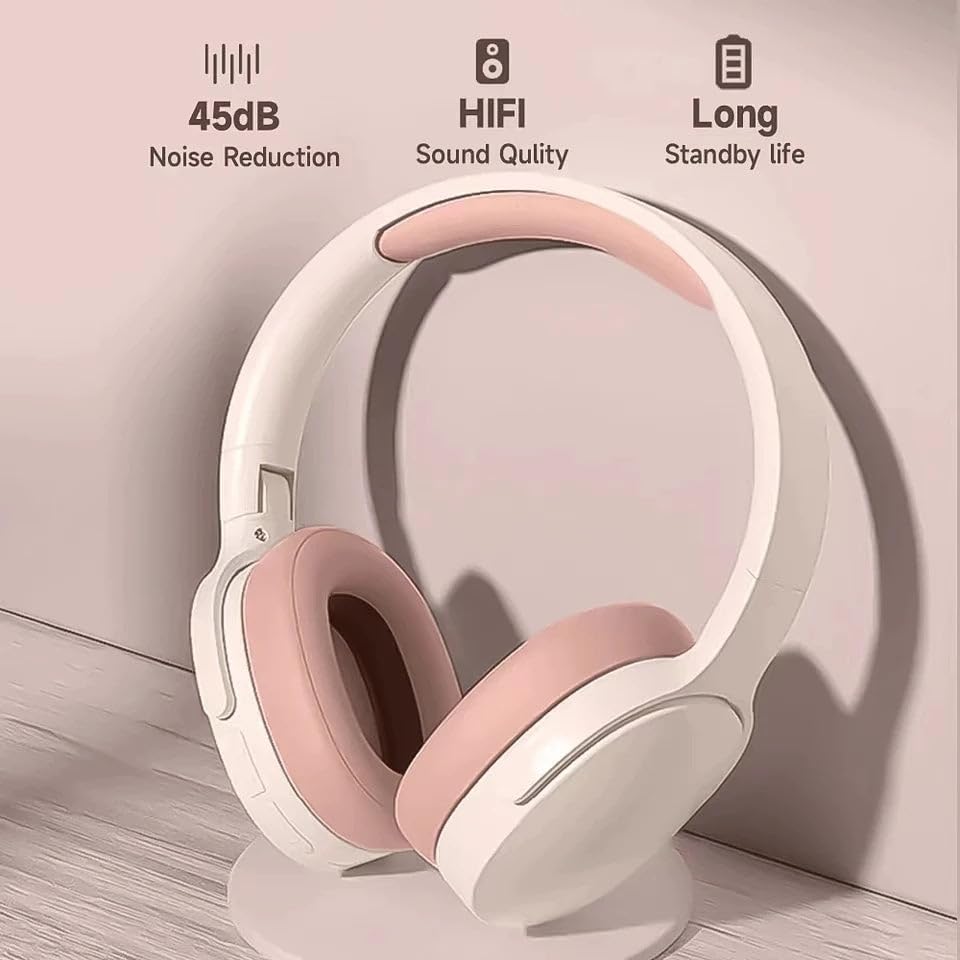
Image: Features such as 45dB Noise Reduction, HIFI Sound Quality, and Long Standby Life are key attributes of the P2961 headphones.

Image: The headphones feature a 40mm driver unit designed to deliver powerful bass and clear treble for an excellent sound experience.
പാക്കേജ് ഉള്ളടക്കം
പാക്കേജിൽ ഇനിപ്പറയുന്ന ഇനങ്ങൾ ഉണ്ടോ എന്ന് പരിശോധിക്കുക:
- P2961 വയർലെസ് ബ്ലൂടൂത്ത് ഹെഡ്ഫോണുകൾ
- യുഎസ്ബി ചാർജിംഗ് കേബിൾ
- AUX ഓഡിയോ കേബിൾ
- ഉപയോക്തൃ മാനുവൽ
ഉൽപ്പന്നം കഴിഞ്ഞുview നിയന്ത്രണങ്ങളും
Familiarize yourself with the various parts and controls of your P2961 headphones.
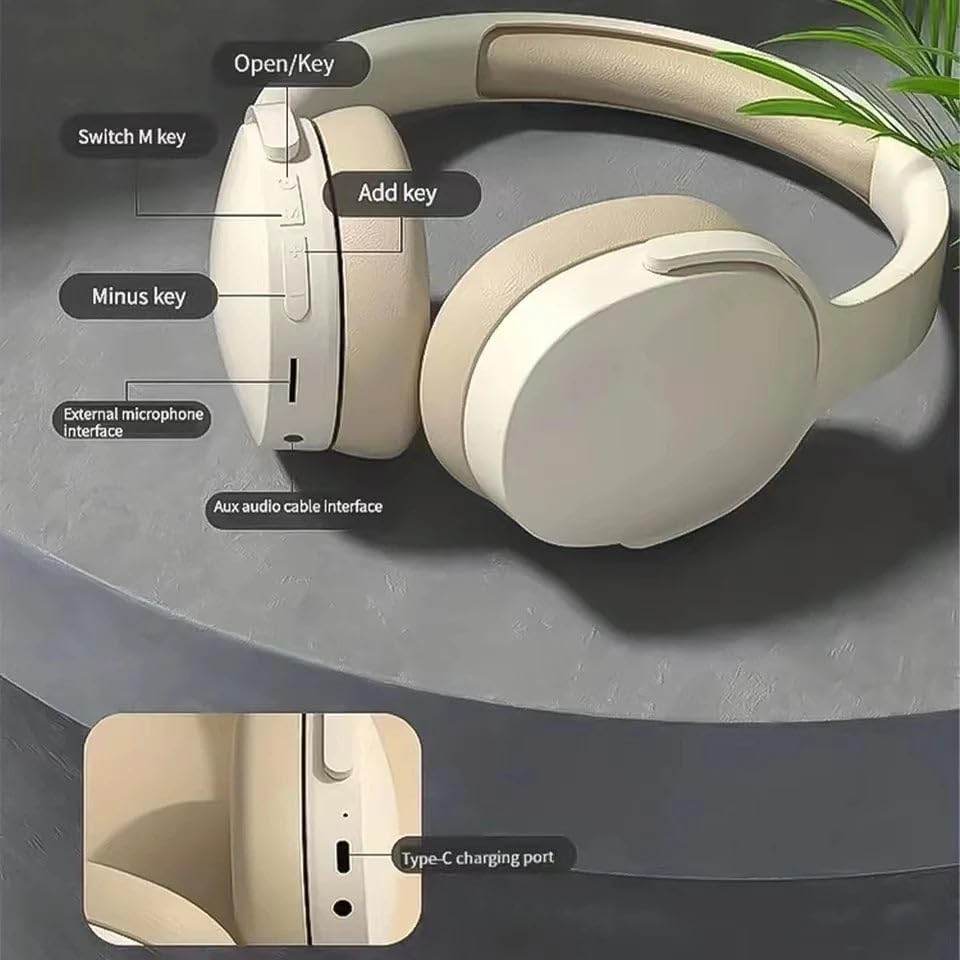
Image: Detailed diagram showing the location and function of the headphone controls. These include the Power/Open key, Mode Switch (M) key, Volume Up/Next Track (Add) key, Volume Down/Previous Track (Minus) key, External Microphone Interface, AUX Audio Cable Interface, and the Type-C Charging Port.
- തുറക്കുക/കീ: പവർ ഓൺ/ഓഫ്, പ്ലേ/താൽക്കാലികമായി നിർത്തുക, കോൾ സ്വീകരിക്കുക/അവസാനിപ്പിക്കുക.
- M കീ മാറ്റുക: മോഡ് സ്വിച്ച് (ബ്ലൂടൂത്ത്, TF കാർഡ്, AUX).
- കീ (+) ചേർക്കുക: വോളിയം കൂട്ടുക, അടുത്ത ട്രാക്ക് (ദീർഘനേരം അമർത്തുക).
- മൈനസ് കീ (-): വോളിയം കുറയ്ക്കുക, മുമ്പത്തെ ട്രാക്ക് (ദീർഘനേരം അമർത്തുക).
- ബാഹ്യ മൈക്രോഫോൺ ഇൻ്റർഫേസ്: For connecting an external microphone (if applicable).
- ഓക്സ് ഓഡിയോ കേബിൾ ഇന്റർഫേസ്: AUX കേബിൾ ഉപയോഗിച്ചുള്ള വയർഡ് കണക്ഷന്.
- ടൈപ്പ്-സി ചാർജിംഗ് പോർട്ട്: ഹെഡ്ഫോണുകൾ ചാർജ് ചെയ്യുന്നതിനായി.
സജ്ജമാക്കുക
ഹെഡ്ഫോണുകൾ ചാർജ് ചെയ്യുന്നു
- ചാർജിംഗ് കേബിളിന്റെ ടൈപ്പ്-സി അറ്റം ഹെഡ്ഫോണുകളിലെ ചാർജിംഗ് പോർട്ടുമായി ബന്ധിപ്പിക്കുക.
- ചാർജിംഗ് കേബിളിന്റെ USB-A അറ്റം ഒരു USB പവർ അഡാപ്റ്ററുമായി (ഉൾപ്പെടുത്തിയിട്ടില്ല) അല്ലെങ്കിൽ ഒരു കമ്പ്യൂട്ടറിന്റെ USB പോർട്ടുമായി ബന്ധിപ്പിക്കുക.
- ചാർജ് ചെയ്യുമ്പോൾ LED ഇൻഡിക്കേറ്റർ പ്രകാശിക്കുകയും പൂർണ്ണമായി ചാർജ് ചെയ്യുമ്പോൾ ഓഫാകുകയും ചെയ്യും.
- സാധാരണയായി ഒരു പൂർണ്ണ ചാർജ് ഏകദേശം 2-3 മണിക്കൂർ എടുക്കും.
ബ്ലൂടൂത്ത് ജോടിയാക്കൽ
- ഹെഡ്ഫോണുകൾ പൂർണ്ണമായും ചാർജ്ജ് ചെയ്തിട്ടുണ്ടെന്ന് ഉറപ്പാക്കുക.
- Press and hold the "Open/Key" button for approximately 3-5 seconds until the LED indicator flashes blue and red alternately, indicating pairing mode.
- നിങ്ങളുടെ ഉപകരണത്തിൽ (സ്മാർട്ട്ഫോൺ, ടാബ്ലെറ്റ് മുതലായവ), ബ്ലൂടൂത്ത് പ്രവർത്തനക്ഷമമാക്കി ലഭ്യമായ ഉപകരണങ്ങൾക്കായി തിരയുക.
- കണ്ടെത്തിയ ഉപകരണങ്ങളുടെ പട്ടികയിൽ നിന്ന് "P2961" തിരഞ്ഞെടുക്കുക.
- വിജയകരമായി ജോടിയാക്കിക്കഴിഞ്ഞാൽ, LED ഇൻഡിക്കേറ്റർ നീല നിറത്തിൽ പതുക്കെ മിന്നിമറയും.
- പാസ്വേഡ് ആവശ്യപ്പെടുകയാണെങ്കിൽ, "0000" എന്ന് നൽകുക.
പ്രവർത്തന നിർദ്ദേശങ്ങൾ
പവർ ഓൺ/ഓഫ്
- പവർ ഓൺ: Press and hold the "Open/Key" button for 3 seconds.
- പവർ ഓഫ്: Press and hold the "Open/Key" button for 3 seconds.
സംഗീത പ്ലേബാക്ക്
- പ്ലേ/താൽക്കാലികമായി നിർത്തുക: "തുറക്കുക/കീ" ബട്ടൺ ഹ്രസ്വമായി അമർത്തുക.
- വോളിയം കൂട്ടുക: Short press the "Add key (+)".
- വോളിയം താഴേക്ക്: Short press the "Minus key (-)".
- അടുത്ത ട്രാക്ക്: Long press the "Add key (+)".
- മുമ്പത്തെ ട്രാക്ക്: Long press the "Minus key (-)".
കോൾ പ്രവർത്തനങ്ങൾ
- ഉത്തരം/അവസാന കോൾ: "തുറക്കുക/കീ" ബട്ടൺ ഹ്രസ്വമായി അമർത്തുക.
- കോൾ നിരസിക്കുക: Long press the "Open/Key" button.
- അവസാന നമ്പർ വീണ്ടും ഡയൽ ചെയ്യുക: Double press the "Open/Key" button.
മോഡ് സ്വിച്ചിംഗ്
- സ്വിച്ച് മോഡ്: Short press the "Switch M key" to cycle between Bluetooth, TF Card, and AUX modes.
- ടിഎഫ് കാർഡ് മോഡ്: സംഗീതത്തോടുകൂടിയ ഒരു TF കാർഡ് ചേർക്കുക files into the TF card slot. The headphones will automatically switch to TF card mode and begin playback.
- ഓക്സ് മോഡ്: Connect one end of the 3.5mm AUX audio cable to the headphone's AUX port and the other end to your audio source. The headphones will automatically switch to AUX mode.
മെയിൻ്റനൻസ്
- വൃത്തിയാക്കൽ: ഹെഡ്ഫോണുകൾ വൃത്തിയാക്കാൻ മൃദുവായതും ഉണങ്ങിയതുമായ തുണി ഉപയോഗിക്കുക. അബ്രാസീവ് ക്ലീനറുകളോ ലായകങ്ങളോ ഉപയോഗിക്കരുത്.
- സംഭരണം: നേരിട്ടുള്ള സൂര്യപ്രകാശത്തിൽ നിന്നും കടുത്ത താപനിലയിൽ നിന്നും മാറി തണുത്തതും വരണ്ടതുമായ സ്ഥലത്ത് ഹെഡ്ഫോണുകൾ സൂക്ഷിക്കുക.
- ബാറ്ററി കെയർ: To prolong battery life, charge the headphones regularly, even if not in use for extended periods. Avoid fully discharging the battery frequently.
- ജല പ്രതിരോധം: ഈ ഹെഡ്ഫോണുകൾ വാട്ടർപ്രൂഫ് അല്ല. വെള്ളത്തിലോ അമിതമായ ഈർപ്പത്തിലോ സമ്പർക്കം ഒഴിവാക്കുക.
ട്രബിൾഷൂട്ടിംഗ്
| പ്രശ്നം | സാധ്യമായ കാരണം | പരിഹാരം |
|---|---|---|
| ഹെഡ്ഫോണുകൾ പവർ ഓൺ ചെയ്യുന്നില്ല. | കുറഞ്ഞ ബാറ്ററി. | ഹെഡ്ഫോണുകൾ പൂർണ്ണമായും ചാർജ് ചെയ്യുക. |
| ഉപകരണവുമായി ജോടിയാക്കാൻ കഴിയില്ല. | ഹെഡ്ഫോണുകൾ ജോടിയാക്കൽ മോഡിൽ ഇല്ല; ഉപകരണ ബ്ലൂടൂത്ത് ഓഫാണ്; ഉപകരണത്തിൽ നിന്ന് വളരെ അകലെയാണ്. | ഹെഡ്ഫോണുകൾ ജോടിയാക്കൽ മോഡിലാണെന്ന് ഉറപ്പാക്കുക (ഫ്ലാഷിംഗ് നീല/ചുവപ്പ്). നിങ്ങളുടെ ഉപകരണത്തിൽ ബ്ലൂടൂത്ത് ഓണാക്കുക. ഹെഡ്ഫോണുകൾ ഉപകരണത്തിന് അടുത്തേക്ക് നീക്കുക (10 മീറ്ററിനുള്ളിൽ). |
| ശബ്ദമില്ല. | ശബ്ദം വളരെ കുറവാണ്; തെറ്റായ മോഡ് തിരഞ്ഞെടുത്തു; ഉപകരണം ഓഡിയോ പ്ലേ ചെയ്യുന്നില്ല. | Increase headphone and device volume. Press 'M' key to switch modes. Ensure audio is playing on your connected device. |
| മോശം ശബ്ദ നിലവാരം. | Interference; Low battery; Device too far. | Move away from sources of interference. Charge headphones. Move closer to the device. |
| മൈക്രോഫോൺ പ്രവർത്തിക്കുന്നില്ല. | External mic not connected properly (if applicable); Device settings. | Ensure external mic is securely connected. Check microphone settings on your connected device. |
സ്പെസിഫിക്കേഷനുകൾ
| ഫീച്ചർ | വിശദാംശങ്ങൾ |
|---|---|
| മോഡലിൻ്റെ പേര് | P2961 വയർലെസ് ബ്ലൂടൂത്ത് ഹെഡ്ഫോണുകൾ |
| കണക്റ്റിവിറ്റി ടെക്നോളജി | വയർലെസ് (ബ്ലൂടൂത്ത്) |
| ചെവി പ്ലേസ്മെൻ്റ് | ചെവിക്ക് മുകളിൽ |
| ഫോം ഫാക്ടർ | ചെവിക്ക് മുകളിൽ |
| നിറം | നീല |
| നിർമ്മാതാവ് | മുകുളങ്ങൾ മിക്സ് ചെയ്യുക |
| ബിൽറ്റ്-ഇൻ മൈക്രോഫോൺ | അതെ |
| സംഗീത പ്ലേബാക്ക് ഓപ്ഷനുകൾ | ബ്ലൂടൂത്ത്, TF കാർഡ്, AUX |
വാറൻ്റിയും പിന്തുണയും
For warranty information and customer support, please refer to the documentation provided with your purchase or contact the retailer where the product was acquired. Keep your proof of purchase for any warranty claims.
Ask a question about this manual
Ask about setup, troubleshooting, compatibility, parts, safety, or missing instructions. Manuals+ will review the question and use this page’s manual context to help answer it.