
1. ആമുഖവും അവസാനവുംview
The G-Shock GA2100RL-1A is a robust and stylish timepiece engineered for durability and functionality. Featuring Carbon Core Guard technology, this watch offers exceptional shock resistance in a lightweight, slim profile. Its design includes an octagonal bezel and a combination of analog and digital displays. Key functions include 200-meter water resistance, world time, multiple alarms, a stopwatch, a countdown timer, and a high-brightness LED backlight for visibility in low-light conditions.
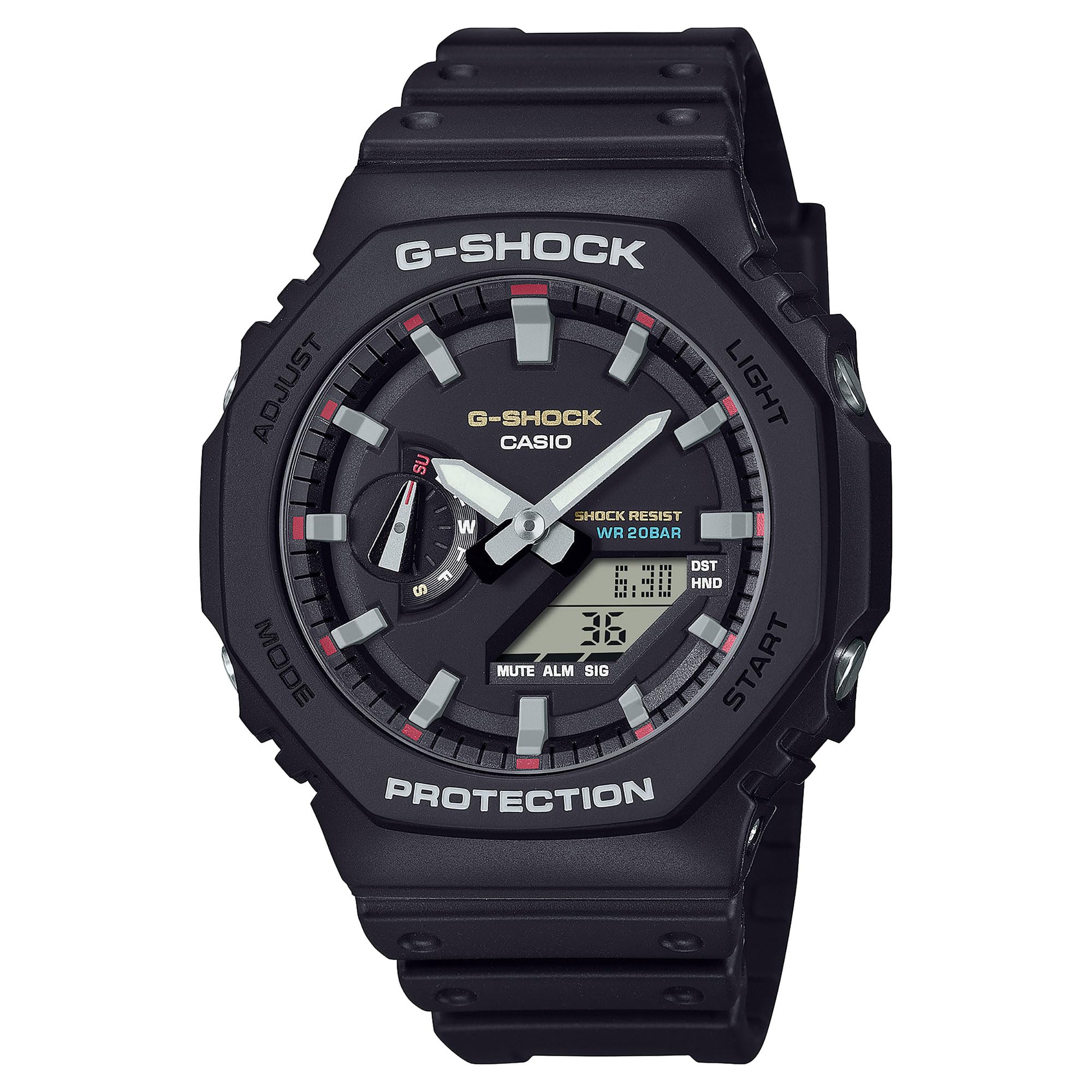
ചിത്രം 1: മുൻഭാഗം view of the G-Shock GA2100RL-1A watch, showcasinജി അതിന്റെ ഒസിtagonal bezel and analog-digital display.
2. സജ്ജീകരണം
2.1 പ്രാരംഭ സമയ ക്രമീകരണം
Upon first use or after a battery change, the watch requires initial time setting. Refer to the button functions diagram (Figure 2) for button identification.
- സമയ ക്രമീകരണ മോഡ് നൽകുക: Press and hold the 'Adjust' button (usually top-left) until the city code starts flashing.
- Select Home City: Use the 'Forward' (top-right) and 'Reverse' (bottom-right) buttons to select your desired home city code. This will automatically set the time zone.
- Adjust Daylight Saving Time (DST): Press the 'Mode' button (bottom-left) to move to the DST setting. Use the 'Forward' or 'Reverse' button to toggle DST ON or OFF.
- സമയവും തീയതിയും സജ്ജമാക്കുക: Continue pressing the 'Mode' button to cycle through settings for seconds, hour, minute, year, month, and day. Use the 'Forward' and 'Reverse' buttons to adjust each value.
- ക്രമീകരണ മോഡിൽ നിന്ന് പുറത്തുകടക്കുക: Press the 'Adjust' button to save settings and exit.
2.2 Analog Hand Alignment
If the analog hands do not match the digital time, they may need alignment. Consult the full manufacturer's manual for detailed instructions on hand home position correction, typically found in the 'Time Adjustment' section.

ചിത്രം 2: വശം view of the G-Shock GA2100RL-1A, showing the watch profile and button placement for operation.
3. വാച്ച് പ്രവർത്തിപ്പിക്കൽ
3.1 മോഡ് നാവിഗേഷൻ
Press the 'Mode' button (bottom-left) to cycle through the different modes:
- ടൈം കീപ്പിംഗ് മോഡ്: നിലവിലെ സമയവും തീയതിയും പ്രദർശിപ്പിക്കുന്നു.
- ലോക സമയ മോഡ്: ലോകമെമ്പാടുമുള്ള വിവിധ നഗരങ്ങളിലെ നിലവിലെ സമയം പ്രദർശിപ്പിക്കുന്നു.
- സ്റ്റോപ്പ് വാച്ച് മോഡ്: നടപടികൾ കഴിഞ്ഞ സമയം.
- കൗണ്ട്ഡൗൺ ടൈമർ മോഡ്: Counts down from a specified time.
- അലാറം മോഡ്: Allows setting up to 5 daily alarms and an hourly സമയ സിഗ്നൽ.
3.2 LED ബാക്ക്ലൈറ്റ് ഉപയോഗം
The watch features a Double LED Light (Super Illuminator) for both the face and digital display. Press the 'Light' button (usually top-right or bottom-right, depending on model configuration) to illuminate the display for a few seconds. The illumination duration can often be configured in the settings.
3.3 ജല പ്രതിരോധം
The GA2100RL-1A is rated for 200-meter water resistance. This means it is suitable for swimming, snorkeling, and other water-based activities, but not for deep-sea diving. Do not operate buttons while the watch is submerged in water.

Figure 3: The G-Shock GA2100RL-1A watch worn on a wrist, demonstrating its fit and style.
4. പരിപാലനം
4.1 വൃത്തിയാക്കൽ
To maintain the appearance and functionality of your watch:
- അഴുക്കും ഈർപ്പവും നീക്കം ചെയ്യാൻ മൃദുവായ ഉണങ്ങിയ തുണി ഉപയോഗിച്ച് വാച്ച് തുടയ്ക്കുക.
- For stubborn dirt, use a soft cloth dampened with water and a mild neutral detergent. Avoid harsh chemicals or solvents.
- Rinse the watch with fresh water after exposure to saltwater or sand.
4.2 ബാറ്ററി മാറ്റിസ്ഥാപിക്കൽ
The GA2100RL-1A uses 2 nonstandard batteries. When the display becomes dim or functions become erratic, it may be time for battery replacement. It is recommended to have the battery replaced by an authorized service center to ensure proper sealing and maintain water resistance.

ചിത്രം 4: പിന്നിലേക്ക് view of the G-Shock GA2100RL-1A, showing the case back with model information and Carbon Core Guard inscription.
5. പ്രശ്നപരിഹാരം
5.1 തെറ്റായ സമയ പ്രദർശനം
- ഡിജിറ്റൽ സമയം: Re-enter Time Setting Mode (Section 2.1) to adjust the digital time and date. Ensure the correct home city and DST setting are selected.
- അനലോഗ് കൈകൾ: If analog hands do not match the digital time, perform analog hand alignment as described in the full manual.
5.2 Dim or Blank Display
- This often indicates a low battery. Replace the batteries as soon as possible (Section 4.2).
- Ensure the watch is not in a power-saving mode if applicable (refer to the full manual).
5.3 Buttons Unresponsive
- Ensure the watch is not submerged in water when attempting to press buttons.
- If buttons remain unresponsive, a low battery might be the cause.
- പ്രശ്നം നിലനിൽക്കുകയാണെങ്കിൽ, ഉപഭോക്തൃ പിന്തുണയുമായി ബന്ധപ്പെടുക.
6 സ്പെസിഫിക്കേഷനുകൾ
| മോഡൽ നമ്പർ | GA2100RL-1A |
| ബ്രാൻഡ് നാമം | ജി-ഷോക്ക് |
| നിർമ്മാതാവ് | കാസിയോ |
| ഡിസ്പ്ലേ തരം | അനലോഗ്-ഡിജിറ്റൽ |
| ചലന തരം കാണുക | Japanese Automatic |
| പവർ ഉറവിടം | Battery Powered (2 Nonstandard Battery batteries included) |
| ജല പ്രതിരോധ ആഴം | 200 മീറ്റർ |
| Case Material Type | കാർബൺ |
| ബാൻഡ് മെറ്റീരിയൽ തരം | റെസിൻ |
| ക്രിസ്റ്റൽ തരം | ധാതു |
| കേസ് വ്യാസം | 48.5 മി.മീ |
| കേസ് കനം | 11.8 മി.മീ |
| ഇനത്തിൻ്റെ ഭാരം | 0.5 കിലോഗ്രാം (1.1 പൗണ്ട്) |
| ഉൽപ്പന്ന അളവുകൾ | 4 x 4 x 3 ഇഞ്ച് |
| യു.പി.സി | 889232397771 |
7. വാറൻ്റി വിവരങ്ങൾ
The G-Shock GA2100RL-1A watch comes with a Limited Warranty. For specific terms, conditions, and duration of the warranty, please refer to the warranty card included with your purchase or visit the official G-Shock webസൈറ്റ്. വാറന്റി ക്ലെയിമുകൾക്കായി നിങ്ങളുടെ വാങ്ങലിന്റെ തെളിവ് സൂക്ഷിക്കുക.
8. പിന്തുണ
For further assistance, detailed operating instructions, or service inquiries, please visit the official G-Shock support webസൈറ്റിൽ ബന്ധപ്പെടുക അല്ലെങ്കിൽ അവരുടെ ഉപഭോക്തൃ സേവന വിഭാഗവുമായി ബന്ധപ്പെടുക. കോൺടാക്റ്റ് വിവരങ്ങൾ സാധാരണയായി നിർമ്മാതാവിന്റെ വെബ്സൈറ്റിൽ കാണാം. webസൈറ്റ് അല്ലെങ്കിൽ പാക്കേജിംഗ് മെറ്റീരിയലുകളിൽ.
- ഓൺലൈൻ ഉറവിടങ്ങൾ: ഇതിനായി തിരയുക 'G-Shock GA2100RL-1A manual' on the official Casio G-Shock webസൈറ്റ്.
- കസ്റ്റമർ സർവീസ്: Refer to your product packaging or the G-Shock website for regional customer service contact details.