
1. ആമുഖം
This manual provides essential information for setting up, operating, maintaining, and troubleshooting your CyberpowerPC Gamer Supreme Gaming PC, model SLCAI15000A2. Please read this manual thoroughly before using your new computer to ensure proper functionality and longevity.
2 സുരക്ഷാ വിവരങ്ങൾ
Observe the following safety guidelines to prevent damage to your system and ensure personal safety:
- വൈദ്യുതി വിതരണം: Use only the power cord provided with your system. Ensure the power outlet is properly grounded.
- വെൻ്റിലേഷൻ: Do not block ventilation openings. Ensure adequate airflow around the computer to prevent overheating.
- ദ്രാവകവും ഈർപ്പവും: Keep the computer away from liquids and excessive moisture. Do not operate the computer with wet hands.
- പ്ലേസ്മെൻ്റ്: Place the computer on a stable, flat surface. Avoid placing it near heat sources or in direct sunlight.
- സേവനം: Do not attempt to service the computer yourself. Refer all servicing to qualified service personnel.
3. പാക്കേജ് ഉള്ളടക്കം
പാക്കേജിൽ എല്ലാ ഇനങ്ങളും ഉണ്ടെന്ന് ഉറപ്പാക്കുക:
- CyberpowerPC Gamer Supreme Gaming PC (SLCAI15000A2)
- പവർ കോർഡ്
- ഗെയിമിംഗ് കീബോർഡ്
- ഗെയിമിംഗ് മൗസ്
- Documentation (Quick Start Guide, Driver Discs if applicable)
4. സജ്ജീകരണം
4.1. ഭൗതിക സജ്ജീകരണം
- പിസി അൺപാക്ക് ചെയ്യുക: പാക്കേജിംഗിൽ നിന്ന് കമ്പ്യൂട്ടറും എല്ലാ അനുബന്ധ ഉപകരണങ്ങളും ശ്രദ്ധാപൂർവ്വം നീക്കം ചെയ്യുക.
- പെരിഫറലുകൾ ബന്ധിപ്പിക്കുക:
- നിങ്ങളുടെ മോണിറ്റർ(കൾ) പിസിയുടെ പിൻഭാഗത്തുള്ള ഗ്രാഫിക്സ് കാർഡ് പോർട്ടുകളിലേക്ക് (HDMI അല്ലെങ്കിൽ DisplayPort) ബന്ധിപ്പിക്കുക.
- Connect the keyboard and mouse to any available USB ports.
- ആവശ്യമെങ്കിൽ സ്പീക്കറുകളോ ഹെഡ്ഫോണുകളോ ഓഡിയോ ജാക്കുകളുമായി ബന്ധിപ്പിക്കുക.
- For wired internet, connect an Ethernet cable to the LAN port. For wireless, ensure antennas are attached if provided.
- പവർ ബന്ധിപ്പിക്കുക: Plug the power cord into the power supply unit (PSU) at the rear of the PC, then plug the other end into a grounded electrical outlet.
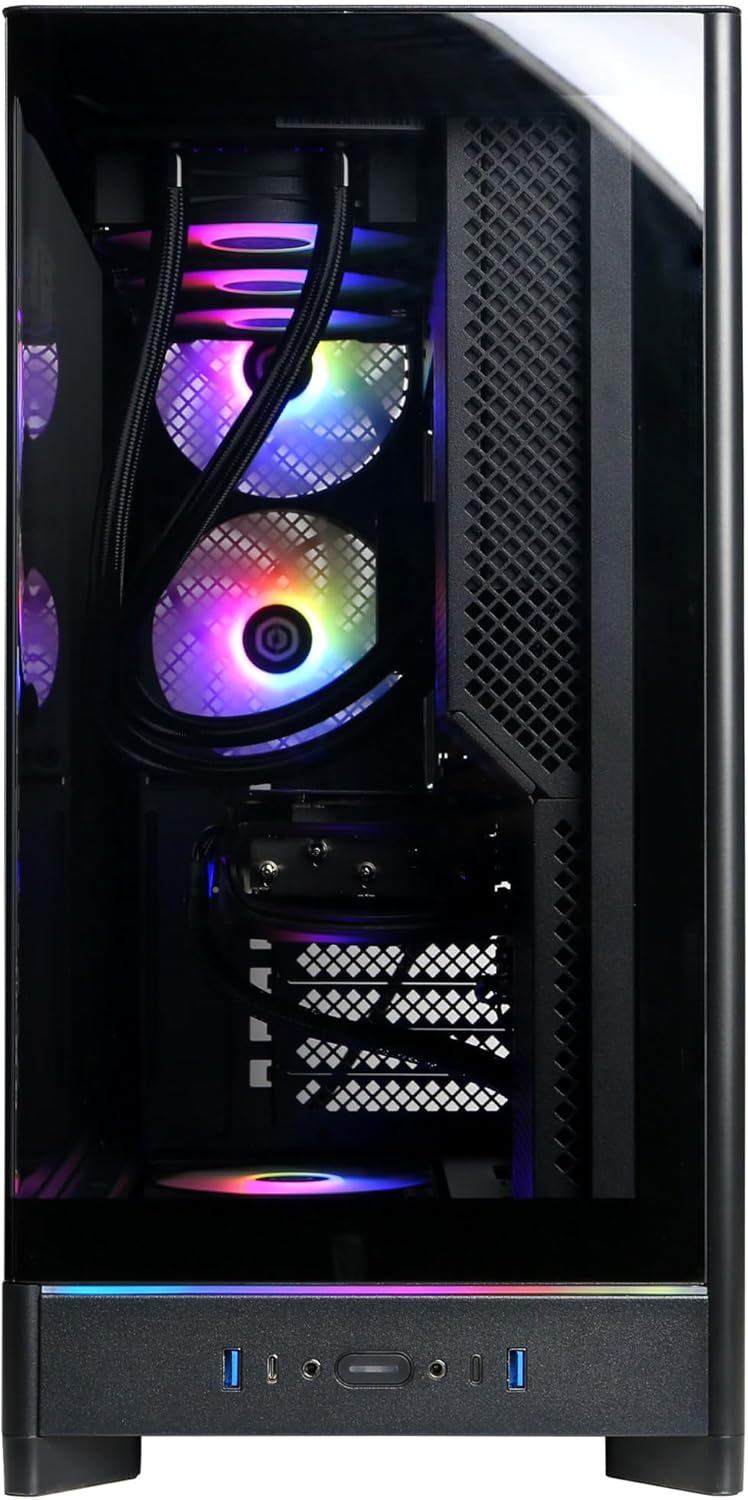
Image: Front panel connections including USB ports and power button.

ചിത്രം: വിശദമായത് view of the front input/output ports for easy access.
4.2. പ്രാരംഭ പവർ ഓൺ
- Press the power button located on the front of the PC.
- The system will boot up, and you should see the operating system loading on your monitor.
4.3. ഓപ്പറേറ്റിംഗ് സിസ്റ്റം സെറ്റപ്പ്
Your CyberpowerPC comes with Windows 11 Home pre-installed. Follow the on-screen instructions to complete the initial setup, which includes:
- നിങ്ങളുടെ പ്രദേശവും കീബോർഡ് ലേഔട്ടും തിരഞ്ഞെടുക്കുന്നു.
- Connecting to a network (wired or wireless).
- ഒരു Microsoft അക്കൗണ്ട് ഉപയോഗിച്ച് സൈൻ ഇൻ ചെയ്യുകയോ ഒരു പ്രാദേശിക അക്കൗണ്ട് സൃഷ്ടിക്കുകയോ ചെയ്യുക.
- സ്വകാര്യതാ ക്രമീകരണങ്ങൾ സജ്ജമാക്കുന്നു.
5. നിങ്ങളുടെ പിസി പ്രവർത്തിപ്പിക്കൽ
5.1. പൊതുവായ ഉപയോഗം
Once the operating system setup is complete, your PC is ready for use. You can install applications, browse the internet, and engage in gaming. Familiarize yourself with the Windows 11 interface for optimal experience.

Image: Internal components of the PC, showcasing the liquid cooling and RGB lighting.

Image: A different angle of the PC's interior, showing the high-performance graphics card and memory.
5.2. കണക്റ്റിവിറ്റി
Your PC offers a variety of connectivity options:
- USB പോർട്ടുകൾ: Includes 2 x USB-C 3.1, 4 x USB-A 3.1, and 2 x USB-A 2.0 for connecting various devices.
- വീഡിയോ ഔട്ട്പുട്ടുകൾ: 1 x HDMI and 3 x DisplayPort for multiple monitor setups.
- നെറ്റ്വർക്ക്: 1 x LAN port for wired internet and WiFi 6 for high-speed wireless connectivity.
- ബ്ലൂടൂത്ത്: Bluetooth 5.3 for connecting wireless peripherals.
- ഓഡിയോ: 7.1 Channel Audio for immersive sound experiences.
6. പരിപാലനം
Regular maintenance helps ensure the longevity and performance of your PC:
- വൃത്തിയാക്കൽ: Periodically clean the exterior of the case with a soft, dry cloth. Use compressed air to clear dust from ventilation grilles and internal components (ensure the PC is powered off and unplugged).
- സോഫ്റ്റ്വെയർ അപ്ഡേറ്റുകൾ: Keep your operating system, drivers (especially graphics drivers), and applications updated to the latest versions for security and performance improvements.
- ഡാറ്റ ബാക്കപ്പ്: പ്രധാനപ്പെട്ട ഡാറ്റ ഒരു ബാഹ്യ ഡ്രൈവിലേക്കോ ക്ലൗഡ് സംഭരണത്തിലേക്കോ പതിവായി ബാക്കപ്പ് ചെയ്യുക.

ചിത്രം: മുകളിൽ view of the PC chassis, illustrating the ventilation design.

ചിത്രം: വശം view of the PC, showing the solid panel and potential rear airflow.
7. പ്രശ്നപരിഹാരം
നിങ്ങളുടെ പിസിയിൽ പ്രശ്നങ്ങൾ നേരിടുകയാണെങ്കിൽ, ഇനിപ്പറയുന്ന അടിസ്ഥാന ട്രബിൾഷൂട്ടിംഗ് ഘട്ടങ്ങൾ പരിഗണിക്കുക:
- ശക്തിയില്ല: Ensure the power cord is securely connected to both the PC and the wall outlet. Check if the power supply switch at the back of the PC is in the 'ON' position.
- ഡിസ്പ്ലേ ഇല്ല: Verify that your monitor is powered on and correctly connected to the graphics card ports (not the motherboard video outputs). Try a different video cable or monitor if available.
- സിസ്റ്റം ഫ്രീസുചെയ്യുന്നു/ക്രാഷുചെയ്യുന്നു: Restart the PC. Ensure all drivers are updated. Check for overheating by monitoring temperatures with software.
- പെരിഫറൽ പ്രവർത്തിക്കുന്നില്ല: പെരിഫറൽ മറ്റൊരു യുഎസ്ബി പോർട്ടിലേക്ക് ബന്ധിപ്പിക്കാൻ ശ്രമിക്കുക. പെരിഫറലിനുള്ള ഡ്രൈവറുകൾ ഇൻസ്റ്റാൾ ചെയ്തിട്ടുണ്ടെന്ന് ഉറപ്പാക്കുക.
- മന്ദഗതിയിലുള്ള പ്രകടനം: Close unnecessary applications. Check for malware or viruses. Ensure sufficient free space on your primary drive.
For more complex issues, refer to the CyberpowerPC support webസൈറ്റ് അല്ലെങ്കിൽ സാങ്കേതിക പിന്തുണയുമായി ബന്ധപ്പെടുക.
8 സ്പെസിഫിക്കേഷനുകൾ
| ഘടകം | സ്പെസിഫിക്കേഷൻ |
|---|---|
| മോഡൽ നമ്പർ | SLCAI15000A2 |
| ഓപ്പറേറ്റിംഗ് സിസ്റ്റം | വിൻഡോസ് 11 ഹോം |
| സിപിയു | AMD Ryzen 9 9950X 4.3GHz (16 Cores) |
| ചിപ്സെറ്റ് | എഎംഡി ബി850 |
| ഗ്രാഫിക്സ് കാർഡ് | NVIDIA GeForce RTX 5090 32GB |
| റാം | 64GB DDR5 |
| സംഭരണം | 4TB PCIe 4.0 NVMe SSD |
| കണക്റ്റിവിറ്റി | WiFi 6, Bluetooth 5.3, 1x LAN |
| USB പോർട്ടുകൾ | 2x USB-C 3.1, 4x USB-A 3.1, 2x USB-A 2.0 |
| വീഡിയോ ഔട്ട്പുട്ട് | 1x HDMI, 3x ഡിസ്പ്ലേ പോർട്ട് |
| ഓഡിയോ | 7.1 ചാനൽ ഓഡിയോ |
| തണുപ്പിക്കൽ | Liquid Cool CPU |
| അളവുകൾ | 17.6 x 9.2 x 20 ഇഞ്ച് |
9. വാറൻ്റിയും പിന്തുണയും
Your CyberpowerPC Gamer Supreme Gaming PC is covered by a 1 വർഷത്തെ ഭാഗങ്ങളും ലേബർ വാറന്റിയും. Additionally, you receive Free Lifetime Technical Support.
For warranty claims, technical assistance, or further inquiries, please visit the official CyberpowerPC support website or contact their customer service department. Keep your purchase receipt and product serial number readily available when seeking support.
ഓൺലൈൻ പിന്തുണ: www.cyberpowerpc.com/support