
1. ആമുഖം
The DOOGEE Blade GT Play is a robust 5G rugged smartphone designed for durability and performance. It features a slim profile, a vibrant 120Hz display, a powerful processor, and a long-lasting battery, making it suitable for various environments and demanding tasks. This manual provides essential information for setting up, operating, and maintaining your device.
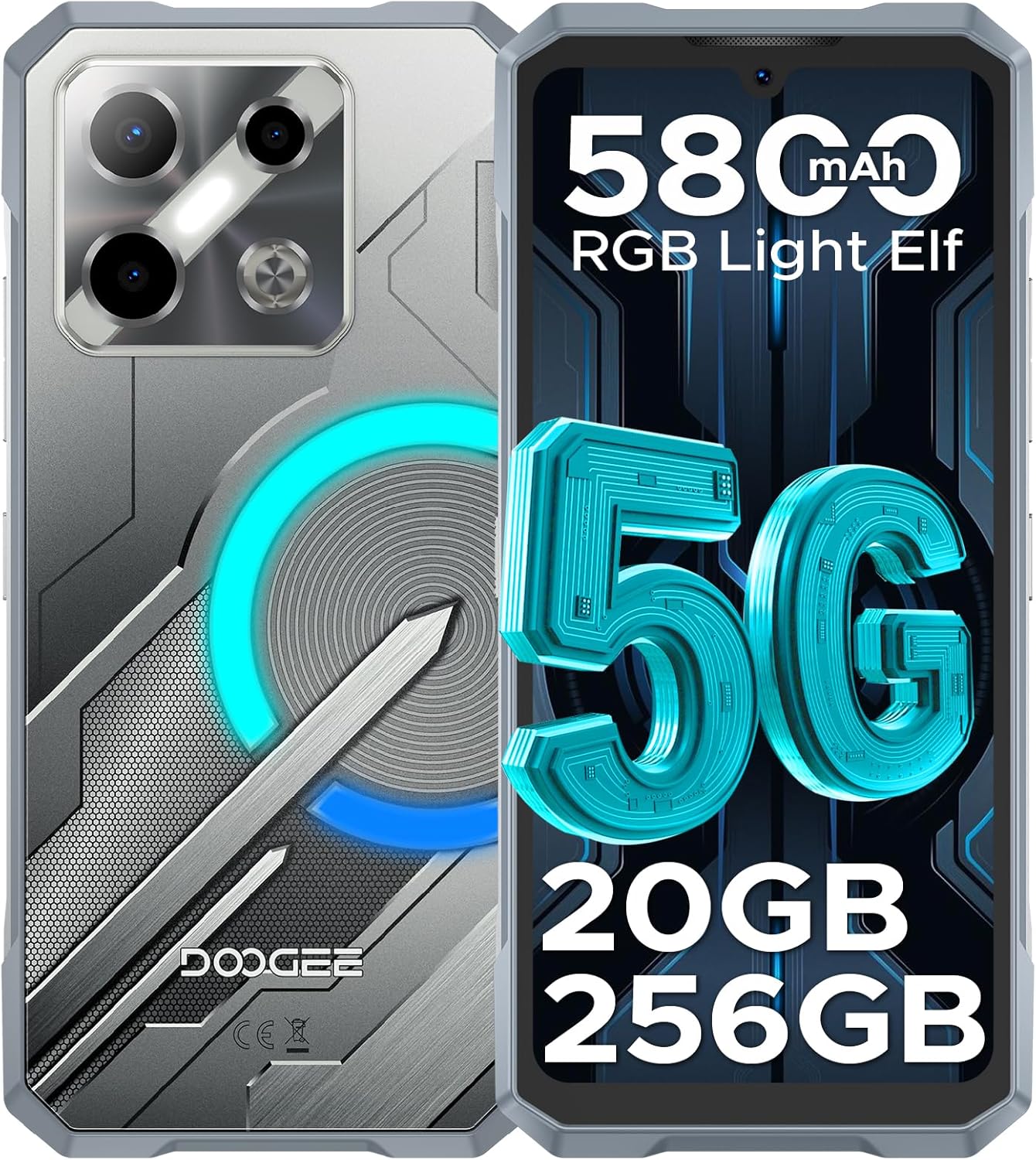
ചിത്രം: മുന്നിലും പിന്നിലും view of the DOOGEE Blade GT Play 5G Rugged Smartphone, highlighting its design and key features like 5G connectivity, 5800mAh battery, 20GB RAM, and 256GB storage.
2. പാക്കേജ് ഉള്ളടക്കം
നിങ്ങളുടെ ഉൽപ്പന്ന പാക്കേജിൽ എല്ലാ ഇനങ്ങളും ഉണ്ടെന്ന് ഉറപ്പാക്കുക:
- 1 x DOOGEE Blade GT Play Rugged Smartphone
- 1 x ടൈപ്പ്-സി യുഎസ്ബി കേബിൾ
- 1 x 18W Charger
- 1 x ഉപയോക്തൃ മാനുവൽ
- 1 x വാറൻ്റി കാർഡ്
- 1 x Anti-Explosion Film (Screen Protector)
- 1 x ഫോൺ കേസ്
- 1 x പാക്കിംഗ് ബോക്സ്

Image: All components included in the DOOGEE Blade GT Play retail package, neatly arranged.
3. ഉപകരണ ലേഔട്ട്
The DOOGEE Blade GT Play features a thoughtful design for both aesthetics and functionality. Key physical components include:
- മുൻഭാഗം: 6.72-inch FHD+ IPS display, 16MP front camera, earpiece.
- പിൻഭാഗം: 50MP main camera, 2MP macro camera, LED flash, RGB LED light effect panel.
- വശങ്ങൾ: Power button (integrated with fingerprint sensor), volume up/down buttons, USB Type-C port, dual SIM/TF card slot.

Image: The DOOGEE Blade GT Play showcasing its ultra-slim 10.5mm thickness and ergonomic design, emphasizing its comfortable grip and light weight of 260g.
4. പ്രാരംഭ സജ്ജീകരണം
4.1. സിം/ടിഎഫ് കാർഡ് ഇൻസ്റ്റാൾ ചെയ്യൽ
- ഉപകരണത്തിന്റെ വശത്ത് സിം/ടിഎഫ് കാർഡ് സ്ലോട്ട് കണ്ടെത്തുക.
- ട്രേ തുറക്കാൻ നൽകിയിരിക്കുന്ന സിം എജക്റ്റർ ഉപകരണം ഉപയോഗിക്കുക.
- Carefully place your Nano-SIM card(s) and/or TF card into the designated slots on the tray. Ensure correct orientation.
- ട്രേ ഫ്ലഷ് ആകുന്നതുവരെ ഉപകരണത്തിലേക്ക് പതുക്കെ തിരികെ തള്ളുക.
4.2. പവർ ഓൺ/ഓഫ്
- പവർ ഓണാക്കാൻ: Press and hold the Power button (located on the side) until the DOOGEE logo appears.
- പവർ ഓഫ് ചെയ്യാൻ: പവർ ബട്ടൺ അമർത്തിപ്പിടിക്കുക, തുടർന്ന് സ്ക്രീനിലെ ഓപ്ഷനുകളിൽ നിന്ന് 'പവർ ഓഫ്' തിരഞ്ഞെടുക്കുക.
- പുനരാരംഭിക്കാൻ: പവർ ബട്ടൺ അമർത്തിപ്പിടിക്കുക, തുടർന്ന് ഓപ്ഷനുകളിൽ നിന്ന് 'പുനരാരംഭിക്കുക' തിരഞ്ഞെടുക്കുക.
4.3. പ്രാരംഭ കോൺഫിഗറേഷൻ
Upon first power-on, follow the on-screen prompts to set up your device. This includes selecting your language, connecting to Wi-Fi, setting up your Google account, and configuring security features like fingerprint and face unlock.
5. പ്രവർത്തന നിർദ്ദേശങ്ങൾ
5.1. ആൻഡ്രോയിഡ് 14 ഓപ്പറേറ്റിംഗ് സിസ്റ്റം
Your DOOGEE Blade GT Play runs on Android 14, offering a secure, smooth, and responsive user experience. It includes features such as App Cloning, Anti-Peeping mode, Anti-theft Alarm, and Fingerprint App Lock for enhanced privacy and security.

Image: Multiple screens of the Android 14 interface on the DOOGEE Blade GT Play, demonstrating various applications and system features.
5.2. RGB LED Light Effect
The device features an RGB LED light effect panel on the rear, offering 8 lighting modes and 3 flashing styles. These can be customized via the 'Cyber Aura' app to sync with music, notifications, calls, messages, gaming, and charging status. You can also adjust brightness and lighting speed.
- ഇഷ്ടാനുസൃതമാക്കൽ: Access the 'Cyber Aura' app to select lighting modes (e.g., Call, Message, Music, Gaming, Charging), color combinations, and notification styles (Flicking, Breathing, Flowing).
- തെളിച്ചവും വേഗതയും: Adjust the intensity and speed of the light effects within the app settings.

Image: Illustration of the DOOGEE Blade GT Play's smart RGB lighting effects, showing various customization options for calls, messages, games, music, charging, and brightness.
5.3. ക്യാമറ പ്രവർത്തനം
The DOOGEE Blade GT Play is equipped with a 50MP AI main camera, a 2MP macro lens, and a 16MP front camera. The camera app provides various modes and AI features to enhance your photography.
- പ്രധാന ക്യാമറ (50MP): For high-resolution photos in various conditions.
- Macro Camera (2MP): ചെറിയ വസ്തുക്കളുടെ വിശദമായ ക്ലോസ്-അപ്പ് ഷോട്ടുകൾക്കായി.
- മുൻ ക്യാമറ (16MP): For selfies and video calls, with AI beauty features.
- ക്യാമറ മോഡുകൾ: Explore modes like Night Mode, Beauty Mode, Time-lapse, and Portrait Mode for different photographic effects.
- AI സവിശേഷതകൾ: Utilize AI Recognition for automatic scene detection and Google Intelligent Camera features like View Search, E-commerce Search, Plant & Animal Identification, Text Extraction & Translation, and Homework Analysis.

Image: Diagram illustrating the camera setup of the DOOGEE Blade GT Play, highlighting the 50MP main camera, 2MP macro camera, and 16MP selfie camera.

ചിത്രം: ഉദാamples of different camera modes available on the DOOGEE Blade GT Play, including Night Mode, Beauty Mode, Time-lapse, and Portrait Mode.
5.4. സുരക്ഷാ സവിശേഷതകൾ
The device offers multiple security options for quick and secure access:
- Side Fingerprint ID: Register your fingerprint for fast unlocking and app access.
- ഫേസ് അൺലോക്ക്: സൗകര്യപ്രദമായ അൺലോക്കിംഗിനായി മുഖം തിരിച്ചറിയൽ ഉപയോഗിക്കുക.
- NFC: Supports Google Pay and mobile ID for contactless transactions.

Image: Visual representation of the DOOGEE Blade GT Play's convenient NFC for payments, face and side fingerprint unlock, and the dual-card slot.
6. ഈടുനിൽപ്പും പരിചരണവും
The DOOGEE Blade GT Play is built to withstand challenging conditions, featuring:
- IP68/IP69K Certification: Provides resistance against dust, dirt, and water immersion.
- MIL-STD-810H Standard: Military-grade durability for shock and drop protection.
- ശക്തിപ്പെടുത്തിയ നിർമ്മാണം: Four-corner tire-style design and reinforced rubber for superior impact protection.
6.1. ജനറൽ കെയർ
- Keep all ports and covers securely closed to maintain water and dust resistance.
- ഒരു സോഫ്റ്റ്, ഡി ഉപയോഗിച്ച് ഉപകരണം വൃത്തിയാക്കുകamp തുണി. കഠിനമായ രാസവസ്തുക്കൾ ഒഴിവാക്കുക.
- ഉപകരണം ദീർഘനേരം ഉയർന്ന താപനിലയിൽ തുറന്നുകാട്ടുന്നത് ഒഴിവാക്കുക.

Image: Demonstrations of the DOOGEE Blade GT Play's IP68 & IP69K waterproof, drop-proof, and dust-proof capabilities in various outdoor settings.
7 സാങ്കേതിക സവിശേഷതകൾ
| ഫീച്ചർ | സ്പെസിഫിക്കേഷൻ |
|---|---|
| മോഡലിൻ്റെ പേര് | BLADEGTPLAY |
| ഓപ്പറേറ്റിംഗ് സിസ്റ്റം | ആൻഡ്രോയിഡ് 14 |
| പ്രോസസ്സർ | MediaTek Dimensity 7025 Octa-Core (2.5GHz, 6nm) |
| റാം | 20GB (8GB Basic + 12GB Extended) |
| ആന്തരിക സംഭരണം | 256GB (Expandable up to 2TB via TF card) |
| പ്രദർശിപ്പിക്കുക | 6.72-inch FHD+ IPS Waterdrop Display, 1080x2400 resolution, 120Hz Refresh Rate, 380cd/m² brightness |
| പ്രധാന ക്യാമറ | 50MP AI Main Camera |
| മാക്രോ ക്യാമറ | 2എംപി |
| മുൻ ക്യാമറ | 16എംപി |
| ബാറ്ററി | 5800mAh Si-C Battery, 18W Fast Charging |
| കണക്റ്റിവിറ്റി | 5G, Dual SIM, Wi-Fi (2.4/5GHz), Bluetooth 5.2, NFC, GPS (GLONASS, Galileo, Beidou) |
| ഈട് | IP68/IP69K Waterproof & Dustproof, MIL-STD-810H Certified |
| അളവുകൾ | 7 x 3 x 0.4 inches (10.5mm thickness) |
| ഭാരം | 1.1 പൗണ്ട് (260 ഗ്രാം) |
| ഓഡിയോ ജാക്ക് | ടൈപ്പ്-സി |

Image: A visual representation of the Dimensity 7025 5G Octa-Core Processor, highlighting its 5G capability, 6nm process technology, and 2.5GHz frequency.

Image: Illustration of the DOOGEE Blade GT Play's memory configuration, showing 20GB RAM (8GB basic + 12GB extended) and 256GB ROM (expandable up to 2TB).

Image: The DOOGEE Blade GT Play's 6.72-inch 120Hz ultra-clear display, emphasizing smooth visuals and its FHD+ resolution.

ചിത്രം: വിശദമായത് view of the DOOGEE Blade GT Play's enhanced Si-C 5800mAh battery, highlighting its durability with 1000 charging cycle times and 3 years of battery durability.
8. പ്രശ്നപരിഹാരം
If you encounter issues with your DOOGEE Blade GT Play, consider the following common solutions:
- ഉപകരണം പവർ ചെയ്യുന്നില്ല: ബാറ്ററി ചാർജ്ജ് ചെയ്തിട്ടുണ്ടെന്ന് ഉറപ്പാക്കുക. ഉപകരണം ചാർജറുമായി ബന്ധിപ്പിച്ച് വീണ്ടും പവർ ചെയ്യാൻ ശ്രമിക്കുന്നതിന് മുമ്പ് കുറച്ച് മിനിറ്റ് കാത്തിരിക്കുക.
- ആപ്പുകൾ ക്രാഷാകുന്നു/ഫ്രീസാകുന്നു: Close background applications. Clear the cache of the problematic app (Settings > Apps > [App Name] > Storage > Clear Cache). Restart the device.
- മോശം നെറ്റ്വർക്ക് കണക്റ്റിവിറ്റി: Check if your SIM card is properly inserted. Ensure mobile data is enabled. Try toggling Airplane Mode on and off.
- ഫിംഗർപ്രിന്റ്/ഫേസ് അൺലോക്ക് പ്രവർത്തിക്കുന്നില്ല: Ensure your fingers/face are clean and dry. Re-register your fingerprint or face data in Settings > Security.
- ബാറ്ററി വേഗത്തിൽ തീർന്നു: Reduce screen brightness, disable unnecessary features like GPS or Bluetooth when not in use, and close background apps. Check battery usage in Settings to identify power-hungry apps.
- ഉപകരണം പ്രതികരിക്കുന്നില്ല: ഉപകരണം പുനരാരംഭിക്കുന്നത് വരെ ഏകദേശം 10-15 സെക്കൻഡ് നേരത്തേക്ക് പവർ ബട്ടൺ അമർത്തിപ്പിടിച്ചുകൊണ്ട് ഒരു നിർബന്ധിത പുനരാരംഭം നടത്തുക.
- ഫാക്ടറി റീസെറ്റ് (അവസാന ആശ്രയം): പ്രശ്നങ്ങൾ നിലനിൽക്കുകയാണെങ്കിൽ, നിങ്ങൾ ഒരു ഫാക്ടറി റീസെറ്റ് നടത്തേണ്ടി വന്നേക്കാം. മുന്നറിയിപ്പ്: ഇത് നിങ്ങളുടെ ഉപകരണത്തിലെ എല്ലാ ഡാറ്റയും മായ്ക്കും. തുടരുന്നതിന് മുമ്പ് പ്രധാനപ്പെട്ട ഡാറ്റയുടെ ബാക്കപ്പ് എടുക്കുക. ക്രമീകരണങ്ങൾ > സിസ്റ്റം > റീസെറ്റ് ഓപ്ഷനുകൾ > എല്ലാ ഡാറ്റയും മായ്ക്കുക (ഫാക്ടറി റീസെറ്റ്) എന്നതിലേക്ക് പോകുക.
9. വാറൻ്റിയും പിന്തുണയും
Your DOOGEE Blade GT Play comes with a standard manufacturer's warranty. Please refer to the included Warranty Card for specific terms, conditions, and duration of coverage. For technical support, service, or warranty claims, please contact DOOGEE customer service through their official webസൈറ്റ് അല്ലെങ്കിൽ നിങ്ങളുടെ വാറന്റി ഡോക്യുമെന്റേഷനിൽ നൽകിയിരിക്കുന്ന ബന്ധപ്പെടാനുള്ള വിവരങ്ങൾ.
വാറന്റി സാധൂകരണത്തിനായി നിങ്ങളുടെ വാങ്ങിയതിന്റെ തെളിവ് സൂക്ഷിക്കുക.