

1. ആമുഖം
The OnRetul V315 OBD2 Diagnostic Tool is designed to assist in diagnosing issues in OBD2 compliant vehicles. This device functions as a code reader, engine light diagnostic tool, and battery voltage tester. It provides essential diagnostic information, enabling users to understand vehicle status and perform basic troubleshooting.
This manual provides instructions for the proper setup, operation, and maintenance of your V315 diagnostic tool.
2. ഉൽപ്പന്ന സവിശേഷതകൾ
- Reads and clears Diagnostic Trouble Codes (DTCs).
- Resets Check Engine Light (MIL).
- Performs I/M Readiness checks.
- Displays live data stream.
- Analyzes freeze frame data.
- ബാറ്ററി വോളിയം പരിശോധിക്കുന്നുtage.
- Built-in DTC library for code definitions.
- ഒന്നിലധികം ഭാഷകളെ പിന്തുണയ്ക്കുന്നു.

Image: A visual representation of the OnRetul V315's professional OBDII scanner features, including Live Data, Read Codes, DTC Code Lookup, O2 Sensor Test, Vehicle Info, Freeze Frame, I/M Readiness, Clear Codes, On-Board Monitor, and EVAP System Test.
3. സജ്ജീകരണം
Before using the OnRetul V315, ensure your vehicle is OBD2 compliant. This tool is compatible with gasoline cars produced after 1996 (USA), 2002 (EU), and 2008 (Asia). It does not support hybrid, electric, or non-OBD2 models. This product does not support ABS, SRS, or TPMS detection.
ഉപകരണം ബന്ധിപ്പിക്കുന്നു
- Locate your vehicle's 16-pin OBD2 diagnostic port. This port is typically found under the dashboard on the driver's side.
- വാഹനത്തിന്റെ ഇഗ്നിഷൻ ഓഫ് പൊസിഷനിൽ ആണെന്ന് ഉറപ്പാക്കുക.
- Firmly plug the V315's OBD2 connector into the vehicle's diagnostic port.
- Turn the vehicle's ignition to the ON position (do not start the engine). The V315 will power on automatically.

Image: The OnRetul V315 diagnostic tool connected to a vehicle's OBD-II port, located under the dashboard. The image highlights the connection point.
4. പ്രവർത്തന നിർദ്ദേശങ്ങൾ
Once connected and powered on, the V315 will display the main menu. Use the directional buttons (Up, Down, Left, Right) and the OK button to navigate and select options.
4.1. Reading Diagnostic Trouble Codes (DTCs)
- From the main menu, select "Read Codes" and press OK.
- The tool will scan the vehicle's systems for stored DTCs.
- Any detected codes will be displayed along with their descriptions.
4.2. Clearing Diagnostic Trouble Codes (DTCs)
Clearing DTCs will turn off the Check Engine Light (MIL). Ensure you have addressed the underlying issue before clearing codes, as they may reappear if the problem persists.
- From the main menu, select "Erase Codes" and press OK.
- ആവശ്യപ്പെടുമ്പോൾ പ്രവർത്തനം സ്ഥിരീകരിക്കുക.
- The Check Engine Light should turn off, and stored DTCs will be cleared from the vehicle's computer.
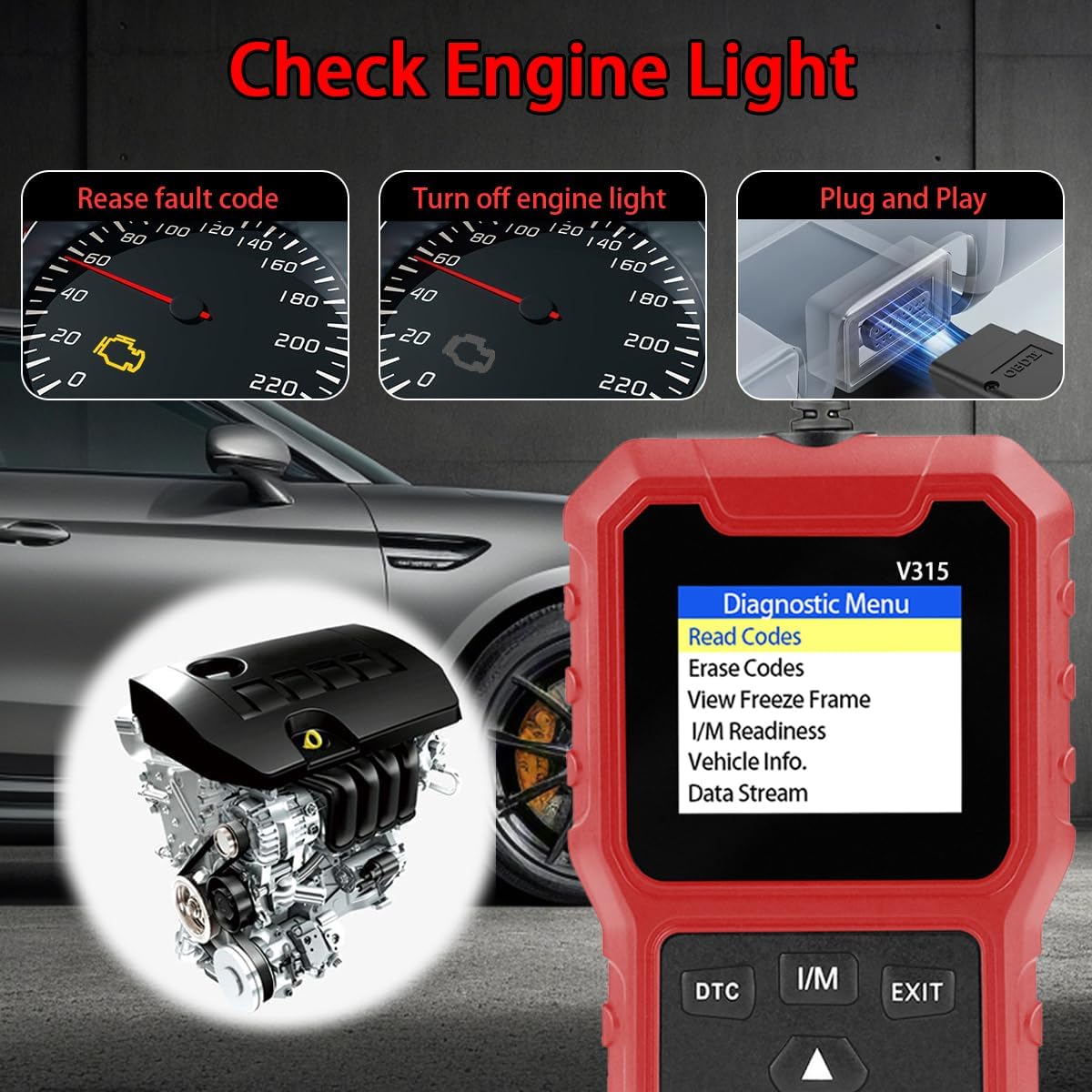
Image: A visual demonstrating the V315's ability to read fault codes, turn off the engine light, and its plug-and-play operation, with a car engine illustration in the background.
4.3. I/M Readiness Check
The I/M Readiness function checks the status of various emission-related monitors to determine if the vehicle is ready for an emission test.
- From the main menu, select "I/M Readiness" and press OK.
- The tool will display the status of the vehicle's monitors (e.g., MIL, MIS, FUE, CCM, CAT, EVAP, O2S, HRT, EGR). A green checkmark indicates the monitor is complete, while a red 'X' indicates it is incomplete.
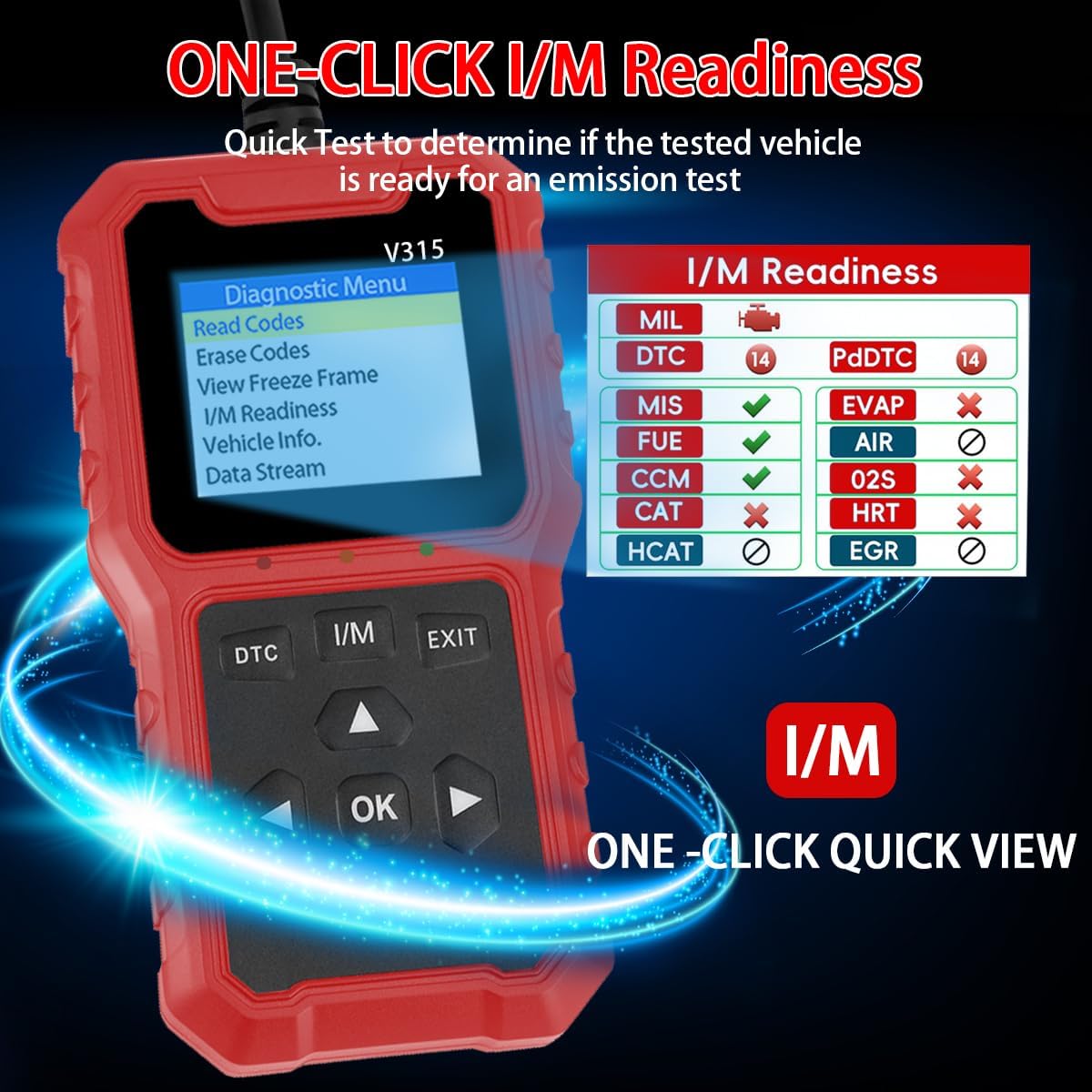
Image: The OnRetul V315 displaying the I/M Readiness screen, showing the status of various vehicle systems with checkmarks and 'X' marks, indicating readiness for emission testing.
4.4. ലൈവ് ഡാറ്റ സ്ട്രീം
View real-time operational parameters of the vehicle, such as engine RPM, vehicle speed, coolant temperature, and fuel pressure.
- From the main menu, select "Data Stream" and press OK.
- The tool will display various data parameters in real-time.
4.5. View ഫ്രീസ് ഫ്രെയിം
When an emission-related fault occurs, the vehicle's computer stores a snapshot of operating conditions at that moment. This is called Freeze Frame Data.
- From the main menu, select "View Freeze Frame" and press OK.
- The tool will display the recorded parameters.
5. പരിപാലനം
The OnRetul V315 is a low-maintenance device. Follow these guidelines to ensure its longevity:
- ഉപകരണം വൃത്തിയായും പൊടിയിൽ നിന്നും ഈർപ്പത്തിൽ നിന്നും മുക്തമായും സൂക്ഷിക്കുക.
- Store the device in a dry, cool environment when not in use.
- ഉപകരണം ഉപേക്ഷിക്കുകയോ ശക്തമായ ആഘാതങ്ങൾക്ക് വിധേയമാക്കുകയോ ചെയ്യരുത്.
- ഉപകരണം ഡിസ്അസംബ്ലിംഗ് ചെയ്യാൻ ശ്രമിക്കരുത്, കാരണം ഇത് വാറന്റി അസാധുവാക്കും.
6. പ്രശ്നപരിഹാരം
| പ്രശ്നം | സാധ്യമായ കാരണം | പരിഹാരം |
|---|---|---|
| ഉപകരണം പവർ ഓണാക്കുന്നില്ല. | Loose connection to OBD2 port; vehicle ignition not ON; vehicle not OBD2 compliant. | Ensure the connector is firmly seated. Turn vehicle ignition to ON. Verify vehicle compatibility. |
| Cannot link to vehicle. | Vehicle not OBD2 compliant; communication error; faulty OBD2 port. | Verify vehicle compatibility. Check for loose connections. Try on another OBD2 compliant vehicle if possible. |
| Codes cannot be cleared. | Underlying fault still present; ignition not ON. | Address the root cause of the DTCs first. Ensure ignition is ON. |
7 സ്പെസിഫിക്കേഷനുകൾ
- മോഡൽ: V315
- ഉൽപ്പന്ന അളവുകൾ: 2.7"L x 0.94"W x 5.1"H
- ഇനത്തിൻ്റെ ഭാരം: 6.4 ഔൺസ്
- ഓപ്പറേറ്റിംഗ് സിസ്റ്റം: Windows 10 (for software compatibility, not device OS)
- ഓട്ടോമോട്ടീവ് ഫിറ്റ് തരം: Universal Fit (for OBD2 compliant vehicles)
- UPC: 768383869088
- പിന്തുണയ്ക്കുന്ന പ്രോട്ടോക്കോളുകൾ: SAE J1850 PWM, SAE J1850 VPW, ISO9141-2, ISO14230-4 KWP (5 baud init), ISO14230-4 KWP (fast init), ISO15765-4 CAN (11bit ID, 500 Kbaud), ISO15765-4 CAN (29bit ID, 500 Kbaud), ISO15765-4 CAN (11bit ID, 250 Kbaud), ISO15765-4 CAN (29bit ID, 251 Kbaud)
- പിന്തുണയ്ക്കുന്ന ഭാഷകൾ: English, German, Dutch, Italian, Spanish, French, Japanese, Portuguese

Image: A diagram illustrating the physical dimensions of the OnRetul V315 diagnostic tool, showing its length, width, and height in both inches and centimeters.
8. വാറണ്ടിയും ഉപഭോക്തൃ പിന്തുണയും
OnRetul is committed to providing quality products and customer satisfaction. For any issues encountered during use, please contact our customer service team.
We aim to respond to all inquiries within 24 hours to provide assistance and resolution.