
1. ഉൽപ്പന്നം കഴിഞ്ഞുview
The zelotes C-12 Professional Wired Gaming Mouse is designed for high-performance gaming and office use. It features an ergonomic design, 12 programmable buttons, adjustable DPI settings, multi-modes RGB backlighting, and a customizable weight system.

Image 1.1: The zelotes C-12 Professional Wired Gaming Mouse, showcasing its ergonomic shape and customizable RGB lighting.
പാക്കേജ് ഉള്ളടക്കം:
- 1 x zelotes C-12 Gaming Mouse
- 1 x ഇൻസ്ട്രക്ഷൻ മാനുവൽ
- 1 x സോഫ്റ്റ്വെയർ സി.ഡി
- 1 x ഫുട് പാഡ് സെറ്റ്
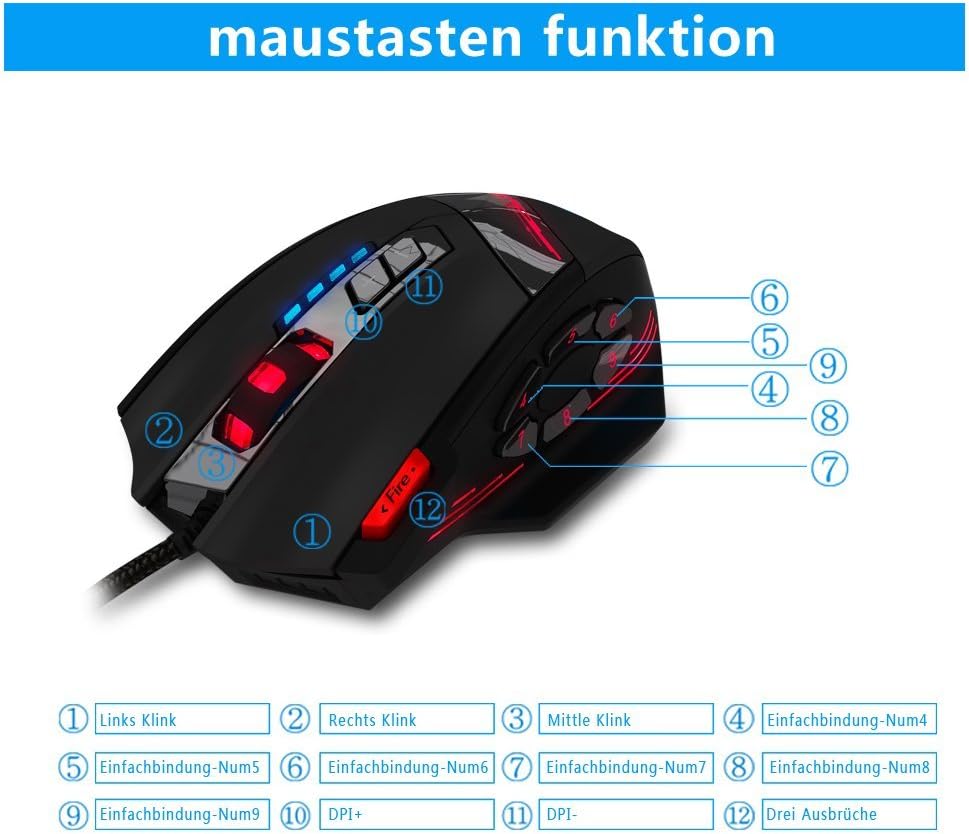
Image 1.2: The complete package contents of the zelotes C-12 Gaming Mouse.
2. സജ്ജീകരണം
2.1 മൗസ് ബന്ധിപ്പിക്കൽ
Connect the USB cable of the zelotes C-12 Gaming Mouse to an available USB port on your computer. The mouse is plug-and-play for basic functionality.
2.2 സോഫ്റ്റ്വെയർ ഇൻസ്റ്റാളേഷൻ (ഓപ്ഷണൽ)
For full customization of buttons, DPI, and lighting, install the provided software from the included CD. Insert the CD into your computer's optical drive and follow the on-screen instructions. If your computer does not have an optical drive, please visit the official zelotes website to download the latest software driver.
Note: The programming software is not fully compatible with Mac operating systems.
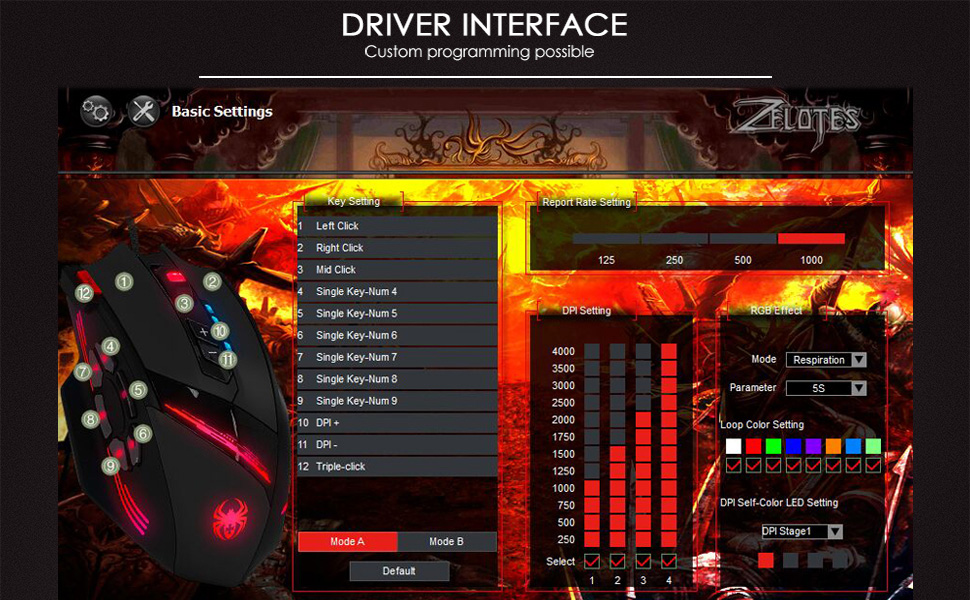
Image 2.1: The software interface for customizing the zelotes C-12 Gaming Mouse.
2.3 Weight Tuning
The mouse includes 8 removable weight blocks, each weighing 2.5 grams, located in a compartment on the underside of the mouse. To adjust the mouse's weight:
- മൗസിന്റെ അടിയിലുള്ള വൃത്താകൃതിയിലുള്ള കവർ സൌമ്യമായി വളച്ചൊടിച്ച് നീക്കം ചെയ്യുക.
- Add or remove the 2.5g weight blocks as desired to achieve your preferred mouse feel.
- Replace the circular cover by twisting it back into place.
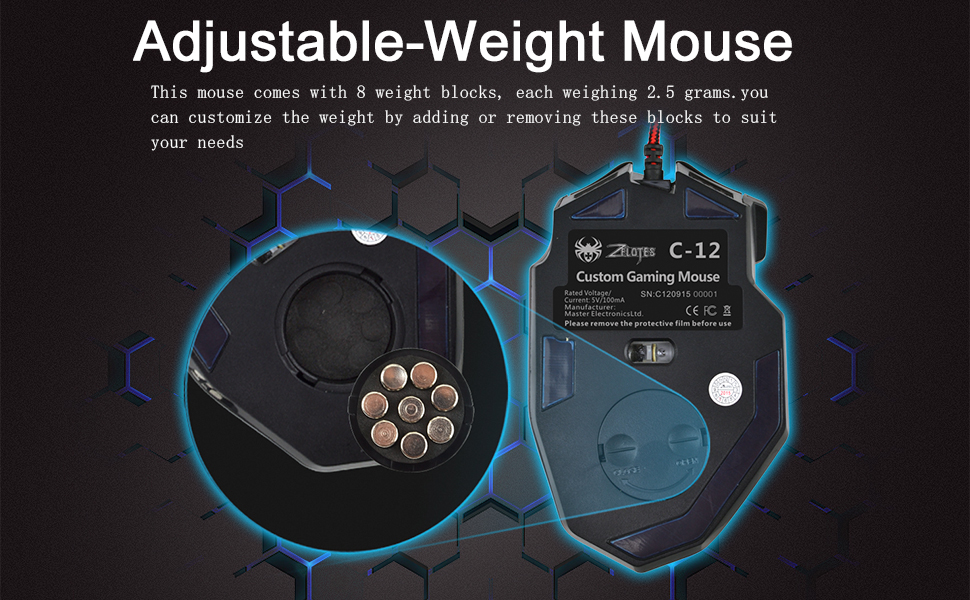
Image 2.2: Adjusting the weight of the zelotes C-12 mouse by adding or removing the 2.5g blocks.
Video 2.1: A demonstration of the weight tuning feature and programmable buttons on the zelotes C-12 Gaming Mouse.
3. പ്രവർത്തന നിർദ്ദേശങ്ങൾ
3.1 ബട്ടൺ പ്രവർത്തനങ്ങൾ
The zelotes C-12 mouse features 12 programmable buttons. The default functions are:
- ഇടത് ക്ലിക്ക് (ബട്ടൺ 1)
- റൈറ്റ് ക്ലിക്ക് ചെയ്യുക (ബട്ടൺ 2)
- മിഡിൽ ക്ലിക്ക് / സ്ക്രോൾ വീൽ (ബട്ടൺ 3)
- സൈഡ് ബട്ടണുകൾ (Buttons 4-9): Default to various functions, customizable via software.
- DPI+ (Button 10): Increases DPI sensitivity.
- DPI- (Button 11): Decreases DPI sensitivity.
- ഫയർ ബട്ടൺ (Button 12): Default to triple-click, customizable via software.

Image 3.1: Labeled diagram of the zelotes C-12 mouse buttons.
3.2 ഡിപിഐ അഡ്ജസ്റ്റ്മെന്റ്
The mouse offers 4 default DPI levels: 1000/1500/2000/4000 DPI. You can cycle through these levels using the dedicated DPI+ and DPI- buttons. For finer control and to reach up to 8000 DPI, use the included software.
3.3 RGB ലൈറ്റിംഗ്
The mouse features multi-modes RGB backlighting, including 7-color cycle breathing and monochromatic constant bright modes. Lighting effects can be customized through the software to match your preferences.
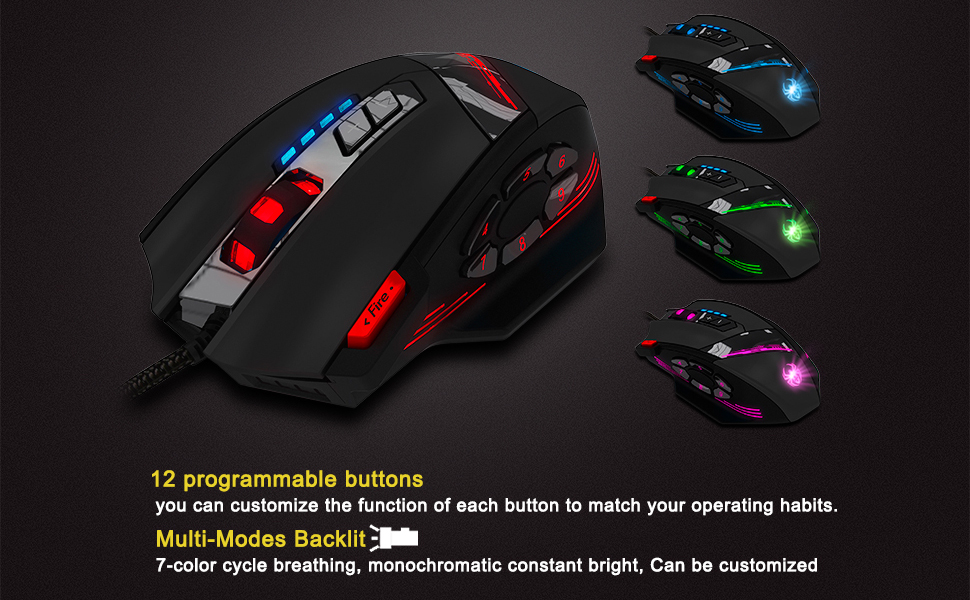
Image 3.2: The zelotes C-12 mouse showcasing its multi-color RGB lighting options.
3.4 എർഗണോമിക് ഡിസൈൻ
The mouse is designed for comfort during extended use, featuring a sweat-resistant and anti-slip rubber surface. Its ergonomic shape helps prevent wrist fatigue.

Image 3.3: The ergonomic design of the zelotes C-12 mouse provides a comfortable grip.
4. പരിപാലനം
To ensure the longevity and optimal performance of your zelotes C-12 Gaming Mouse, follow these maintenance guidelines:
- വൃത്തിയാക്കൽ: മൗസിന്റെ പ്രതലം തുടയ്ക്കാൻ മൃദുവായതും ഉണങ്ങിയതുമായ ഒരു തുണി ഉപയോഗിക്കുക. കഠിനമായ അഴുക്കിന്, ചെറുതായി dampതുണിയിൽ വെള്ളം അല്ലെങ്കിൽ നേരിയ ക്ലീനിംഗ് ലായനി ഉപയോഗിക്കുക. കഠിനമായ രാസവസ്തുക്കളോ ഉരച്ചിലുകളോ ഉള്ള വസ്തുക്കൾ ഒഴിവാക്കുക.
- സെൻസർ പരിചരണം: മൗസിന്റെ അടിവശത്തുള്ള ഒപ്റ്റിക്കൽ സെൻസർ വൃത്തിയായും പൊടിയോ അവശിഷ്ടങ്ങളോ ഇല്ലാതെയും സൂക്ഷിക്കുക. ആവശ്യമെങ്കിൽ ഒരു കോട്ടൺ സ്വാബ് അല്ലെങ്കിൽ കംപ്രസ് ചെയ്ത വായു ഉപയോഗിക്കുക.
- കേബിൾ മാനേജുമെന്റ്: കേടുപാടുകൾ ഒഴിവാക്കാൻ മൂർച്ചയുള്ള വളവുകളോ യുഎസ്ബി കേബിളിൽ അമിതമായി വലിക്കുന്നതോ ഒഴിവാക്കുക.
- സംഭരണം: ഉപയോഗത്തിലില്ലാത്തപ്പോൾ, കടുത്ത താപനിലയിൽ നിന്ന് മാറി വൃത്തിയുള്ളതും വരണ്ടതുമായ ഒരു സ്ഥലത്ത് മൗസ് സൂക്ഷിക്കുക.
5. പ്രശ്നപരിഹാരം
5.1 മൗസ് പ്രതികരിക്കുന്നില്ല
- യുഎസ്ബി കേബിൾ നിങ്ങളുടെ കമ്പ്യൂട്ടറിലേക്ക് സുരക്ഷിതമായി കണക്റ്റുചെയ്തിട്ടുണ്ടെന്ന് ഉറപ്പാക്കുക.
- മറ്റൊരു യുഎസ്ബി പോർട്ടിലേക്ക് മൗസ് ബന്ധിപ്പിക്കാൻ ശ്രമിക്കുക.
- Test the mouse on another computer to rule out a computer-specific issue.
- നിങ്ങളുടെ കമ്പ്യൂട്ടർ പുനരാരംഭിക്കുക.
5.2 DPI or Button Settings Not Changing
- Ensure the zelotes C-12 software is correctly installed and running.
- Check if the settings are saved within the software after making changes.
- For Mac users, note that the programming software has limited compatibility. Basic DPI changes via mouse buttons should still function.
5.3 RGB ലൈറ്റിംഗ് പ്രവർത്തിക്കുന്നില്ല അല്ലെങ്കിൽ തെറ്റാണ്.
- Verify lighting settings within the zelotes C-12 software.
- Ensure the mouse is properly connected and receiving power.
5.4 Mouse Movement Is Erratic
- മൗസിന്റെ അടിയിലുള്ള ഒപ്റ്റിക്കൽ സെൻസർ വൃത്തിയാക്കുക.
- മൗസ് അനുയോജ്യമായ ഒരു പ്രതലത്തിലാണ് ഉപയോഗിക്കുന്നതെന്ന് ഉറപ്പാക്കുക (ഉദാ. ഒരു മൗസ് പാഡ്). ഉയർന്ന പ്രതിഫലനമുള്ളതോ സുതാര്യമായതോ ആയ പ്രതലങ്ങൾ ഒഴിവാക്കുക.
6 സ്പെസിഫിക്കേഷനുകൾ
| ഫീച്ചർ | വിവരണം |
|---|---|
| ബ്രാൻഡ് | zelotes |
| മോഡലിൻ്റെ പേര് | സി-12 |
| കണക്റ്റിവിറ്റി ടെക്നോളജി | യുഎസ്ബി വയർഡ് |
| മൂവ്മെന്റ് ഡിറ്റക്ഷൻ ടെക്നോളജി | Optical (A3050 Gaming Chip) |
| ഡിപിഐ ക്രമീകരണങ്ങൾ | 1000/1500/2000/4000 (Adjustable up to 8000 DPI via software) |
| ബട്ടൺ അളവ് | 12 പ്രോഗ്രാം ചെയ്യാവുന്ന ബട്ടണുകൾ |
| ഭാരം ട്യൂണിംഗ് | 8 x 2.5g removable weights |
| കൈ ഓറിയൻ്റേഷൻ | വലംകൈയ്യൻ |
| ഓപ്പറേറ്റിംഗ് സിസ്റ്റം അനുയോജ്യത | Win11, Win10, Win8, Win7, Mac OS (limited software compatibility for Mac) |
| അളവുകൾ (L x W x H) | 130mm x 81.5mm x 39.8mm |
| പോളിംഗ് നിരക്ക് | 125-1000Hz |
| കേബിൾ നീളം | 1.8മീ |
| മെറ്റീരിയൽ | പ്ലാസ്റ്റിക് (മാറ്റ് ഫിനിഷ്) |

Image 6.1: Detailed technical specifications and dimensions of the zelotes C-12 Gaming Mouse.
7. വാറൻ്റി വിവരങ്ങൾ
The zelotes C-12 Professional Wired Gaming Mouse comes with a 1 വർഷത്തെ നിർമ്മാതാവിന്റെ വാറന്റി from the date of purchase. This warranty covers defects in materials and workmanship under normal use. It does not cover damage caused by misuse, accident, unauthorized modification, or external causes.
വാറൻ്റി ക്ലെയിമുകൾക്കായി നിങ്ങളുടെ വാങ്ങിയതിൻ്റെ തെളിവ് സൂക്ഷിക്കുക.
8. പിന്തുണ
For further assistance, technical support, or warranty inquiries, please refer to the contact information provided with your product packaging or visit the official zelotes webസൈറ്റ്.