
TqcSXToXQ
M73 വയർലെസ് ഇയർഫോൺ ഉപയോക്തൃ മാനുവൽ
Model: TqcSXToXQ
ആമുഖം
Thank you for choosing the M73 Wireless Earphones. These earphones are designed to provide advanced connectivity and high-fidelity sound quality, offering an unparalleled audio experience. Featuring a mini design, liquid silicone ear tips for comfort, and fingerprint touch controls, they are ideal for extended wear, including during sleep. This manual will guide you through the setup, operation, and maintenance of your new earphones.
സുരക്ഷാ വിവരങ്ങൾ
Please read all safety instructions carefully before using this product. Failure to follow these instructions may result in injury or damage to the device.
- ഇയർഫോണുകളോ ചാർജിംഗ് കേസോ കടുത്ത താപനിലയിലോ, ഈർപ്പം അല്ലെങ്കിൽ ദ്രാവകങ്ങളിലോ തുറന്നുകാട്ടരുത്.
- ഉപകരണം താഴെയിടുകയോ, അടിക്കുകയോ, വേർപെടുത്തുകയോ ചെയ്യുന്നത് ഒഴിവാക്കുക.
- കുട്ടികൾക്കും വളർത്തുമൃഗങ്ങൾക്കും ലഭ്യമാകാതെ സൂക്ഷിക്കുക.
- നൽകിയിരിക്കുന്നതോ സാക്ഷ്യപ്പെടുത്തിയതോ ആയ ചാർജിംഗ് കേബിളുകൾ മാത്രം ഉപയോഗിക്കുക.
- Do not use the earphones at excessively high volumes for prolonged periods to prevent hearing damage.
പാക്കേജ് ഉള്ളടക്കം
- M73 Wireless Earphones (Left and Right)
- ചാർജിംഗ് കേസ്
- യുഎസ്ബി ടൈപ്പ്-സി ചാർജിംഗ് കേബിൾ
- ഉപയോക്തൃ മാനുവൽ
- (Potentially) Different sized ear tips (liquid silicone)
ഉൽപ്പന്നം കഴിഞ്ഞുview

Figure 1: M73 Wireless Earphones and Charging Case (White)
The image above displays the M73 Wireless Earphones nestled within their open charging case. The case features a digital display indicating the battery level. Both earphones are visible, showcasing their compact design and ear hooks for secure fit.

Figure 2: Individual Earphone and Charging Case
This image provides a closer look at one M73 earphone, detached from its charging case. It highlights the earphone's ergonomic shape and the charging contacts inside the case.
ഘടകങ്ങൾ:
- ഇയർഫോണുകൾ: Left and Right, with integrated ear hooks and touch control areas.
- ചാർജിംഗ് കേസ്: Houses and charges the earphones, features a digital battery display and a Type-C charging port.
- LED സൂചകം: On earphones and case, indicating charging status and connection.
- മൈക്രോഫോൺ: കോളുകൾക്കും വോയ്സ് അസിസ്റ്റന്റിനും.
സജ്ജമാക്കുക
1. ഇയർഫോണുകളും കേസും ചാർജ് ചെയ്യുന്നു
Before first use, fully charge both the earphones and the charging case.
- Place the earphones into the charging case. Ensure they are correctly seated; the LED indicators on the earphones should light up.
- Connect the USB Type-C charging cable to the charging port on the case and the other end to a USB power adapter (not included) or a computer's USB port.
- ചാർജിംഗ് കെയ്സിലെ ഡിജിറ്റൽ ഡിസ്പ്ലേ ബാറ്ററി ശതമാനം കാണിക്കും.tage during charging. Once fully charged, the display will indicate 100%.
2. നിങ്ങളുടെ ഉപകരണവുമായി ജോടിയാക്കുന്നു
ചാർജിംഗ് കേസിൽ നിന്ന് നീക്കം ചെയ്യുമ്പോൾ ഇയർഫോണുകൾ യാന്ത്രികമായി ജോടിയാക്കൽ മോഡിലേക്ക് പ്രവേശിക്കും.
- Open the charging case and remove both earphones. They will automatically power on and attempt to pair with each other.
- നിങ്ങളുടെ ഉപകരണത്തിൽ (സ്മാർട്ട്ഫോൺ, ടാബ്ലെറ്റ് മുതലായവ), ബ്ലൂടൂത്ത് ക്രമീകരണങ്ങളിലേക്ക് പോകുക.
- ഇതിനായി തിരയുക available devices and select "M73" from the list.
- Once connected, a voice prompt will confirm the successful pairing. The earphones will automatically reconnect to the last paired device when removed from the case.
3. ഇയർഫോണുകൾ ധരിക്കൽ
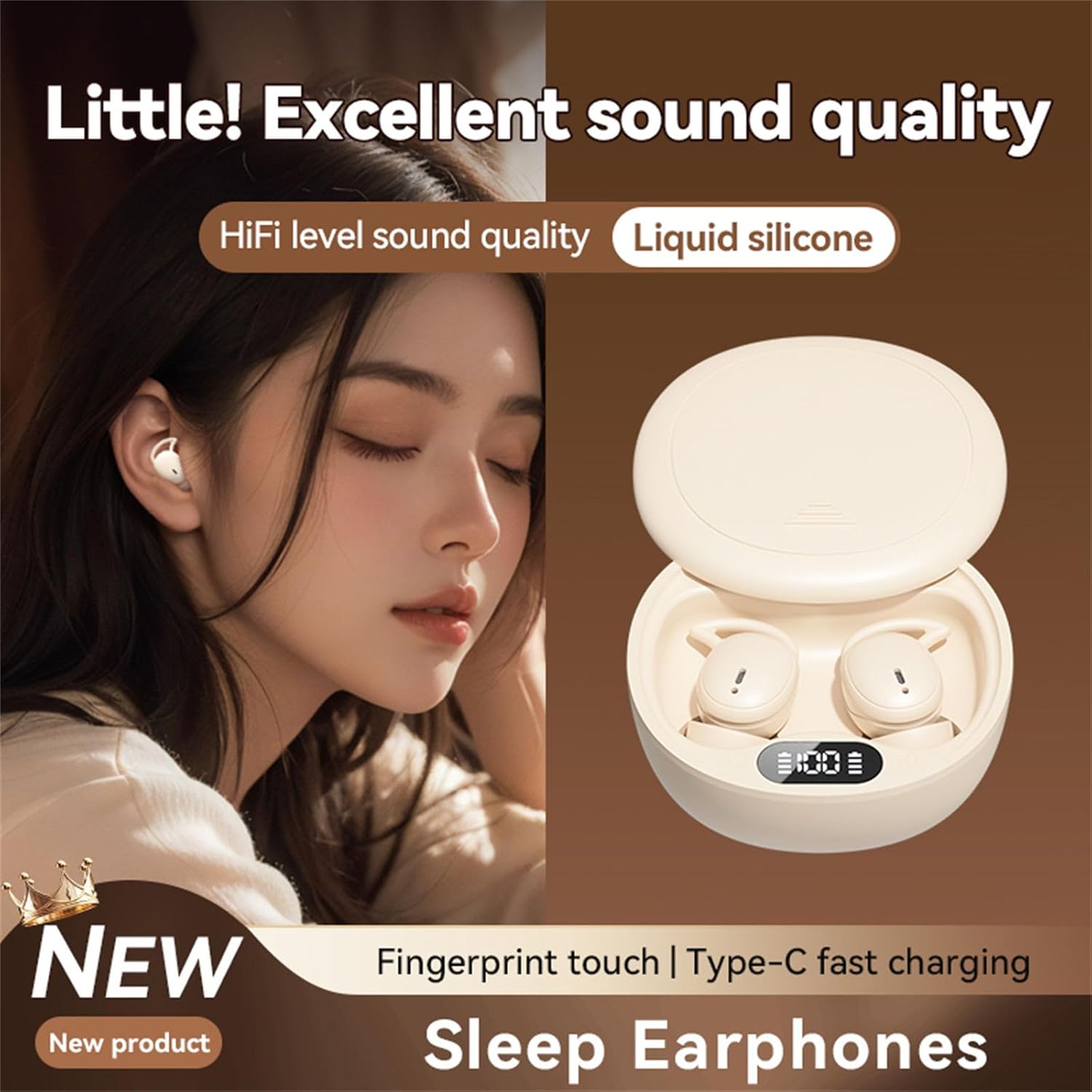
Figure 3: Earphone in Use
This image shows an M73 earphone being worn, highlighting its ergonomic design and how it sits comfortably in the ear, suitable for extended periods, including sleep.
- ഇടത് (L) ഉം വലത് (R) ഉം ഇയർഫോണുകൾ തിരിച്ചറിയുക.
- Gently insert the earphone into your ear canal and rotate it slightly to ensure the ear hook sits securely around your earlobe.
- Adjust for a comfortable and snug fit to optimize sound quality and passive noise isolation. The liquid silicone material is designed for comfort during prolonged wear.
പ്രവർത്തന നിർദ്ദേശങ്ങൾ
The M73 earphones feature intuitive fingerprint touch controls for various functions.
| ഫംഗ്ഷൻ | ആക്ഷൻ |
|---|---|
| പവർ ഓൺ | ചാർജിംഗ് കേസിൽ നിന്ന് ഇയർഫോണുകൾ നീക്കം ചെയ്യുക. |
| പവർ ഓഫ് | Place earphones back into the charging case. |
| സംഗീതം പ്ലേ ചെയ്യുക/താൽക്കാലികമായി നിർത്തുക | ഏതെങ്കിലും ഇയർഫോണിൽ ഒറ്റ ടാപ്പ് ചെയ്യുക. |
| അടുത്ത ട്രാക്ക് | Double tap on the Right earphone. |
| മുമ്പത്തെ ട്രാക്ക് | Double tap on the Left earphone. |
| വോളിയം കൂട്ടുക | Triple tap on the Right earphone. |
| വോളിയം ഡൗൺ | Triple tap on the Left earphone. |
| ഉത്തരം / കോൾ അവസാനിപ്പിക്കുക | Single tap on either earphone during an incoming call. |
| കോൾ നിരസിക്കുക | ഇൻകമിംഗ് കോൾ വരുമ്പോൾ ഇയർഫോണുകളിൽ ഏതെങ്കിലുമൊന്ന് 2 സെക്കൻഡ് അമർത്തിപ്പിടിക്കുക. |
| വോയ്സ് അസിസ്റ്റൻ്റ് സജീവമാക്കുക | കോളിൽ ഇല്ലാത്തപ്പോൾ, ഇയർഫോണുകളിൽ ഏതെങ്കിലുമൊന്ന് 3 സെക്കൻഡ് അമർത്തിപ്പിടിക്കുക. |
Sleep Mode Features:
Designed for comfort during sleep, the M73 earphones offer immersive sound quality suitable for relaxation or masking ambient noise. Their mini design and liquid silicone ear tips ensure they remain comfortable even when lying down.
മെയിൻ്റനൻസ്
വൃത്തിയാക്കൽ:
- ഇയർഫോണുകളും ചാർജിംഗ് കെയ്സും മൃദുവായതും ഉണങ്ങിയതും ലിന്റ് രഹിതവുമായ തുണി ഉപയോഗിച്ച് തുടയ്ക്കുക.
- അബ്രാസീവ് ക്ലീനറുകൾ, ആൽക്കഹോൾ, കെമിക്കൽ ലായകങ്ങൾ എന്നിവ ഉപയോഗിക്കരുത്.
- ആവശ്യമെങ്കിൽ, ഇയർഫോണുകളിലെയും കേസിലെയും ചാർജിംഗ് കോൺടാക്റ്റുകൾ ഉണങ്ങിയ കോട്ടൺ സ്വാബ് ഉപയോഗിച്ച് സൌമ്യമായി വൃത്തിയാക്കുക.
സംഭരണം:
ഉപയോഗത്തിലില്ലാത്തപ്പോൾ, ഇയർഫോണുകൾ ചാർജിംഗ് കേസിൽ സൂക്ഷിക്കുക, അതുവഴി അവയെ സംരക്ഷിക്കുകയും ചാർജ് ചെയ്യുകയും ചെയ്യുക. നേരിട്ട് സൂര്യപ്രകാശം ഏൽക്കാത്ത തണുത്തതും വരണ്ടതുമായ സ്ഥലത്ത് സൂക്ഷിക്കുക.
ബാറ്ററി കെയർ:
- To prolong battery life, avoid fully discharging the earphones and case frequently.
- പതിവായി ഉപയോഗിക്കുന്നില്ലെങ്കിലും, ഉപകരണം പതിവായി ചാർജ് ചെയ്യുക.
ട്രബിൾഷൂട്ടിംഗ്
| പ്രശ്നം | പരിഹാരം |
|---|---|
| ഉപകരണവുമായി ഇയർഫോണുകൾ ജോടിയാക്കുന്നില്ല. |
|
| ഒരു ഇയർഫോൺ മാത്രമേ പ്രവർത്തിക്കുന്നുള്ളൂ. |
|
| ഇയർഫോണുകൾ ചാർജ് ചെയ്യുന്നില്ല. |
|
| മോശം ശബ്ദ നിലവാരം. |
|
സ്പെസിഫിക്കേഷനുകൾ
| ഫീച്ചർ | വിശദാംശങ്ങൾ |
|---|---|
| മോഡൽ നമ്പർ | TqcSXToXQ |
| കണക്റ്റിവിറ്റി | വയർലെസ് (ബ്ലൂടൂത്ത്) |
| ചാർജിംഗ് പോർട്ട് | യുഎസ്ബി ടൈപ്പ്-സി |
| നിയന്ത്രണ തരം | Fingerprint Touch Control |
| Ear Tip Material | ലിക്വിഡ് സിലിക്കൺ |
| ഓഡിയോ നിലവാരം | HiFi Level, Hi-Res Audio Support |
| ഡിസൈൻ സവിശേഷത | Mini Design, Sleep Specific |
| അളവുകൾ (കേസ്) | Approximately 6.5cm / 2.55in (width) |

ചിത്രം 4: ചാർജിംഗ് കേസ് അളവുകൾ
This image illustrates the approximate width of the M73 charging case, measured at 6.5 cm or 2.55 inches, indicating its compact size.
വാറൻ്റിയും പിന്തുണയും
വാറന്റി വിവരങ്ങൾക്കും സാങ്കേതിക പിന്തുണയ്ക്കും, നിങ്ങളുടെ വാങ്ങലിനൊപ്പം നൽകിയിരിക്കുന്ന ഡോക്യുമെന്റേഷൻ പരിശോധിക്കുകയോ റീട്ടെയിലറെയോ/നിർമ്മാതാവിനെയോ നേരിട്ട് ബന്ധപ്പെടുകയോ ചെയ്യുക. വാറന്റി ക്ലെയിമുകൾക്കായി നിങ്ങളുടെ വാങ്ങിയതിന്റെ തെളിവ് സൂക്ഷിക്കുക.
Ask a question about this manual
Ask about setup, troubleshooting, compatibility, parts, safety, or missing instructions. Manuals+ will review the question and use this page’s manual context to help answer it.