
1. ആമുഖം
This manual provides essential information for the safe and efficient operation of your new SHARP 9 kg Fully Automatic Top Load Washing Machine (Model ES-T90N-GY). Please read these instructions thoroughly before installation and use, and retain them for future reference. Proper use and maintenance will ensure optimal performance and extend the lifespan of your appliance.

Figure 1: SHARP 9 kg Fully Automatic Top Load Washing Machine (ES-T90N-GY) with dimensions and energy label.
2 സുരക്ഷാ വിവരങ്ങൾ
Always follow basic safety precautions when using electrical appliances to reduce the risk of fire, electric shock, or injury. This washing machine is designed for household use only.
- പവർ കോർഡിന് കേടുപാടുകൾ സംഭവിച്ചിട്ടില്ലെന്നും ശരിയായി ഗ്രൗണ്ട് ചെയ്തിട്ടുണ്ടെന്നും ഉറപ്പാക്കുക.
- ഉപകരണത്തിലോ ഉപകരണത്തിലോ കളിക്കാൻ കുട്ടികളെ അനുവദിക്കരുത്.
- വാഷിംഗ് മെഷീനിൽ നിന്ന് തീപിടിക്കുന്ന വസ്തുക്കൾ അകറ്റി നിർത്തുക.
- ഗ്യാസോലിൻ, ഡ്രൈ-ക്ലീനിംഗ് ലായകങ്ങൾ, അല്ലെങ്കിൽ കത്തുന്നതോ സ്ഫോടനാത്മകമോ ആയ മറ്റ് വസ്തുക്കൾ എന്നിവയാൽ മലിനമായ വസ്തുക്കൾ കഴുകരുത്.
- Unplug the appliance before cleaning, maintenance, or if it will not be used for an extended period.
- Do not attempt to repair or replace any part of the appliance unless specifically recommended in this manual. All other servicing should be referred to a qualified technician.
3. ഉൽപ്പന്നം കഴിഞ്ഞുview
The SHARP ES-T90N-GY is a 9 kg fully automatic top load washing machine designed for efficient and convenient laundry care. Key features include a toughened glass lid, soft close mechanism, hot & cold water dual inlet, and an 'Add Laundry' function.
പ്രധാന ഘടകങ്ങൾ:
- നിയന്ത്രണ പാനൽ: Touch panel with digital display for program selection and settings.
- Washing Tub: Stainless steel drum for durability and effective cleaning.
- Pulsator: Stainless steel insert pulsator for powerful washing action.
- ലിഡ്: Toughened glass lid with soft close mechanism.
- വാട്ടർ ഇൻലെറ്റുകൾ: Separate inlets for hot and cold water.
- ഡ്രെയിൻ ഹോസ്: For water discharge.

ചിത്രം 2: മുൻഭാഗം view വാഷിംഗ് മെഷീന്റെ.

ചിത്രം 3: വശം view വാഷിംഗ് മെഷീന്റെ.
ചിത്രം 4: പിൻഭാഗം view of the washing machine with water inlet and drain hose connections.
4. സജ്ജീകരണവും ഇൻസ്റ്റാളേഷനും
നിങ്ങളുടെ വാഷിംഗ് മെഷീനിന്റെ പ്രകടനത്തിനും ദീർഘായുസ്സിനും ശരിയായ ഇൻസ്റ്റാളേഷൻ നിർണായകമാണ്. യോഗ്യതയുള്ള ഒരു ടെക്നീഷ്യനെക്കൊണ്ട് ഉപകരണം ഇൻസ്റ്റാൾ ചെയ്യാൻ ശുപാർശ ചെയ്യുന്നു.
4.1 അൺപാക്കിംഗ്
- എല്ലാ പാക്കേജിംഗ് വസ്തുക്കളും ശ്രദ്ധാപൂർവ്വം നീക്കം ചെയ്യുക.
- Check for any damage during transit. Contact your dealer immediately if any damage is found.
- Ensure all included components are present: 1 Washing machine unit, 1 User Manual, 1 Warranty Card, Fill Hose, Drain Hose.
4.2 സ്ഥാനവും ലെവലിംഗും
- Place the washing machine on a firm, level surface. Avoid direct sunlight or excessively damp പരിസരങ്ങൾ.
- Adjust the leveling legs at the bottom of the machine to ensure it is perfectly stable and balanced. An unbalanced machine can cause excessive vibration and noise.
- Install the protective rat mesh at the bottom of the machine to prevent rodent entry.
4.3 വാട്ടർ കണക്ഷൻ
- Connect the fill hoses to the hot and cold water inlets at the back of the machine and to the corresponding hot and cold water taps. Ensure connections are tight to prevent leaks.
- Position the drain hose into a suitable drain pipe or sink, ensuring it is securely fastened and allows for proper water drainage without kinking.
4.4 പവർ കണക്ഷൻ
- പവർ കോർഡ് ഒരു ഗ്രൗണ്ടഡ് ഇലക്ട്രിക്കൽ ഔട്ട്ലെറ്റിലേക്ക് പ്ലഗ് ചെയ്യുക. വോള്യം ഉറപ്പാക്കുകtage ഉം ഫ്രീക്വൻസിയും വാഷിംഗ് മെഷീനിന്റെ സവിശേഷതകളുമായി പൊരുത്തപ്പെടുന്നു.
5. പ്രവർത്തന നിർദ്ദേശങ്ങൾ
This section guides you through the basic operation and special features of your SHARP washing machine.
5.1 കൺട്രോൾ പാനൽ ഓവർview
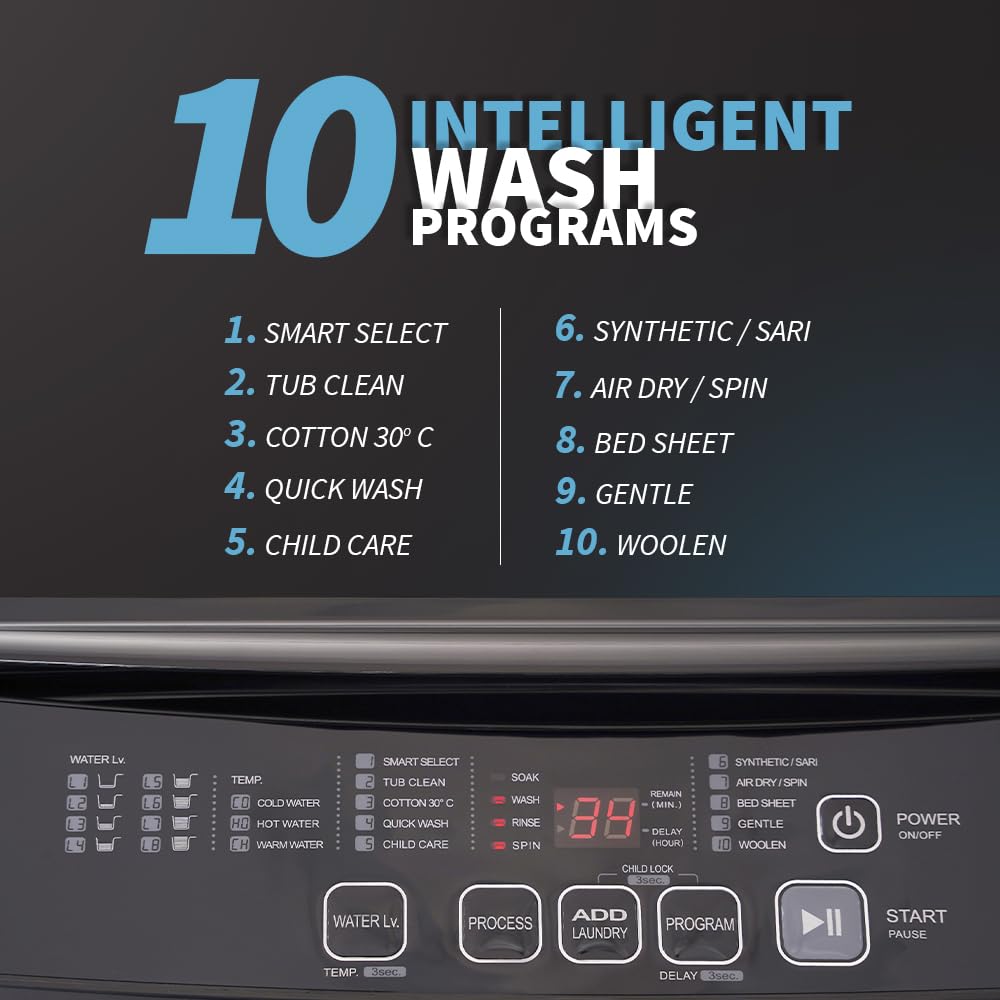
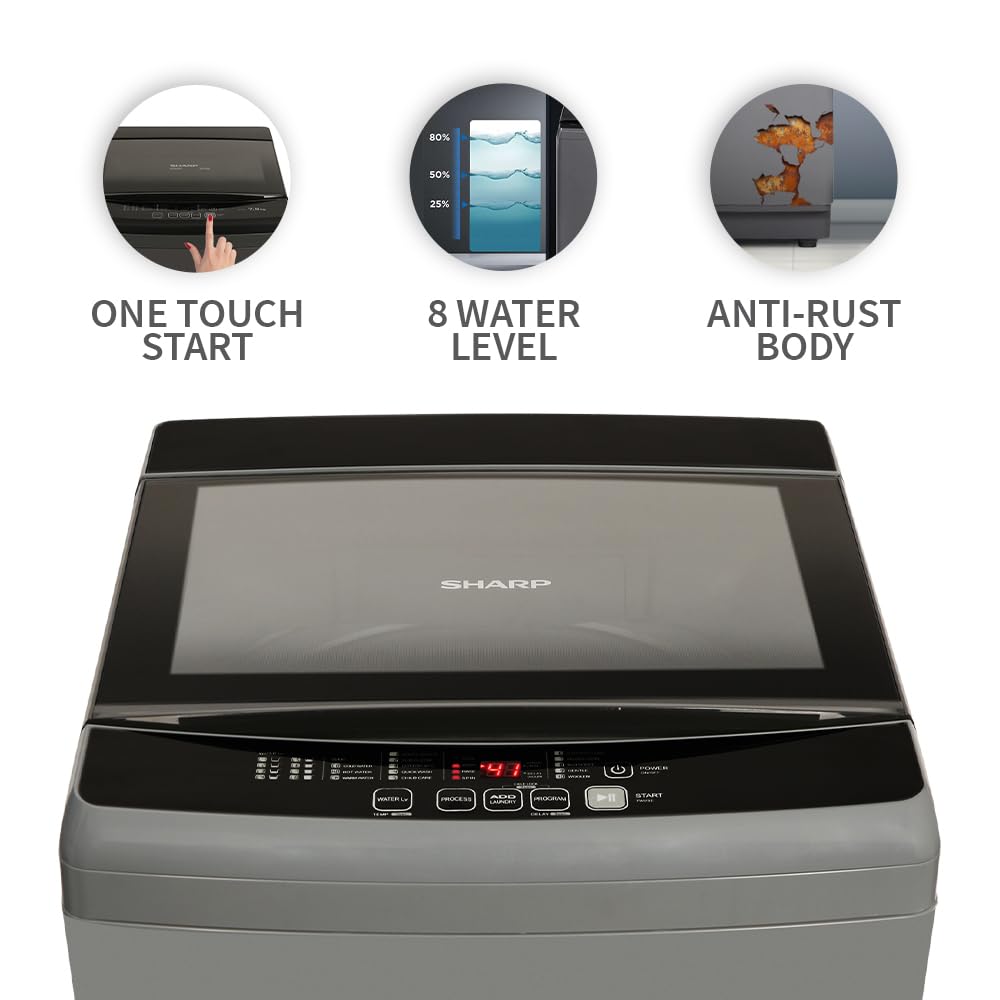
Figure 5: Control Panel with One Touch Start, Water Level indicator, and Anti-Rust Body indication.
The touch panel and digital display allow for easy selection of wash programs and settings. Indicators show water level, temperature, remaining time, and selected program.
5.2 Basic Wash Cycle
- ലോഡ് ലോൺഡ്രി: Open the soft-closing lid and place clothes loosely into the drum. Do not overload.
- ഡിറ്റർജൻ്റ് ചേർക്കുക: Dispense appropriate detergent and fabric softener into their respective compartments.
- പവർ ഓൺ: Press the 'Power' button to turn on the machine.
- പ്രോഗ്രാം തിരഞ്ഞെടുക്കുക: Choose one of the 10 wash programs using the 'Program' button. The digital display will show the selected program and estimated time.
- ക്രമീകരണങ്ങൾ ക്രമീകരിക്കുക (ഓപ്ഷണൽ): Modify water level, temperature (if using hot water inlet), or delay start if desired.
- സൈക്കിൾ ആരംഭിക്കുക: വാഷ് സൈക്കിൾ ആരംഭിക്കാൻ 'ആരംഭിക്കുക/താൽക്കാലികമായി നിർത്തുക' ബട്ടൺ അമർത്തുക.
5.3 വാഷ് പ്രോഗ്രാമുകൾ
Your washing machine offers 10 intelligent wash programs:
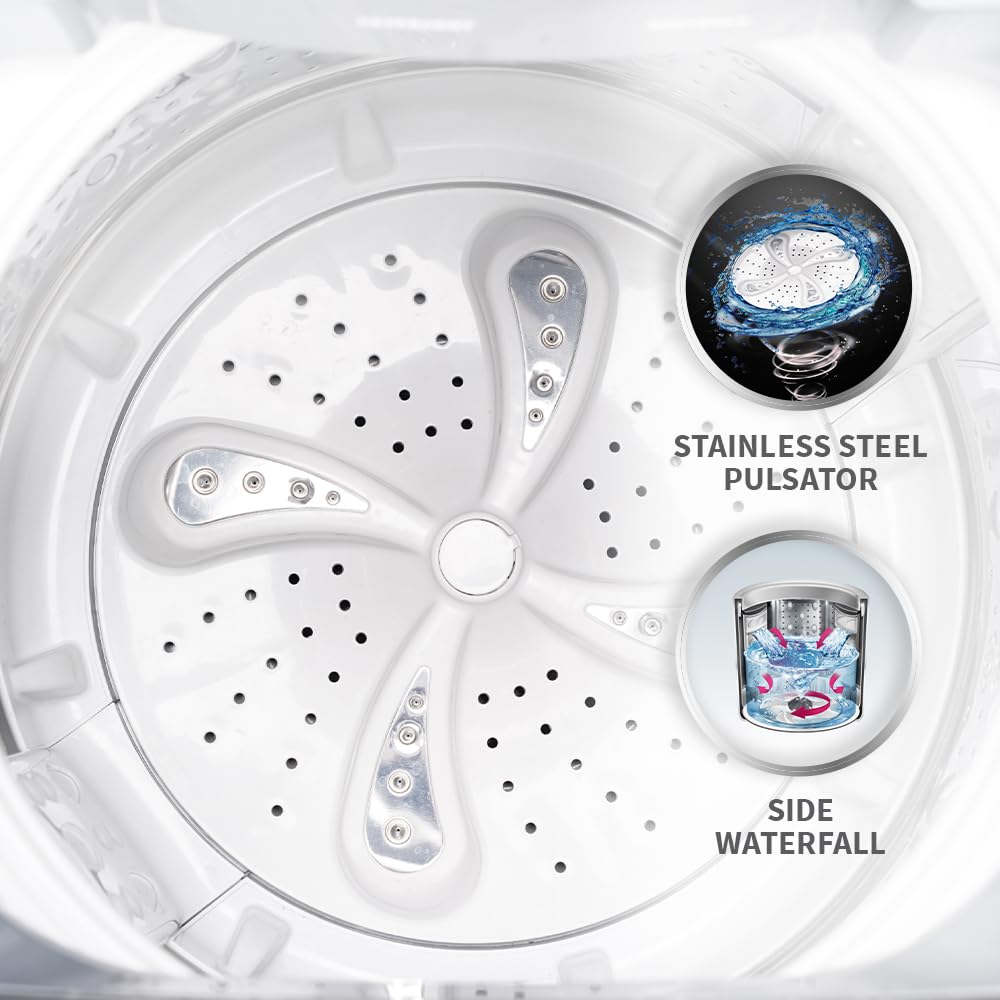
Figure 6: The 10 Intelligent Wash Programs available.
- സ്മാർട്ട് തിരഞ്ഞെടുക്കുക
- ടബ് ക്ലീൻ
- പരുത്തി 30°C
- പെട്ടെന്ന് കഴുകുക
- Child Care
- Synthetic / Saree
- Air Dry / Spin
- ബെഡ് ഷീറ്റ്
- സൌമ്യമായ
- കമ്പിളി
5.4 പ്രത്യേക സവിശേഷതകൾ
- Add Laundry: Allows you to add forgotten clothes to the wash cycle at any time before the main wash phase ends.
- Hot & Cold Water Dual Inlet: Provides flexibility to wash clothes with either hot or cold water, or a mix, depending on the fabric and soil level.
- Waterfall Wash: Ensures even water spray from the side during the wash cycle for thorough and hygienic cleaning.
- One-Touch Start: Simplifies operation by initiating a standard wash cycle with a single button press.
- ചൈൽഡ് ലോക്ക്: Prevents accidental changes to settings by locking the control panel.
- കാലതാമസം ആരംഭിക്കുക: Allows you to set a delayed start time for the wash cycle, useful for off-peak hours.
- Soft Closing Lid: The toughened glass lid closes gently and quietly, preventing sudden drops.

Figure 7: Hot & Cold Water Dual Inlet and Soft Closing Lid features.

Figure 8: Stainless Steel Pulsator and Side Waterfall for effective cleaning.
6. പരിപാലനം
Regular maintenance helps keep your washing machine in optimal condition and prevents issues.
6.1 ഡ്രം വൃത്തിയാക്കൽ (ടബ് വൃത്തിയാക്കൽ)
Use the dedicated 'Tub Clean' program periodically to remove detergent residue and bacteria from the stainless steel drum. Follow these steps:
- ഡ്രം ശൂന്യമാണെന്ന് ഉറപ്പാക്കുക.
- Add a suitable washing machine cleaner or a small amount of bleach to the detergent dispenser.
- Select the 'Tub Clean' program.
- Press 'Start/Pause' to begin the cycle.
6.2 ഫിൽട്ടർ വൃത്തിയാക്കുന്നു
The lint filter should be cleaned regularly to ensure efficient drainage and prevent lint buildup on clothes. Refer to your specific model's diagram in the full manual for filter location and removal instructions.
6.3 പുറംഭാഗം വൃത്തിയാക്കൽ
വാഷിംഗ് മെഷീനിന്റെ പുറംഭാഗങ്ങൾ മൃദുവായ, ഡി-ടച്ച് ഉപയോഗിച്ച് തുടയ്ക്കുക.amp തുണി. ഫിനിഷിന് കേടുവരുത്തുന്ന ഉരച്ചിലുകളുള്ള ക്ലീനറുകളോ ലായകങ്ങളോ ഒഴിവാക്കുക.
7. പ്രശ്നപരിഹാരം
If you encounter issues with your washing machine, refer to the following common problems and solutions. If the problem persists, contact customer support.
| പ്രശ്നം | സാധ്യമായ കാരണം | പരിഹാരം |
|---|---|---|
| മെഷീൻ ആരംഭിക്കുന്നില്ല | Power cord unplugged; Lid not closed properly; 'Start/Pause' not pressed. | Check power connection; Ensure lid is fully closed; Press 'Start/Pause'. |
| വെള്ളം നിറയ്ക്കുന്നില്ല | Water taps closed; Water supply cut off; Fill hose kinked. | Open water taps; Check household water supply; Straighten fill hoses. |
| യന്ത്രം അമിതമായി വൈബ്രേറ്റ് ചെയ്യുന്നു | മെഷീൻ ലെവലല്ല; ലോഡ് ബാലൻസ് ചെയ്തിട്ടില്ല. | Adjust leveling legs; Redistribute laundry evenly in the drum. |
| Error code displayed (e.g., due to slow water) | Insufficient water pressure or flow. | Check water supply and pressure. Often, opening and re-closing the lid can reset the machine to resume the cycle. |
| വെള്ളം വറ്റുന്നില്ല | ഡ്രെയിൻ ഹോസ് വളഞ്ഞിരിക്കുന്നു അല്ലെങ്കിൽ അടഞ്ഞിരിക്കുന്നു; ഡ്രെയിൻ ഫിൽട്ടർ അടഞ്ഞിരിക്കുന്നു. | ഡ്രെയിൻ ഹോസ് പരിശോധിച്ച് വൃത്തിയാക്കുക; ഡ്രെയിൻ ഫിൽട്ടർ വൃത്തിയാക്കുക. |
8 സ്പെസിഫിക്കേഷനുകൾ
Technical details for the SHARP 9 kg Fully Automatic Top Load Washing Machine (ES-T90N-GY).
| ഫീച്ചർ | വിശദാംശങ്ങൾ |
|---|---|
| മോഡലിൻ്റെ പേര് | ES-T90N-GY |
| ശേഷി | 9 കി.ഗ്രാം |
| ഓപ്പറേഷൻ മോഡ് | പൂർണ്ണമായും ഓട്ടോമാറ്റിക് |
| ലൊക്കേഷൻ ആക്സസ് ചെയ്യുക | ടോപ്പ് ലോഡ് |
| എനർജി റേറ്റിംഗ് | 5 നക്ഷത്രം |
| Spin Speed (RPM) | 700 ആർപിഎം |
| വാഷ് പ്രോഗ്രാമുകൾ | 10 (Smart Select, Tub Clean, Cotton 30°C, Quick Wash, Child Care, Synthetic/Saree, Air Dry, Bed Sheet, Gentle, Woollen) |
| ഡ്രം മെറ്റീരിയൽ | സ്റ്റെയിൻലെസ്സ് സ്റ്റീൽ |
| പൾസേറ്റർ തരം | Stainless-Steel Insert Pulsator |
| നിയന്ത്രണ തരം നിയന്ത്രിക്കുന്നു | Touch Panel & Digital Display |
| ഉൽപ്പന്ന അളവുകൾ (D x W x H) | 62D x 60.5W x 100H സെന്റീമീറ്ററുകൾ |
| ഇനത്തിൻ്റെ ഭാരം | 41.5 കിലോഗ്രാം |
| പ്രത്യേക സവിശേഷതകൾ | Add Laundry, Hot & Cold Water Dual Inlet, Waterfall Wash, One-Touch Start, Soft Close Lid, Child Lock, Delay Start, Protective Rat Mesh |
9. വാറൻ്റിയും പിന്തുണയും
Your SHARP washing machine is covered by a comprehensive warranty and dedicated customer support.
9.1 വാറൻ്റി വിവരങ്ങൾ
The SHARP ES-T90N-GY washing machine comes with a 2 വർഷത്തെ സമഗ്ര വാറന്റി ഉപകരണത്തിലും ഒരു Total 10 Years Warranty on the Motor. Please refer to the warranty card included with your product for detailed terms and conditions.
Figure 9: Warranty details for the SHARP washing machine.
9.2 ഉപഭോക്തൃ പിന്തുണ
For any queries, service requests, or technical assistance, please contact SHARP customer support:
- ടോൾ ഫ്രീ: 1800-419-4322
- ഇ-മെയിൽ: support@sharp-oa.com
Please have your model number (ES-T90N-GY) and purchase details ready when contacting support.